Desert Online General Trading LLC
Dubai, United Arab Emirates
Desert Online General Trading LLC
Dubai, United Arab Emirates


🖤 Stay ahead with the sleekest, smartest e-ink display on your Pi!
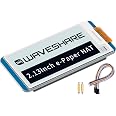
The FancyWhoop 2.13 inch E-Ink Display HAT V4 offers a sharp 250x122 black & white screen optimized for Raspberry Pi 5/4B/3B+ and Jetson Nano. Featuring ultra-low power consumption with no backlight, SPI interface compatibility, and support for partial refresh, it’s designed for efficient, versatile, and long-lasting display projects. Perfect for professionals seeking a stylish, energy-efficient visual upgrade.


| Brand | FancyWhoop |
| Series | E-Ink Display HAT V4 |
| Item Weight | 0.634 ounces |
| Package Dimensions | 2.91 x 2.01 x 0.94 inches |
| Color | Black & White |
| Manufacturer | FancyWhoop |
| ASIN | B0D8T362X2 |
| Country of Origin | China |
| Date First Available | July 4, 2024 |
C**B
Works great with Pi Zero
Easy to set up following the Waveshare Wiki (make sure to follow the "2.13inch e-Paper HAT" instructions, not the B, C or D---make with the "EPD=epd2in13V4" option). I like that it is the same size as the Pi Zero. The contrast is great. I didn't use it with an MCU yet, but I like that it comes with the wiring harness for that too.
L**Y
great display
have two of these and it seems the letters are thicker and easier to read on one, same app, same fonts.
R**S
Great little hat.
This hat has worked well for my use. I am using this display as a mini weather station paired with a Pi zero. Board is made well and the display looks clean and sharp. I really love the look of e-ink displays and this one looks great. Very happy with this display hat.
J**Y
Easier setup than expected. Stock libraries worked. Good Pi Zero size.
The module is sized about like a Pi Zero. The 8-pin connector is a little recessed compared to the Pi's connectors, probably to let it fit inside cases.The mounting is mostly the 40-pin connector. You also get two tiny stand-offs to support the front edge of the display, but they don't attach to it directly. They came up a little short so the display tilts slightly.I tried this with waveshare's aluminum case (PI-ZERO-CASE-B). I had to remove the 8-pin connector, but the inductor near the 40-pin connector just barely lets it seat. I'll probably modify the case later to give it more space.Fairly straightforward Pi setup. I used waveshare's wiki, which recommends fetching libraries from git, but I found everything necessary already packaged in raspios bookworm.The general gist was:enable spi in raspi-config (per wiki)sudo apt install git libgpiod-dev libbcm2835-dev liblgpio-devclone waveshare's e-Paper repo (can't include URL in review)cd e-Paper/RaspberryPi_JetsonNano/make cleanmake EPD=epd2in13V3sudo ./epdThis was enough to run the C demo which shows off various drawing, fonts, and partial refresh. Seems like everything necessary for what I want, and I didn't have to fight with particular versions or libraries that only work on older releases.
J**S
Great display
This E-ink display works fine on the Raspberry Pi but is an even better fit on the Raspberry Pi Zero. I like that it offers a nice compact package when attached to the Raspberry Pi. Getting it working required a little bit of experimenting, but nothing too difficult. The Waveshare wiki on the display pretty much tells you everything you need to know to get it working. I'm very happy with it
K**E
Crisp and Clear E-Paper for Raspberry Pi
This Waveshare 2.13" E-Ink Display HAT (V4) is a fantastic addition to my Raspberry Pi projects. The e-paper display is crisp and clear, making it easy to read even in bright sunlight. The black and white display is perfect for projects where low power consumption is important, as the display only uses power when updating the image. The partial refresh feature is a nice touch, making it possible to update specific areas of the screen quickly.
J**T
A great looking display, but a pain to get working w/ ESP32
I've used many OLED and LCD displays w/ Arduino-based ESP32 projects in the past, but this display was considerably more challenging to get working. I ended up using the GxEPD2 library (ZinggJM). The Waveshare wiki for this product was detailed, but the drivers were ultimately a swamp that I gave up on (while the product page claims ESP32 compatibility, the waveshare github explicitly notes that ESP32 isn't supported by the drivers). So, in the end, the display is great for high contrast / easy-reading scenarios where updates are performed infrequently. This is not a display for motion graphics, but that's standard-fare for e-ink displays. Minus one star for the challenge getting it working on a platform advertised in the listing.
T**D
Great e-ink display for Pi
I tried this with my Pi and it worked great. It was easy to set up and the display is crisp and clear. The letters stand out beautifully and everything looks as it should.
Trustpilot
3 days ago
2 weeks ago