
DOWNLOAD THE APP


Customer Services
Copyright © 2025 Desertcart Holdings Limited
DOWNLOAD THE APP

📡 Upgrade Your WiFi Game — Because Buffering Is So Last Decade!
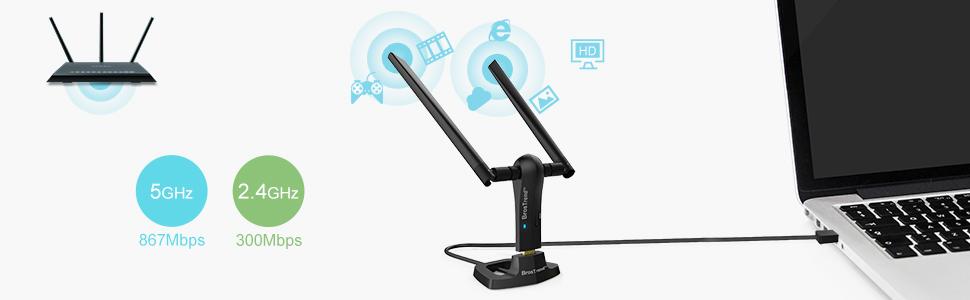
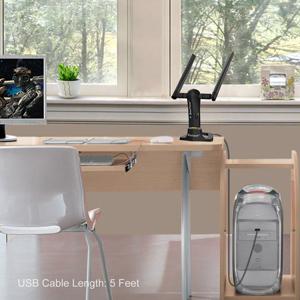
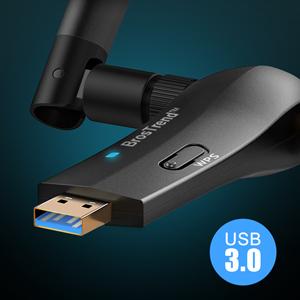
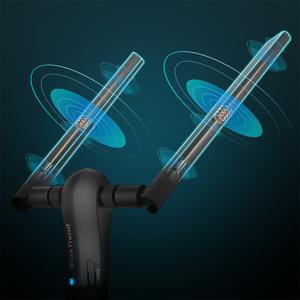
The BrosTrend 1200Mbps Long Range USB WiFi Adapter delivers dual-band wireless speeds up to 867Mbps (5GHz) and 300Mbps (2.4GHz), enhanced by two 5dBi high gain antennas for extended coverage. Equipped with a USB 3.0 gold-plated port and a 5-foot cradle extension, it offers flexible, high-speed connectivity compatible with Windows 7 through 11. Advanced WPA3 security ensures your network stays protected, making it the perfect upgrade for professionals demanding reliable, fast internet on desktops and laptops.








| ASIN | B01IEU7UZ0 |
| Best Sellers Rank | #97 in USB Computer Network Adapters |
| Brand | BrosTrend |
| Built-In Media | 1 x 1200Mbps USB WiFi Adapter with 2 X External High-gain Antennas; 1 x USB 3. |
| Color | Black |
| Compatible Devices | PC, Computer, Desktop, Laptop |
| Customer Reviews | 4.2 out of 5 stars 13,508 Reviews |
| Data Link Protocol | IEEE 802.11 ac/n/a 5GHz, IEEE 802.11 n/g/b 2.4GHz |
| Data Transfer Rate | 1200 Megabits Per Second |
| Global Trade Identification Number | 00701017579854 |
| Hardware Interface | USB 3.0 |
| Item Dimensions L x W x H | 3.7"L x 3.9"W x 7"H |
| Item Type Name | USB WiFi Adapter, WiFi Dongle, WiFi Adapter for Desktop PC, WiFi USB Adapter, Wireless Network Adapter |
| Item Weight | 0.15 Pounds |
| Manufacturer | BrosTrend Technology LLC |
| Product Dimensions | 3.7"L x 3.9"W x 7"H |
| UPC | 701017579854 |
| Unit Count | 1.0 Count |
| Warranty Description | Register for 2-Year Warranty |
J**R
EXCELLENT... using with my "old" Mid-2010 MacPro! (I bought 2!:*)
Worked so good I bought 2! For my edit work AND for gaming!!!! I really need fast, fast, fast internet, my internet has been slow, until now! These USB Wifi Adapters from BrosTrend are EXCELLENT and worked flawlessly with a simple install (used the include software installer for both MacOS and Window 10 Bootcamp). I have 2 "old" Mid-2010 MacPro's (they both are dual-boot, MacOS and Windows 10 BootCamp) and my house is spread out and the walls are very shielded, I get weak WiFi around the house. In my studio (Video Editing and Gaming), that MacPro gets very weak WiFi and around 25Mbs WiFi, the other MacPro is near the WiFI router and gets a strong signal, but even with that it's old WiFi card only gets around 45Mbs WiFi. My WiFi internet is 200Mbs/20Mbs (next week it will be 500Mbs/500Mbs with option for up to 5Gbs/5Gbs). With these WiFi Adapters I'm getting up to 585Mbs for BOTH MacPro's!!!! Right now I have Spectrum Cable WiFi at 200Mbs down and 20Mbs up AND BOTH MACPROS see that full speed! In the next few days I'm replacing that slow, unstable Spectrum WiFi, with Frontier Fibre Internet at 500Mbs/500Mbs (up to 5Gbs, I would just get a new Mac with 10Gig Ethernet to use the 5Gbs). The advertised speed is 867Mbps for this WiFi adapter, but I'm not getting that. I'm getting 585Mbs. Not sure why? ALSO, I get that same 585Mbs if I'm connected to my MacPro's USB2, or USB3 ports (I have USB3 cards in my MacPro's). I am using this WiFi adapter in MacOS and Windows 10 and see the exact same speeds. I have my MacPro's boot MacOS and Windows 10 with BootCamp. My Mid 2010 MacPro's are updated to include fast new GPU's, 64GB RAM, M.2 Drives and more. They are very fast! (Though I do plan soon to upgrade to a new Mac with latest tech, next few months). JOHNAVATAR.com
R**G
Perfect but still laggy
The lag is ongoing and he compatibility was great. The value of the money for the product is good the size is great the functionality is good . I had someone help me with instruction quality to install the item on my computer. Instruction quality great
S**D
Almost works great!
The initial install was straight forward and worked. Great improvement in connection speed. Stable connection until it wasn't. The device started dropping the connection. A simple reconnect was all that was needed to correct. The problem become more frequent. I contacted Tech support who responded quickly and said to install an updated driver which they provided. I did and it stopped working completely. I had to roll back the driver to reconnect to the network. I left it alone until a Win10 update came along and once again killed the device. When it works, it does well. Some sort of issue with Win10 is lurking out there. Would I recommended it. Yes with the possibility your results may be better than mine. Or worse. It is certainly at the right price point. One mark down I do give it is that its not stable on its stand. Easy to knock over. I currently have a small flashlight weighing it down that works just fine. And I know where the flashlight is when I needed it! The blue led light is very bright and constantly busy. Just turn the unit around if it bothers you.
D**"
I love it, it consistent
I purchased this antenna and downloaded the software on my Windows 7 laptop. "AMAZING: is all I can say. Without exaggeration, it spead up my signal about 4x's. I love it, it consistent, I use 5.0 and 2.4. Avg download speads, 175 Mbps. I also hooked it up my my newest laptop with Windows 10. The software doesn't load up like it did on Win 7. It was a little aggravating, but my downloads speeds average about 170 Mbps. Sometimes it's less, but that the internet! I am not exaggerating, I can take the antenna off, and my speeds are in the 40 to 60 Mbps range. I just wish the software was the same for Windows 10 as it is for Windows 7. You have to know a little bit about setting up networks to make it work. You will have a WiFi 1 and a WiFi 2 after installing the software. This antenna will be on WiFi 2. UPDATE: You MUST have a good Router for this antenna. I call the support line, they helped me with the settings for my router. LynkSys changed a few settings on the Router. No calls or changes to the antenna. 60ft away and I am constantly getting around 175 Mbps. I have a two story home, I take the antenna off, and my speeds are 50 to 60 Mbps.consistently. Put the antenna back on (USB 3.0 port) and instantly I have my 160 to 170 Mbps back. I love this antenna, but you need a fairly new computer to get these speeds. NOTE: I only have 150 Mbps service at my home, that's all I pay for, but sometimes I will reach over 180 Mbps. My internet is lightening fast. I am very happy and will be buying a few more. My nephew has an MAC. With the stock antenna and NO adjustments, he gets 160Mpbs with no problem. The apple computer does this straight out of the box, FYI., Also his Apple phone gets around 150 Mbps with not problem. UPDATE #3: I am in the process of buying another one of these antennas. It's still working great, and my speeds have not changed. I have another laptop I am going to use the new one on. Works great on Windows 7 & 10. I am still very happy with the antenna. "Just" sometimes it gets in the way, but considering I am using it on laptops, that's to be expected. When I disconnect the antenna, I loose 70% of my speed!
T**T
2 units tested - only the left connector works on both (2nd unit purchased 2 months after first)
Something is legitimately wrong with this product. After many network monitoring tests, I have concluded that only one of these antenna adapters actually works. Both antennas are fine, but only one plug is active. This might not be that big of a deal if it wasn't for the fact that the single antenna port that works, has a horrible signal. It's about 3x worse than my laptops built in wifi card. Less than ten ft away from my router, yields a signal strength of 90db + (no matter what orientation of the 1 working antenna port). Switching over to my built in wifi card, shows a signal strength of 25db in same location. For reference, I did update the drivers on Windows 10. I've also tried this adapter on two Windows 10 computers with the exact same results. Maybe I got a lemon or something, but for this kind of product to pass quality control, should make anyone think twice about purchasing. My 10 year old (54mbps) adapter (no external antenna's) easily gets better signal strength and more networks. Returning promptly, it's a really horrible product.. Edit: I've run a few more tests. I'm within 3 feet of my router right now, and the signal strength is, at best, 74 db. I think this device is causing destructive interference wifi patterns on itself. It's the only thing that makes any sense. I'd love to open it up and see if I can fix it with a quick solder, but I want my 25 bucks back. EDIT: Bought a second one 2 months after initial review and can say with 100% certainty that the right antenna connection on both units only SLIGHTLY enhances 5GHz signal (comparing to using w/ no antenna). The left antenna, increases both 2.4 and 5GHz bands, while the right antenna connector shows absolutely no 2.4GHz bands whatsoever (aside from being 3 feet away from a 2.4GHz router.. This must be a mass manufactured defect in either all, a particular batch, or (even worse) by design. It's hard to believe that 2 units purchased months apart would have been from the same batch... I suggest that if you do own this product, to test connection signal strength with only one antenna connected to the right side port and report in your reviews/comment here if you observe the same results. I'll attach images to show the data on signal strength with all combinations of possible antenna configurations (i.e. no antenna - left only - right only - both). I've tested the individual antenna that came with this, separately on a a Panda wifi adapter. Surprisingly, they are very good antennas when used with another adapter. The main body is messed up in these and can't utilize the antennas power. I took apart on of the antenna and can verify that the actual antenna (internals) are build correctly and with good quality. My suggestion from this though, is to just go with the Panda Wireless PAU09 N600 Dual Band. The Panda unit works really well. Plus it works with Kali Linux. I took an hour combining tests for this review because I have come to hate this product and the company who makes them (I gave them a chance, but decided to keep the defective unit(s) and throw them a hard up middle-finger).. After contacting support to inform them of a dead-on-arrival product(purchase #1), they requested that I pay to ship it back to them, and then wait 2-4 weeks for a replacement to be sent from China. WTF is up with that??? Their idea of this situation is that a customer is supposed to pay for a problem the company should bear 100% responsibility for. Anyways screw this company and this product. Let the data speak for itself. Here's the product you should buy though: https://www.amazon.com/dp/B01LY35HGO/ref=cm_cr_ryp_prd_ttl_sol_1
A**B
Works. Good price. That should be enough.
I bought this for my Macbook so I could get a wifi signal while at work. With this adapter, I am actually able to get onto a Spectrum wifi hotspot, so I don't need to be on my work's network with my personal laptop. I ended up using it at home, too so I don't have to run an ethernet cord to my desktop. The signal is strong and the download/upload speeds are as fast as having my ethernet cable connected (~250 mbps down and 10 up). I bought this because I wanted the two antennas and more is usually better when it comes to antennas. That being said, the device is is pretty big, so I probably wouldn't recommend connecting directly to the back of your computer unless you have a lot of clearance. It also looks pretty weird sticking out of the side of a modern laptop. However, I assume anyone who is buying this is planning on using the extension and dock to place the receiver up high or somewhere will it will get better reception (isn't that the point of having an external WiFi receiver?). I leave the dock at work and take the receiver with me back and forth to use at home, too. It's big, but not so big you can't carry it in a laptop sleeve or bag or whatever. The wire on the dock is not very long- about 3-4 feet, so you might want to also get a USB 3.0 extension (with M/F ends). I have run it through a couple of different splitters/extenders and see no difference in speed performance. I used the driver from the website for both my PC and Mac. I have seen in other reviews that Win10 will recognize it without needing a manual driver installed. You need it for a mac, though because it doesn't use Mac's native WiFi interface. I *think* you could concurrently use this with you Mac's wifi, but I'm not sure why you would do that, considering this antenna is much stronger than your laptop's (if it isn't, then why are you buying it??). Anyway, I would recommend this. I bought it with the dock for $25 and I think you could get it without the dock for $5 less. Either way, it is worth the price. I'll update the review if it stops working soon, but so far, so good.
G**S
Easy to install
Works great
C**R
High speed and tremendous range, but needs better instructions on how to prevent random disconnects
Unit appears to be of a sturdy, high-quality, construction. Works great and the range is very good, am getting a high speed connection at the farthest point in the house from the router. On my Windows 7 machine I initially had problems with it randomly disconnecting and needing to periodically re-set the adapter, but figured out that by: 1. In Windows Power Options, under Power Saving Mode, set Wireless adapter to "Maximum Performance" 2. In Windows Power Options, under USB settings, set the USB Selective Suspend Setting to "Disabled" 3. In Device Manager, under Network Adapters, right click on the Realtek adapter, then properties, then Power Management and then UNCHECK the box that says "Allow the computer to turn off this device to save power." With those three steps it will stay connected indefinitely - no problems. Not sure why the instructions provided with the unit don't give you these instructions; from other reviews it seems that many people are frustrated by the unit constantly disconnecting. Update Summer 2020 Started having problems with the adapter cutting out during long video conferences while working from home during Covid lockdown. It completely failed a couple of days later. Replaced it with a TP-Link USB Wifi Adapter. It is a little slower, but has worked flawlessly so far (and it was really cheap on Amazon)
Trustpilot
2 weeks ago
1 day ago