
DOWNLOAD THE APP


Customer Services
Copyright © 2025 Desertcart Holdings Limited
DOWNLOAD THE APP
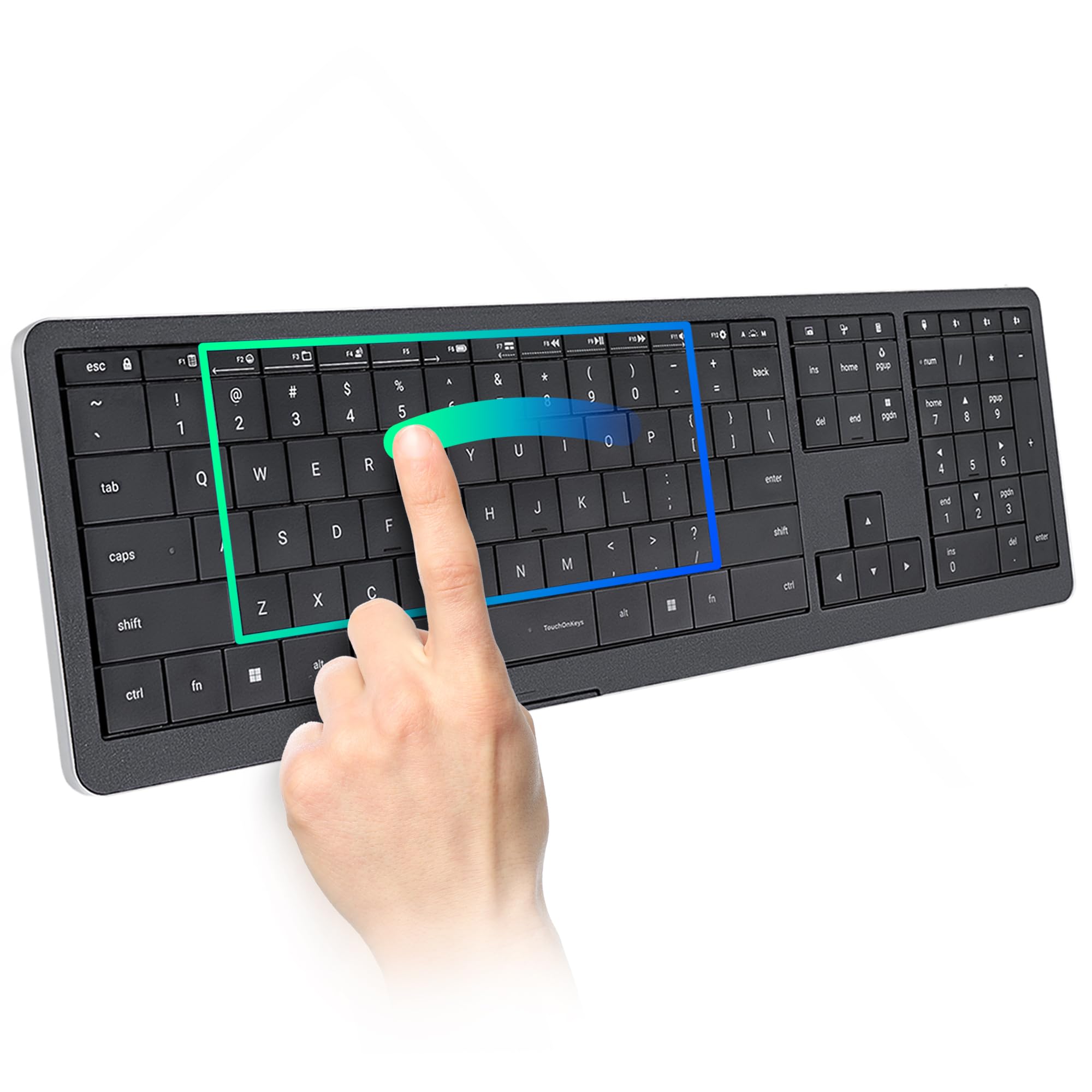
⌨️ Elevate your desk game: where AI meets artistry in every keystroke.
The Clevetura CLVX 1 is a cutting-edge wireless keyboard designed for professionals who demand precision and versatility. Featuring AI-powered TouchOnKeys technology, it integrates a full touchpad directly on the keys, enabling intuitive gesture controls alongside quiet, low-profile scissor switches. With multi-device Bluetooth connectivity, USB-C support, and a durable aluminum chassis, it offers seamless switching and premium build quality. Customize your experience with interactive RGB lighting and programmable gestures through the dedicated app. Boasting up to 40 hours of battery life, the CLVX 1 is the ultimate productivity and creative tool for Windows, Linux, and Android users.


| ASIN | B0FCSN1XPV |
| Batteries | 1 Nonstandard Battery batteries required. (included) |
| Batteries Included | Yes |
| Batteries Required | Yes |
| Battery cell composition | Lithium Ion |
| Brand | Clevetura |
| Compatible Devices | Laptop, PC, Smart TV, Smartphone, Tablet |
| Connector Type | Bluetooth, USB-C |
| Customer Reviews | 4.3 4.3 out of 5 stars (24) |
| Date First Available | 10 August 2025 |
| Hand Orientation | Ambidextrous |
| Item Dimensions LxWxH | 43.7 x 13 x 1.2 Centimeters |
| Item Weight | 1 kg 130 g |
| Item model number | CL11RA1ANSB0US |
| Keyboard Description | Touch On Keys AI Gesture Keyboard for Windows QWERTY 110 keys |
| Manufacturer | Clevetura |
| Material | Aluminum Polycarbonate Acrylonitrile Butadiene Styrene |
| Model | CL11RA1ANSB0US |
| Model Name | CLVX 1 Windows |
| Mounting Hardware | Quick Start Guide, USB-C to USB-C Cable (2m) |
| Net Quantity | 1.0 Count |
| Number of items | 1 |
| Power Source | Battery Powered |
| Product Dimensions | 43.69 x 13 x 1.24 cm; 1.13 kg |
| Special Features | Bluetooth, Interactive Gesture RGB Backlit, Low-Profile Key, Touch On Keys — Native Touchpad on Keyboard, TouchOnKeys App |
D**C
I have had this keyboard for 90 days, so I am past the honeymoon phase. If you don’t want to read this entire review, then here’s the spoiler. If a Ferrari, a Bentley, and a Waymo had a baby, it would be this keyboard. I am a VP of sales, working from home, and doing Zoom and Teams presentations throughout the day. I have purchased keyboards in this category for 15 years. I have had the good, the bad, and the ugly, but never had 1 keyboard that did it all, until now…. Pros: what matters to me • Excellent backlighting - I am older, I don’t need all the special lighting effects, so I love the fact that I could program the backlighting to just plain white! • Excellent Bluetooth range – I sit across the room, on my couch, about 15 feet from my laptop, which is connected to my 65-inch mounted flat screen. The keyboard works perfectly. • Excellent multi-device toggling – I have both a personal computer and a business computer, both connected to my flat screen. I am able to easily toggle back and forth between computers without leaving my couch! • Touchpad – I scoffed at this keyboard and refused to buy it because I thought that a keypad that doubles as a touchpad was nonsense (remember, I am at the “get off my lawn” age). Anyway, I couldn’t find a better option, so I pulled the trigger. It took me a couple of days to get the hang of it, and a couple of weeks to master it. I don’t even think about it now. • Numberpad – Didn’t think I needed this, and still don’t, but I must admit it is “nice to have”, and well lit. • Battery life – I work from 6am-5pm, sometimes longer, it has never run out of juice on me. I charge it in the middle of the night. • Build – Feels like good quality, nice to the touch, responsive and seems sturdy. Cons: • Expensive! Paid $250, hopefully by the time you read this it will be less. • The App requires a wired connection. The good news is that I only needed the app once for setup, and haven’t needed it since. • As a right-handed person, it would be nice if the touchpad extended another 2 inches further to the right, but I admit this is definitely a nit-pick. Conclusion: I took the time to write this long a@s! review because this is the best keyboard ever made in this wireless keyboard with touchpad category, and it ain’t even close (I have had them all over the years). I will probably buy another one as a backup when the price drops.
R**E
This is seriously the coolest keyboard I have ever used. The touch pad being the keys is by far the leading reason why I go this, and it keeps on being the number one reason why I love this keyboard. It is a great gaming and entertainment device, and I love using it- especially with how easy and fast the sensor is. I don’t understand how this isn’t well known yet- but it will be. There’s nothing else like it on the market. I’m obsessed!
T**R
I’m genuinely amazed at how useful this keyboard is. It’s not just good—it’s special. When I first read about its features, I was skeptical. I thought, “There’s no way you can move the cursor without accidentally pressing a key, or type an email without unintentionally shifting the cursor.” I’m not the proficient typing. so I expected to make those mistakes. But after two full days of use—I haven’t made a single one. The sensors are that accurate. It does take a little getting used to, especially if you’re used to a smooth surface touchpad. But after a full day, I barely noticed the transition. Moving along the keys feels natural and effortless. Some feature I like : • The sliding controls for keyboard lighting and volume—intuitive and sleek. • The dedicated calculator key (huge win for me as an inventory manager). • The ability to disable the touchpad during long emails—perfect for preventing accidental typos and adding peace of mind. This isn’t one of those gimmicky keyboards that promise innovation but delivers nothing. Every feature here is thoughtfully designed and genuinely useful. If you’re looking for an all-in-one keyboard that is precise, convenient and a smart design—I highly recommend
A**R
The TouchOnKeys feature of this keyboard is a HUGE efficiency improvement to my daily workflow. I love it. However the biggest cons for me are the keys themselves. They could have been made with a small indentation in each key that would aid in feeling the individual keys for us touch typers. It has taken me awhile to get used to the feel, and I'm still not quite there. The second thing is how badly they show finger oils. My guess is the specific plastic or finish of the plastic is necessary to allow the keys to function as a touchpad, but I've used other keyboards with dark keys that didn't show oils this bad. I am cleaning the keys off constantly, which can't be good in the long term. We'll see how they hold up I guess. Maybe they can make some improvements on the key material and typing feel for the small version that is pending. It would also be nice if they could include an integrated number pad in the smaller version that makes use of the 7-8-9, U-I-O, and J-K-L keys, like older laptops used to. As a number pad user, I'm stuck with the long version.
D**N
I type most of the day and this feels great. Gestures took a bit to learn, but now I use them without even thinking. It’s solid, quiet, and looks great next to my monitor.
Trustpilot
5 days ago
1 month ago