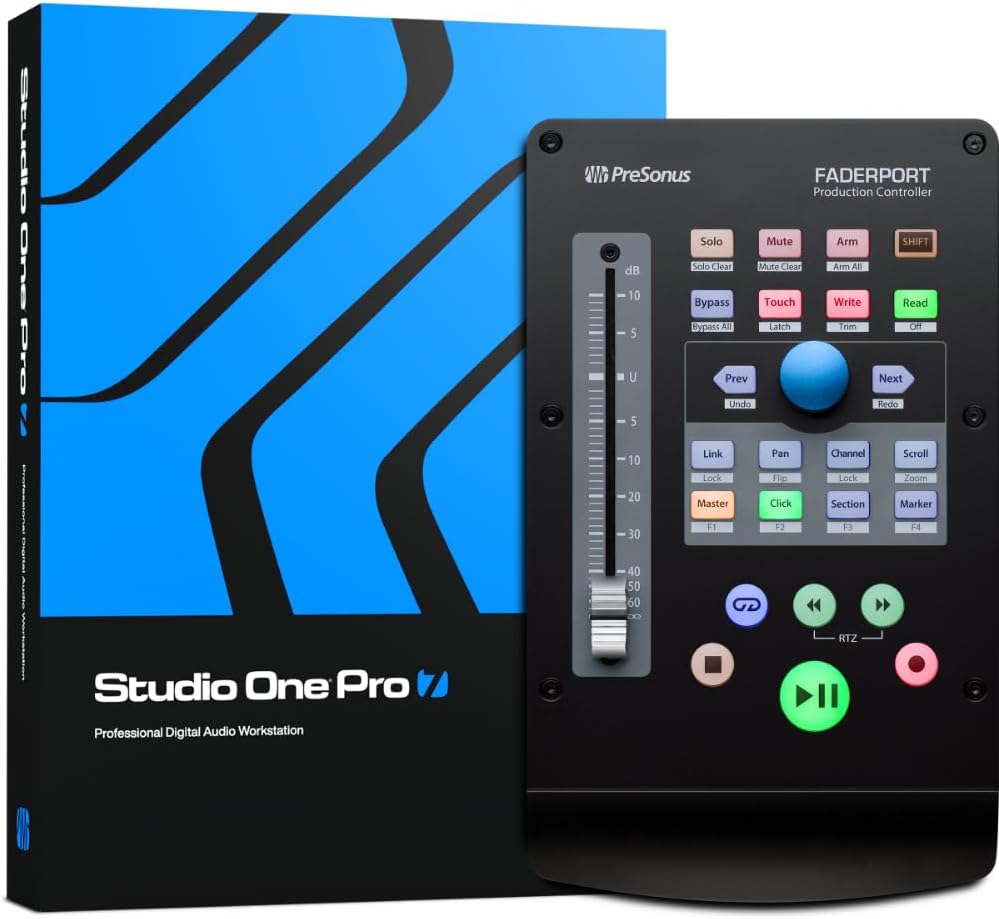
🎛️ Elevate your mix game — control, create, and conquer your soundscape!
The PreSonus FaderPort V2 is a compact, USB-powered DAW controller featuring a smooth, motorized 100 mm fader and over 40 multifunction buttons. Designed for professional and aspiring producers alike, it offers native integration with Studio One Pro and broad compatibility with major DAWs. Its innovative Session Navigator and bundled premium software suite deliver an efficient, high-end mixing experience that fits perfectly on any modern creative’s desk.
| ASIN | B07FWF3GR2 |
| Additional Features | Touch-sensitive, motorized, 100 mm fader for writing fades and automation in real-time; controls DAW recording transport, solo, window selection, and much more; innovative Session Navigator makes mixing and controlling your favorite DAW application quick and easy; native control of Studio One, including Control Link support and parameter follow, allowing quick hardware access to most controls; opt… |
| Best Sellers Rank | #7,640 in Musical Instruments ( See Top 100 in Musical Instruments ) #8 in Digital Audio Workstation Controllers |
| Brand Name | PreSonus |
| Compatible Devices | Various DAWs (Digital Audio Workstations) |
| Connectivity Technology | USB |
| Connector Type | USB |
| Control Method | Touch |
| Control Type | volume control, transport control, encoder control |
| Customer Reviews | 4.3 out of 5 stars 1,258 Reviews |
| Global Trade Identification Number | 00673454006920 |
| Hardware Interface | USB 2.0 |
| Hardware Platform | PC/Mac |
| Human Interface Input | Buttons, Dial |
| Included Components | 1 Faderport |
| Instrument | digital audio workstation |
| Instrument Key | Any |
| Item Dimensions D x W x H | 14.21"D x 8.9"W x 4.9"H |
| Item Height | 4.09 inches |
| Item Type Name | PreSonus Faderport USB Production Controller with Studio One Artist and Ableton Live Lite DAW Recording Software |
| Item Weight | 16 ounces |
| Manufacturer | Presonus |
| Mixer Channel Quantity | 1 |
| Model Name | FADERPORT V2 |
| Model Number | Faderport V2 |
| Noise Control | None |
| Outer Material | Metal and Plastic |
| Platform | Android, Windows 10, iOS |
| Product Style | 1 Fader Control Surface - New Version |
| Supported Software | Ableton Live, Studio One, Logic Pro X, Cubase, Pro Tools |
| Total USB 2.0 Ports | 1 |
| UPC | 673454006920 |
| Unit Count | 1.0 Count |
| Warranty Description | 1 year manufacturer. |
B**R
If you love Studio One FaderPort DAW Controller is an essential
I'm enjoying the FaderPort. I love that it came with the latest version of Studio One 7 Pro. After a firmware update the FaderPort works perfectly in Studio One 7 without requiring any modifications or reprogramming. It's very intuitive to use. The physical fader feels nice to the touch. The build quality is solid. This is compatible with Studio One 7 DAW, which came with the FaderPort. I simply had to register my unit to be able to download the DAW software. The buttons are responsive. This is a solid value if you love Studio One and it's your DAW of choice. This lets me work with sound more efficiently without taking up much desk space.
A**R
Excellent DAW Controller
This controller comes with Studio One Pro, and the motorized fader works perfectly for automation control. The included software alone makes this a worthwhile purchase. While there are occasional connection issues, solutions are readily available on YouTube, making them easy to resolve. Making and editing music with Studio One Pro is an excellent experience, and I highly recommend it.
P**J
Add a grommet for jog wheel!
A simple hardware store rubber grommet as shown will turn the otherwise miserable knob into a jog/shuttle-style wheel you can easily turn with one fingertip. The knob will grind a bit (by design, sadly...this is an audio product and should be silent) but loosen up over time, as will the motorized fader. I like the design, have used the Faderport 2 for a few years, stayed with it for my podcast rig, which brings us to the audio side. It's fine enough, nothing special, the headphone amp cranks but does get a bit of harmonic distortion when cranked. The mic pre is commodity, it has enough gain for the SM7B but no phase invert. I didn't try a guitar, no idea of the input impedance. Comparing, the SSL2 is more euphonious than this certainly, but doesn't have the nifty controller of course. This lacks the SSL2's stereo control button, I think the low-latency input monitoring lock both channels as mono, but I didn't test that. Both have 115dB dynamic range spec, the SSL2 does sound better, but I can live with this Presonus audio for simple use cases. The SSL2 headphone level doesn't get as loud, but the preamps do have the somewhat handy "4K" mode. Testing further, the audio section on the ioStation is pretty poor. There are error spurs (continuous high tones) in the ADCs, and the main outs are unbalanced. This is sloppy corner cutting consumer gear quality. The PCB traces were made for manufacturing convenience and not for performance. Read the instructions next time. Presonus does read the instructions on their Quantum units fwiw. The DACs are OK, and the headphone amp, while getting some 3rd harmonic when cranked, is quite usable. I would probably prefer a USB Mic like the Shure MV7 over these ADCs if possible. But just to listen back in headphones while editing/mixing, or even over speakers, this works fine. The SSL 2 is far far better on the bench though. But no Faderport included unless you buy a UF8.
E**N
Great piece of hardware, and does the job of a mixing board on a budget.
This interfaced with my DAW (Waveform Pro) almost immediately. Just needed to download the driver and put it in Midi mode (hold the "Next" button as it boots, then hit the "Solo" button while in your DAW" and I'm able to swap channels, pan, scroll the timeline, adjust master, turn metronome (click) on and off, solo or mute whichever channel, and arm for recording. It's a fairly nice piece of equipment. I was initially shopping for an 8 or 16 fader device, but having a single fader that I can swap to whichever channel is very handy. I would recommend this as a cost effective alternative. I can also start, pause playback, start or stop recording. I can't speak for the software included, honestly for items like this I don't think they need to include it. Kinda a waste for most people looking at this, as they will be intermediate or advanced users.
E**E
Tactile mixing is better than a mouse
I could not recommend one of these more. Once the software is installed and I opened Studio One for the first time, the board lit up like Times Square. It's so easy to use, I don't think I looked at the manual for a week or so. Even if you don't use SO, it's compatible with many other DAWs. PreSonus has incredible customer service and the quality is superb. I heard reviews about it being loud, but I've never even heard a fan turn on. It's seamless integration with SO got me into their world and I am loving everyday of it. For the money, an 8 motorized fader controller, that comes with a cutting edge DAW with 200GB of goodies is a steal. Spend your money on this first!
S**C
Great tool for live streaming
Purchased the PreSonus FaderPort8 to aide in mixing sound for livestreaming a church service. We are using Reaper for our DAW and have between 18 and 25 channels being mixed. The original purpose was to make the mixing process easier for other volunteers that were not involved in setting up the system and are less computer savvy. I am not sure it is going to help as much for new volunteers. I've been mixing on a full soundboard for 10+ years so I forgot how intimidating the faders on a soundboard can be, even with only 8. It will take a little time for new people to get used to the board. For those used to mixing this board works exactly as you would expect. In Reaper all you have to do is select a channel and the FaderPort8 will transition to include that channel as one of the 8 you are controlling. If you cannot show all the channels on your screen at once, you can press Select on the FaderPort8 and your screen will shift to show the channel you just selected. The movement of the faders is smooth. The faders being motorized is key and one of the main reasons I didn't go with less expensive solutions. Having the fader automatically move to the correct level when you select the channel is a must for mixing live sound. Only issues I have are minor. First, in Reaper, only the left most channel shows the channel number in the scribble pad area. They all correctly show the name of the channel however so it's not a big deal. The other issue is if you move the fader in Reaper all the way to the top (past 0) the fader on the FaderPort8 drops back to the bottom. Not a problem, just a behavior. All in all, if you are mixing for live sound and have the budget, I would recommend this device.
R**A
Faderport 16 - Be aware of Major Issues / November 2020
I am a studio veteran and previous touring professional with primetime TV appearances. I do not leave reviews, but if I can help others with it, I will do so. I have the Studio live 32 Series III - A faderport V2 - Atom Drum Pad, and Studio One Professional 5, and have also had the Studio Live 24 Series III - and their stage boxes AVB monitoring and their discontinued digital remote CS mixer too. As you can see I have been a major supporter of Presonus even going back to their Firewire Firepod interface back in the day. Faderport 16 usage for channel button on, and left right arrow buttons does not connect with the on screen mixer in studio one and is a useless function - the assumed movement like on Faderport V2 (single channel) is the channel arrows scrolls the software mixer window on the Studio One screen fader by fader to help you keep track of your movement. On the faderport 16 the channel arrows only move into view the unseen faders on the physical mixer's tiny scribble strips and still leave the previous selected channel engaged and highlighted. Movement around on this mixer as a whole takes 3 times longer fiddling with what is what and where you are at and what track is in view. Depending on what button mode you are in, there is no consistency to what the blue scroll wheel does or left right buttons do - In a constant state of checking your mode, then asking yourself can I use this button for this, and that scroll wheel for that. Add to this the shift button mess, as buttons that you were using for this, are all the sudden doing something else because the shift button is on - even though you turned it off. So cumbersome and its a function overload with poor design for software navigation on every level. I was blown away by how much more logical, functional and fast the single channel faderport v2 is in comparison to this. The LCD scribble strip screens above the faders are near useless and as you can see on the youtube videos horribly invisible (those videos don't lie) - and of the same embarrassingly cheap quality as the studiolive series III scribble strips. The only way to effectively use this mixer is to have the studio one mixer viewable on a computer screen, and then you are battling with what your touching on the faderport16 and what mixer channel on screen is in view. Double the work and focus, its a constant back and forth. The single faderport v2 you always know what channel you are on, and can control the entire mixing workflow with one hand stationary. Mute, Solo, Arm Volume pan - right there in front of you underneath your hand - and all the functions of automation with one handed operation. The record arm buttons are hidden underneath the select layer toggle button to the left. Meaning, even on a faderport v2 single channel you can go directly to a channel with one hand using the arrows or scroll wheel and engage the record arm with one button press, literally just resting your hand in a stationary position and working the whole studio app with your fingers (not even moving your wrist). Faderport 16 however requires fishing for the channel you need which is a chore on those tiny scribble strips, using two arms, then going to the arm button on the side, then remembering which track you were going to arm (because the select buttons go blank when you push it), arm it, then click arm button again to get back to the select button option to know which track you are on in a sea of 16 faders. This is the most ridiculous implementation of track arming I have ever seen. Above the scoll wheel on the right handside there are buttons on top that could have been used for this purpose to arm an engaged track that are not even in use or functional (not even coded for features) - Choose shift Arm to arm all track, and then there is no way to Un Arm all the tracks you just did other than un-button press them all one by one, or use your mouse to shift click the tracks in studio one - no toggle for arming all/ disarming all. When scrolling around the mixer - the master fader moves - meaning the faderport 16 puts the master fader on any available mixer channel not used - as you add more faders - the master channel moves to the right - what is the purpose of that? - a master fader is always in one spot - even when using the faderport v2 the master fader is never mixed in with the scrolling through tracks - I can't tell you how many times I accidentally hit the master fader volume thinking it was another track as they are all mixed together on the faderport 16. This is a side effect of their cheap deployment not including a physical master fader (there is a button for master that turns the master fader on the blue scroll wheel which is notched in steps and not smooth). Regardless of the master button option, the master fader should never be on a fader unless you want it there, and surely should never move around. The plug edit function would be a great feature if the scribble strips weren't of such a horribly bad resolution. the tiny text contrast, and fonts shown there force you to hunch over the unit and search around for what is what for the connected parameter. To even view those scribble strips you need this mixer propped in an angle. Its beyond cumbersome, and defeats the whole purpose of having nice plug in displays on a Large HD screen. These scribble strips are TINY. And I mean TINY. This once again, slows down the entire process of searching for what fader and button does what instead of just getting the work done with a click of the mouse, or setting up a midi remote which would do the same thing. They budget deployed this unit with no pans for each channel (have to use a notched pan knob on the side that is clicked with values that skip in between integers - its the most clunky deployment you can imagine, and if only 1 knob was to be used for panning function, why make it notched and step clicked? There is a panning button option that turns the faders into pans, but at that point you lose connection to the VOLUME FADER for synchronous automation runs!!! Although Studio One Daw is extremely stable and probably the most feature rich DAW out there bar none (I have used them all - ProTools - Cubase - Nuendo - Ableton - Studio one all versions - Studio One blows them all out the water) - the faderport 16 will disconnect from the recording session when instantiating certain Plugins - meaning the physical mixer will disconnect from Studio one while say Omnisphere gets added to a track. Once back online, the mixer connects but is now bugged with Lights that are incorrect colors, buttons that should be lit, are not lit, and non responsive to fader views using the buttons to the right of the faders, you will also see the scribble strips glitch out with incorrect data. Only way to resolve this is go to external devices in studio one and force a reconnect command which fixes it. Next time you add the plugin, it will do it again. I have tested this on 4 different DAW's, and different build versions of Studio one 5 to the most current 11 19 2020,, and also re-firmwared my Faderport 16 unit multiple times. All show the same bugs on every different PC system - This behavior is also seen with Addictive Drums vst. Last thing you want during a creative session is wrestling with these technical corruption breaking your mood just so you can have a fader to touch - its SO not worth it. A true mixing environment is one that can be man handled with very little eye requirements. knowing your hand is on an eq knob, or a fader or a pan knob, you name it, using your ears. A physical hardware target that is always the same, and always works is why hardware mixing is so addictive. Faderport 16 is a constant fight for I need to do this here, and do that there, then this here, then that over there, then wait, if its shift on, that its here, then wait no, its over there, oh my its glitched, let me fix it, rinse repeat. I had very high hopes for this unit, in fact was beyond excited to integrate it, but if making music is your critical priority - this unit can derail you very quickly artistically. It can take a powerfully speedy workflow and derail it to mud. It is not the end all controller many had hoped for. I have learned it inside and out, backwards and forward, every single function shift option, hack trick, and feature (i'm a total tech nerd and always on the cutting edge of equipment) -for the price its an expensive hyped paperweight that can be spent better on plugin instruments or real musical instruments or midi tools to get the job done. I have reported these issues to Presonus, and they have provided no resolutions for it, I do hope at some point, this item gets fleshed out before they simply discontinue it like they have done with other products, and move on to the next invention. As much as I like them, Presonus does have a history of this type of product evolution. My personal professional advise, get a faderport v2 if using Studio One, its all you need if you are recording and mixing in the box and want to get REAL work done, not battle with this process just to have a cool toy in front of you (it does look sexy). I like gadgets just like the next guy - however this one is going back.
J**S
Works With Reaper - But There is A Workaround Needed
Faderport V2 Single channel. One other reviewer mentioned the Faderport works with Reaper. There is a workaround that will take less than an hour to get setup. You will have to search for and download the Klinke software. This was written by someone in the Reaper community. It is free and has simple instructions. This controls the Faderport and is a version of Mackie Control. The generic control software for many control surfaces. Once you have the Klinke software setup inside of Reaper. (You have to drag a few files into the UserPlugins folder). You will then need to start the Faderport while holding down the "Next" key. This will allow you to choose one of the operating modes. They have setups for Studio One, Logic, Live, Cubase, and Pro-Tools. If you are using Reaper. Set the Faderport into Logic mode for Logic software by hitting the "Mute" button, once you are in setup mode. *There is a setup already in Reaper for the Faderport. But I could only get it to work with a few of the buttons. So I used this workaround instead, with some success. I ended up with around 90% of the features working. I now have full functionality to: Arm, Solo, Mute, Touch, Read, Write, Latch, and trim on a track. Scroll between channels. Jump between markers. Scroll/fast backwards or forwards. Undo/Redo Pan. Record. Stop. Play/Pause. The 100mm Fader is motorized and works well and feels nice. Much better than using a mouse. I was going to go for the 8 or 16 channel version but went for this as space is limited. I can scroll extremely fast between tracks and have all the functions I really need. It would be nice to have more faders, but for the price this is a great tool. You can add a foot switch and use it to record when you're on your own. Keep your hands free for an instrument. Mixing should be about listening and not looking at stuff on the screen. I feel this gives me more of that. What didn't work? Nothing important that I'm going to miss. One was the link function - But Logic doesn't support that and I am using the Logic setup. The Section Button doesn't work. The Marker button scrolls but doesn't drop a marker. That's something I rarely do once I have an arrangement setup. I only have to press the M key on the keyboard. I don't mind that these few minor things don't work. I can program these buttons myself unless I can find someone who has already done it. But it's such a minor thing that I probably won't waste the time. Why only 4 stars? It has taken some 3rd party person who makes no money from this to create the software to make the Faderport work with Reaper. Neither of the two companies could stick a programmer on it for 2 days and make it work? Overall, this has improved my workflow. A few hours of use and you don't have to even look at it because you get the feel of where the buttons are. The unit is solid and well built. The buttons have just the right amount of rubbery feel to them. For just over $200.00 I think it's worth it. Even with the hour of messing around, you have to do to get it going.
Trustpilot
2 days ago
2 weeks ago