
⌨️ Elevate your workspace, protect your wrists, and type like a pro!
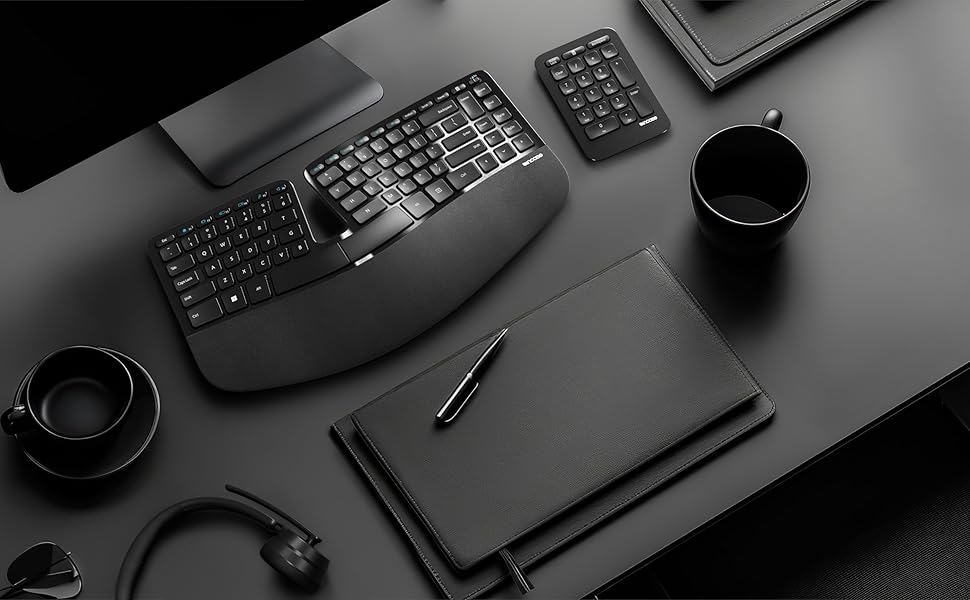
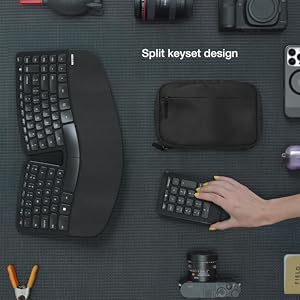
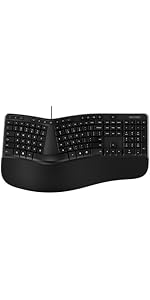
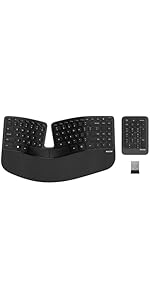
The Incase Sculpt Ergonomic Keyboard, designed by Microsoft, features a split keyset and contoured layout to promote natural wrist positioning and reduce strain. It includes a cushioned palm rest with customizable tilt options, a one-touch Windows button for quick navigation, and AES 128-bit encryption to secure your keystrokes. This black keyboard comes with a separate number pad and runs on 2 AAA batteries, offering a perfect blend of comfort, security, and productivity for professionals.
| ASIN | B0F5YNL62D |
| Batteries | 2 AAA batteries required. (included) |
| Best Sellers Rank | #37 in Computer Keyboards |
| Customer Reviews | 4.2 4.2 out of 5 stars (46) |
| Date First Available | May 1, 2025 |
| Item Weight | 2 pounds |
| Item model number | 5KV-00001 |
| Manufacturer | Incase |
| Product Dimensions | 15.5 x 9 x 2.7 inches |
C**N
Love, love, love this keyboard!
Microsoft originally produced this keyboard as the Microsoft Sculpt Ergonomic Keyboard. A couple years ago Microsoft stop selling them. This is an EXACT copy of that keyboard! It looks like it's made by the same manufacturer. The Microsoft version sold with an ergonomic mouse and keypad. This one doesn't come with a mouse, but does have the keypad, which I never use. Many of my co-workers use the Microsoft keyboard, but we have been unable to find anything like it, until now. I like the ergonomic feel and it can be place in the middle of your screen because it doesn't have the keypad on the right side. If you are right handed, you don't have to reach over where the keypad is on most keyboards. Very nice key action with a short travel when pressed. I converted a lot of people at work who were having wrist issues to this keyboard. It takes about 3 days to get used to it. I have not had wrist issues since using this keyboard. It takes 2 triple A batteries and you don't have to turn it off. Batteries last about a year. Very convenient.
B**.
Perfect Microsoft replacement
Perfect Microsoft sculpt replacement. Works good, and good quality.
P**K
Sleek, minimalist, very functional
I had been holding out for a new wireless KB from my old Microsoft Natural 4000 (remember those?) and was happy to see InCase took these over from Microsoft. The flat ergonomic design is very comfortable and the compact navigation layout works well... floating number pad is fantastic for centering the keyboard / mouse on the desk if you don't normally do a lot of 10-key, spreadsheet entry etc. It takes a second to get used to the key mapping but this would be true of any new keyboard layout. Overall it feels high quality -- magnetic snap-ins and access panels underneath are a nice design touch that shows some thought went into this. Been daily-driving it for a few weeks now and definitely not going back!
K**6
Not Comparable to Sculpt, At ALL
Augh. Where to start. I usually purchase the Microsoft Scuplt. Those prices were ridiculous (more than double) from my last purchase. While the design of the Incase keyboard "appears" to be the same as the Microsoft Sculpt, I promise you, it is NOT. I can't pin point the difference, but it is there. That really shouldn't be an issue of concern as it is NOT the same product, but for me, it is a turn off. Next, I was noticing that my numerical keys were not always inputting. Namely 205 as I use those all several times daily in my job. Now, this week, (six days after my return window closed), the 6 button is sticking and clicking. I am so not pleased. I tried calling the help desk. Immediately to a voice answering system. Hmmmmm. At least it was clear audible English. Thank you for that. They did give an email for support. I chose to use that option. We will see how this turns out. In the mean time, back to hunting for a reasonably priced keyboard for work.
K**V
Just like Microsoft sculpt.
Pretty identical to the Microsoft sculpt keyboard. Only board that I will use.
U**O
Great investment!
I was super nervous to actually buy this but ended up really loving it! It was a little awkward at first to get use to but figured that was pretty normal since I upgraded from a flat keyboard. i’ve had it for about 6 months & so glad I made the change !
D**L
Luv, LUV this Ergonomic Keyboard (Plus its Mouse)
This is the MOST comfortable keyboard! My wrists sit on the extended bottom and my fingers fall directly over the keys which belong to each finger! My old keyboard (this model) is 8 years old and still going strong, but when I saw how difficult it was to find it's matching mouse (https://www.amazon.com/dp/B00D68ZVY8?ref_=ppx_hzsearch_conn_dt_b_fed_asin_title_2). I quickly bought one of each and put them in the closet until I need them......
R**E
Function keys poorly placed
After a month, the Sculpt has some shortcomings. Pros: 1) Quiet. 2) Very ergonomic. My shoulders appreciate the space between the left and right side of the keyboard. Cons: 1) Missing keystrokes. I've moved the USB transceiver within 2 feet but it still happens. My Wave Keys keyboard didn't do that. 2) The F7, F8, F9 keys are too far to the left and too small. Even after a month, it's hard to reach those keys. Just poor placement of that upper row.
M**E
I've been using the Microsoft version for... a long time. I was anticipating this re-release by Incase since mine started to show early signs of failure. And they delivered: Great compact layout allowing ample room for the mouse. Same moderate curvature I've come to appreciate. Pretty good typing experience. Changes that I noticed are minor: The USB A key is shorter and the dongle comes stored near batteries. Audio shortcuts moved over to the right row. New logo. It's difficult to compare materials after years of use but they seem about the same. New features could have been nice but no particular complaint.
K**W
Identical in appearance to Sculpt but there are performance and customer service issues. I had to replace my sculpt after many years as the spacebar was getting flaky. The Incase version is so identical to the Sculpt that it came with a non working spacebar out of the box 😢. OK, it does work about 2/3 of the time but missing about 1/3 of the spaces is a huge issue. They dir3ct you outside of Amazon for support so I followed their links and wrote their support email to ask for help within the return window on June 23 and they only responded to me on July 2, a full 9 days later, when the return window conveniently (for them) had expired. Their response was a recommendation that I email them at the exact same email address I wrote to the first time. So now I have a $157 keyboard that works great if I don’t need to tyoe spaces. Beware any company that overrides Amazon’s support by directing you to their own support site if response times are not quick as this is nit the only seller that will lag on the reply until a return is nit possible. The circular instructions to keep emailing the same address are also a huge red flag. Cannot recommend this company.
Trustpilot
1 week ago
3 weeks ago


