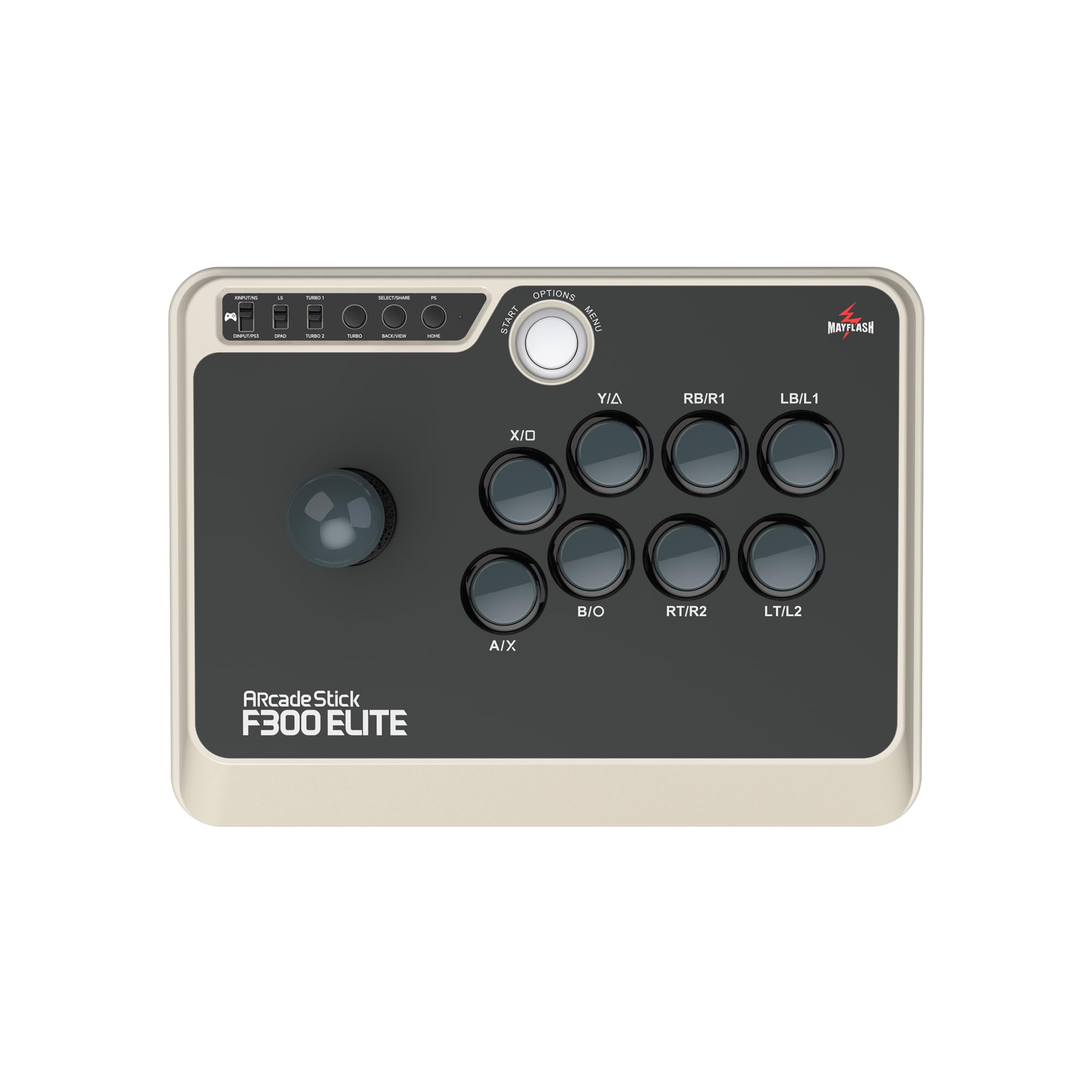
🎯 Own the arena with the ultimate cross-platform arcade stick!
The MAYFLASH F300 Elite arcade stick delivers professional-grade Sanwa joystick and buttons, compatible with a vast range of consoles and devices including Switch, Xbox Series X/S, PS4/3, Windows, macOS, Steam Deck, and Android. Designed for modders and competitive gamers alike, it features turbo support and an accessible interior for customization. Despite minor firmware quirks on some PC modes, it remains a top-tier, versatile arcade stick that brings authentic arcade precision to your fingertips.


| ASIN | B07CXJ77DT |
| Best Sellers Rank | #12,521 in Video Games ( See Top 100 in Video Games ) #16 in Xbox One Game Joysticks #92 in PC Game Joysticks #134 in Nintendo Switch 2 Controllers |
| Brand | MAYFLASH |
| Color | Black, Tan |
| Customer Reviews | 4.6 4.6 out of 5 stars (808) |
| Date First Available | May 7, 2018 |
| Hardware Platform | Nintendo Switch, PC/Mac, PlayStation 4, Xbox One, Xbox Series X |
| Is Discontinued By Manufacturer | No |
| Item Dimensions LxWxH | 11.81 x 8.86 x 2.2 inches |
| Item Weight | 4.62 pounds |
| Item model number | F300Elite |
| Manufacturer | MAYFLASH |
| Operating System | Android,Windows |
| Product Dimensions | 11.81 x 8.86 x 2.2 inches |
N**K
PS4/5 firmware freezing / Sanwa parts: Most of the case works except DInput
Updated to 1 star as current latest firmware (1ms input delay) is freezing while using PS4/5. When it happens, I need to disconnect and connect again and push PS button. It is happening on my 3 devices. Tech support replied that there is not such issue they know. The support person instructed me to ungraded and upgrade firmware, but it does not help. == Updated 5 to 4 star as it appeared DInput is not supported. I spent more than several hours to figure out and contacted to customer service as well. But it just verified that it is not working. DInput mode is not working as advertised as 100% compatible. I hope they can fix by firmware update. Verified working: PS4 with console mode: DOA5LR Switch with console mode: Tetris Puyopuyo, Pokken, Ikaruga PC (Steam) with XInput mode: Tetris Puyopuyo, Tekken 7, Soul Calibur 6 PC (Steam Link) with console mode: Soul Calibur 6 PC (Steam Link) with DInput mode: Soul Calibur 6 Not working with any setting (XInput, DInput, PS4) PC(Steam with any mode): DOA5LR (I think it support only DInput) PC (Steam Link) with XInput mode: Soul Calibur 6 ==== Note for Steam Link It does not work with XInput, but it works with Console mode and DInput. It required to configure controller within Steam Link settings. I'm not sure the difference between Console mode and DInput, but both worked. Verified working: Soul Calibur 6 with both Consoe mode and DInput mode. Verified not working: DOA5LR (it might be game side issue) ==== It is F500 price ($89.99) for F300 ($54.97) features. But it comes with Sanwa parts. So if you are considering to replace to Sanwa parts. You don't need to do with this. I has almost all current gaming machines are supported. I think this is cheapest Arcade Stick with Sanwa parts as well. This is different and newer from F300 and no firmware update required to support Switch. One tips for restrictor gate plate for Sanwa lever customization. I would recommend to purchase following parts. Sanwa GT-Y Octagonal Restrictor Plate for JLF Joysticks https://www.amazon.com/SANWA-GT-Y-Octagonal-Restrictor-Joysticks/dp/B06VVG936T/ Original parts is 4/8 way switch. If you use regular 8 way game, above octagonal gate is much better than 4/8 gate. If you play 4 way games (Puyo Puyo, Tetris, etc), use original plate and change setting to 4 way. It's so much easier than 8 way setting for 4 way games. It may takes 5-10 min with screwdriver. 2 point I do not like, but not much issue. 1) Pricing I hope this is about $75 range. Since F300 original parts are not need it. 2) Body Color It is greenish gray color. It looks really old device even new. I preferred just solid black or other color But over all this is great device. You can use most of game machine and no need to exchange to Sanwa parts. Well, I bought 4 unit of this model. 2 for 8 way usage. 2 for 4 way usage.
J**G
Started to die after 2 months...:/
I really did like this stick at first; small and light, works on multiple platforms...but after about 2 months it started to randomly disconnect during games, which is horrible when playing online fighting games because it means you insta lose. I tried emailing Mayflash about any sort of warranty beyond the 30 day Amazon return window, and surprise surprise, I never heard back from them so I’m left with a plastic brick. I also question whether the parts are truly Sanwa (notice in the description, it says “Sanwan” joystick, just a typo or wtf?). Additionally the rubber feet on the bottom started falling off around the same time. It’s just cheap build quality all around and I’m honestly surprised it lasted this long. Do yourself a favor and spend a little more for something that’s actually worth your money, such as the Obsidian.
K**R
WARNING! Careful with ordering in used condition.
The Elite version should have Sanwa buttons and joystick. I ordered a used one and the buttons and joystick have been changed out. I believe the buttons are from the non elite version. They are generic blue buttons. All Sanwa buttons have "Sanwa" stamped on them on the back. Also, the joystick has been changed out as the elite Sanwa version does not have wires soldered onto the side. It should have a connector plugged into the base of it. You can look on the Mayflash website for what the joystick should look like. This joystick also looks like the non elite version from Amazon's listing pictures. Who ever changed it out was kind enough to leave the original Sanwa 4 way back panel gate though. Be cautious. I believe someone has bought both versions, swapping out the parts, and returned the elite version.
M**I
Stopped working entirely 2 months in.
After about a month it began to have issues where it would randomly disconnect from my controller, and I'd have to unplug it and replug it before it would reconnect. This happened with increasing frequency until it stopped working entirely. Have found other reports of this happening to others as well. Do NOT buy.
S**U
Not worth it
Colette waste of money. Stopped working a couple months after I bought it and haven’t been able to use it since.
D**R
Great beginner fight stick, works on many platforms, and great customer service!
I really love this fight stick! It works really well on a bunch of different platforms, including pretty much all modern platforms from PS3 to Switch! Though if you want to use it on PS5 or Series X games, you'll also need to pick up something like their Magic-S Ultimate Wireless Bluetooth USB Adapter, which I got for use with my PS5. Figuring out how to get it working on each new console, particularly the PS5 is my only complaint with this stick, but after you're working its fantastic. For the record, I did run into a snag where I couldn't use my stick right away, but because of the simple design and easy to understand construction I was quickly able to open up the stick and diagnose the problem. I was missing an internal wire connecting the joystick to the board (see pictures), but I was able to message Mayflash support and they mailed me a replacement cord at no charge, so fixing this was a breeze!! Huge props to them for that. Overall this is a really great stick for a beginner fighting game player who likes to play on a bunch of different platforms. I love that the face-plate can be easily switched out for something custom later, and the weight and feel of the stick is just right, balancing affordability with quality, and the Sanwa parts here are a great touch. Thanks for making such a great fighting stick, you can tell my kitties love it too!
通**猫
ファームウェアアップデートしたら使えました。がNEOGEO mini本体の電源ONと本器との接続どちらが先かは忘れてしまいましたが、最初繋いだ時は認識されませんでした。またNEOGEO mini用の切替SWもメーカHP見ても分かりにくかったので、ググりましたら代理店のHP等記載あり無事使えるようになりました。 上記の通り最初は不便ではありましたが、NEOGEO miniに中継無しで使えるのと部品交換を自分でできるというメリットから星5としました。
R**T
My first arcade stick. The lever and buttons are great. Works on my PC. I played Street Fighter 6 on Steam. But I think the price is a little expensive. Thanks Amazon!
B**E
Arcade sticks are hard to learn. You have to relearn all the muscle memory, where everything is, and it will be frustrating. Could even take a long time to get fully comfortable. Did for me. Now I can't go back. But it's worth it. Not only do you stand out from everyone else rocking their dualshocks, not only do you can you use the same fightstick for every game on (just about) every console, but it also convinces you that you're a better player than you are. You aren't. I had to learn that the hard way. But that's okay. As the title (a quote stolen from Maximilian Dood) says, if you have a touch of derringdo, then definitely consider it. Arcade sticks are the most tactile way to pay fighting games. Slamming the stick, slapping the buttons. Sounds and feels excellent. Solid construction, quality parts, wide compatibility, the only minor gripe is the aesthetics, but you can always slap on a skin. Can also fit on your lap comfortably. This size is the perfect middle ground, as it's not cramped to use, and the portability is passable (considering).
E**0
It arrived on time and had excellent communication with the seller. Buy from the seller with confidence. A+++
E**W
Paired this with magic S ultimate to play on my PS5. My kid just smashes/spams when’s she plays with me. When I use it, I feel it has a solid arcade feel and feels accurate.
Trustpilot
1 week ago
1 month ago


