

Desert Online General Trading LLC
Dubai, United Arab Emirates
Desert Online General Trading LLC
Dubai, United Arab Emirates

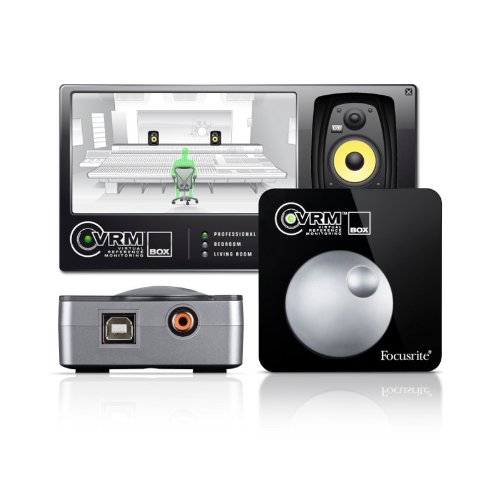
🎛️ Elevate your mix game with studio-grade monitoring in your pocket!
The Focusrite VRM Box is a compact USB audio interface featuring patented Virtual Reference Monitoring technology that simulates multiple professional studio speaker environments through any headphones. Delivering 24-bit/48kHz high-quality playback with a 108dB dynamic range and ultra-low distortion, it outperforms typical laptop headphone outputs. USB-powered and Pro Tools compatible with S/PDIF input support up to 192kHz, it’s designed for mobile mixing without compromise.
| Product Dimensions | 20.98 x 15.49 x 7.49 cm; 127.01 g |
| Item model number | VRM Box |
| Colour | Black |
| Compatible Devices | Laptop |
| Hardware Interface | USB 2.0 |
| Supported Software | Pro Tools |
| Operating System | Windows |
| Wattage | 2.50 |
| Item Weight | 127 g |
D**R
When monitors aren't an option, this device makes the world of difference!
While I am quite certain that high quality monitors in an acoustically treated room will yield better results than artificial reference monitoring. I am equally certain that most hobbyists struggle to justify spending a small fortune on monitors and treating rooms they need to use for other purposes.I fall into that category, using a small single bedroom that has to double as an office/spare room and with a young family to support I cannot justify spending a lot on monitors that I wouldn't be able to crank up anyway.That's where this little fella comes in. Coupled with KRK KNS 6400 headphones, this box/software is amazing. It faithfully recreates the sound of many industry standard monitors in either a studio or bedroom set up and goes on to let you hear what your mix would sound like on standard stereos in standard rooms. I'd love it if they'd included car stereo and club systems but you can't have everything I guess.Anyway, using this set up late into the night at a time when I would be forced to pack up due to noise constraints I've managed to mix several tracks and they sound better than anything I'd mixed on my old monitors. Being able to reference lots of different set ups gives you a good all round feel of how your track will sound out there in the real world.Coupled with good quality neutral headphones this little device is a genius piece of work and would be cheap at twice the price! Check it out, you won't be disappointed!
D**D
Good
A great headphone amp, and the vrm software is great for auditioning your mixes on different systems, saves you having to burn cds or transfer tracks to other sources. good headphones are a must, and accurate ones at that.The device itself does not process the vrm, this is left to the software running on your pc/mac, so make sure the minimum spec is covered, but my 10 year old xp machine had no problem running this alongside nuendo with several plugins and such.The only issue i had was with the device not being detected by windows on boot up, so i had to reinstall every time i started up. Focusrite support couldn't really figure out why, but chances are my pc usb configuration was at fault as the device installed successfully on both a win7 pc and os x.If they were to make any changes i would suggest a button on the device to bypass the software processing, and perhaps both a standard and mini headphone jack connection as 3.5mm adaptors generally have poor connections and have to wiggled a bit to get both channels to be heard, only an issue if you have 3.5mm headphones though.The VRM processing itself is very interesting, with the speaker and room configurations being different enough to warrant their inclusion, though the living room TV and computer desktop speaker settings seem a little better than they should be.Anyone mixing at home, and certainly anyone doing their own premasters should consider this item and some good headphones, I'm toying now with the idea of sennheiser hd650s as i have a remastering project on the go.You may be able to get some active reference speakers for the money it would cost for great headphones and the VRM box, but unless you already have a very good room, treated perfectly, then this will save you money, and if you do have the room, you probably don't need this, although the ease of error checking on several systems virtually may be of benefit too.Buy
J**N
Sounds Interesting...
I bought the VRM Box as I do a lot of recording at home in a relatively small back room. My monitors are Tapco S5s which means they only have limited Bass response. Installing the device/software was a breeze. I use Digital Performer 7 on an intel iMac (obviously) and DP picked up the VRM Box with no problems. I have opted to connect direct via USB rather than through my MOTU 828...as I do not have an S/Pdif cable.You need good headphones with a relatively flat response for VRM technology to work properly. I have a pair of Sennheiser HD580s which do the job.Playing your mixes through the various rooms and speakers can be a bit of an eyeopener and lets you recognise instantly is something is "poking out" of the mix.I tend to use the VRM Box as a reference check just before I commit to the final mix rather than use it to mix on, but I guess the option is there to mix using this box....especially if you mix on headphones most of the time.It would be useful to have a few more high end monitor emulations, but all in all I guess it's worth the money and hence the 5 stars. If you mix mostly on headphones or have limited monitoring facilities, this little box could prove very useful!
R**S
Neat and useful device
Simulates the effect of monitoring with a wide range of speakers, and works well (once you remember to turn it on in its control panel by clicking on the logo, otherwise it just passes the sound striaght through without the speaker simulation). I use it with my laptop when I'm away from the studio to listen to mixes on headphones, but it's useful as a general output-only audio interface - it will drive speakers as well as headphones. I wouldn't make it your default audio output device in this scenario (as recommended in the sparse installation instructions.In the studio, linking it to your main DAW/audio interface is via by SPDIF, which is a shame: it would be great if it acted a full two-way audio interface or better still a plug-in... but I guess for £89 that's asking a bit much.
J**S
Overrated
I used this for quite a long time, and I concluded that the money would be better spent on some much superior headphones. I purchased some very good quality studio phones, and I found that the shortcomings of the vrmbox were suddenly apparent. The new phones made the vrm sound horribly artificial, and I found that I could get far better mixes with just the phones.I also had some problems with bluescreen crashes which I traced to the vrmbox drivers. These were very unpredictable, and went away when the drivers were uninstalled/removed.Final verdict. Save up and spend as much as possible on superior headphones!
Trustpilot
2 months ago
5 days ago