
🎞️ Elevate your film scanning game—because your memories deserve the sharpest spotlight.
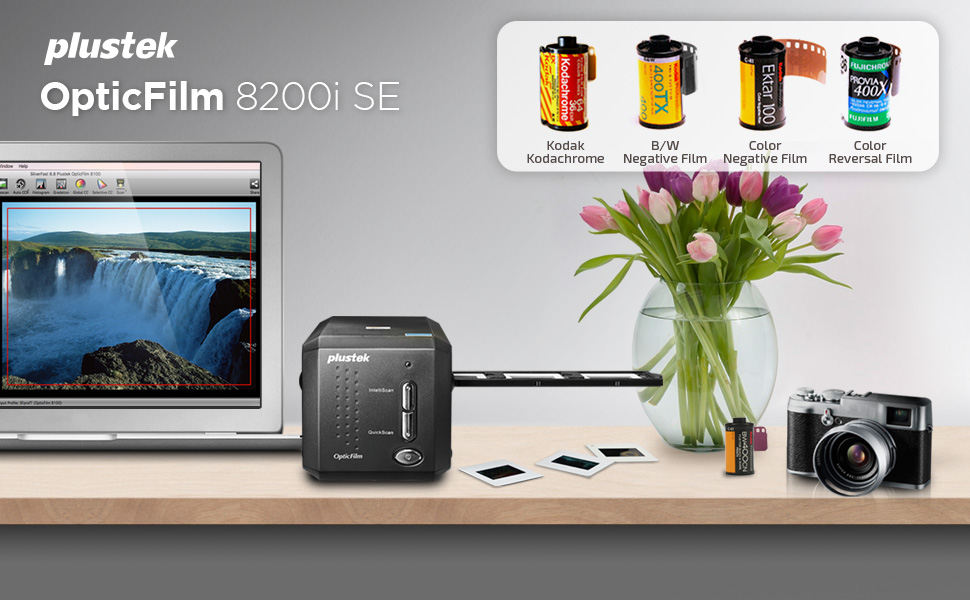
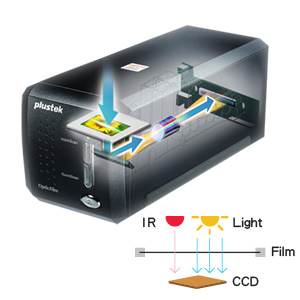
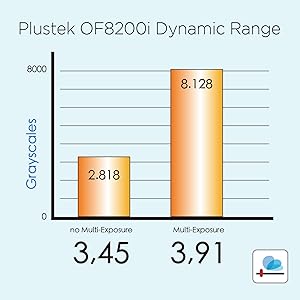
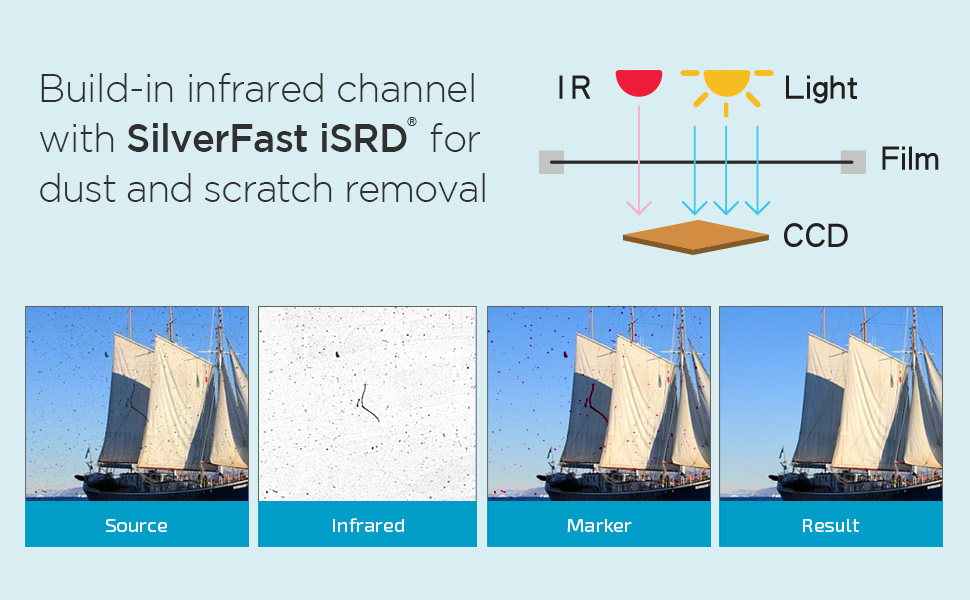
The Plustek 8200I SE OpticFilm scanner delivers ultra-high 7200x7200 dpi resolution with 48-bit color depth, featuring built-in infrared dust and scratch detection for flawless image restoration. Its 3.6x dynamic range multi-exposure enhances image quality, while bundled professional software and broad OS support make it the ideal tool for digitizing 35mm negatives and slides with precision and ease.


| Brand | Plustek |
| Product Dimensions | 12 x 27.2 x 11.9 cm; 1.6 kg |
| Item model number | 8200I SE |
| Manufacturer | Plustek |
| Series | 8200I SE |
| Colour | Black |
| Standing screen display size | 0.01 Centimetres |
| Computer Memory Type | DIMM |
| Are Batteries Included | No |
| Lithium Battery Weight | 1800 Grams |
| Item Weight | 1.6 kg |
| Guaranteed software updates until | unknown |
L**R
Potentially extremely competent hardware and software
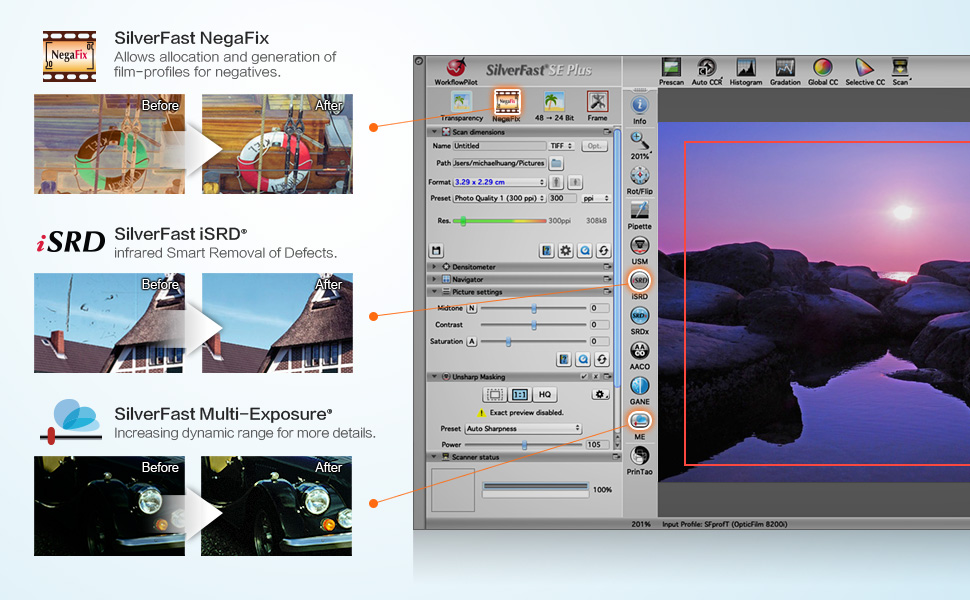
Owners of large archives of colour slides or negatives may be aware that they will eventually fade. Digitising them is practical means of preservation even if deterioration may have started but not drastic. Black and white films are effected more slowly. The "Plustek 8200I SE OpticFilm 8200iSE Film Scanner - Black" is a digitiser for 35mm colour and B&W films. SilverFast 8 SE for Windows is included although v9 is available. Carriers for 35mm strips (up to 6 frames) and four 2 x 2 mounted slides are included; those for formats such as half-frame 35mm, 126 and 110 are no longer available as optional extras. The scanner is about the size of two 1Kg bags of sugar placed end to end and quite lightweight. Space will be needed for the carriers' travel. It initially appeared that its power supply was missing. A report was made to the seller, Fuzion, who immediately responded and offered to replace it until they discovered the hiding place which they had twice missed! Excellent service from a UK company. Although the software is provided on CD for Mac and Windows, it can be downloaded or, when possible, copied to a flash drive via any computer with an optical drive. Silverfast should be installed first followed by the driver package. It is then possible to enter user details and the serial number from the CD case. Its many demo movies may be viewed pre-registration. Once fully installed, updates and upgrades are offered. Depending on the choices made, updates start at €49. Once registration is confirmed, there is an option within two months of purchase for a free like-for-like update (8 SE to 9 SE in this instance). Controls are limited to a power button and two mode selectors on the front panel. Power input (UK and Euro adapters are provided) is at the rear as is its USB output. Other than the mode buttons, all other functions are controlled in software. Series 8200i includes infra-red capabilities to identify and locate dust on the surface of the film or slide; with their locations noted, they can be later collectively removed. The alternative is to digitally retouch spot-by-spot, or use a 'healing brush' or equivalent within a photo-editing package although potentially time-consuming. Scanning a colour slide or negative is complex as there are numerous variables. There is a considerable learning curve needed to become familiar with the various settings and their effects for the best results. Although some scans may need minimal correction, others may need several changes to most settings; that takes time! Silverfast can take-on much of the work but scans can be saved as TIFF files (equivalent to RAW format) to maximise the saved data and detail for later correction in graphics software if desired; if initially saved as a JPG file, some of the detail will be lost and only recoverable if re-scanned. Post-correction, the images can then be saved to relatively small JPG files and the TIFF deleted when no longer needed. TIFF files can be 70 Gb each if scanned at 7200 dpi although 2400 dpi is ideal for high quality A4s printed at 300 dpi and the TIFF files then smaller. A faded slide can have a strong cast, often pink, blue or green. Changes to individual channels, curves, contrast and brightness with possible changes to black and white points may recover much of what was lost although it can take time as continuous reassessment and adjustment is likely. Experience may allow some settings to be roughly pre-set with expected approximation to ideals. While Silverfast offers a considerable variety of adjustability, most graphics software can do more with many supporting plug-ins for additional effects. Silverfast supports numerous scanners, flatbeds included, but those supported each need a dedicated version of Silverfast that will need to be purchased and that can prove expensive when several are used. There is an alternative software that claims to offer several advantages, not least internal drivers for all supported models, a Linux version and its low price for a Pro version which alone supports any combination of slide and flatbed scanners for those who cannot install or use Silverfast. A comparison chart for the versions of SilverFast 9 is available and lists all the new and improved functions where applicable. SE Plus may be a worthwhile and relatively inexpensive upgrade for many users while Ai offers considerably more but with the highest fee (up to €249!). Advanced users may gain considerable benefits if able to justify the greater outlay. The software/hardware combination is very competent and capable if the owner or user is prepared to put in the effort. Familiarisation with the software controls and awareness of the changes to settings and their effects will pay dividends. The package is not cheap but can pay for itself by preserving slides and negatives that may otherwise be eventually and permanently lost. Irreplaceable family photos (snaps, school photos etc) will need a suitable photo scanner to preserve them; some include a version of Silverfast.
C**E
Good scanner, non-intuitive software
The scanner arrived in excellent condition before the scheduled delivery date: I was kept informed of the actual date. The first device I received had a minor fault because the dust 'door' on the left hand side stuck open. I contacted Amazon who arranged for me to return this relatively large package via the local post office free of charge. A replacement arrived extremely quickly. So, in terms of service, I have to congratulate Amazon - this is the first item I have returned. This scanner has the ability to produce extremely high resolution scans, up to 7200dpi. Obviously these are very large, and most probably beyond the resolution required by most people most of the time. It can scan at set increments of this value (1800 and 3600dpi), and you can also select intermediate values. The time taken to scan slides is dependent on the resolution, but I do not think I could scan more than 8 slides an hour at the lowest resolution by the time I have used the software to adjust the resulting image file: higher resolutions will not take proportionally longer times because the processing time is significant. The results are between good and excellent on the 50+ slides I have processed. The provided software, Silverfast 8, has the potential to be very powerful, and this is probably its weakness. My comments will reinforce those of most reviewers. One is left with a multitude of options in Silverfast, all of which have an effect on the final image: there is little guidance on how to use these. The option that is most used (and useful) is the dust and scratch removal tool, which integrates the normal scan with an IR one. It can really improve quite dusty images when you have worked out how to use it - that takes quite some time and experimentation. Another option that can have a tremendous effect on the acceptability of the image is that affecting the colour cast of the image - again little advice is given on how to use this. However, if you persevere good images can be obtained. You can see that I have been a little frustrated by Silverfast 8, and I never seemed to have these problems with an old Nikon Coolscan plus associated software I had in the past. Other reviewers have suggested using other software but, being mean, I have resisted this approach: I might resort to it in the future. So, to summarise, this scanner has great possibilities and a high resolution; it is not quick (but probably all others are a similar speed, although the expensive flat-bed ones will do multiple slides in one scan); and Silverfast can both annoy and impress. If you have a lot of slides you wish to archive this scanner will definitely do the job - with practice, and in time.
T**R
Plustek OpticFilm8200iSE Film Scanner - not impressed with Silverfast software support.
12/8/12 - After much research on the web, I recently I bought a Plustek OpticFilm 8200i SE Film Scanner from Amazon to convert my old 35mm slides and some negative film to digital format. The item was delivered promptly and upon opening the box was just what I required, a scanner with a small footprint. All good so far. Following the instructions I installed the printer drivers and associated software, SilverFast 8 SE Plus processing package. Silverfast 8 SE Plus was one of the main reasons I bought this item as it comes highly praised. The scanner worked fine with the supplied drivers and Plustek scanning software, but when I attempted to use Silverfast 8 SE Plus the problems began. Basically the program won't run. Thinking that I had perhaps made an error in the installation procedure I uninstalled and reinstalled the complete package. The result was the same, scanner works fine with Plustek software but the Silverfast wouldn't run. The SilverFast "Launcher" appears but the program refuses to progress beyond that stage. It won't accept serial no details and closed down when asked to continue. After double checking I hadn't done anything wrong and extensively searching the Silverfast and Plustek FAQ's I knew I couldn't sort the problem so requested help from Silverfast support. To give them their due they replied very promptly, with a general "Do this" email and then a more specific email with links to the latest updates on the SilverFast package and the Plustek website requesting that I download and re-install using the new updates. Having done this sadly the software still won't work. The scanner again is fine with its Plustek drivers but the Silverfast still refuses to function. It now responds a little differently in that it produces an error message to say that the scanner cannot be found but it still won't accept the serial number or allow any function to operate. I am now waiting on the next email from Silverfast support but must admit that after wasting MANY hours trying to get the scanner to work with the supplied software I'm on the point of returning the package to Amazon and looking for another scanner that will work with the supplied software. So far if someone asked me if I could recommend this scanner and software, my answer would be a resounding NO due to all the messing around attempting to get the software to work. If I have success with Silverfast I'll post an updated review, but until then, its 1 star for the Plustek OpticFilm 8200i SE Film Scanner with LaserSoft Imaging Silverfast 8 SE Plus scanning software. So far "Not recommended". 14/08/12 - Downloaded a trial of VueScan scanning software, this installed no problem and found the Plustek 8200i and works a treat. So why can't Silverfast find the scanner? 16/08/12 - Received a follow up email from Silverfast support reiterating that I need to check that there are no other imaging devices connected. I've already done this and told them previously! I've now sent them a screen grab of Device Manager so perhaps they believe me! Still no follow up from Plustek. 16/8/12 - Let's play "Pass The Buck". Just had an email from Plustek's support, this is exactly what it said, no salutation or greeting, complete with capitalisation and spelling errors! "silverfast is made by German company & they have thier own technical support for thier software. please contact [...] for help" Plustek package their scanner with software, which costs of course, yet take no responsibility for it when the scanner won't work with it. Looks like I'm definitely returning the Plustek 8200i SE with SilverFast software for a refund. 17/8/12 - Received another scanner from Amazon today, a different model with different software, thought I'd try the EPSON Perfection V600 flatbed photo scanner. Installed the drivers and software including Adobe Photoshop Elements 9. No problems with installation, everything works perfectly with no problems. Scans are brilliant, software does everything it says it will, well done Epson for a great package that works. Epson Perfection V600 High Resolution 6400 x 9600 dpi Scanner 18/8/12 - Still no follow up from Silverfast. Arranged a return of the Plustek OpticFilm 8200i SE Film Scanner to Amazon for a refund.
P**H
A serious piece of kit.
I’ve been scanning 35mm slides and negs, on and off, for nearly 20 years now, using a Minolta ScanElite II which cost a relative fortune “back in the day”. Sadly, this has been slowly failing for the last few years and is now effectively unusable, at least “on demand”. It is my only point of comparison with the Plustek, both good and bad. Good - very high Dmax (shadow detail), good auto batch scanning, used infrared Digital ICE dust removal to produce clean scans. Bad - poor resolution (2700 dpi), noisy, used USB 1.0 or FireWire (IEEE 1394), OEM software unusable since Windows XP. So, a replacement scanner was much needed and the Plustek was one of very few “mid range” scanners out there. The 8200 Ai seemed like overkill, as I do not need formal end-to-end colour profiling these days (been there, done that) and I have been using VueScan for ages to run my old Minolta and my previous and current flatbed scanners (the latter is quite new, but does not really need the fancy CanoScan software for simple scan/tweak/print). The 8200i arrived very promptly and when unboxed was similar in size and weight to the Minolta. The main difference is that the film moves side to side rather than front to back. This may well be to allow manual movement between frames, otherwise the holder would become “buried” inside the machine! I thought the manual feed would be a pain, but since I tend to stick around during scanning, I find that I actually rather like it. Hopefully, the film holders will not wear too much with repeated use. They are reasonably sturdy, but not quite up to Minolta 2000s standards. The new setup worked out of the box with VueScan, but SilverFast required a scanner driver update (from Plustek) and seemed better after an update of the scanning software itself. I found that if it became unstable the best option was to go into the opening menu, reset all the settings to default and start again. After a few hours, I decided the SilverFast software was worth the trouble, especially with black & white film. I have some b&w slides somewhere, but have not tried those yet. Colour slides look excellent straight off the machine (Fuji etc.) but I haven’t reached my Kodachrome yet. Colour negatives also look good, but I do not use them much, TBH. The high resolution is really useful - 3600 dpi routinely or 7200 dpi for special slides or heavy cropping. That means slow scans and big files - but the results are worth it. Haven’t used grain reduction much, but I routinely use multi scan (to increase Dmax) and Plustek’s version of digital ICE. This is not a good idea with most b&w films, but you will soon know if it is not working - the scans look like modern art from all the artefacts! At just over the RRP (COVID-19), I think this is still decent value, but note that the price has gone crazy since I ordered mine. Keep an eye on fluctuations as there seems to be a supply and demand problem currently. This apart, I would certainly recommend this machine, but if you are a newbie, please remember that scanning, like most things, is a skill which requires practice to gain experience.
W**4
A good quality scanner and software giving excellent results ;-)
I purchased this item on the 09/08/2017 & it arrived within the specified delivery time. It comes with the relevant leads for connecting to PC/Laptop plus a neat carrying case & driver/scanning software. Also included is the excellent instructions/quick set up guides and the film holders, 1 for negative film & 1 for 4 mounted slides. The scanner is very simple to use, load up your negative strips or mounted slides in the relevant holder, switch on the scanner after having installed the software, slide the film holder into the left hand side slot & follow the on screen instructions which are very intuitive. Slides take longer to scan then negative film and I can say from experience, the results from slide film are excellent. The software Silverfast 8 produces 17.2mb Tiff files from 35mm slides with a choice of either slide film or Kodachrome slide film (which has a different emulsion from other slide films). These Tiff files can be opened & manipulated in Photoshop or similar software to produce files for printing or displaying on the Web. The scanner is very well manufactured & is good VFM at £220, it takes around 12 minutes to scan & save a 35mm slide. Negative film scans & saves much quicker at around 3 to 4 minutes per image. I would certainly recommend this scanner bearing in mind that there is a learning curve with Silverfast 8 software plus Photoshop. It is worth checking out ScanVue software as an alternative to Photoshop, which is less complicated and easier to use.
S**T
No Doubt Capable, BUT Prepare To Struggle.
The scanner is ok, it is now in reality old tech but there are precious few items out there that have some of the features that this is meant to deliver. It scans 35mm negatives and transparencies (Mounted Slides), the Plustek 8200i item seems well enough manufactured though I do wonder if it may be susceptible to dust internally with use. I want to manage both so the only choice is to go for the AI version with the IT8 Calibration slide included. Knowing my luck SilverFast 8 which was issued in 2012 will be supersceded making the as now (2020) new purchase obsolete in no time. Install and setup raised no real issues on Windows 10 Pro 64 bit. The scanner price is largely made up by the SilverFast software from LaserSoft in Germany. Addons or upgrades, if you find you need them (so think before you buy), from LaserSoft are disgracefully expensive for what they are and the complete lack of any worthwhile manual except an additional ebook item purchase from LaserSoft is a disgrace. The user Book (its not claimed to be a manual by Lasersoft) is a PDF purchasable from LaserSoft for C. 30 Euros currently is barely adequate. Sure its 380 pages long but its layout and lack of proper setout contents and index are grave shortcomings as is the fact that printing it doesn't get useful images when these are supposed to demonstrate functions. If you thought you may get a knowledgebase and chat forum for user interaction, then think again, the SilverFast forum has no visible posts since 2018 even their Facebook is posts (not great if You don't like or trust Facebook) are useless, again you are on your own! Many other purchasers will simply direct users to other software probably driven to do so because of the poor online customer service Lasersoft provide for what is potentially a very capable product. Overall, this messy product only goes to make getting to grips with scanner even more problematic and in many ways devalues the actual scanner significantly. Half the features shown on the website for the software are NOT included, indeed the HDR features (as they use the term HDR, which is not the normal Photo HDR technique) is an additional £90 as an upgrade to the Ai Studio Package if you want their Archiving features (keeps all scan detail for future reprocessing without having to rescan again). Terms they use are not defined and you'll feel like a lost soul struggling with really crude webpages full of bitty rubbish video/pdf clips trying to find anything of help from the SilverFast website. To do anything worthwhile its an absolute muddle of finding the best scan you can get and then using Photoshop or Lightroom to fix the final image. SilverFast documentation does NOTHING to help you do this. As an update: some weeks after purchase. I can affirm that using the Ai Studio software without the HDR addon is all but pointless as scanning takes so long that if you want to retain original scans for reprocessing then the HDR addon is the only way to apply any of teh features like dust removal or any other real edits. It adds a virtual light table and allows you to create Jobs in Job Manager to batch process your original scans. I will say that Lasersoft do reply to support requests form the application help menu, that said they are dogmatic, completely unhelpful and frankly have no customer care repeatedly directing you to the pdf and video files you've already read/viewed that don't cover the detail. They want you to buy 1:1 training, which based on their support replies I'd say you'd be really disappointed with so I can't recommend. I now scan to 64bit HDRi, ignore all the garbage about formats etc. but scan to the optical limit of teh scanner then process basics in the HDR addon package and then pass the rest of any work on to a package which has better support. Its an expensive route but as the HDR addon I'm told will work stand alone I can keep the original HDRi scans (in case) and reprocess at will. The Amazon Shop that provided my purchase (CCL) thought it ok to dispatch the scanner in its manufacturers retail box, no extra protection, poorly labelled and not even sealed. The packaging looked slightly second hand when it arrived. I hope it will deliver enough for the price I paid. I would not recommend one of these unless you are prepared to spend a lot of time learning the software and then don’t expect to spend less than 10 mins per frame to tweak settings (even if you have the AI version NegaFix library) if you want respectable results. Slide scan results seem to be even worse than Negatives and colour balance tuning even with the additional ebook is less than great.
H**E
I'm very pleased I bought this scanner!
I'm so glad I bought this scanner ; I was going to buy one of the cheaper models that are in the £50 to £70 range commonly seen in catalogues etc. but for not a lot more ( £120 in my case when I bought it) you get a really nice quality scanner which is capable of really nice results I have so far scanned about 150 films so thats heading towards 5000 scans and this scanner had been working just fine. Heres my experience of using the scanner for about 4 months. Most importantly , YOU MUST BE PATIENT TO GET DECENT RESULTS!! The quick scan takes about 30 seconds , scanning a neg at 2400dpi (my default setting as a balance between quality and scan time) takes about a minute.Using 3600dpi for better fine detail takes maybe 2-3 minutes So scanning a 36 roll neg can take about an hour to set up and save at highest resolution but its up to you what quality you want to achieve! Scanning at lower res will take much shorter time if you just want "contact sheet" style scans and then you could just pick a select few as favourites to scan at higher res. The Silverfast software works just fine for me ; one thing I would say is I prefer to scan using as few filters and adjustments as possible from the Silverfast software and just use Photoshop to adjust my scans afterwards.Prescans can be easily cropped to your desired ratio and to remove the rough black edges of the neg frame One quirk of the prescan is that sometimes the prescan works at what is clearly a low resolution as the image lacks the normal detail that you usually see in the prescan However, when you scan , the saved image will be scanned at the correct resolution! I have never found out why this happens but if you prescan a second time it will show the detail if you need it. The neg holder works fine but once a neg strip is inserted , I often need to gently tap the holder to get the neg strip to align properly and I always use a blower brush on the holder before inserting in the device. The seals on the scanner seem to work well in keeping dust out of the innards ; I have not noticed any dust on the scanned images from the scanner bed itself ( but too many from my less than perfect negatives unfortunately!) The plastic clip that you press on to clip the holder together lasted about 100 films and then it snapped off, leaving the holder too loose to hold the neg strip tightly. After cursing for not buying a spare holder I solved the problem easily ; just put a bit of duct tape across the clip area ; the thickness of the tape provides enough friction to close the holder tightly again.Job Done! It worked for me but your experience may differ ; spare holders are not expensive This must be the classic " when I retire" job to be done when you have the time to devote to it, like me! I have about another 25 films to scan but I feel this scanner has already paid for itself and I highly recommend it Dont waste money on a cheap scanner ; you only want to do this once so spend the extra and do the job properly! Get a decent scanner like this one!
S**G
Plustek 8200i Film Scanner
I have been using the Plustek 8200i scanner for three days now. At first after installing the software the scanner worked fine and I was impressed with the Silverfast software, it is quite powerful and comprehensive. After a while the Silverfast program would not run a full scan and I eventually reinstalled the software to be able to scan within Silverfast. This happened 3 or 4 times and I was about to give up when I decided to click on the Workflow Pilot button which enabled me to scan again. When I pressed the button to get back to the main program everything worked fine again. So I guess that I have stumbled on a bug within the program. Otherwise the program is extremely good and I have already scanned about 90 slides at 3600 dpi with great results. The scanner seems to be quite well made but is fiddly to align the film adaptor properly within the scanner. Overall the quality of the scan is very good and better than any flatbed scanner I have used so overall I can recommend it.
Trustpilot
3 weeks ago
2 months ago


