
DOWNLOAD THE APP


Customer Services
Copyright © 2025 Desertcart Holdings Limited
DOWNLOAD THE APP

🚀 Upgrade your WiFi game — don’t get left buffering!
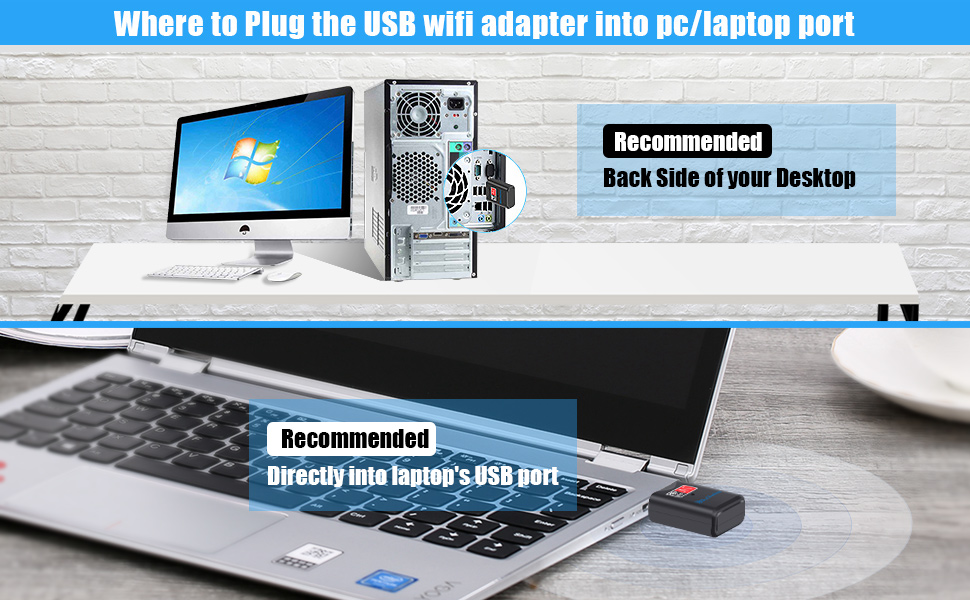
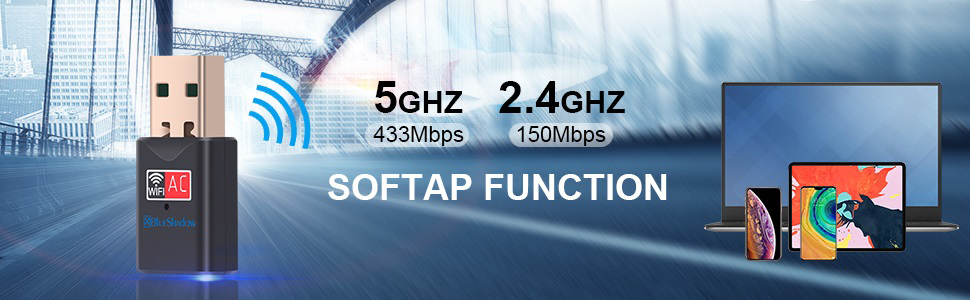
The Blueshadow USB WiFi Adapter delivers dual-band 802.11ac wireless speeds up to 600Mbps (5GHz 433Mbps + 2.4GHz 150Mbps) in a compact, plug-and-play USB dongle. Compatible with Windows, Mac, and Linux systems, it effortlessly upgrades older desktops and laptops to support modern high-speed routers, ensuring seamless HD streaming, gaming, and reliable connectivity wherever you go.






| ASIN | B077XJB1Z8 |
| Best Sellers Rank | #194 in USB Computer Network Adapters |
| Brand | Blueshadow |
| Color | Black |
| Customer Reviews | 4.3 4.3 out of 5 stars (8,289) |
| Date First Available | December 4, 2017 |
| Is Discontinued By Manufacturer | No |
| Item Dimensions LxWxH | 3.8 x 0.83 x 0.59 inches |
| Item Weight | 1.12 ounces |
| Item model number | 802 |
| Manufacturer | Blueshadow |
| Operating System | Support Windows XP/7/8/10, MAC OS 10.5-10.15, Linux(Kernel 2.168~4.8), NOT support chromebook, NOT support TV, Projector, Printer. |
| Product Dimensions | 3.8 x 0.83 x 0.59 inches |
| Voltage | 0.01 Volts |
| Wireless Type | 802.11a |
A**Y
Wow, works!
I changed my internet provider and the router with the new service ran at 5mgz. My adapter card in my 5 year old PC only ran at 2.4mgz, so the day I changed services my "high speed" internet came to a crawl. After many hours of trying to figure out what was wrong I found some blogs that led me to check the existing cards MGZ. After learning that I cannot swap the card out some blogger suggested these USB toggles. I found this one, bought it, just installed it, and boom! High speed is 100% as advertised. For just under 20 bucks I don't know how you could go wrong. I'm shocked that it works as advertised, and took 5 minutes to install. Just pop in the mini disk, run the install file when you search in your folder (it does not automatically guide you to an installer) , double click and finish install through the wizard. Easy peazy. Then press the windows and X key to bring up your device manager, disable your old card and enable your new card and reboot. Or I think I rebooted first then disable and enabled. It was super easy, and super quick and I know how the speed my service is able to provide. Cheaper than buying a new pc :) This is a super great work-around!
T**T
Easy Installation If...
When I installed an upgraded wireless 5G router, I found that my ancient (7 year old) Dell laptop did not support 5G wireless. Not wanting to go through the hassle of setting up a new laptop, I searched around for a alternate solution. That's how I found the BlueShadow WiFi USB adapter. Actually, there are a number of different devices that handle this problem and the price is definitely less than a new laptop. I ordered and received it the following day. While waiting I did some reading and found that the necessary drivers could be downloaded from BlueShadow. I knew that the product came with an installation CD, but pulling out an external drive is usually a pain. Also, when I received the package I found that the included CD is one of those small (M-Disk) things. I don't know if my external drive will even accept one of these, so downloading the software was a good solution for me. After downloading the driver package, I found that it included a quick-install PDF document. Reading through it only took about five minutes and was definitely worth the effort. There are several important tips: 1. You must "disable" the existing Wireless device if your computer has one. Otherwise the computer will be confused about which wireless device to use. Do this before anything else. 2. Unzip the downloaded driver package then find the folder for your operating system. They include folders for Windows, Linux and Apple. In the correct folder is an "Install.exe" file. Double click this application and the normal Windows installation screen will show and you can do a normal software install. 3. Once the install process is completed restart your computer. You can plug in the USB WIFI device before performing the restart. After restarting, go to your "Available Networks" list and you should see your 5G network. Click on it and enter any required password. That's it, I now have 5G wireless access on my old non-5G laptop. Total installation time is under ten minutes once you know what to do. So far, the device work perfectly. Connects automatically on start up and doesn't seem to be unstable or to have disconnect issues. For the price, it's an amazing solution.
S**Y
Doesn't have Bluetooth
When I first ordered this, I thought I was getting a combination WIFI AC and Bluetooth dongle. I probably thought it had Bluetooth because of the company's name Blue Shadow. My mistake that I didn't look carefully. The dongle wasn't immediately recognized by Windows 11 Pro so I had to look up the hardware ID from the Device Manager and then google it. Once I found the right driver, it worked flawlessly. The company does offer their driver but its in a mini-CD which isn't practical with modern computers without optical drives. They also offer a web url but I felt safer to get the realtek drivers directly from realtek instead of the Chinese supplied one not to mention it was more up to date. It's a fine dongle as long as you only need wifi and not bluetooth. Tapo offers a dual bluetooth wifi for just a few extra dollars more and its a more known brand. I'll be returning this one to pickup the Tapo dongle
B**C
Works on WIN 10S laptop
Seller delivered in record time - Next day! I bought two as I'm tired of the 2.4G network speed due to so much local interference on our two laptops. 1st problem is the drivers are on a mini CD - well who has an optical drive on a laptop theses days? Downloaded the drivers from the website listed on amazon product page. It takes a little while but was easy to install and get the 5G up and running. The WIN 10S was a little more problematic. The download takes forever - presumably due to the Microsoft security. So I copied the CD to a USB drive on a desktop then tried running the driver installation on the 10S - No joy. 10S wouldn't accept the program UNLESS I EXIT 10S as a one way deal - not a good idea. Then to my surprise, feeling defeated and ready to send the 5G USB back to Amazon, I plugged it into the 10S computer and it fired up all on it's own - clearly the 10S laptop had the drivers already installed. The moral of this story is if you have a WIN 10S laptop - just plug the USB WIFI in as a plug and play. Performance wise, this unobtrusive little dongle multiplied the internet speed significantly. Of course you do need a 5g router available.
G**S
The adapter card in my laptop died - and this was a quick and simple fix. The USB dongle is slightly larger than a mouse dongle, for example - but is not particularly obtrusive. It worked great straight out of the packaging, and was delivered the next day.
P**D
Guter, schneller USB WLAN Adapter. Wird sofort (mit den richtigen Treibern von Windows, Linux und Android erkannt und ist sehr leicht zu installieren. Jederzeit eine Empfehlung wert.
M**N
Fonctionne très bien
A**R
For educational purpose and it is easy to use
S**A
Una piccola chiavetta usb. Utile, mi ha risolto il problema del 2,4gz/5gz Semplicissima da usare. Basta inserirla in una porta libera e il gioco è fatto. Il pc la rileva da solo. Come sempre puntuale la consegna
Trustpilot
2 days ago
3 weeks ago