
DOWNLOAD THE APP


Customer Services
Copyright © 2025 Desertcart Holdings Limited
DOWNLOAD THE APP


🚀 NanoPi R5C: The Mini Router That Means Business
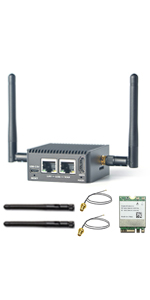
The NanoPi R5C is a compact, high-performance mini WiFi router powered by a Rockchip RK3568B2 quad-core CPU, 4GB LPDDR4X RAM, and 64GB eMMC storage. It features dual 2.5Gbps PCIe Ethernet ports, an AI-capable 0.8T NPU, and supports multiple OS options including OpenWrt, Debian, and Android. Designed for professionals and tech enthusiasts, it offers extensive connectivity with USB 3.2, HDMI, and M.2 expansion slots, making it ideal for advanced networking, IoT development, and portable smart home gateways.



| ASIN | B0BNNNGTND |
| Batteries Included | No |
| Batteries Required | No |
| Best Sellers Rank | #1,034,284 in Electronics ( See Top 100 in Electronics ) #593 in Routers (Computers & Accessories) |
| Brand | WayPonDEV |
| Compatible Devices | Personal Computer |
| Connector Type | Ethernet, USB,HDMI, Wi-Fi |
| Customer Reviews | 4.4 4.4 out of 5 stars (24) |
| Data Transfer Rate | 2.5 Gigabits Per Second |
| Date First Available | 29 December 2022 |
| GSM frequencies | 2 GHz |
| Generic Name | mini router |
| Item Dimensions LxWxH | 6.3 x 6.3 x 3 Centimeters |
| Item Weight | 181 g |
| Item model number | Nanopi R5C 4+64GB WiFi Router |
| Manufacturer | WayPonDEV |
| Model | Nanopi R5C 4+64GB WiFi Router |
| Model Name | Nanopi R5C Wireless Mini WiFi Router |
| Mounting Hardware | 1 x Nanopi R5C 4GB RAM 32GB eMMC Mini Router--with CNC Metal Case |
| Number of Ports | 2 |
| Number of items | 100 |
| Operating System | Android, FriendlyWrt 22.03 (64-Bit), Buildroot, Debian Buster-Desktop (64-Bit), FriendlyCore Focal Lite (Basis auf Ubuntu 20.04) |
| Product Dimensions | 6.3 x 6.3 x 3 cm; 181 g |
| Radio bands supported | Dual Band |
| Ram Memory Installed Size | 4 GB |
| Special Features | wps |
| Total USB ports | 2 |
| Voltage | 5 Volts |
| Wireless Type | 802.11a, 802.11ac, 802.11b, 802.11g, 802.11n |
J**.
I was running OpenWRT on a Raspberry Pi 4 for a very long time but it kept crashing on me. I later found out that it was the USB Ethernet adapter but I decided I'd rather have a piece of hardware with 2 ethernet ports baked in. This unit fit the bill. The fact it can do 2.5 Gbps was just icing on the cake. First thing I did was remove FriendlyWRT and install OpenWRT. I made the mistake of trying to restore my config from my Raspberry Pi install and that bricked it. So I was able to flash OpenWRT on a microSD card and boot from that. I wound up making another ext4 filesystem on the card and putting the .img file in there and then running the 'dd' command to get it on the internal 32gb storage. After that, I expanded the ext4 filesystem on the internal storage and then very carefully started copying over everything in /etc/config manually making sure not to copy anything with mentioning eth0 and eth1. Eventually I got it setup just like I had it on my Raspberry Pi and my speedtests look pretty good. I don't know much about FriendlyWRT but I wanted OpenWRT straight from the source. Can't be too careful these days. Ease of Setup: 4/5 Customization: 5/5 Wireless Connectivity: You can add a card and antennas, but I didn't need that. Looks: Pretty good. Would have preferred at least 1 USB port on the rear Power: I'm using the power cord for my Raspberry Pi 4. Everything is peachy so far Thermals: Only a little warm. I'm talking comfortable enough to hold in your hand. Fanless, but the shell acts as a heat sink. Recovery: It does include a button to force it to not boot from the internal storage. This came in handy. Overall, 4.8 / 5 stars. Only thing I'd change is for it to come with OpenWRT and not FriendlyWRT out of the box but I would have still flashed it myself straight from the source just to be safe.
C**W
I bought a $10 laptop cooling pad for this and my unmanaged switch, which has taken care of what felt like high temps (but were within normal). seems pretty good. runs a couple moderate docker apps like adguardhome and swag with no trouble, along with way more OpenWRT luci apps than I really need. currently at a couple months of solid OpenWRT use. be aware that OpenWRT is much more complicated than most router firmwares, but there's plenty of good documentation out there. manufacturer documentation is adequate, but not entirely complete. I have not tested the Debian or Android firmware images, but I bet it would make for a great streaming box. probably not powerful enough for proxmox / heavy docker apps / or multi-client Plex transcoding? I already have a Plex server on a NAS. Seems to have plenty of RAM for being a router. great price point, although RasPi5 probably beats it now if you don't need 2.5gbe.
P**W
I love this little thing. It uses next to no power. It came with Linux-based routing software installed. I got a good micro-SD card and am running my own Linux installation on it instead, using their kernel, but Gentoo Linux for everything else (not recommended, but I already knew the configuration system and wanted to port complicated networking scripts). Yes, it's slow, but everything works great. I did not get the WiFi option, as I have separate access points on a switch; this is the firewall/gateway for my home, and I've tossed a number of additional services on it, and it handles everything just fine.
T**S
I want to implement a NAS (network attached storage) with multi-Gig ethernet support. I picked this ARM-Linux box because it has two 2.5G ethernet ports. After receiving the shipment from Amazon, I found its case is made of aluminum, which serves as a large heatsink. Thus, no fan is needed for cooling. As a result, it makes no noise and is suitable for home office and entertainment environments. Based on the information provided, I opened its wiki page and downloaded the firmware provided there. Everything worked pretty well. No issue was encountered at this stage. I installed the Debian 11 (bullseye) core as its OS. It booted smoothly after burning the rootfs image to a micro SD card, plugged in and powered on. However, the rootfs image is a little bit weird. As far as I know, most of such image for ARM single board computer (SBC) contains one partition (rootfs) or two partitions with a separate boot partition. However, this image contains many small partitions. Not sure what are those partitions for. I then checked the network speed. By using a 2.5G ethernet switch and an USB3.0 to 2.5G ethernet adapter on my Windows 11 PC, my iperf3 test showed that its speeds on both directions were about 2.35 Gbps. Which is not bad. In order to set up a NAS, I installed OpenMediaVault 6 (OMV6) on the Nanopi R5C with Bullseye Debian Linux. A 2.5" hard disk (hdd) with a USB3 interface was used as the storage. Installation carried out smoothly with no problem. When I used it as the fileserver, I found the read speed (NAS to Windows PC) could reach over 200MB/s, which should be satisfactory. However, the write speed (PC to NAS) was only somewhat over 10MB/s. This is essentially ethernet 100M speed. (Update: I noticed that the vendor just updated the OS firmware provided. In particular, the new firmware includes an OVM6 implementation. I tried their implemented OVM6. Both the write and read speeds were higher than 200 MBytes/s at start, then they reduced to about 100 MB/s and 60 MB/s, respectively. I think the speed reductions were due to the write and read speeds limitation of the hdd used in the NAS. However, when I used their new Bullseye firmware and implemented OMV6 from scratch, the write speed is still about 10 MB/s. I am not sure why. I contacted them but no reply was received.) One warning I want to make is that if you decide to buy this SBC, don't expect community and/or the vendor's supports like you would get for the Raspberry Pi's. However, if you want to take the adventure of utilizing its fast ethernet speed or other features that are not provided by Raspberry Pi's, this unit may not be a bad choice.
P**N
Took a lot of fiddling to get a different image loaded. Despite numerous attempts and multiple reads of various instructions. Then, once I got Debian and Docker installed, the device was not powerful enuff to run home assistant and pi hole simultaneously. I'll find some other use for this little computer. But running containers isn't one of them.
Trustpilot
2 weeks ago
5 days ago