
DOWNLOAD THE APP


Customer Services
Copyright © 2025 Desertcart Holdings Limited
DOWNLOAD THE APP
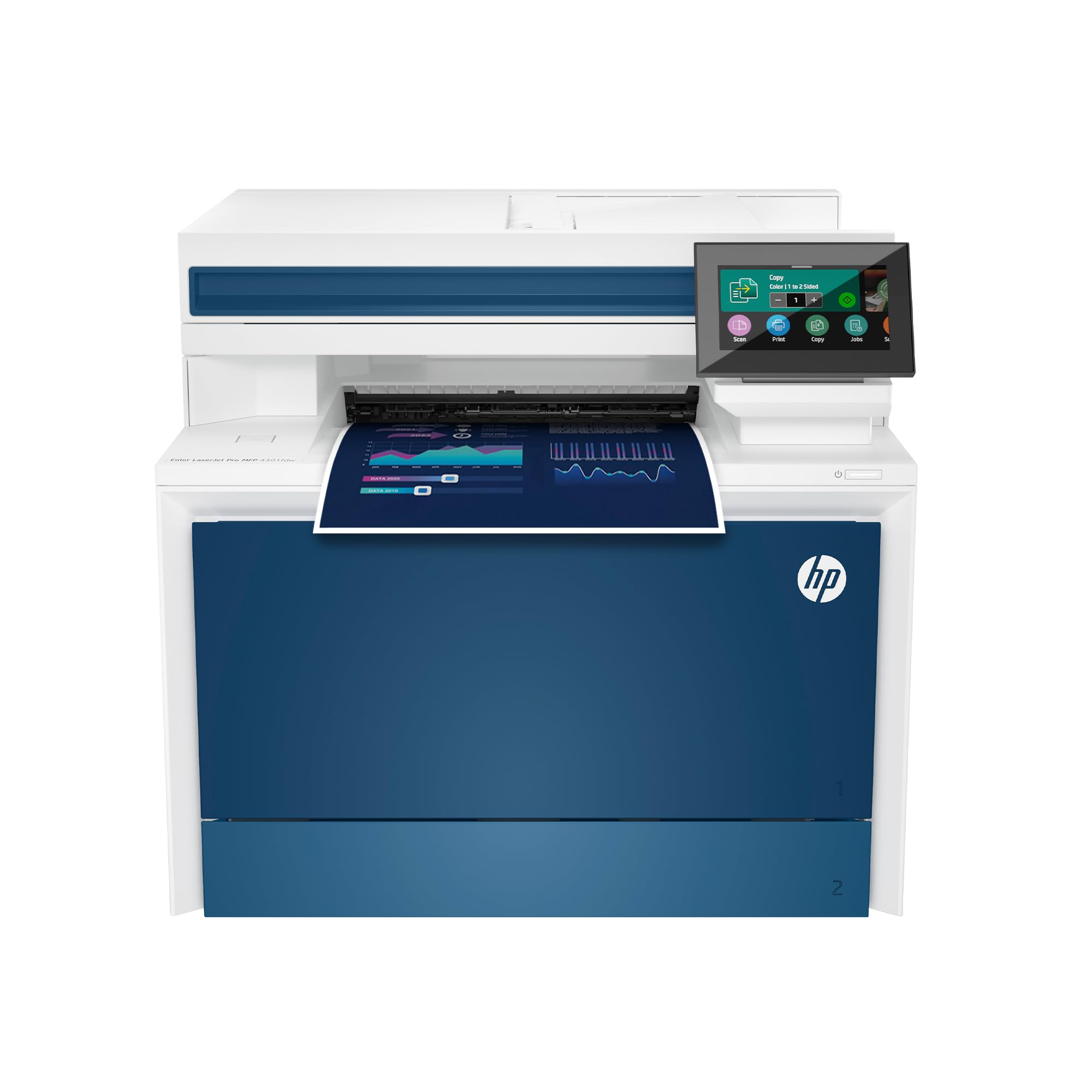
🚀 Elevate your office game with speed, security, and seamless connectivity!
The HP Color LaserJet Pro MFP 4301fdw is a wireless all-in-one color laser printer designed for small teams up to 10 users. It delivers professional-quality prints at up to 35 pages per minute, featuring automatic duplex printing and a fast auto document feeder. Equipped with intelligent Wi-Fi for stable connections and HP Wolf Pro Security for robust data protection, it supports printing from virtually any device including PCs, Macs, smartphones, and tablets. This compact powerhouse combines printing, scanning, copying, and faxing in one efficient machine, making it ideal for busy office environments.


| ASIN | B0BVWSGP4F |
| Additional Printer Functions | All In One, Copy, Scan |
| B&W Pages per Minute | 35.0 |
| Best Sellers Rank | #3,757 in Office Products ( See Top 100 in Office Products ) #12 in Laser Computer Printers |
| Brand | HP |
| Built-In Media | Printer, toner cartridges (black and introductory cyan, magenta, yellow), docs (reference guide, setup card), power cord |
| Color | white |
| Color Depth | 30 |
| Color Pages per Minute | 33.0 |
| Compatible Devices | Laptops, PC, Smartphones |
| Connectivity Technology | Ethernet, USB |
| Control Method | App |
| Controller Type | Android |
| Customer Reviews | 3.9 out of 5 stars 4,519 Reviews |
| Display Type | LED |
| Dual-sided printing | Yes |
| Duplex | Automatic |
| Hardware Interface | Ethernet |
| Ink Color | White |
| Item Dimensions D x W x H | 16.6"D x 23.5"W x 15.1"H |
| Item Type Name | Color Laser Printer |
| Item Weight | 45 Pounds |
| Manufacturer | HP |
| Maximum Copy Resolution Black and White | 600 x 600 |
| Maximum Copy Resolution Color | 600 x 600 |
| Maximum Copy Speed Black and White | 35 ppm |
| Maximum Media Size | 8.5 x 14 inch |
| Maximum Print Resolution Black and White | 607 x 600 |
| Maximum Sheet Capacity | 300 |
| Maximum print Resolution Color | 607 x 600 Dots Per Inch |
| Model Name | New version |
| Model Number | 4301fdw |
| Model Series | Color LaserJet Pro MFP |
| Number of Ethernet Ports | 1 |
| Number of Trays | 1 |
| Other Special Features of the Product | All in One |
| Paper Size | 6 x 5 to 8.5 x 14 |
| Power Consumption | 585 Watts |
| Print media | Envelopes, Glossy photo paper, Paper (plain) |
| Printer Connectivity Type | Ethernet, USB |
| Printer Output Type | Color |
| Printer Type | Laser |
| Printing Technology | Laser |
| Processor Count | 1 |
| Resolution | 600 x 600 |
| Scanner Type | Sheetfed |
| Series Number | 4300 |
| Special Feature | All in One |
| Specific Uses For Product | Small office, Team environments |
| Total Usb Ports | 1 |
| UPC | 196068323134 |
| Unit Count | 1.0 Count |
| Warranty Description | One Year Limited Hard |
| Warranty Type | limited warranty |
| Wattage | 585 watts |
L**1
Best printer out there for home office!
Fantastic full color/ scanner/printer that is easy to use, produces professional level prints for your brochures and other printed materials. Highly recommended!
L**.
5 years and still going strong
I've had this printer for over 5 years, to print class materials, as well as things for home use. I print on both regular printer paper as well as cardstock, and I have to say I've been very happy with it so far. The one small issue I have is with the top load paper feeder when I'm making copies. The belt that feeds the paper is either misaligned or worn down so my copies and scans usually ended up lopsided. It's not a huge deal at the end of the day. The HP Smart app is horrible. Avoid using it if you can. It often doesn't detect that the printer is online, will crash in the middle of a job, makes you log in even though you've just logged in. They either need to redo this app or get rid of it entirely. This has been a great workhorse all-in-one device, and I've been very happy with it so far!
J**B
Updated Review: Printer Absolute Garbage
Final updated Review (10-1-24). The printer has once again given us the "paper jam" error code when there is in fact no paper jam. After a little over a year of barely using the printer, It is going in the garbage. We are not wasting anymore time on this printer and we are just going to replace it. Another updated Review. I will keep coming back to update this review each time I have an issue with the printer. I have had this printer for slightly over a year and I 100% have buyers remorse. There is a known issue with an electrical part and the only way to fix it is to have HP send you a refurb or have a tech come out and replace it with a refurb part. The tech that replaced the broken part used an old and dirty replacement part that now leaves all of my printing pages with giant streaks that we cannot figure out how to get rid of. In addition, today it has started making this god awful screeching noise when it prints. I purchased this printer when it was still at full price it has been the worse purchase of my life. Updated Review: DO NOT BUY THIS PRINTER. This printer is absolute garbage. In the 40 years I have lived on this Earth, this purchase has been one of my biggest regrets. And that's saying something because I've made a lot of stupid financial mistakes in my life. I have had the printer for less then a year and now it is unusable. I had a paper jam in the printer so I cleared everything. The printer is stuck thinking it has a paper jam when there is not. An HP tech came out to inspect and the tech informed me there is a part that is known to fail in these printers and the only solution is to replace it with a refurb. I got the refurb in and I made two copies on it. By the 3rd copy the paper jammed and guess what....it no longer works. I will have to start the entire warranty claim all over again and wait to get another tech out to have it swapped with another refurb. At this point we are just SOL in getting any sort of refund for the printer or the toner we just purchased. I repeat. DO NOT BUY THIS PRINTER. Old Review: The printer itself is a vast improvement from my old printer in terms of quality and performance. It runs smooth, quiet, and its pretty damn fast. The software however makes me want to launch this thing into the sun. It more or less does what it wants regardless of what settings you have in place. Does it print double sided? Absolutely. Does it print double sided when you ask it to? Who knows, maybe it will, maybe it won't. Does it scan front and back? You bet it does! However it will only scan front and back in document mode and it cuts off half the page. And I know what you are thinking "oh that's an easy fix, just change the settings!" Guess again because changing the settings don't matter. If you have the patience of a saint, this printer will do the job. If you aren't tech savvy or if you have the little to no patience, you might want to try another model. Or get someone in IT to set it up for you....maybe a priest. TLDR: Do not buy this printer. Has known issues that are reoccurring. Buy something else.
A**R
This is a great printer!
This printer functions perfectly thus far for a small business/home office application. It is easy to setup, reliable, intuitive, high quality printing. I had two Canon Image Class printers that cost considerably more, and they were plagued from the first day with refusal to print, failure to recognize connections, unstable drivers, unresolvable and erroneous out of paper or jam messages, and overall extreme unreliability. I spent many many hours in technical support, uninstalling and reinstalling drivers, usually with mostly futile outcomes. In contrast, this HP printer, and I now have one for each of my offices, is exceptionally reliable and hassle free. Setup was extremely easy and error free and the printer works equally well over wireless and wired connections.
F**P
Worth the premium!!
I have had this printer for the past few months and have been very pleasantly surprised. This printer is not cheap; however, it is already starting to pay itself off on reduced inkjet costs. Full review below! Setup: The printer was very easy to set up for computers and from phones/tablets. The HP Smart App was very user friendly and I experienced no issues getting it set up in just a few minutes. Speed: The printer is extremely fast at warming up and printing. It is at least twice as fast as the inkjet I was using that was only a few years old. Two sided printing for less paper use is very speedy as well. Print Quality: The printer has a variety of print quality settings, none of which you will use regularly. The standard setting is fantastic for office level print quality. For the occasional picture or flyer, it does a fantastic job on the print quality. Scanning: Openly admit that one of the features I had to have was 2 sided scanning. Why have a printer that can print on two sides if you can't scan on both sides!? This has just helped cut my paper consumption considerably. Toner: Toner lasts much much longer than any inkjet cartridge. This is such a benefit to the environment if you look at your waste stream per page. The toners from my purchase are still going strong after 428 sheets. I was going through an XL HP 62 cartridge every week prior to this purchase.
A**.
Excellent printer, expensive replacement cartridges -- Duplex printing setup can be a challenge.
Purchased new 4301 FDW in Aug 2024 for $505 including tax. Well packaged, easy to setup with one irritating exception. Unclear whether a Windows 10 or HP software issue, but Duplex printing did not work until I changed (after a couple hours of searching online for solution) Duplex setting in Universal Printer properties. See pic courtesy of J. Fling. My third HP color laser over the last 20 years, expensive up front but thus far proved their worth over time. Print quality, duplex printing, copying, scanning all work as advertised. Of course, the cost of toner is what keeps HP stockholders happy and execs making millions. The color starter cartridges lasted about 1,000 pages (2 reams). I used third party toner the last few years on my last HP printer, but given the HUGE price increase to over $750 in just over a year, I opted to pay more than my first used car for genuine HP high capacity cartridges (used Amazon's offer of zero interest over 12 months to spread out the cost). My printing needs are less than in years past, so maybe the color will last a couple of years? Had first paper jam a few days ago on a label inserted into the manual feed -- as always its easy when you know how to fix ... 20 min video to locate a button that lowers paper feeder under manual tray (after removing the lower paper tray). Well, I did not plan to write a novel. Excellent printer, yet at $750 plus similar amounts for replacement cartridges it's def an investment!
P**S
A top-notch laser all-in-one printer
I have had a lot of printers over the years (IBM, Epson, HP, Canon, Lexmark, etc.), and had kind of gone away from HP a bit due to their software/driver problems (when they off-shored the development/support, the quality slipped quite a bit). However, when printing Christmas cards, my Canon died, and I had been impressed with this HP model when I was helping my sister sort out hers, so I bought one (MFP M479fdw). Software seems to work reliably so far, so I think HP has addressed that somewhat, granted it is a bit rough and crude in places, but it works. And it works from both Windows 10 and macOS 11 (Big Sur), as well as from mobile (iOS). The printer hardware seems to be very good, output arrives quite fast. One of the problems you run into with cheaper printers (including some lower end HPs) is that they do not put much horsepower into the printer CPUs, and cost-reduce the hardware to the point that they are slow and do not hold up, but this version seems well designed and made. Ratings from PC Magazine, Wirecutter, etc. generally have this printer at or towards the top, I would say that is accurate. Print quality on text is excellent, graphics from web pages and similar also excellent, scans are very good (a custom flat-bed would be a tad better, but this is for an all-in-one amongst the best I have seen). For printing high-quality pictures, you probably still want a Canon or Epson InkJet printer, but this one prints OK for a laser. HP does not ship this printer with full duty cycle cartridges, but the ones they ship with will still do a decent number of pages. Control screen is touch and good sized, gets the job done. Unit is fairly heavy and large, so if you are using this on a desk, check the dimensions some. The printer is not cheap, but it has excellent print quality and appears to be very well built, so HP has come back to where it once was, at the top.
D**.
**Printer nightmare**
I bought two identical printers of this model for two different locations. I had the same horrible experience with each of them. Initially, everything went fine. Setup was easy and for the first 10 print jobs or so, they both worked great. Then suddenly, out of the blue, they started printing out every other page. I called tech support to troubleshoot. After about 2 hours on the phone (30 minutes waiting on hold + 90+ minutes of letting the tech take over control of my laptop for remote troubleshooting), they got them working again. But then inexplicably, about 10-20 print jobs later, they started to malfunction again – either by only printing every other page or not printing anything at all. Once again, I called tech support line and went through the same laborious process of waiting on hold, and then waiting 90+ minutes for the tech to troubleshoot the problem. Once again, the tech got the printer working again. But then, the exam exact same thing happened – after another 10-20 jobs, the printer suddenly stopped printing. I went through this cycle 3 times for one printer, and 4 times for the other one, racking up more than 10 hours on the phone on hold or speaking with tech support.. Finally, I asked tech support to escalate my case so that a tech could come to my house and fix the problems in person. The request was approved, so they sent out a guy who called himself the "printer whispered” to come to my house. As soon as this guy walked into my office and saw the printers, he start to chuckle and rolled his eyes. He said that particular model is a lemon and he gets more complaints about it than any other model. He said he would try to fix the problem, but honestly, in my shoes, he would just buy a new printer from another company. He said unlike the older HP printers, which were excellent, the new ones are "garbage" (his word) that use substandard parts and have endless software problems. I asked if HP would at least refund my money since this model was known to be a lemon. He said no, in his experience they never did that, they would just keeping on sending me back to tech support until my one-year warranty ran out. ***Again, just to be clear, the guy saying all of this was the technician HP sent out to fix their own printer.*** He said that even if he got it working again, these problems would probably keep cropping up. After an hour or so, he did get the printer working again. But then sure enough, about five weeks later, it stopped printing in the middle of a job. I reached out to the "printer whisperer" again but he refused to come back out. So finally - after having wasted about $1400 on two printers (one of which was still under warranty) and a spare set of cartridges, and 10+ hours of my time – recycled these worthless pieces of junk and bought a Canon. I have certainly had my share of frustrating experiences with shoddy consumer products sold by unethical companies. But given how much money AND TIME I wasted on these pieces of garbage, I think this one takes the cake. I will never buy another HP printer again as long as I live.
Trustpilot
2 months ago
2 weeks ago