
DOWNLOAD THE APP


Customer Services
Copyright © 2025 Desertcart Holdings Limited
DOWNLOAD THE APP
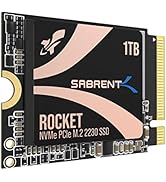
![SABRENT 2230 M.2 NVMe Gen 4 1TB SSD 4750MB/s Read PCIe 4.0 X4 Internal Solid State Drive Compatible with Steam Deck, surface pro, PCs, NUCs, and Laptops [SB-2130-1TB]](https://m.media-amazon.com/images/I/71BVLQNOlmL.jpg)
🚀 Upgrade your device, upgrade your game — speed and space that keep you ahead!
The SABRENT 2230 M.2 NVMe Gen 4 SSD delivers up to 4750MB/s read speeds and 1TB capacity in a compact 2230 form factor. Designed for devices with limited space like Steam Deck and Surface Pro, it offers PCIe 4.0 x4 performance with backward compatibility, efficient 3D TLC flash, and DRAM-less design with HMB support. This retail SSD includes cloning software and firmware updates, ensuring a reliable, high-speed storage upgrade for gaming and professional use.




| ASIN | B0BQG6JCRP |
| Best Sellers Rank | 22,795 in Computers & Accessories ( See Top 100 in Computers & Accessories ) 149 in Internal Solid State Drives |
| Guaranteed software updates until | unknown |
| Item model number | SB-2130-1TB |
| Manufacturer | SABRENT |
| Product Dimensions | 3 x 2.21 x 0.2 cm; 20 g |
C**G
Great storage...
Got this on a sale for my Steam Deck OLED in a sale, Works really well and now I have plenty of space for all my gaming needs. Loads fast and was an easy install too. Overall very happy with my purchase and would recomend.
B**X
Good upgrade to Steam Deck 64gb internal drive (if you don't mind opening up electronics)
Got a Steam Deck over the holidays a neat little device, had been primarily installing games on a micro sd but regardless of this found that games would install shader caches on the internal which was quickly filling up the free storage on 64gb drive, decided I would go down the route of an SSD swap, watched some youtube vids on procedure (Sabrent even have one on their channel) and played the waiting game for decent upgrade for a decent price that would ship to my address. SSD arrived quickly, again followed guides on youtube for swapping the ssd out and getting Steam OS Running, mostly painless procedure outside of slightly tearing the foil sleave that goes around the ssd, the sabrent drive is a tiny bit taller than the deck 64gb one, so it is a very tight fit to get that on the new drive so i would be mindful of that, so far so good doesn't seem to have impacted things yet. So far drives been working great, shuffled newer games off micro sd that make better use of nvme load speeds and shader cache barely makes a dent with 82 games installed between ssd and micro sd. micro sd is free to hold older games and emu-deck bits and bobs. In the end opting to go this route saved me money on just buying the Deck with the 512gb already installed that went to games in the steam sale.
C**N
It's like a digital TARDIS!
So much room for films! Bought to be used in an enclosure, I've no complaints. Fast reliable and excellent value. Does everything I need it to and fast.
D**L
Easy install
Quick and easy installation, works well with ROG Ally.
S**0
Great for Steam Deck
Much like everyone else here i got this for my Steam Deck to give it a bit more storage. Really easy to install and the drive works perfectly. Fits in the steam deck shield with no issues. Simple slide the old one out and this one will slide right in. Recommended for anyone wanting more storage in their steam deck. Also the little case it comes in is a nice little extra. Just note you'll need a usb-c pen drive or adapter with a usb a to re install the OS on the Deck.
M**K
It's a good replacement for ROG Ally SSD
It was easy to install it has 4 times the storage capacity of the ROG Ally's built in SSD. It's quick and performs very well in the Ally. Just be aware that you will have to rebuild your SSD from the built in software rather than cloning the drive. You literally have to go through Asus' Hoops i imagine for security. (Theirs not yours). But once that's done which takes half an hour then you are ready to go.
A**.
RoG Ally/steam deck
theres not many 2tb 2230 drives to choose from but this one is great for the steam deck/Ally
S**M
Good SSD for steam deck
Swapped into my 64gb steam deck, works well and boots/Wakes much faster, comes In a little metal tin with a soft cushion to well protect the drive, no damage here, easy to swap into steamdeck especially if you have prior knowledge.
C**S
Het product werd ontzettend goed verpakt en in een klein trommeltje geleverd. De installatie was in mijn geval zo gedaan en de performance is zoals omschreven. Goed product.
P**G
Bought to use with the Zitay CFExpress adapter, for use in my Canon R5C. Works great and is super fast to offload. Get the 1TB if this is your application as the 2TB uses quad level memory which has lower sustained write speeds. Recommended!
A**C
Har den som ssd disk till min RPI5 med full desktop. Startar på <4sek
M**0
J’ai acheté ce SSD pour booster les performances de mon ordinateur portable, qui dispose d’un emplacement M.2 2230. Le SSD est compatible avec la norme PCIe 4.0, ce qui lui permet d’atteindre des vitesses de lecture et d’écriture impressionnantes. Le SSD a une capacité de 1 To, ce qui est rare pour un SSD de cette taille. Il me permet de stocker tous mes fichiers, mes jeux et mes applications sans problème. Le SSD est de qualité et facile à installer, il suffit de le glisser dans l’emplacement M.2 et de le visser. Le SSD a un design sobre et compact, il ne chauffe pas trop et ne fait pas de bruit. Je suis très satisfait de ce SSD, il a transformé mon ordinateur portable en une bête de course. Je le recommande à tous ceux qui cherchent un SSD M.2 2230 performant et abordable.
B**B
I had read a lot of horror stories about upgrading the M.2 NVMe drive on the Surface Pro 8 (SP8). There were a lot of stories about overheating and BSOD when trying to re-install Windows. When I saw this Sabrent drive advertised on Amazon it specifically said Surface Pro compatible and that it ran cool, so I took a chance on it. I am very pleased with the result. I'll do the TL;DR part up front: I upgraded my 256GB M.2 Drive on my Surface Pro 8 with the 1 TB Sabrent Rocket 2230 NVMe M.2 drive, and the drive runs great at PCIe 4.0 Speeds according to CrystalMark 8. No BSOD and runs under 50 Celsius *EDIT*: Under maximum load, about 35 degrees celcius degrees idle/normal operations *END EDIT* according to CrystalDiskInfo 8. I was able to copy all of my files using Acronis partitioning software you get to use free from Sabrent when you purchase their drive. If you want to know exactly how I copied everything over without ever having to go into the BIOS, keep reading: UPFRONT DISCLAIMER: You will need to purchase three things to do this upgrade if you don't have them already. Two of them you would need anyway if you were to upgrade like Microsoft suggests: #4 Torx screwdriver/bit, thermal compound, and an external NVMe drive enclosure. 1) First I did purchase an external NVMe enclosure to copy the old drive to the new one. You can find them on Amazon for under $30 US. You need to make sure the enclosure can take 2230 size drives. I got one that had USB C to USB C cable and was thunderbolt compatible. Another consideration is that after you swap the NVMe drives you can use the enclosure with your old drive and have another high speed hard drive to back stuff up on, although I found you will need an NVMe thermal pad/heatsink for the old drive or it can overheat. 2) After reading about BSOD NVMe upgrade horror stories on the SP8 it lead me to articles talking about AHCI Link Power Management - HIPM/DIPM. HIPM/DIPM power management is not on by default and you actually have to do a Windows registry edit to make it available. There are some good guides on how to do this via a quick google search. I recommend you enable it and turn the feature on. 3) I had to disable drive encryption before copying files over (it is on by default). You can either disable encryption or get a USB encryption key. I chose to decrypt the drive which will take hours depending on how much data you have on the drive. You can re-encrypt once everything is over to the new drive. THIS NEXT PART IS WHERE MOVING FILES OVER AND GETTING WINDOWS SETEP ON THE NEW DRIVE DIFFERS FROM WHAT MICROSOFT WANTS YOU TO DO. 4) I cannot stress enough the kudos to Sabrent for having their own disk partition software. Acronis, which you can get from Sabrent's website, will copy all of your files over for you verbatim; no reinstalling necessary. Follow the disk cloning prompts, and the best part is it will automatically increase the size of your main windows drive to maximum while keeping your boot partition and recovery partition intact (just make sure you chose the correct cloning prompt). Acronis alone makes it worth it to go with Sabrent. 5) The SP8 comes with a front and back metal sleave for the NVMe drive. YOU WILL NEED a #4 Torx screwdriver bit (very tiny!) to unscrew the drive and screw it back in. The metal casing snaps off (do so gently so as not to bend the casing). I cleaned off the thermal compound the old drive had, put in the Sabrent drive, re-applied some CPU thermal compound I already had, and put the casing back together, then screwed it back into the SP8. A lot of videos show using a thermal pad instead of re-using the Microsoft drive enclosure. I think the drive enclosure helps distribute heat evenly back into the SP8 chassis. I turned the SP8 on and it recognized me with all of my files intact without ever having to go into the BIOS the first time. I have been running normally for almost two weeks and not a single issue. Drive runs cool and fast. Works great and couldn't be happier. I hope this helps you out if you are on the fence!
Trustpilot
2 months ago
2 weeks ago