

Desert Online General Trading LLC
Dubai, United Arab Emirates
Desert Online General Trading LLC
Dubai, United Arab Emirates


🚀 Elevate your data game with Synology DS218+ — where speed meets security!
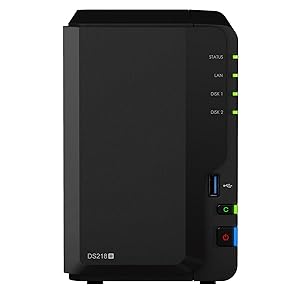
The Synology DS218+ is a powerful 2-bay desktop NAS designed for small businesses, featuring a dual-core Intel Celeron J3355 processor, 2GB DDR3L memory expandable to 6GB, and AES-NI hardware encryption. It delivers encrypted sequential throughput speeds exceeding 113 MB/s read and 112 MB/s write, supports up to 1500 concurrent devices with RAM expansion, and utilizes the advanced Btrfs file system offering extensive snapshot capabilities for robust data protection.









| Brand | Synology |
| Product Dimensions | 23 x 10.5 x 16 cm; 1.3 kg |
| Batteries | 1 Lithium Ion batteries required. |
| Item model number | Z661334 |
| Manufacturer | Synology |
| Colour | Black |
| Form Factor | 3.5 inches |
| Processor Count | 2 |
| RAM Size | 2 GB |
| Computer Memory Type | DDR2 SDRAM |
| Hard Disk Description | No Hard-disk |
| Are Batteries Included | No |
| Lithium Battery Energy Content | 5 Watt Hours |
| Lithium Battery Packaging | Batteries contained in equipment |
| Lithium Battery Weight | 1 Grams |
| Number Of Lithium Ion Cells | 2 |
| Number of Lithium Metal Cells | 5 |
| Item Weight | 1.3 kg |
| Guaranteed software updates until | unknown |
T**Y
I use it for RAID 1 storage, sync to OneDrive (cloud), Plex (video streaming) and file share
I bought the DS218+ to replace a NAS that I'd had for 8 years (a custom built HP Microserver running Windows Home Server 2011).The NAS is very small and the fan is quiet. Even under load, the 'quiet' fan mode is sufficient and the temperatures remain good. Most the the noise comes from the operation of the 2 hard disks I have installed. SSD's would be silent.The NAS was very easy to set up. The hard disks install without tools, you need a screwdriver if you install SSD's. RAID, disk management, networking and everything else set up via the Synology web interface - all very easy.I backed up all data from my original NAS to a 4TB USB disk a have, then from there to this NAS. On the NAS, I created shares on the volume (Photographs, Videos, Documents, Music) and enabled SMB so they can be seen from Windows PC's on my network. The whole process was quick and easy.Data transfer rates over the 1GB port are good and watching videos via Plex is very responsive with no buffering. Note - you have to give the 'plex' user read-only access to all content (e.g. videos, music and photographs) that you want it to be able to access.There are a lot of packages to choose from. The 'Cloud Sync' package is brilliant - I'm using it to back up all of my data from my NAS to Microsoft OneDrive (to a folder that I have set up that doesn't get replicated to PC's). I have 1TB space on OneDrive as I subscribe to Office 365 for £80 per year. So I now have data duplicated locally (over RAID 1), as well as in the cloud. In addition, all of my documents are duplicated in OneDrive (as I store them on my PC's).The Docker package is useful for installing additional functionality or using applications that aren't supported natively, but are as Docker packages.In the future, I might install a virtual server on it, to run applications such as cryptocurrency wallets. It's nice to have the option to do this.Overall, I think the DS218+ is a really good NAS for the home user - it's powerful, quiet, easy to use, has lots of features and is reasonably priced.
M**!
First Class NAS
Synology DS218+Being my first NAS I spent long enough trying to decide which one to get, and eventually decided that I would get one that was somewhat more powerful than I needed, because there was so much I didn't know about a modern NAS, so much they could do, that I might well regret buying a less powerful model.My primary use for the NAS is backup, but I want to experiment with all the other goodies they offer.The NAS arrives very well packed and is very well presented. There is a short installation guide that tells you how to insert a disc, connect the NAS to your network, and log in using a web browser. Once you are logged on, again the presentation is excellent. The environment is very Windows like ~ very friendly and simple. Digging in the menus you soon you very soon start to realise that this machine can do a tremendous amount.I felt most of the help missed out the very basic stuff for real noobs like myself. The help tends to be business oriented and so assumes you know something about a NAS and the language. For example, after initialisation, although the device web page was visible on my Windows network, the storage space was not. When I finally found the configuration setting to make it visible, I couldn't create a folder in it. ...no guide as to how you should create any. It assumes you know that all folders are called Shared Folders whether they are shared or not. Lol. Another example is that various applications often have guides on how to set them up, but not how to use them. So they tell you how to configure a backup task but miss the critical information of how you actually trigger a backup. The simple fact is that you aren’t going to get this up and running in one day without some knowledge, and it really does help if you can talk to someone who already has one! It's baffling, but you make quick progress. You can do almost anything, it just takes a while to find out how and overall it's pretty enjoyable albeit time consuming.It took me about four to five hours or so to get the NAS on my network, folders constructed and my backups started. At the moment I am actually using my old backup software, simply because it works. You can do that, you don't have to use any of the apps Synology provide. The NAS has a number of backup solutions you can download, including ones for the PC, but as per everything else, noob information on these is scant, so I just stuck with what I knew. Incidentally, I elected not to pre-install the most popular apps, during setup, missing that step out it's really simple to add them later. Turned out to be the right decision, there was a lot they wanted to add that I didn't need. Also, you don't need to create a Synology account if you don't want one.Right there on the main window is an icon you click and all the available apps appear for you to download if you wish. Couldn’t be easier. These is a wide selection of apps from backup software, video and music servers, all the way to an Office suite similar to Microsoft Office. There are calendars, photo apps, even development apps like an implementation of the programming language PHP. So there is a wide variety of tasks you can perform with the device, other than just file serving!One very interesting thing I noticed is that the USB ports support dongles, so it would be possible to set the NAS up wirelessly although I think you would certainly have to start with it plugged in to your router ~ only after you have plugged in the dongle and configured it could you go wireless. Wireless is of course really handy if you want to locate the NAS out the way, somewhere safe. Anyway, I am off to investigate more of what this device can do!I have to say that for mere file operations this NAS is probably way more powerful than I need. So far I have not seen it use more than 12% of the 2GB of RAM it has nor more than 53% of it's CPU. Mostly it uses about 11% RAM and 15% CPU. So I think the 218 or even the 218Play would have been more appropriate for me. But having said that, this device can just do so much, I will very probably find new things for it to do, and the extra power and memory will come in handy. I had also planned on buying the RAM upgrade but now having seen how little it actually uses I will leave that to another day! Oh, mind you, another thing you really need to check if you are buying something less than the + is whether the application you want is supported by the NAS you are buying. The + gets all the apps but some are not supported by the cheaper models. So if you intend to buy something other than the +, CHECK!The only word of warning I would give you is that the NAS automatically sets up a single HDD as SHR. This may not be what you want. You may in fact need Basic and there is no way to convert one to the other without wiping the disk, so you need to know the difference and change it as soon as you log on to the user interface. So one thing I would do is read a guide to Raid that include SHR (Synology Hybrid Raid) and decide what you want now and in future before you set the NAS up, or you may have to do it all again later when you realise what it's done is not for you.I set my NAS up for maximum power saving so I configured it to power down the discs after 20 minutes and enter full sleep mode each night, waking itself up automatically in the morning. The auto power-on is very useful indeed. It means it's always ready in the day and saving energy at night. Also of course it's extra security if it's off at night.Anyway, this is a first class device. Buy it!
A**I
Just gets better and better. Full of surprises and great value
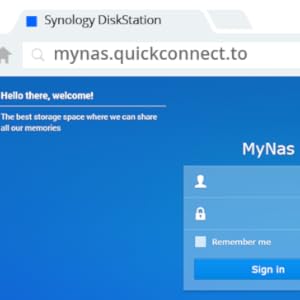
Just gets better and better. Owned it for 18 months now and still learning. From wanting a separate home based non-cloud secure physical back up for photos, music and several computers and other storage devices such as a Naim music server, this does so much more. Takes a while to set up, but if you think it should do it it probably does! The Apps are amazing for managing data. Accessible anywhere you have internet access, it works seamlessly in the background and provides a whole new level of functionality. DS Audio for example can efficiently access ALL backed up music while in the office miles from home and output WAV quality music multiroom to several streamers without a glitch using Airplay 2. Need to sort DS Photo next!
A**R
Amazing!
Very impressed with this NAS. Does the main job well as a NAS drive (network storage). I put 2x 10TB drives in it and has worked flawlessly now for over 2years. The add on features are in my view excellent. The software is easy to use and with Synology drive (backup & sync), moments (photos), dS video (my entire DVD collection), dS audio (music), surveillance station (security / bird box cameras) I can access my files, films, music, photos and cameras anywhere and anytime. Very pleased.
Trustpilot
5 days ago
3 days ago