
DOWNLOAD THE APP


Customer Services
Copyright © 2025 Desertcart Holdings Limited
DOWNLOAD THE APP


🚀 Power your productivity with speed, smarts, and seamless connectivity!
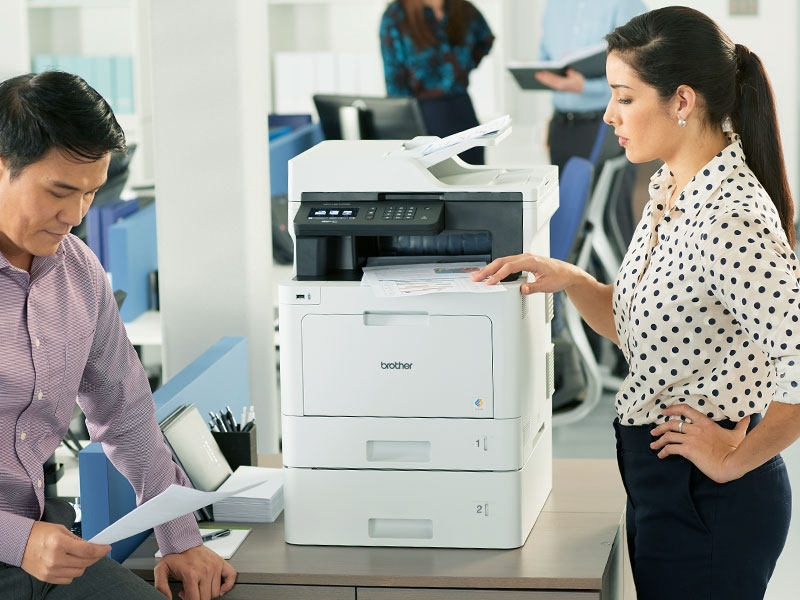
The Brother MFC-L8610CDW is a robust business-grade color laser all-in-one printer designed for small offices and workgroups. It delivers fast 33 ppm print and copy speeds, automatic duplex printing, and versatile scanning to multiple cloud and network destinations. Featuring a 3.7" color touchscreen, wireless and Ethernet connectivity, and Dash Replenishment for automatic toner ordering, it combines efficiency, security, and convenience in a single powerhouse device.




| ASIN | B06XDRP59Y |
| Additional Printer Functions | All In One |
| B&W Pages per Minute | 33 ppm |
| Best Sellers Rank | #16,844 in Office Products ( See Top 100 in Office Products ) #28 in Laser Computer Printers |
| Brand | Brother |
| Built-In Media | Brother MFCL8610CDW, Standard yield toner cartridges (3000 pages black/ 1800 pages color) Approx yield , DR431CL drum unit (30,000 pages) approx yield, Quick Set Up Guide, Installation CD-ROM, AC Power Cord, Telephone Line Cord |
| Color | White |
| Color Depth | 24 bpp |
| Color Pages per Minute | 33 |
| Compatible Devices | Laptops, PC |
| Connectivity Technology | Ethernet, USB, Wi-Fi |
| Control Method | Voice |
| Controller Type | Amazon Alexa, Vera |
| Customer Reviews | 4.2 out of 5 stars 676 Reviews |
| Display Type | LCD |
| Dual-sided printing | Yes |
| Duplex | Automatic |
| Global Trade Identification Number | 00012502646457 |
| Hardware Interface | Ethernet, USB |
| Ink Color | black, cyan, magenta, yellow |
| Item Dimensions D x W x H | 17.1"D x 20.7"W x 21.2"H |
| Item Type Name | Business Color Laser All-in-One with Duplex Printing and Wireless Networking |
| Item Weight | 61.1 Pounds |
| Manufacturer | Brother Printer |
| Maximum Copies Per Run | 50 |
| Maximum Copy Resolution Black and White | 600 dpi |
| Maximum Copy Resolution Color | 2400 x 600 |
| Maximum Media Size | 8.5 x 14 inch |
| Maximum Print Resolution Black and White | 2400 x 600 dpi |
| Maximum Sheet Capacity | 300 |
| Maximum print Resolution Color | 2400 x 600 dpi |
| Model Name | MFC |
| Model Number | MFCL8610CDW |
| Model Series | L8610 |
| Number of Trays | 2 |
| Other Special Features of the Product | 3.7" Color Touchscreen display, Auto Document Feeder, Print from Scan to Cloud Services, USB Host to print from scan to your USB flash memory card |
| Output sheet capacity | 250 |
| Paper Size | 8.30 x 11.70, 8.50 x 11, 5.80 x 8.30, 5.80 x 8.30, 7.25 x 10.50, 8.50 x 14, 8.27 x 13, 4.80 x 9.50, 4.30 x 8.60, 3.37 x 9, 3 x 5 |
| Print media | Card stock, Envelopes, Labels, Paper (plain) |
| Printer Connectivity Type | Ethernet, USB, Wi-Fi |
| Printer Output Type | Color |
| Printer Type | Laser |
| Printing Technology | Laser |
| Processor Count | 1 |
| Resolution | 2400 x 600 |
| Scanner Type | Sheetfed |
| Special Feature | 3.7" Color Touchscreen display, Auto Document Feeder, Print from Scan to Cloud Services, USB Host to print from scan to your USB flash memory card Special Feature 3.7" Color Touchscreen display, Auto Document Feeder, Print from Scan to Cloud Services, USB Host to print from scan to your USB flash memory card See more |
| Specific Uses For Product | Office, business, small business |
| Total Usb Ports | 1 |
| UPC | 012502646457 |
| Unit Count | 1.0 Count |
| Warranty Description | 1 Year |
| Warranty Type | limited warranty (1 year) |
| Wattage | 1000 watts |
S**V
High-quality printer, for personal or enterprise use. Still working and supported after six years!
I'm posting this as a preliminary review, since I have only owned this printer/scanner/FAX for a few weeks. I'll post a followup once I've had it long enough to put it through its paces, see how often jams happen (and how difficult they are to clear), see if any other usability or maintenance issues arise, and see how long the supplies last. INITIAL IMPRESSIONS: First of all, this model seems to be VERY NEW, so much so that Amazon Dash Replenishment hasn't been integrated yet -- though Brother promises that it will be soon. Nevertheless, there was a firmware update available when I finished configuring the device. Also, for a SOHO or small-workgroup printer, it is BIG and HEAVY, though relatively quiet. You WILL want two people to lift it out of the crate, which is of the same kind that heavy servers are shipped in: removing four retaining clips allows the box (top 90%) to be lifted straight off the base (bottom 10%), in order to get hands under the device easily. Other than this the heavy lift, basic setup was a breeze. In terms of hardware, there were a lot of tape, clips, and other protection to remove, but instructions point out the location of each. Despite the plastic exterior chassis, the build quality was very high. For example, the pull-out tray (actually the drum unit) containing the toner cartridges, and providing easy access to the other replaceable components, is one of the cleanest designs I've seen outside of datacenter equipment. Additionally, the various trays, flaps, rollers, and access doors involved in the printing and scanning paper paths move smoothly and engage/disengage with a positive audible and tactile "click". In terms of software, one of the biggest pains in the neck for new devices is usually joining the local WiFi. Here, Brother made the process easy, in the same way the Google does with their Chromecasts: the device advertises a peer-to-peer WiFi network which the manufacturer's software can use to connect to the device and upload the correct network settings from the computer. After that, local install of drivers etc, was fairly painless. And that's as far as most SOHO users need to go. For those with more complex requirements, it is worth noting that in almost every instance Brother did The Right Thing with the firmware on this device. For example, EVERYTHING can be configured through an embedded webserver, which also supports HTTPS, and allows the admin to create and upload REAL certificates if they choose. It supports just about every local and remote printing protocol imaginable, from the old BSD lpd protocols to AirPrint and Google Cloud Print, and everything in between, along with a full suite of file-transfer and network management protocols... all individually disableable, of course. The WiFi can operate in the "personal" (same password for everyone) or "enterprise" (EAP) modes, and IPV6 is supported but can be disabled. The device can update its own firmware over the network, and the process was basically painless. It was great to see a multi-function laser printer that was as easy to set up as a consumer device (and easier than many cheap inkjets) while having the configuration flexibility, protocol flexibility, and "enterprise" options to meet the needs of a more secure (or more complicated) network environment. In terms of the desktop software, I have only tried the MacOS version. They got the job done, but were not actually as polished as the printer's firmware. For example, the network-install wizard, which connects to the printer's ad-hoc WiFi network to transfer WiFi credentials and parameters, claimed to have failed with a timeout, despite having successfully configured the printer's network interface. The rest of the computer-side install worked well, and it was nice to see that the print drivers use CUPS rather than some weird proprietary interface. The only other gotcha was in the Control Center application, setting up the presets for scanning. This application controls the presets (for example, resolution, file format, destination directory) both for "pull" scanning (initiated by the computer) and "push" scanning (initiated by the printer), but it was difficult to figure out how to configure the latter. The program provides buttons for "Image", "OCR" (which is integrated, fast, and reasonably accurate), "email" and "file", but clicking these configures (and initiates) a "pull" scan. A net nearch revealed that to configure the presents for "push" scanning, in is necessary to hold the "control" key while clicking one of these buttons.. this worked fine, but was counterintuitive and not well documented. These were really the only troubles with the MacOS desktop software. Again, I can't comment on the Windows software as I haven't used it, but the MacOS software has all the necessary features, and gets the job done. It just lacks the level of user-friendliness and polish that I would expect given both the excellent firmware on the device and the high build quality. OVERALL ASSESSMENT: Brother did a really good job with this device, especially for less than $500. The model seems very new, with room to improve via software and firmware updates. I hope that future versions of the MacOS desktop software will smooth out some of the rough edges, and future versions of the device firmware will integrate Amazon Dash Replenishment as well as additional web services for print sources and scan targets.
C**R
A beast. In a good way.
Replaced a consumer grade "all in one" brother color laser that needed new drums. This is a higher volume small business grade printer. Comes with enough toner to print 3k pages so it was almost a wash compared to just getting all OEM consumables for the older printer. Works fine. Has a multi page source doc feeder for single sided copies. It can scan to USB, or mail a scan as an attachment. The only minor gripe, the wireless N does not support the 5ghz band. It is large and heavy, needed 2 people to unpack. The previous Brother model lasted us 4 years w several toner refills and one set of new cartridges. Update : The factory toner in this new printer did run out in 9 months (2-3k pages). Note that the page rating given is typically at 5% coverage which is not realistic. (your actual coverage will be vary between 5-20%). Given that, I think the factory cartridges did pretty good. Update2: We had this printer now for 28 months, using it as a copier and a scanner as well. (Scan to USB stick ). Replaced cartridges with aftermarket ones, and refilled some of these, and the printer is still going strong, no failures of any kind, print quality looks good. Maybe the aftermarket black is not quite as black as the OEM, but good enough for me. Per the page counter, we have printed 11K pages so far, 3k copies. All parts report 86-96% life left. I highly recommend this printer. Well though out, functional, and proven to be reliable for us. Replacement drums are pretty inexpensive for this model, so when those wear out, I will probably replace the drums unless a more compelling, similar model comes out by then. I expect to get another 2-4 years out of it.
B**E
Best Color Printer I Will Ever Own
Have owned for about 1yr. My specific use case is for color printing manuscripts which allows me to read anywhere without the need for electronics. I am very satisfied with this purchase. Very fast, double sided color prints and wireless. I can print from my phone using the app, which can be a little slow when printing large pdf files (~20Mb). I highly value reading ink on paper. I can quickly print 2-4 hours worth of reading materials in a few minutes and have a very relaxing reading period without a laptop or a tablet. Just note that it needs to cool off for 5-10 minutes every 50-80 (double sided) pages printed sequentially. When comparing the 80th page vs the 1st page It looks as if the prints start to lose contrast but are still legible. I use ink owl's refills available through amazon. I still have the original cartridges and have refilled them twice now - three times for the black toner. See ink owls videos for how to refill cartridges and reset the toner level indicator. *Be warned that this voids warranty* I think it is worth it after one refill. I have spent 250 on refills, but saved about 1000. The inkOwl items on Amazon or inkOwl site are PUN-8438 (caps to reseal cartridges), TBR-436-CMYK (CMYK refill toner), TBR-433-G4 (the reset gear for the cartridges that come with a newly purchased printer). The included brother cartridge is high quality plastic with metal parts - better quality than many car parts. These are not "disposable" items. It is a sturdy container with a roller and gears. It will last for hundreds of refills. Be very careful when refilling. Make sure you lay out a large plastic sheet, use gloves, a mask and clothing that you don't mind getting stained. Also make sure your AC/fans are tuned off. I spilled a little of the toner and stained my rug, my wooden floor and some tools. It kind of comes off with cold water, but it is a hassle. Just take your time and avoid squeezing out the toner, let gravity do the work.
B**I
Avoid this printer
Worked great for 9 months. Then had to replace the toner. Toner is expensive $150 x four for a total of $600. Then the worst part many of the yellow toners are defective. Had to purchase 3 yellow toners TN433Y before the printer would work again! I purchase the first replacement directly from Brother. They will not replace the yellow. I had to search 5 local office supply stores to find the yellow toner. The in store shelf had plenty of black, cyan and megenta toner, buy almost no yellow! Brother does not replace the defective toner! By and HP the higher price will save you money in the long run.
J**.
good quality, premium printer
This printer is easy to set up and install. The color quality is very good. This printer was worth the money. The print capabilities on this printer is wide ranged from printing from any device connected over the same wifi network or printing directly from your phone
M**R
Suitable replacement for my old HP
I had a 14 year old HP 475mfp that was getting extremely expensive to get toner for. In addition to the exorbitant cost of toner, this printer had an annoying self-calibration cycle that would run at seemingly random times throughout the day while the printer was sleeping. With HP (and others) now locking printers into subscriptions, Brother printers seem to be one of our last hopes of "owning" our printers and giving us free selection of toner sources. This printer arrived without any damage. It was easy to unpack, install the toner and get connected to the network. In my case, I connected it via wired Ethernet and did not use WiFi. The software configuration is fairly straightforward simply using the built in web server. I did originally have a problem connecting due to the default password being only available on a very small sticker on the back of the printer. I am very happy with the print quality. The colors seem decent and the included toner should last me 6 - 12 months. The printer is overall quieter than my previous HP 475mfp. The printer goes in sleep mode and wakes up relatively quickly when receiving a print job. I was also successful in setting up a scan to network folder option. I do not have a fax line so I did not test this functionality. Overall, I am very happy with this purchase. I do think it was a good value for the money because for less money that a replacement set of genuine HP 475mfp toner cartridges, I was able to get a significantly updated mfp printer that prints faster, scans faster, has reliable sleep/wake, easy to use touch panel and good integration with my Windows, Mac and Linux systems. But there are some potential issues. Recently it appears that Brother may also be locking their printers into ink/toner subscriptions. To mitigate this, I disabled all firmware updates and blocked the printer from originating access to the internet for firmware updates. I deliberately kept older firmware on the printer since it does work fine and meets my needs. This printer also allegedly can do duplex (double sided) scanning but I have not been able to get this to work. The only duplex scanning I have had success with is a copy function. Trying to duplex scan to a network folder or remotely from software does not seem to work. This is not a deal breaker for me given all the other issues this mfp solves compared to my old HP 475mfp.
W**S
Fast, quiet, never clogs.
This is a great multifunction printer/copier/scanner. I don't like inkjet machines because they are constantly coughing, the ink tends to run and the ink is expensive. This printer runs on color toner so no matter how long it did unused, it always works first time. I found the printing speed to be much faster than my previous color printers. It's almost as fast as my previous high speed brother black printer. The colors are reasonably true. Installation was much simpler than the hp MFC printer it replaced and connecting to my cell phones was a breeze. It is very quiet, I sometimes think it failed because I couldn't hear it printing from another room.
D**S
Good Brother Printer
This Brother printer works very well.
Trustpilot
3 days ago
3 weeks ago