
DOWNLOAD THE APP


Customer Services
Copyright © 2025 Desertcart Holdings Limited
DOWNLOAD THE APP
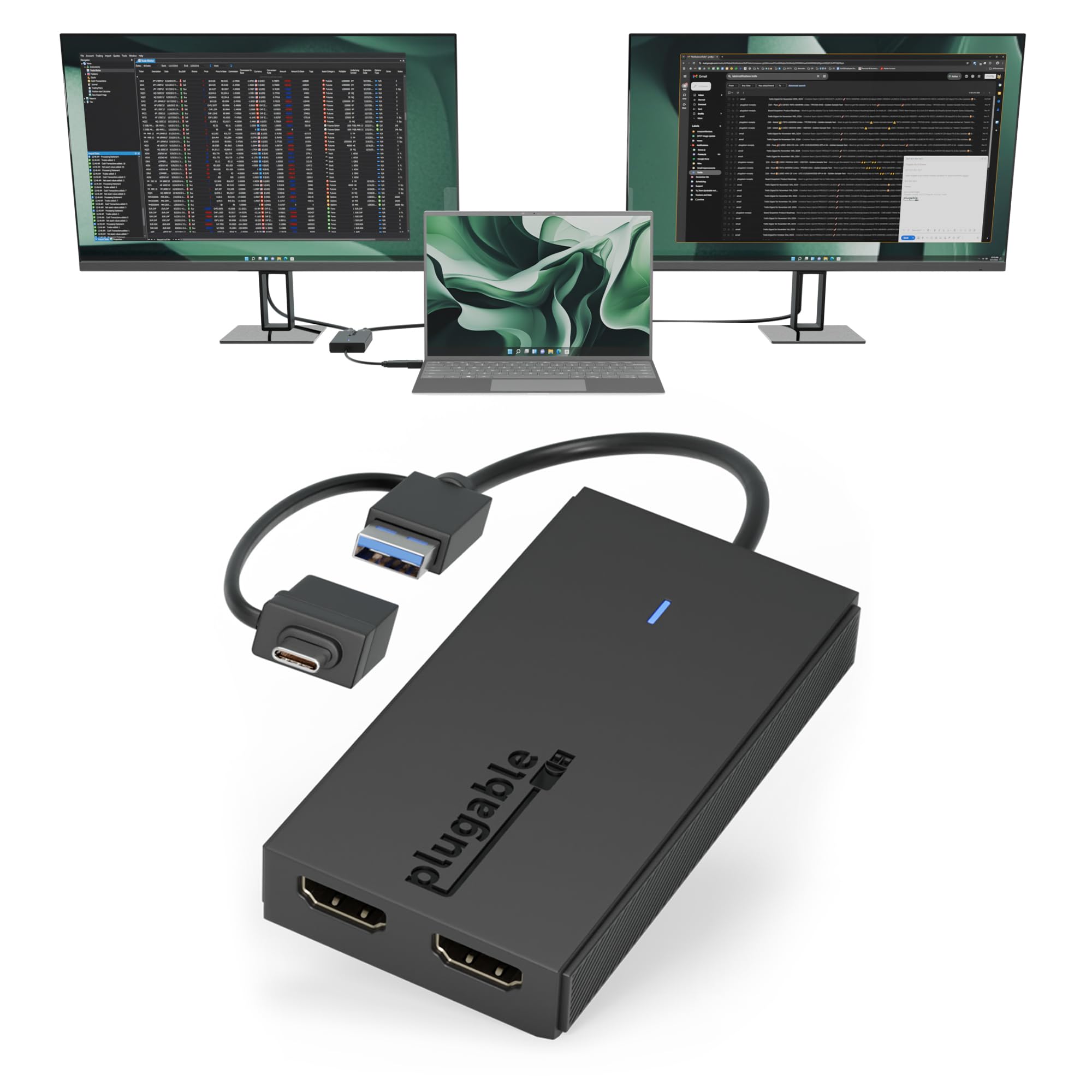
🖥️ Double your screens, double your edge — stay ahead in every meeting and multitask like a pro!
The Plugable Dual Monitor Adapter transforms your USB-C or USB 3.0 port into two full HD 1080p HDMI outputs at 60Hz, compatible with the latest M1-M4 MacBooks, Windows 10/11, and ChromeOS 100+. Powered by Silicon Motion technology, it supports extended or mirrored displays with easy driver installation and lifetime expert support. Perfect for professionals craving expanded, seamless multi-monitor setups with broad device compatibility and scalable display options.


| ASIN | B09R47RD5M |
| Best Sellers Rank | #19 in USB-to-VGA Adapters #32 in DVI-HDMI Adapters |
| Brand | Plugable |
| Color | Black |
| Compatible Devices | (Silicon Motion driver required): • Apple: MacBook Pro 13"/14"/15"/16", MacBook Air, Retina, and M1/M2/M3/M4 models • HP: Spectre x360, Pavilion, Envy • Dell: XPS, Precision, Latitude • Lenovo: ThinkPad, IdeaPad, Yoga, Flex • Microsoft Surface: Pro 7 / 7+ / 8 / 9, Laptop 3 / 4 / 5 / Go / Go 2 / Studio / SE, Surface Go / Go 2 / Go 3 • LG: Gram • Acer: Aspire, Swift, Spin • ASUS: Zenbook, Vivobook • Operating Systems: Windows 10 / 11, and most Chromebooks running ChromeOS 100 or newer. Compatible Devices (Silicon Motion driver required): • Apple: MacBook Pro 13"/14"/15"/16", MacBook Air, Retina, and M1/M2/M3/M4 models • HP: Spectre x360, Pavilion, Envy • Dell: XPS, Precision, Latitude • Lenovo: ThinkPad, IdeaPad, Yoga, Flex • Microsoft Surface: Pro 7 / 7+ / 8 / 9, Laptop 3 / 4 / 5 / Go / Go 2 / Studio / SE, Surface Go / Go 2 / Go 3 • LG: Gram • Acer: Aspire, Swift, Spin • ASUS: Zenbook, Vivobook • Operating Systems: Windows 10 / 11, and most Chromebooks running ChromeOS 100 or newer. See more |
| Connector Type | HDMI |
| Current Rating | 3 Amps |
| Customer Reviews | 4.2 out of 5 stars 880 Reviews |
| Finish | Matte |
| Global Trade Identification Number | 00819927012634 |
| Item Dimensions | 5.39 x 3.94 x 0.79 inches |
| Item Weight | 0.1 Pounds |
| Item dimensions L x W x H | 5.39 x 3.94 x 0.79 inches |
| Manufacturer | Plugable |
| Model Number | UGA-HDMI-2S |
| Number of Items | 1 |
| Number of Ports | 2 |
| Package Quantity | 1 |
| Power Plug Type | No Plug |
| Specific Uses For Product | Laptop, Monitor |
| UPC | 819927012634 |
| Unit Count | 1.0 Count |
| Warranty Description | 2 Year Limited Parts and Labor |
| Warranty Type | Limited |
A**K
Seamless, works perfectly
Adding some more monitors to my system for options trading. Went from 4 monitors to 6 on Win10. I am running an AMD5950X, 128GB, Win10 Pro, and 3070. I had 4 monitors on the 3070 and added this device and easily added 2 more monitors. Simply install the correct plugable software and then plug in the additional monitors. No problem running my additional 1920 x 1080 monitors, Win10 sees all 6 monitors. I might add two more monitors. wow, that was too easy. UPDATE ++ Now running 8 monitors without issue, great product, hope it lasts a few years.
M**H
Works in Ubuntu 20.04 with Wayland
So I found a driver from SiliconMotion that says it supports Ubuntu 20.04 (and mentions Xorg specifically at the end of the install cycle reboot screen), but I still only see 3 screens in the Cinnamon desktop from the Intel integrated graphics card after reboot. HOWEVER: when I log into a Wayland session, the USB display does show 5 unique displays. I have one monitor capable of 2560x1440, But it's plugged into the integrated adapter which doesn't support above FHD. So all 5 are at FHD. But I fully expect this device to work at higher resolution on that monitor whenever I get around to untangling the mess behind the desk. Note that I previously had a PCI graphics card that had the same problem... generic driver installed successfully, then the additional screens won't show in X, but they do show up in Wayland, so it's probably working in X, just my specific variant of ubuntu (not official release) or all the messing around with X config i've done over the last 5 years is the root cause that it isn't supporting more than 3 screens, or more hardware attached after initial install... But this does confirm that at least with a wayland session, this product does work with linux! Now Wayland on ubuntu 20.04 is still not quite production worthy... but I've read that later ubuntu 22.04 and 24.04, Wayland runs better. I still have a couple things that work for me in 20.04 that I haven't confirmed will continue to work after an OS upgrade (without switching from 1 time licenses to monthly maintenance... but this is way off topic.) Total time to see pixels on screen <1 hour. The driver I'm using can be obtained from siliconmotion (dot) com/downloads (as of 19 May 2025.)
K**N
Bypass (HDCP) Issues.
works perfectly. Only feedback that I have is the issue with watching netflix, disney + or hulu. The video go black due to High-bandwidth Digital Content Protection. But quick fix is to goto chrome or brave browser settings and disable "Use graphics acceleration when available" When you do this the videos should start working.
J**Y
Church Tech Director recommended! ✅
Church Tech Director here. I love this product for MacOS with the limited screens allowed for M2 screens. The event I was at needed lyrics for audience, confidence monitors, and lower 3rds for livestream—this solved the issue with the limitations on the Mac M2, that is not the PRO or MAX. This adapter is great. I highly recommend for groups and churches that don’t have big budgets for PRO or MAX M chips from Apple, or that don’t have budgets to purchase and build your own Windows Towers or gaming computers. This is the solution that I recommend. Currently only using the 1920x1080 version. In the future, I’ll be trying the 4k version. Compatible for MacOS MacBook Air M2 for 3 additional screens and my main laptop screen. Semi-easy to setup, outside of the app that you have to download. MY ONLY COMPLAINT: on MacOS, the app that you have to download for this to work, you constantly have to re-open it and start it, as well as choose content on settings for screen extending. If that issue can be solved, this would be a seamless experience and would get 5 stars instantly.
M**E
Doesn't work long term
Great price and worked well for about 45 days -- just long enough to get me outside the return window. Now it cuts out/loses connection at least one time per session. If I just wait for it to reconnect, my mouse lags, and basic navigation doesn't work. I have to unplug the adapter from my computer and reconnect. It's a waste of time and money. Pay more for a better one!!!
S**B
Easy to use right out of the box
works well. basically "plug and play. I do worry that the cord section for the B adaptor will break. it is attached at the same place you hold the cord to plug it into the laptop. Since the laptop travels, the cord is frequently plugged and unplugged so if you are not careful the "B" adapter has extra pressure on it while plugging in the "C" adapter.
C**A
Works perfectly for dual monitors
We bought this to connect two external monitors to both an M1 Mac and a Windows laptop. You do need to install a software driver, but once that’s done it works perfectly. No glitches, no lag, and both screens run smoothly. For the price, I think it’s absolutely worth it.
D**A
Excellent products and exceptional customer support
The Plugable Dual Monitor Adapter is a wonderful connector. It works beautifully on my MacBook Pro laptop by connecting two external monitors. The adaptor has two HDMI ports and can be connected either directly to the laptop or to another connector, if necessary. You quickly and effectively have three independent monitors (including the laptop's monitor), which makes work with various files so much easier. The key, however, is the technical support Plugable offers. After using my adapter for three months, it "appeared" to have stopped working. I contacted customer support and immediately received a response offering to replace the unit by providing a serial number. I received a brand new unit two days later. As it happens, the problem was not the connector, and once I reloaded a program and rebooted my computer, I found out the original unit was working perfectly. When I notified Plugable and offered to return the unit, they kindly suggested I keep it for future needs or gift it to a friend. This company provides "above and beyond" support, and its team members are exceptionally courteous. From now on, I will always purchase docks, connectors, and adapters from Plugable. They make products that last and support them for life. Thank you!
Trustpilot
2 weeks ago
1 month ago