
DOWNLOAD THE APP


Customer Services
Copyright © 2025 Desertcart Holdings Limited
DOWNLOAD THE APP

⌨️ Elevate your typing game—comfort meets productivity in every keystroke!
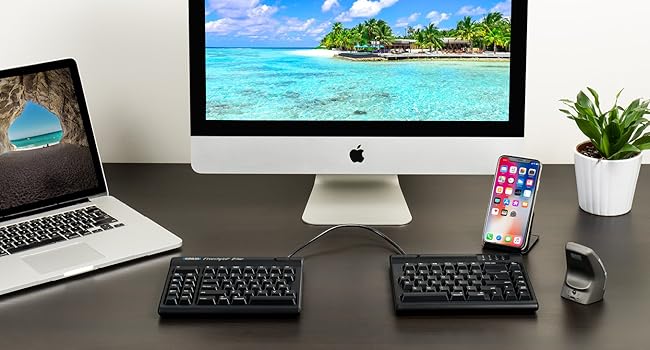
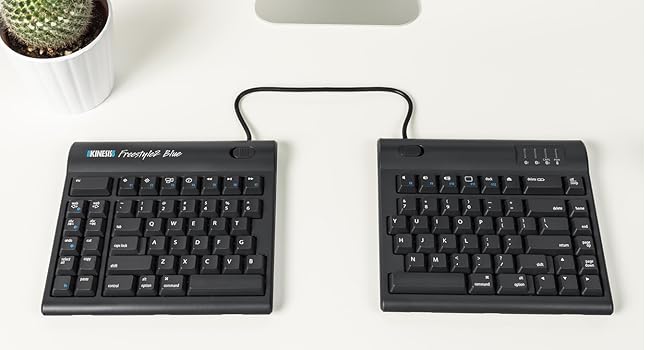
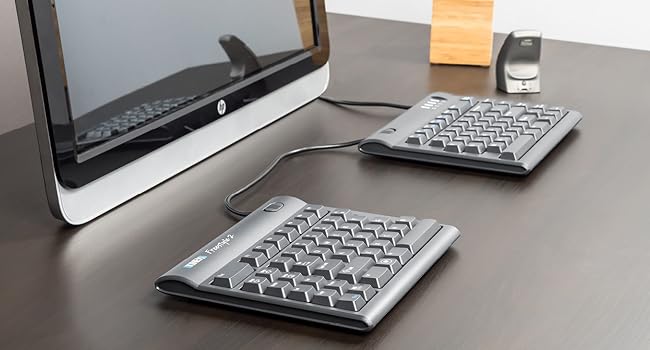
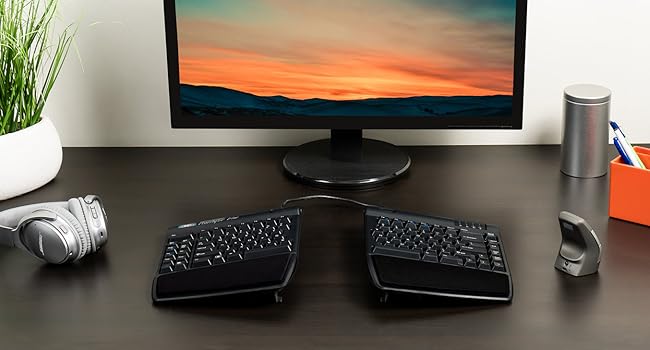
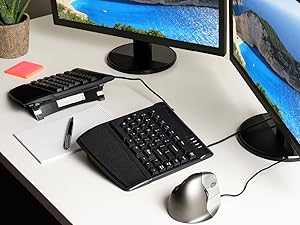
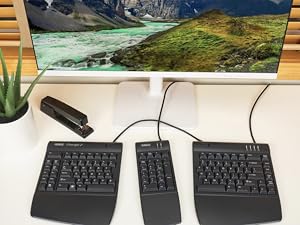
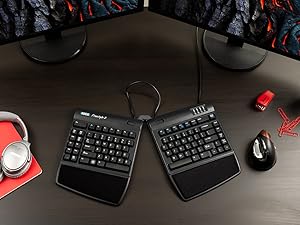
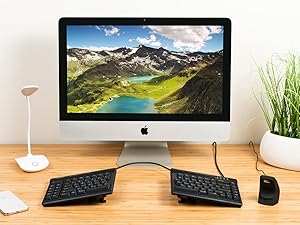
The KINESIS Freestyle2 USB-A Ergonomic Keyboard features a unique split design with up to 9" separation and adjustable VIP3 tenting lifters (5°, 10°, 15°) to promote natural hand and wrist positioning. It offers a standard Windows layout with dedicated multimedia and editing hotkeys, low-force membrane switches to reduce finger fatigue, and comes fully equipped with cushioned palm supports and adjustable accessories for a tailored ergonomic experience. Ideal for professionals seeking long-term comfort and enhanced productivity.






| ASIN | B0089ZLENA |
| Additional Features | Ergonomic |
| Antenna Location | Office |
| Best Sellers Rank | #188 in Computer Keyboards |
| Brand | KINESIS |
| Built-In Media | adhesive cushioned palm pads, detachable pivot tether, 2 x Ergonomic Keycaps |
| Button Quantity | 94 |
| Color | Black |
| Compatible Devices | Windows 7, 8, 10, Linux |
| Connectivity Technology | USB |
| Customer Reviews | 4.2 out of 5 stars 869 Reviews |
| Enclosure Material | Plastic |
| Global Trade Identification Number | 00607998820025 |
| Hand Orientation | Ambidextrous |
| Item Dimensions L x W x H | 19"L x 12.5"W x 3.5"H |
| Item Height | 3.5 inches |
| Item Weight | 2 Pounds |
| Keyboard Backlighting Color Support | Single Color |
| Keyboard Description | Ergonomic, Multimedia, Membrane |
| Keyboard Layout | QWERTY |
| Manufacturer | Kinesis Corporation |
| Model Name | Freestyle2 for PC with VIP3 Lifters Pre-Installed |
| Model Number | KB820PB-US |
| Number of Keys | 94 |
| Power Source | USB Powered |
| Recommended Uses For Product | Office |
| Series Number | 820 |
| Special Feature | Ergonomic |
| Style Name | PC Layout |
| Switch Type | Membrane |
| UPC | 607998820025 607998882009 |
| Unit Count | 1.0 Count |
| Warranty Description | Limited Warranty |
A**N
A great ergonomic keyboard
It took a little bit of time to get used to this layout, but this is a very good keyboard for those looking for ergonomic equipment. It takes a bit of time to get used to the design, but practice and regular use will make it easy to adjust. The keys feel great and my fingers have never ached after prolonged use. Changing width and tenting angles are both great for adjusting the keyboard for optimizing comfort. I also really like that this keyboard has separate keys for Cut, Copy, Paste, and Undo. They make those actions much easier. I haven't used the web home, back, or forward keys very much since my mouse already has back and forward buttons. My main disagreement about the design is that the B key is on the left section. I strongly think it should be on the right. The Fn key can be confusing because it stays active after pressing it. I'm used to Fn only being active while the key is held down. The Delete key can also take some getting used to because it's the same size as the Backspace key and the keys are very close to each other. I've had a few experiences where I've tried to use Backspace but ended up hitting the Delete key instead. These issues haven't been enough to hinder my experience, and overall I'm very satisfied with this keyboard.
A**A
OMG, the best keyboard EVE!
It seems I type all day, and have gone through keyboards, have broken keys, and have particular criteria I need in a keyboard, and specific things I don't want. Important to me: ergonomic is #1. And part of that includes NOT having a numeric keypad attached. It means I have to over-reach and take my hands off the keyboard to use my mouse which slows me down. I've used the Microsoft Sculpt and loved it -- that is, until the doggle (?, the USB thing you plug into your computer) stopped communicating to the keyboard. So I bought another one. Except the new one had the same problem the old one developed after several years of great use. So I returned it. And the search was one. I got another one which had the same problem (the lag time between hitting the keys and it typing was either terribly slow, or the keys I typed never showed up. And then I started reviewing the reviews much more thoroughly, and it seemed NONE of the reviews of the ergonomic keyboards without numeric keypads had unanimously positive reviews. Except 2: one of them was about $200 + an additional $150 or $200 for the lifters. Well, if this thing works best with the lifters (which all reviews say it does), why would that not be included? Plus, it had features I didn't like and didn't really want, including bright red, blue and green lights on the keys, and keys you could program (largely for programmers, which I am not). Another feature I want is for the caps lock key to be backlit so I can tell at a glance if it's on or not. And then a friend sent me the link to this keyboard. It had all the features I wanted, none of the features I didn't want . . . at a fraction of the price. And the reviews were ALL positive. It's still costs more than the average run-of-the mill keyboard. But, when my friend compared it to when he buys a guitar.... he doesn't mind spending the money on a Les Paul. Well, my keyboard is how I make music!, and so I decided to go for it. It's my Les Paul! It was instant plug-and-play, I have the lifters in the halfway position, and am totally in love with it. It took zero time to get used to. So what that it has a cord. This keyboard is a dream. I'm so grateful to have found it!!!!!! You won't be disappointed. Oh, one more little thing. I use the little bumps that remind my fingers when they're on the home keys (or not!). These little bumps were rather little, and hard to sense. So I just added a little thing (a textured tape) to make the bumps bigger, and now my fingers find the home keys without my having to look!
J**A
Great feel and ergonomics; special keys don't work for my purposes
In the brief time I used this keyboard, it seemed like a very good quality, comfortable keyboard with good build quality. Unfortunately, it didn't serve my needs. I previously used a Kinesis Ergonomic Maxim keyboard, and I depended on being able to remap the right Windows key and Menu key for special functions, while leaving the left Windows key as a modifier key. The Freestyle2 only has one Windows key, so I can't do that. I knew that, but I assumed I'd be able to remap the other special keys on the left as needed. But they can't actually be remapped as independent keys; they're only shortcuts for other existing keys or key combinations (at least as far as Linux can tell; perhaps it's different under Windows). For instance, pressing the Cut key sends a left Control key keypress, an X keypress, an X key release, and a left Control key release, so it's absolutely identical as far as the computer can tell to pressing Control-X. I'd just live with it if the keyboard had a distinct right Windows key so I wasn't *losing* functionality over the older Maxim keyboard. I'm very disappointed, because I love the ability to have the two halves of the keyboard separated and I really love the feel of the keyboard. If all the keys were distinguishable I would be very very happy. I'd recommend it for anyone who just wants a good ergonomic keyboard and doesn't want to do funny things with key layouts. This is, of course, a fairly specific use case, and there aren't going to be very many people it matters for. But I wanted to share this as a little caveat for anybody who was hoping to use this with Linux (or, perhaps, anybody who was hoping to remap the additional special-function keys in software for Windows or Mac, although I can't be 100% certain Windows and OS X can't tell them apart from the corresponding key sequences on the main part of the keyboard).
R**K
An Outstanding Keyboard!!!
An outstanding keyboard!!! I recently broke my wrist but needed to continue working so went looking for a keyboard that would accommodate not being able to rotate, tilt or flex my left wrist. This keyboard was exactly what I was looking for! The construction is as good as the best out there, except maybe the old IBM Model M mechanical keyboards. Mine arrived with the wrist rest and left-right tilt accessory kit installed. I wouldn't buy this keyboard without it. I tilted the left section full (15 degrees) and fiddled with it's rotation until they home keys were under my fingers without having to tilt, rotate or twist my wrist. After a few minutes getting used to the slight variation in the location of some of the lesser used keys I was able to work as quickly as if I hadn't had a titanium T plate and half a dozen screws recently installed in my distal radius bone. I definitely recommend this keyboard to anyone needing a keyboard to adjust to your hand(s) position. I also found it more comfortable for my uninjured hand versus the typical square layout or even the Microsoft Natural keyboard I normally use. After a week's use I can find only two things that might improve it. The first is if there was a way to adjust the tilt of each half from front to back. I did this by stacking 3x5 cards under it but a front to back tilt adjustment would be well worth it to go along with the left to right tilt that is built into the accessory kit. The other improvement might not be enjoyed by all, but I really like the tactile feel of the old IBM Model M mechanical keyboards. If Kinesis offered this keyboard with front to back tilt (in addition to the current left to right tilt) and mechanical keys I'd have to rate it a 10 out of 5!!! But even with these potential improvements left off, this is an excellent keyboard for the wrist movement challenged at a fair price. I'd buy it again and recommend it highly.
J**R
Great ergonomics, terrible key ghosting
I've been using this as my daily driver at work for over 6 months now. It is very comfortable and helped with growing carpal tunnel problems. Also helped correct years of bad typing habits. BUT: there is a key ghosting issue on the left hand side. If you hold left shift and a middle row key like ASD, the keyboard will not register a press on the keys directly above. So I constantly get blocked when trying to type "DE" with the "E" getting dropped and other similar annoying situations. Would make this absolutely useless as a gaming keyboard. There is a firmware update available on the manufacturer website, but it did not help at all. Otherwise this would be a perfect 5 star product.
A**R
Great keyboard, and exactly what I wanted from my keyboard, but work deemed it too expensive and made me send it back.
I wanted to post a positive review on this keyboard. Even though I had to return it. I used this keyboard for almost a solid month, and it performed like a champ, and felt great in my hands. The keys were just right, not too crisp that I felt them there, but just enough that the presses were crisp and intentional. The angle of the keyboard is great, and makes the keys feel like they are just where your hands want them. This keyboard eliminated my wrist strain, and made typing a pleasure. My keyboard had to be returned not for any fault of the keyboard, but because I ordered it and work deemed the keyboard "unnecessarily expensive". I tried to explain that it was an ergonomic keyboard and that ergonomics cost money... They wouldn't have it, and asked me to return them or pay for it out of pocket. I am now typing this on my "ergonomic" microsoft keyboard that I have made work ... it only cost $50, and I guess that's what really matters. That it's cheap enough to do the job.
A**R
Major adjustment if you're used to compact mac keyboard
I'm very "split" about this keyboard. I'm a developer and previously worked almost exclusively on my macbook pro keyboard, or the compact mac bluetooth wireless keyboard. However, I started having wrist and shoulder pain so decided it was time to try something more ergonomic. Safe to say, it's been a bit of an adjustment. Pros: • The ability to split the keyboard is great, and definitely lends itself to better ergonomic positions. • Generally speaking, the keys are nice and have a good feel. • I definitely recommend the accessories pack; the wrist rests and ability to tent are huge benefits. • Position of page-up and page-down keys is nice and intuitive. Cons: • Overall, the keyboard feels MUCH larger than what I'm used to. I constantly feel like I'm stretching my hand in unnatural ways for keys that used to be easily within reach. I'm 5'8", and consider myself to have average-sized hands. • Otherwise, my largest complaint is the layout of the keyboard; it's proven to be a very large adjustment for me, specifically: a) On the compact keyboard, `shift` is above the up arrow. On the FS2, it's `return`. Many accidental returns :( b) Instead of the `esc` key being above the ~, it's waaay off to the upper left. Instead of being able to easily tap it with my left middle finger, it feels like I have to reach my entire arm to hit escape, which I do regularly. c) Left-hand Option feels waaay further to the left. I basically live with my left hand on the option key, and I end up hitting spacebar instead. I tried for at least an hour to figure out how to convert the left-hand space bar to an option key, but it sounds like you'd have to install custom firmware on the keyboard, which is definitely overkill for me. d) Finally, and the thing that feels the most inexcusable, is the 'function' key behaves like a lock rather than a modifier key. I use the f* keys regularly, and am used to holding 'function' to modify their behavior for things like screen dimming, volume control, etc. On the FS2, you have to hit it once to turn it on, another time to turn it off. Which means you constantly have to remember what state you're in, especially if you use the function keys for both possible purposes. It also means that if you're used to hitting fn+delete to delete forward, you'll have to retrain yourself. Instead, there's forward delete button way off to the northeast that I never use. I've converted to using ctrl+d instead, which is probably a net benefit. • The left-hand shortcut keys (cut/paste/etc) don't really do anything for me except further confuse my hands. • I do wish there was an option for negative tilt - IE, the ability to have the keyboard slope away from you. • Despite being split, it's not very mobile. It's pretty clunky and it would definitely be painful haul back and forth. Conclusion: It's obviously personal preference, but I find myself wishing this keyboard was about half the size. Combo that with the major adjustment in keyboard layout and I've decided to try something else. I've ordered the Goldtouch Go!2 Mobile Keyboard since it seems closer to what I'm used to. I'll update this review with my thoughts after a test drive.
F**G
Finally! Comfort, relaxation, and flexibility in a keyboard!
A week ago I ordered an "ergonomic" wireless mouse by Anker. I was so happy with it I decided to splurge and try the Kinesis Freestyle2 PC Keyboard & VIP3 which arrived today and I set up less than 30 minutes ago. None of the reviews mentioned the immediate shoulder relaxation achieved with the use of the Freestyle 2 and VIP3. Before, my shoulders were constantly hunched up around my ears and no amount of reminding myself worked for but a few minutes then it was right back to tension-ville! After having plugged in the new keyboard and toying with it for a couple of minutes, I suddenly realized my shoulders naturally assumed a relaxed position! This could be the single best benefit of all for me. I have the world's best masseuse but at $120 a session, I can enjoy the sessions rather than be forced into them! The heels of my hands don't even rest on the palm pads while typing anymore – I am holding my hands while typing in a way that would make any piano teacher proud! This is terrific! Furthermore, what terrific Left hot keys!!! I ordered a separate numeric keypad I hope will be delivered in the next day or so however, until then, I am going to try the embedded numeric pad - never liked them but must give it a go given how terrific everything else is! I am thrilled with my new found comfort and improved posture. I am certain, should I (correction, WHEN I) face another marathon computer session, I won’t need to see my massage therapist or my chiropractor, nor will I need a refill on my prescription narcotic pain pills. This is practically miraculous and all because someone had the common sense to say “Wait a minute! That’s not natural” and then to look at what is. Thank you, thank you, thank you!!!
Trustpilot
1 month ago
1 month ago