Desert Online General Trading LLC
Dubai, United Arab Emirates
Desert Online General Trading LLC
Dubai, United Arab Emirates


✨ Light Up Your Imagination!
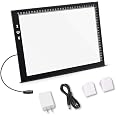
The A4 Ultra-Thin Portable LED Light Box Tracer is a versatile and lightweight art tool designed for artists and crafters. With a thickness of just 0.2 inches and a weight of 300 grams, it features a smooth, glare-free surface and three adjustable brightness levels, making it ideal for drawing, sketching, and various art projects. Powered via USB, this light pad is perfect for on-the-go creativity.


| Item Thickness | 0.2 Inches |
| Item Weight | 300 Grams |
| Light Source Type | Light Emitting Diode (LED) |
| Power Source | Corded Electric |
| Material Type | Light Pad Only |
S**L
First Impressions are Good
First of all, let me explain that I am a natural-media artist (oils, watercolors, acrylics, etcetera). I do not do a lot of tracing, unless I am doing something like animation cells; however, a few years ago, I picked up a light table from a marketing company that was going out of business. I am talking about a desk about the size of an average kitchen table with a top of frosted glass, and a lighting system that when cranked up requires you to wear sunscreen and tinted glasses.It was a bit of overkill; however, my motto is: anything worth doing, is worth overdoing. Anyway, I sold the behemoth, and looked at some of these newer tracing devices. Did my homework, checked reviews and ratings, blah, blah, blah, and decided on this model.FIRST IMPRESSIONSThe device comes well packed and protected. The company wanted to make sure that the device did not suffer during transit, and they did a good job.When you take it out of its protective enclosure, you will have the light pad, a power cord, and an instruction sheet. This specific unit does not come with a USB power plug, so if you plan on using it without plugging it in to your computer’s “powered” USB port, you will need to invest in one… that is if you do not already have about 20 of them hidden in drawers around your house.Amazon sells a lot of different versions, like this one:https://www.amazon.com/AmazonBasics-One-Port-USB-Wall-Charger/dp/B0773BHCV1/ref=sr_1_1_sspa?ie=UTF8&qid=1530621153&sr=8-1-spons&keywords=usb+wall+charger&psc=1One other thing, when I removed the unit, there were about a dozen sheets of tracing paper, and a small eraser, in the bottom of the box. I do not recall reading about that when I purchased the unit, but it was a nice touch.The unit is light weight (335g /11.75 ounces), and crazy thin (4.7mm / 0.19 inches).The instruction sheet has a few minor errors on it, but no more than you would expect from having a document translated from the native tongue to English.For one thing, they give the measurements for width and height in inches, and then switch to metric for everything else. Not that big of a deal; however, you should stick with one measurement system… the world is a confusing enough place as it is.There is a mistake on the height of the unit. It lists the outside (total) height as 9.17 inches, and the active (tracing) area as 9.37 inches, that means the drawing area is bigger than the unit is tall, and I think you just defied the laws of physics. Again, not a big deal.In the photograph of the unit (on the instruction sheet), along with the USB power cord, they have the cord reversed. They are showing the large end of the USB cord being plugged into the unit. Another nothing burger, because I would assume no one would attempt to plug the large end of the USB cable into the unit. But, one of the things that I do is write user’s manuals and “how to” stuff, so I am probably being picky.To use the unit, plug the mini USB into the side of the light pad, and the larger USB cable into a “powered” USB port on your computer, or a USB charger. I found that the mini USB port on the unit is sturdy, and shows no signs of failure. Remember, that the USB plug can only go into the port one way. Look for the USB symbol on the top of the mini plug… that symbol should be facing the front of the unit. If you encounter any resistance, stop, and check to see if you have the plug positioned correctly. There will be resistance, but only enough to keep the plug firmly in place in the port.To turn the unit on, simply tap the touch sensor. With each tap, the touch sensor cycles from off, low, medium, high, and then back to off.The unit is fairly sturdy; however, it is almost a thin as a coin, so throwing it in your backpack and hiking around is probably not a good thing. Based on what I see, it will last a long time, if properly taken care up. I clean mine with a light spritz of window cleaner, and then wipe it off with a paper towel. As with all electronics, keep it from getting wet, or running it over with your car.One person commented that when she plugged it into her computer, it lit up, but nothing else happened… One can only assume what she expected to happen, but remember this is not a computer device, it is only a light pad. It is not necessary to have a computer to use it… just some power. In other words, it is not a Wacom drawing tablet.Several people complained about the black dots that appear between the LEDs, and yes, they are there, and they are black, but when you place your artwork and tracing paper on the unit, the black dots blend into the LEDs and disappear… like magic.Here is a trick: If you are left handed, then turn the unit around to that the USB plug side is on your right, and if you are right-handed, do the opposite. That way you will not accidently brush over the touch sensor, and change the light setting.Another trick: I secure my artwork and tracing paper to the light pad using a few clips that I picked up at my office supply store, and they seem to work fine.I would be described as a light user, and I have only had the unit for about a week, if I do encounter any problems I will come back and amend this review.But, for now, I am very pleased that I made this purchase. And, at the same time, got rid of a 100-pound light table… win, win.
O**T
Not a light box, but…
Not a light box and unsuitable as white camera lightbox background, because of the light dots.I can simulate a consistent white lit background with some papers in between.But sure is excellent for tracing through paper with a pen!Basically thin piece of plexi that can be USB micro connected to an ordinary power bank.Dimmer light modes (dark to bright).I use it a lot for tracing when designing and making art on paper.Very pleased with this. Bought two sizes.
A**R
It fits my needs, has a nice design and functions flawlessly.
By far one of the cheapest but good-quality light boxes (though it's so thin it might be more accurate to call it a light pad) I've seen. It works splendidly; the three different brightness settings, which are all accessed by a simple tap of the power button once the device is plugged in, give a lot of versatility for different kinds of paper to be used, both for the drawing you're tracing and the paper you're tracing it on. Just as well, though I am not an optometrist and cannot prove this, it's supposed to be eye-protective, and I haven't noticed any feeling of tired or irritated eyes while using it, which is great, since I've been using it a lot. (Rather finding excuses to use it, now that I have it.)The working area is nice and smooth and unfettered, and it would appear whether by design or by accident that it has almost a non-slipping nature once you lay the paper down. It doesn't seem to adhere to it, but for as smooth as it is I expected to have problems with the paper moving on it's own. Fortunately, that's not the case. The paper only moves when the user (me) either moves it on purpose or user error like a bump moves it. It's not sliding all over the light box at the slightest touch.I saw one of the FAQs ask if the light box surface got hot after a while, and I can effectively say it does not. It stays completely cool to the touch. However, the black strip of plastic the power button is on does get uncomfortably warm after a little while. Not hot, but if you brush your hand against it, you'll notice the difference. It won't burn you and it's not so hot you can't touch it at all, it's just that it's noticeable.Overall, this was just the right size for what I needed---the super-thin design fits nicely behind sketchbook pages without loosing precious paper space where the page curves over the edge near the binding, and the tracing surface itself is big enough for the whole page, though I will admit I don't usually take up whole pages for a drawing. And I must say I find the idea of controlling the settings with a few taps after the device is plugged in rather than button presses very sleek. The only flaw with this is if you touch the control point while drawing with your arm or another area of skin, it may respond to it as a touch, but this was only a problem that I noticed once and isn't worth docking a star to me.The power cord that comes in the box is surprisingly long in my opinion, and that works out nicely, as I usually have other things already plugged into my computer (or am not at my computer when I want to use the light box) and have to use a wall outlet or usb port on a power strip. Which is where the only other problem for some people (but was not a problem for me) might come in, as the light box, or at least mine, does not come with a wall plug to adapt the usb. But as I said, this was not a problem for me because I already have a couple lying around. Just be aware if you're buying one that if you don't have a usb port available to you, you may want to get one, but again, for me, this wasn't worth docking a star.The light box came pretty well protected; a stack of tissue paper, foam-ish guards on the corners, and even a foam-ish sleeve under that, and in a pretty nice cardboard box. Which I might add has a pretty cute picture on the front.I am very happy with this light box and should I ever need another one, it will be this brand I go to for it. It fits my needs, has a nice design and functions flawlessly, and I look forward to getting a ton of use out of it going forward.
K**N
Great value but fragile usb connector port
Worked well for a couple of years but the input of the usb power cable into the pad is very fragile and it eventually broke. The area is very thin and it's easy to over stress it so the connection is too loose to work. Be gentle and it's an excellent value.
J**Y
Great Tool for Creating
This is a gift for myfriend. I have one of my own and use it for making cards or adding designs to my letters. It is nice to add those extra personal touches.
B**U
fantastic art tool
This was only $10 that is cheap. This was the first tracing box I have used. This is perfect for first time users of light boxes. I have done over five pictures from my journals and transferred to larger pictures. This gives me so much more freedom to practice and make mistakes on a drawing since I can transfer it later. It has a dimmer so you can set the brightness. I just keep it on the brightest setting.
Trustpilot
1 month ago
2 months ago