🚀 Elevate your data game with RocketRAID — where speed meets scale and control!
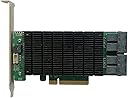
The Highpoint RocketRAID 2840C is a professional-grade PCIe 3.0 x8 RAID controller featuring 16 high-speed 6Gb/s SAS/SATA ports. It supports a wide range of RAID configurations and offers comprehensive management tools across Windows, macOS, and Linux. Designed for enterprise and NAS-class drives, it enables seamless online capacity expansion and RAID migration, ensuring scalable, reliable, and future-proof storage solutions for demanding professional environments.


| ASIN | B08TM38F25 |
| Best Sellers Rank | #97 in RAID Controllers |
| Brand | HighPoint |
| Compatible Devices | Personal Computer |
| Customer Reviews | 3.9 out of 5 stars 233 Reviews |
| Hardware Interface | PCI Express 3.0, PCI Express x8, PCIE x 8 |
| Item Type Name | HighPoint RocketRAID 2840C PCIe 3.0 x8 16-Port 6Gb/s SAS/SATA RAID Controller |
| Manufacturer | HighPoint Technologies, Inc. |
| Model Number | RR2840C |
| Operating System | Only supports 64 bit operating system. • Linux (Support Linux Driver auto Compile) • Redhat/Ubuntu/Debian/Fedora/Proxmox/Rocky Linux(Kernel 3.10 and later) • Unraid6.9.2, Windows 11, 10, 8, 7; Windows Server 2022, 2019, 2016, 2012R2, 2008; Microsoft Hyper-V; Only supports 64 bit operating system, macOS 10.9 ~ macOS Ventura 13.x |
| Style | 4x Int. mini-SAS HD Ports – up to 16 HDD |
| Style Name | 4x Int. mini-SAS HD Ports – up to 16 HDD |
| UPC | 643653284023 |
| Warranty Description | 2 Years |
M**.
Best raid controller for windows 11 hands down
Pros: Easy to use web based management software Supports sata too Supports larger capacity hard drives Alert you when a drive is failing and the management software tells you which drive is failing where it’s connected (the alert states it based on the corresponding connected connection and the fact my cables are labeled and my drives are also labeled doesn’t hurt either) it automatically rebuilds raid 1 arrays You can mute the really loud shrill noise it makes when you have a failing drive It’s not too slow (then again I had a raid controller that was pretty old and slow and was a pcie 2.0 pulled from a retired r710 server after i upgraded the r710 so really anything was better than that Dino) Drivers support windows 11 Easy and painless to install and use Physically durable and well built. Doesn’t feel cheap Supports multiple large capacity drives on multiple arrays Compatible with multiple operating systems including windows 10 and 11. Definitely has windows 11 compatibility. This includes drivers. Functions well hasn’t crashed or froze up my computer It costs less than $200 for me it was about $150 plus tax Well packed. Drivers are easy to find on the manufacturer website. Works in desktop PCs Includes low profile bracket if you need one Is a true one slot card not a 1.5 slot with tall heatsink It’s pcie 3.0 not some stupid halfarsed pcie 2.1 or something older Doesn’t overheat and thermal shutdown or BSOD due to overheating Good for 24/7 use (so far) so it’s good for home labs and NAS RAID setups that are used as primary centralized data and application software. You can run and access multiple arrays at once with minimal slowdown And best of all it absolutely totally DOES NOT SUCK!!!!! Definitely worth picking up especially if you’re a Windows 11 centralized data and application server user There’s also a similar controller by the same manufacturer here on Amazon for $100 if the extra $50 plus tax scared you off. If so I recommend that one as well it also supports windows 11 and 16 sata drives across the same type of cables and is also a 4 port card. So keep that one in mind too if you want. These are great controllers with great compatibility and easy to install and easy to use so DEFINITELY pick one up! Cons: Doesn’t include cables but you can get some cheap third party ones here on Amazon. I got a 2 pack of relabeled mini sas to sata ones for less than $30 including tax on Amazon. This controller supports 4 cables and 16 drives total It states it supports Linux but I’m a Windows user not a Linux user (I can’t Linux even if my life depended on it) so I can’t really speak on that myself No support for Mac according to what I see Sorry rich 1% people and major conglomerates who are so filthy rich they can afford a Mac without using their mortgage money entire life savings work five 9 to 5 jobs not eat for a year and go into massive debt to afford a Mac like everyone else in Main Street America would have to do to afford a Mac. This is not the card for you!
P**C
Excellent Cards *UPDATED* - UPDATED Twice
I have used Highpoint cards for many years. I used to use the 2322, and now I use the 2722. I have probably a dozen of the 2722 model now in my own Mac Pro systems and client Mac Pro systems. These cards have always been great performers. A couple of years ago one of these RAID systems almost succumbed to the Seagate firmware fiasco. But to my amazement the RAID array held together and I was able to migrate the data to a new set of drives. I have never had reason to contact their tech support - until about a month ago. I took the bleeding edge approach with a new server - going with a Mac mini and a Thunderbolt PCI expansion chassis. And yes I bled. :-) The card would not be recognized by the OS. The experience with Highpoint's tech support was prompt and ultimately successful. Highpoint was able to update the driver, and now a new Mac mini is happily hosting a 12-TB RAID 5/0 array. The reviews prior to mine just don't make sense to me, unless perhaps these reviewers were using consumer-grade desktop drives in RAID systems. The use of desktop drives in a RAID system would completely explain their woes. I use nothing but RAID drives in RAID systems. There are important differences between desktop drives and enterprise drives, and pretending these differences don't exist will result in much angst. Desktop drives should not be used in RAID systems, and enterprise drives should not be used as stand-alone drives in a desktop. I do have one nit to pick with Highpoint. They should update their documentation for the Mac explaining that it is unnecessary with OS X 10.8.x to install the driver that is included on the CD or available for download. All that is necessary is that the Web GUI be installed by doing a Custom Install of the driver installer. If the driver is installed along with the Web GIU, it will conflict with the driver included with the OS. This point should be made clear as day in the documentation and on the download page for the driver. In fact there should be two installers - one for the driver and another for the Web GUI - not both rolled into one. Nit pick aside, I do highly recommend Highpoint products on the Mac. Next I will try one of their RocketStor docks. *UPDATE* I am having to reduce my rating from 5 stars to 2 stars. If you are using this in a PCI based Mac Pro then my 5-star raing still applies. However if you are using this in a Thunderbolt system then avoid this product. I discovered a serious performance bug in this card in Thunderbolt systems: I placed a RAID & this card on a Mac Pro with internal PCI and measured the performance, which was excellent. I then took the same RAID & card and placed it in a Mac mini with a Sonnet Thunderbolt enclosure. The write performance was excellent and matched that of the Mac Pro. However the read performance was 1/5 - an 80% degradation. I contacted their tech support and they were able to confirm this behavior, and they said it could not be corrected. Tech support said the 472x line would have better performance. I have about 5 of these cards in Thunderbolt environments. I have repeatedly contacted their sales department with the request of an upgrade to the 472x card. All attempts have been ignored. Meanwhile on their web site this card is still listed as compatible with Thunderbolt. The performance is so poor in my opinion this card cannot be qualified as compatible with Thunderbolt. Due to this brush-off by sales I am going to standardize on a different manufacturer's card. I'm done with HighPoint. *UPDATE 2* March 2015 And a happy ending to this Thunderbolt situation. Somewhere along the line Highpoint fixed the performance issue with Thunderbolt environments. I was using one of the Mac minis with the RAID to do some testing. I noticed with Yosemite that the performance was as expected. Yosemite comes with driver version 4.3.3. So as a test I wiped the OS and installed a Mavericks (which comes with driver 4.0.0). Sure enough the performance was back to terrible. Next I downloaded & installed driver 4.4.4 from Highpoint. Now under Mavericks the performance was again terrific. I will revise my rating back to 5 stars. Although I am not in the least bit pleased by the brush off by their tech support with saying that the problem could not be fixed. Had the numbskulls not brushed me off like that that and had instead fixed the problem I wouldn't have gone and recommended cards from another vendor.
P**N
Good card for the budget.
Update: 10/7/18 Found my problem and it appears to be the cable not this card. So restoring the stars from my previous review. The SAS cable had been the culprit that failed and once I replaced the cables with a decent one, instability has largely disappeared. In the past 6 month or so the RAID array crashed 2 times. Both times rebooting fixed the thing and once was because I was vacuuming near the raid tower had physically knocked it so probably not the card's fault. Lesson, don't cheap out on cables. Update1: 12/27/17 Now the setup has been in use for about 3 months. While there has not been any catastrophic failures, the system is still plagued with occasional instabilities. The card will lose com. with the drives and would require a reboot from time to time. Rebooting fixes issues but still can be worrisome. I have sufficiently cooled the card (have fans top and bot.) and there are plenty of power budget. It isn't clear if its the card, the enclosure or the cable that's problematic. At this point ruling out cable. Whether its the enclosure (another RocketRAID product) or this card, in hind sight perhaps it would have been better to setup the system inside the workstation vs. out. To be continued.... Original Review--------- This will no doubt be a review that I will revisit in a few months as reliability is something that will only be clear with passage of time. This is the review for RocketRAID 2711 with external SAS interface My motivation in buying this product was to replace a dead raid controller. It was a working system pull MegaRAID with 1gig of cache, and it just died one day. I setup a raid 5 array at home for data safety with disk failures in mind but I never thought controller failure will be a problem. But it happened. I didn't lose much data but it was annoying enough that I didn't want to replace it with another used card. Buying a new one of them was out of question as it is waaaaay over my budget. RocketRAID came up in searches and the price point made it attractive enough that if a controller failure occured then I could simply replace the card and it won't hurt my wallet that much. Installation: It was pretty manual. My computer didn't recognize this card on its own, but the instruction on the web suggested that would be the case and I simply downloaded the latest driver which was last updated with release of Win 10 (so a while back). With the driver installed, the system recognized the card and saw the disks attached to the card right away. I had to fidget around with the computer's option rom to give enough room but this was the case for the original MegaRAID that this card was replacing. Setup was simple if a bit lacking in freedom to change parameters but they were all within what I would consider acceptable so I will let that slide. (e.g. I didn't have that much choice on the stripe size etc.) Performance: This is where this card lacks. Looking at it, it was obvious that this won't have the giant cache and pass the saving to the end user. Sequential read/write was about 45% of the MegaRAID card and 4k read\write about 10% of the previous card's performance. So if you are a video person then this probably is not the card for you. But to me, this performance is perfectly acceptable. As long as it is faster than a single disk and proves to be reliable. One line summary: Cheap card that is working well but not the best interface and performance is somewhat less than the premium cards. Time will tell if the card proves to be reliable or not but so far (2 weeks into installation) so good.
S**E
Performance is noticeably worse than no array at all
Well, first, the good news: Installation was easy, setup was easy, updating the firmware was easy. Building my RAID5 array from 6 drives took several hours, but once it was done, I had a large, fault-tolerant disk. Fault tolerance works good too; I bought 7 disks for my 6-disk hot-swap enclosure, and literally 10 days after I started using the array, a disk failed. The card made a godawful racket, letting me know something bad had happened, I pulled the bad disk, put in my spare, and the array started rebuilding. A few hours later, I was up and running again. Now the bad news: Performance is AWFUL. I had intended this array to be used for all my gaming, since it was large, and as it striped across 6 disks, ostensibly fast. Large, it is. Fast, it is not. In benchmarking tests, it has better metrics than my software RAID1 System drive, but not significantly... however, just streaming media (compressed video, mp3 files) from the array gets stutters and pauses. Watching the Disk Activity in the Task Manager, I can see the array spike to 100% activity for each of these pauses. Games (even old games that hardly require any computing power or disk performance at all) also regularly experience this exaggerated stuttering, and are more or less unplayable from this array... this was the main reason I bought it, remember. Researching online suggested I disable the drive caches. That seemed to help a little, but not a lot. I tweaked what I could, researched what I could, and at the end of the day, have come to the conclusion that this card is only good for redundant storage where performance is not important, maybe for NAS or documents. As things stand right now, I am deeply frustrated with this card and I need to look for another solution for my gaming needs. I have included a snapshot of the drive's performance. For 6 SATA III drives in a RAID array, maxing out at 60MB/s is beyond pathetic.
R**S
Great option for media servers and any larger RAID array
I'm using RAID-5 on a custom Windows 10 pc for a home media server used both as a LAN server for home streaming and as a Plex server so friends can stream my collection remotely. I originally started out using Windows 10 software RAID for a couple drives, but that was terrible and I quickly outgrew it, upgrading to a HighPoint RocketRaid 640L which worked great but maxed out at 4 HDDs. Since I run 4tb drives, this meant it topped out at 12tb in RAID-5 which I once again outgrew. I figured out that it was going to be a lot more expensive and a much bigger pain to replace all the drives with bigger ones than to just get a different RAID controller that could hold more drives, plus staying with 4tb drives is cheaper each time I need a little more storage space. So that's where this RocketRaid 2840C comes in. It can hold up to 16 drives via two of their SAS to SAS or SATA breakout cables (don't get the cheap 3rd party ones, suck it up and overpay for the HighPoint ones). For my purposes with the 4tb drives, that mean's I'll have up to 60tb in RAID-5 which should last a good long while even with a 4k UHD bluray collecting habit lol! This card and the HighPoint online RAID management also supports running multiple controllers withing the same RocketRaid family, so I have no concerns about running out of storage space (at that point, the bigger problem will be the physical space the HDDs would take up lol). As an additional note, hardware-wise the controller card doesn't draw huge amounts of power from the PSU, it's low-profile, and has heat sinks. I really can't say enough good for the HighPoint online RAID management, this is an absolutely brilliant solution for users like me. The interface may be clunky, but there are clear walkthroughs available for how to use it and the online management makes maintenance, adding storage space, and changing controllers just sooo easy--and you do not need to be a computer wizard to use it. If you posses some basic to intermediate knowledge of computers and the ability to know what to google to do your research in setting up the right RAID array for your needs, you can use this brand's controllers no problem. When I upgraded from the 640L to the 2840C, I was staggered at how smoothly it went. It literally involved pulling the old card out of my pc, installing the new card, running the new SAS to SATA breakout cables to my drives, booting back up, installing the driver for the 2840C, and my entire RAID array was just...back. Like nothing ever changed. No new configurations, no problems, no bs. At the same time I also added a new drive to expand my total array storage capacity by another 4tb; this is very easy too, you install your new drive to your case, run the cable, initialize it in Windows and then go through the couple of steps to run Online Capacity Expansion in the online HighPoint management. This will rebuild the array with the space of the new drive added, which takes a while (doing 16tb with 5 drives took about 34 hours for me, but the array was accessible during that time--the wait is just for the additional capacity). I haven't had a need to change RAID levels, but I understand that it's similarly doable with the online management. This is just suuuuper smooth and simple and maximized the uptime of your array. I'm giving the old chef's kiss to this entire setup and I'm totally sold on the RocketRaid products with online management concept, it's absolutely brilliant and a great choice for the many of us who are increasingly getting fed up with fickle, greedy streaming services and/or are digitizing our hard copy collections for centralized home or remote streaming and finding the all-in-one box NAS setups too limiting. If you possess the ability to set up something like that, you can certainly use these controllers with a basic, familiar pc and have something way more flexible and upgradable. Highly recommended!
Z**A
RR 2720A failed second time.
I use HighPoint RAID cards for several years and never had a problem until now. I am building and selling media servers with RAID, so I used RR2302 with 1to5 multipiers, RR620 with 1to5 multipiers, RR 640L and over year ago - only ones - RR 2720SGL. Never, ever had a problem with them. In my own server I used RR 640L for over two years and four 10TB IronWolf HDDs in RAID5 setup. Because I've run out of space I decided to expand volume from 30 to 50TB and decided to switch to RAID6 for additional protection. I've chosen RR 2720A, new replacement for 2720SGL which works in my client computer over the year without a problem so I expected the same from 2720A. Before I installed this card I built a backup server from spared parts and copied all media and documents on backup server which took a lot of time. I installed RR2720A with cables from CableDeconn. I started RAID5 expansion and conversion to RAID6. After couple of hours system failed. I touched controller and find out that it is very hot, fingers burning hot. . This is a reason I gave one star only. If HighPoint knows that 2720A it is hot (RR640L doesn’t have radiator and it isn't hot) they should build fan on this card. I restarted computer but controller was dead, so I requested replacement. Before new controller arrived I installed 140mm fan for new card, (Picture 1) replaced by 120mm later on. New card worked OK. I was able to create RAID6, however all data has been lost from new array. When new, 50TB volume was ready I copied all data from auxiliary server to new array, copied data from couple additional disks and SD cards, arranged data in some new folders and was sure that system works. I was wrong. I turned server off, installed cover and left server OFF for a night. I started server in the morning, opened management to check HDDs temperature and RAID status, copied more data onto server, but after around 1 hour controller started beeping and shown that FOUR HDDs failed. Four in the same time? All of them were working before without a glitch for two years in two different servers. (Picture 2 and 3) After restarting server everything was normal, no problem with disks. Controller was barely warm, fan does good job. HDDs are practically cold. (Picture 4) No one is warmer than 87° F. System works fine. (Picture 5) I copied couple of movies to array, but after ~90 minutes the same situation. Array is dead. I tried several options: Second PCIe slot. The same. Controller failed after no more than 90 minutes, but everything was fine after restarting for another hour, hour and+ Reinserting cables. The same. I removed all software related to HighPoint controller, reinstalled drivers, and reinstalled RAID management 2.5.5. After starting server I was sure that server works, it started rebuilding RAID6, it was working around three hours and..... failed again. I didn't turn it ON, just left overnight. This morning I started server to let him continue rebuilding array, but it failed just after starting. I didn't do anything. I had no access to server, neither mouse neither keyboard was working. Frozen. Enough, I am done with this controller. Why I am 100% sure that problem is with controller? Because it never send me an email after falling and I was unable to open RAID management when it was beeping. I am on the fence now. I don't want to go back to RAID5, because with 10TB HDDs, RAID6 is better option, so I have two options; Replace RR 2720A second time or return it and go with RR 4520SGL. I am afraid that 4520 will not recognize my RAID6 and I have to start from scratch. Terrible and very time consuming experiences with RR 2720A. I do NOT recommend this controller. Sorry, for some reason I can't add pictures. No such option. Update April 08, 2020: I received information that replacement 2720A will be sent on May 1st. Potential order for RR 4520SGL can be shipped on May 1st also. WOW. Long time. Update April 10, 2020: I received third controller. WOW, it was fast! I love Amazon. I also opened tickets with HighPoint. I will update this story later on.
B**E
Great Value
Great value here - can't think of anything else in this price range that offers this type of RAID support (0, 1, 5, 6, 10), port count (8) and PCI-E 2.0. I purchased this to upgrade a general-use server (Win2008) for a set of WD RE4 already on hand. 8-ports for sub-$200 - this thing is a bargain, and leaves lots of room for expansion. The negative reviews here raised no major concerns (common, general controller issues - easy to avoid). I'm not new to RAID, and this controller is based on existing product lines - no surprises, aside from RAID 6. Installation Standard and simple enough - physically install the card, boot the system and allow the card's BIOS to post and pass, then install the driver when prompted by Windows (on the included CD, though I recommend downloading the current driver and Web interface, which now has RAID 6 support). No setup utility is needed - Device Manager was able to easily locate the driver. Installing the Web Interface is simple -double click, confirm messages, done. The SGL model does not include cables, so you will need to supply your own - a good thing in this case as I needed an SFF-8087 to SATA for this particular configuration. Thoughts The card is affordable, stable, and importantly, predictable - RR'cards have been on the market for eons, and their strengths and weaknesses are well documented. SATA/SAS backwards-compatibility, and stupid-cheap RAID 6 are bonuses. Linux support is a big plus (many from this series are recognized natively and ready for Linux software RAID configurations if you don't want to deal with HighPoint's set-up). The Web Interface is archaic, but it gets the job done and has a lot of administrative features (probably overkill for many configurations). Useable, real-world performance is very good, great even. However, RAID 6 performance, and recovery time is average at best - this is the advantage of full hardware RAID. But, no surprises here - the features, performance, price-point, availability (Sourcing replacements should always be a concern - stuff breaks) make it one of the best deals around. More Thoughts The problems reported in the other reviews I've seen here are avoidable, and are certainly not exclusive to this controller. Nothing new either. If you use standard consumer-level hard disks with a RAID controller, any RAID controller (host RAID, software RAID, etc.), don't be surprised if disks suddenly drop offline for no apparent reason, or the configuration goes belly up after a reboot or two (disk timing issues). Yes, disk firmware updates or controller "fixes" may be available, and the temptation to save $$ by using cheap desktop drives can be hard to ignore, but it's not worth it in the long-term - the inevitable stability issues, wasted time, support hassles, the toll on your sanity..., no thanks.
A**6
Excellent quality for the price. Highpoint is my go-to for RAID cards.
Pros: Great read and write speeds Nice interface for configuration Easy setup and config Cons: RAID6 only capable in web config. Was not able to setup RAID6 at bios level. I've been using Highpoint rocketraid devices for almost 10 years now, and have nothing but GREAT things to say. I did notice however that I was not able to initiate a RAID6 array in the BIOS manager for the card. Ive only ever configged RAID cards through the BIOS, and this card was only able to do a RAID6 over the web interface. Hardly a set back. Ive had this card a few months, has performed flawlessly. Within a short period of time I was able to have 8 4TB WD RED drives raided and running. The drives came from a mixture of a few previous RAIDs and one of them was complaining of a failed drive. I was wondering if at the time it was an external controller/case i was using (mediasonic - aboslute GARBAGE) as a previous version of the case i had totally crapped out slot 2. Turns out the card here built the array, even allowed me to copy LARGE amounts of data to it, and the SMART events sooner than later kicked the drive out of the array. A rebuild of about 10TB of data took about 3 days. But since it has been flawless. GREAT read and write speeds too. far exceeding what i had expected.
Trustpilot
1 month ago
5 days ago