Desert Online General Trading LLC
Dubai, United Arab Emirates
Desert Online General Trading LLC
Dubai, United Arab Emirates


🚀 Elevate your home network to pro-level speed and security — don’t get left buffering!
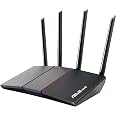
The ASUS RT-AX55 AX1800 Dual Band WiFi 6 Router combines next-gen 802.11ax technology with a powerful 1.5GHz quad-core processor to deliver ultra-fast wireless speeds up to 1800Mbps. Covering up to 3000 sq ft, it supports MU-MIMO, OFDMA, and Beamforming for efficient multi-device connectivity. With lifetime AiProtection security and parental controls, plus Mesh WiFi compatibility and 4 Gigabit LAN ports, it’s designed for seamless, secure, and expansive home networking.


| Wireless Type | 802.11a, 802.11ac, 802.11ax, 802.11g, 802.11n |
| Brand | ASUS |
| Series | RT-AX55(Black) |
| Item model number | RT-AX55(Black) |
| Operating System | Apple iOS, Linux, Mac OS, Microsoft Windows |
| Item Weight | 13.1 ounces |
| Product Dimensions | 9.06 x 5.28 x 2.2 inches |
| Item Dimensions LxWxH | 9.06 x 5.28 x 2.2 inches |
| Color | black |
| Voltage | 110 Volts (AC) |
| Manufacturer | ASUS |
| ASIN | B08J6CFM39 |
| Date First Available | September 16, 2020 |
B**.
Fast, Reliable, and Easy to Set Up
This ASUS router has been excellent. Setup was quick and straightforward, and the WiFi 6 speeds are noticeably faster and more stable compared to my old router. Coverage is strong throughout the house, the parental controls are easy to use, and I like the added peace of mind with the built-in lifetime security features. With 4 gigabit LAN ports and mesh support, it’s a great value for the price.
K**K
Asus Router
This router is replacing a 3 year old unit from another brand. This old router, while working fine is part of a controversy and possible ban. In view of this I felt I could no longer use or recommend this brand. Enough of that.After doing research I had narrowed it down to 2 routers , this Asus and another from Netgear. Then the Asus came up on sale and it also had a 30% discount coupon to top it off, bingo done deal.Basic setup was a breeze. I used the wired connection for setup. I am not a big fan of apps and did not want to install an app on my phone that I would never use. The wired setup all worked great, there were a few options that I use that required a bit of searching and trial and error but I got everything set as I wanted.I am marking this as a 4 star because of the firmware update feature. The wired app has a tab to select for firmware upgrade, Clicking this came back to ‘couldn’t connect to the update feature, please got to Asus.com and download the firmware update and install it manually’. Well that’s no convenient but ok I have no problem doing it manually. So while I was on the site I registered my router and got confirmation that it was done and welcome to the ‘Asus family’ great. So now I selected my registered router and went to download the firmware update. Here begins the problem. When you use the drop down menu to select your OS it has every Windows OS however no options for Linux. I stopped using Windows over 10 years ago and I won’t go back.I submitted a question to the tech support people about how to go about getting the upgrade for a Linux OS. As of this writing I have received an acknowledgment the my query was received and they are working on a solution, but nothing else. Hence the 4 star review, not everybody uses Windows!I will wait and see, for awhile, but this maybe a deal breaker for me. Time will tell...Asus tech support did contact me yesterday and the firmware update issue has been resolved.I also failed to mention that I am having no WIFI problems, dead spots etc. Honestly, this is the third router I have had and had no coverage problems with any of them. I think it has to do with the placement of the router. I have a 2000 sq/ft 2 story home. I place the router on the second floor just a bit off center of the house. I have no problems anywhere, in the basement to the farthest corner of the yard, it just works.I can recommend this router to anyone who is looking for a simple to set up and use router.
K**D
Security and the choice to WPA3 or not…
My first ASUS router was a freebie courtesy of T-Mobile. While that router got software updates, I was really impressed with its software. It was fairly end-user focused (consumer routers _usually_ get this right, with some notable exceptions, TP-Link!), and a few of them are relatively complete in terms of more advanced features someone like me would be looking for as well. The ASUS software was pretty friendly, only had a couple of quirks in the more advanced sections where more advanced users would immediately notice what didn't work and why not, and was generally very full featured.If you've still got one of those old "T-Mobile TM-AC1900" branded RT-AC68Us in service, you need to stop using it. The things are dangerously insecure today, ASUS knows it, and I've been told the fault for that lies with T-Mobile, but rumors may not always be true. What is true is that if you try to hack your one working router and screw up a firmware downgrade, you'll wish you'd bought its replacement first. No, I don't have first hand experience this time, but I've made mistakes before, so keep reading!I liked the ASUS software before, and it's only improved since. One of the cool little features it has now is a security checkup on your router that performs a bunch of sanity checks. Even if you're not a n00b, I really suggest looking this over, because you might have missed a setting. For example, it's going to tell you that WPS is turned on by default and suggest you turn it off. It'll also tell you if certain things are enabled you might have turned on deliberately, just to make sure you know what you're doing if you have them on. (Or if something or someone turned them on without your knowledge…)This brings us to AiMesh and WPA2.If this router has one point of disappointment for me, it's that AiMesh requires WPA2 and cannot be used with WPA3. One of the major reasons I moved to a WiFi 6 router is that if you think your network is secure with WPA2, I have a whole bunch of bridges to sell you, real cheap. WPA2 is about as secure as writing your network password next to your address on a billboard along the nearest highway.Okay, that's not quite true—WEP was that insecure, WPA2 at least requires a couple of minutes to hack your wifi password. But only a couple of minutes, realistically. And if you want to use AiMesh, WPA2 is the best you get for encryption, sorry. That's because probably nothing before WiFi 6 devices will support WPA3, and part of ASUS's marketing is that you can turn your old WiFi 5 (802.11AC) router into a mesh router extension. You can, but because of that, WPA3 is off the table, even if you're not using any WPA2-only routers in your AiMesh.I don't need AiMesh in this location, so I can just use WPA3 and be done with it. And that means the router's OS will warn me every time I set my WPA3 password that I should consider WPA2 instead for AiMesh and greater device compatibility. No, no thank you.Granted, WPA3 denial of service is possible, but mitigations exist for that … you just do what you can. Everyone wants more security and to also at the exact same time transmit every single byte of data they want secured over the airwaves and just hopes nobody intercepts them. *shrug*I get why they're doing it in a home-focused product, but realistically homes are going to be all WPA3-capable sooner than many businesses will be, most likely. I'm not going to let that affect my review of this otherwise very nice product.Oh, another nice feature I almost forgot to mention! Support for more than one guest network! You can (should) put all of your smart devices on the same guest network which cannot talk to your home network computers. That way when one of those things that never gets an update gets hacked, the most it can do is play with your light bulbs, without the ability to use that as a way to start attacking your computers.
Trustpilot
2 weeks ago
2 weeks ago