
DOWNLOAD THE APP


Customer Services
Copyright © 2025 Desertcart Holdings Limited
DOWNLOAD THE APP

🚪 Unlock the future of home access—smart, simple, and always connected.
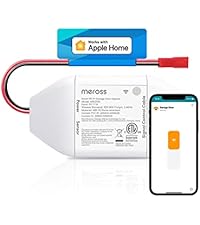
The meross Smart Garage Door Opener Remote (MSG100HK) is a universal WiFi controller that upgrades your existing garage door opener to smart status without replacing hardware. Compatible with over 200 brands and major smart home ecosystems like Apple HomeKit, Alexa, and Google Assistant, it offers app and voice control with no subscription fees. Featuring a wired sensor for precise door status monitoring and real-time notifications, it supports stable operation even during network outages. Easy to install and beginner-friendly, it keeps your original remotes functional while enabling remote access from anywhere.








| ASIN | B084Z5QZR2 |
| Additional Features | No subscription fees or advertising |
| Best Sellers Rank | #2,633 in Tools & Home Improvement ( See Top 100 in Tools & Home Improvement ) #14 in Garage Door Keypads & Remotes |
| Brand | meross |
| Built-In Media | USB adapter |
| Button Quantity | 1 |
| Color | White |
| Compatible Devices | Apple HomeKit, Amazon Alexa, SmartThings, Google Home |
| Connectivity Technology | Wi-Fi |
| Controller Type | APP and voice control |
| Customer Reviews | 4.3 out of 5 stars 17,904 Reviews |
| Item Dimensions L x W x H | 3"L x 2"W x 1"H |
| Item Type Name | Keypads & Remotes |
| Item Weight | 311 Grams |
| Manufacturer | meross |
| Max Number of Supported Devices | 1 |
| Maximum Number of Supported Devices | 1 |
| Maximum Range | 200 Meters |
| Model Name | MSG100 |
| Model Number | MSG100 |
| Special Feature | No subscription fees or advertising |
| UPC | 787446925615 |
| Warranty Description | 1 year |
N**C
Easiest Way to Convert to a Smart Garage Door Opener
Great product. I've owned many meross products over the years - smart indoor plugs, smart outdoor plugs, and smart water leak detectors. They have all worked very well with Apple HomeKit. Truly easy plug-n-play technology. When meross asked me to test this product, I was more than happy to oblige. The device is small (about the size of two packs of cards) and weighs next to nothing. You can use it to control one garage door opener. I believe meross has a version that can control multiple garage door openers too, but this only controls one. This device transforms your simple garage door opener into a smart garage door opener which gives you the advantage of opening remotely, getting notifications when it opens or closes, and allowing your garage door to be a part of whole-house automations (I use Apple Shortcuts to close the door at a certain time every night - just in case I forget after a long day). It took me only ten minutes to do the initial set up. An additional ten minutes were needed to tidy up my work (stapling up wires and securing them with cable ties). Fortunately, I did have a free electrical outlet near the garage door opener. Then it's just hooking up two wires and running a wire with the door-open/close detector to the garage door. The hardest part was getting HomeKit set up. You must have your phone on a 2.4GHz network (my Orbi has a separate one for the internet-of-things) and be within range. After three tries, I got the device set up (I don't think this was the fault of the meross device but rather my network or my iPhone). It's been over a week now (I recorded the video on day one). And the performance is solid. What's great is I can now open the garage door halfway down the street. This means the door will be open when I get to my house - no waiting in the car. Also, HomeKit lets you know when the door has been opened or closed. No more pulling out of the neighborhood and wondering if I closed the door or not anymore. And because I can now open the door anywhere, when my teenager came home early without their key the other day, I was able to open the garage door remotely from work. I can see this coming in handy when receiving deliveries from Amazon too. I hope you found this review useful. Thanks!
A**R
Great Device, but Needs an Apple HomeKit Hub
NOTICE: IF YOU WISH TO USE THIS SMART GARAGE DOOR OPENER WITH APPLE HOMEKIT YOU MUST HAVE A HUB EVEN THOUGH IT SAYS IT IS HUB-LESS IN THE OPENING BANNER. If you are comfortable using the device with the Meross app it works well without a hub and has excellent functionality. The adapter for my Chamberlain garage door opener is simply a wireless remote to which the smart garage door opener is attached. This allows a lot of discretion as to where to place the smart garage door opener since it does not have to be directly attached to the garage door opening machinery. It also means the device does not interfere with any of the existing wireless remotes or buttons in the garage. It comes with a wired sensor which detects whether the door is in the closed or open position allowing the app to notify you when the door is opened or closed or if the door is left open. You can set the time to receive notifications about the status of the door. The setup of the device is relatively simple and was easily done in about 20 minutes. The app connected quickly to the hardware by following the directions with care. In trying to make the device work with Apple HomeKit without a hub, I attempted a workaround using Google Assistant and a shortcut allowing me to call the smart garage door opener using Siri; however, Google Assistant requires a four digit pin which necessitated opening the phone anyway so it did not save anytime. Adding a widget for the Meross garage door opener on the home screen of the iPhone was the best alternative for opening the garage door as quickly as possible. Overall, I recommend this smart garage door opener with the caveat that it needs a hub for use with HomeKit.
J**E
THE solution to making any garage door smart!
I have an old Liftmaster garage door opener from the early 2000's. It is not smart, and can't connect to wifi. I was looking for a way to be able to control it from my phone, particularly through Apple HomeKit. THIS is the solution! It's compatible with TONS of different brands and models, and you can check which brands on the Meross website. I've used other Meross products before (smart plugs, thermostat, etc), and I've never had a bad experience with any of their products. Like all Meross products, their garage door opener checks all the boxes: Reliable wifi that never drops connection, small and never gets in the way, premium quality, and easy to install and use. This product plugs into a power outlet for power (no batteries), and in my garage the outlet was a bit far away from the unit, so I had to run an extension cord, but it was no problem at all. Setup may seem challenging at first, but it's actually pretty simple. I have ZERO electrical or wiring knowledge and I was able to get this fully installed and operational in about 20 minutes. The Meross app is super helpful in the setup process. It shows step by step instructions in clear English with pictures! That was very helpful in knowing which ports to plug the wires into from the device into the Liftmaster. See attached pics for where I plugged in the wires in mine, but of course every garage door opener is different. And of course, the HomeKit paired quickly and works like a dream. I have a HomePod Mini to act as my Home Hub, so I can even control my garage door and monitor its status (is it open or closed) even when I am away from home. It also works with CarPlay, so I can now finally control my garage from my car's touch screen with CarPlay. My car does not have a HomeLink button built into the car. I even set it up with an automation, so as soon as I drive away from home it closes my garage, and when I pull up to my house it opens the garage. I do want to mention, I am personally using this with HomeKit, but I believe it works with Alexa, and Google Home as well. And you actually don't need any of those three, because you can also control it from the Meross app directly, which actually is a very solid app itself. This product is quite literally life changing, and makes my quality of life so much easier. Using this Meross product is so much more secure since I can monitor and control my garage from anywhere. Plus, I no longer am having to change the batteries in that old-school clicker every 2 months. In fact, I don't even keep that thing in my car anymore! Overall, it's a fantastic product and I highly recommend it to anyone wanting to make their older garage door "smart".
J**R
Easy install, works great with Apple Home, just a few setup quirks
I picked up the Meross garage door opener to integrate my Chamberlain unit with Apple Home, and overall I'm really impressed. Installation was quick—took me about 30 minutes, including a couple trips to the basement for zip ties. The included double-sided tape made mounting the magnet, sensor, and receiver super simple. As long as the magnet lines up with the sensor when the door is closed, you're good to go. Wiring into my Chamberlain opener was straightforward once I figured out which wires were for the wall switch vs. the obstruction sensor. The Meross unit needs to be installed near the wall switch, so keep that in mind. Adding it to Apple Home was seamless—just scanned the code and it started working immediately. I did run into a hiccup trying to get it to work with both the Meross app and Apple Home at the same time. Initially, installing it in the Meross app would cause the Home connection to go unresponsive. After a couple resets and removing/re-adding the device, I got it working smoothly in both apps. Functionality has been solid. One minor quirk: if I pause the door mid-close, the Home app reports it as obstructed due to a timeout. Even using the wall switch wouldn’t clear the error, but toggling the door from the app fixed it. Despite a few setup quirks, this is a cost-effective and reliable way to bring smart control to a Chamberlain opener. Would definitely recommend for Apple Home users looking for an easy upgrade.
R**O
Works flawlessly and integrates perfectly with Homekit, Google, and Alexa
I purchased the meross Smart Garage Door Opener Remote after researching several options, and it has exceeded every expectation. Installation was fast and frustration-free. I had it wired and connected to Wi-Fi in about fifteen minutes using the clear step-by-step guide in the app. The hardware feels well-made, and all the included mounting materials are thoughtfully designed to make setup clean and simple. Performance: This opener has been rock-solid since the day I installed it. My garage door responds instantly to commands through Apple HomeKit, Google Home, Alexa, and even the Meross app. And the real-time door status updates are accurate every time. Siri and CarPlay integration have been especially convenient — I can open or close the door hands-free as I drive up without even unlocking my phone. Compatibility: Unlike many other models I considered, this one truly works across platforms. I've used the opener with Apple HomeKit, Alexa, Google Assistant, SmartThings, and Siri and it functions perfectly on these platforms. Automations such as “close garage when leaving home” or “open when arriving” work flawlessly and without lag. Reliability and Build Quality: The Wi-Fi signal stays strong even with my router more than 50 feet away, and the door sensor consistently reports accurate status. It works exactly as it is supposed to work--that's obviously very important for something like a garage door opener. Bottom Line: If you want a dependable, well-integrated, and easy-to-install smart garage controller, this is the one to buy. It adds real convenience to everyday life and costs far less than many comparable systems that do less. Don't waste your time using the MyQ system that came with your garage door opener. This Meross opener performs better than MyQ, works across platforms, and there are no subscription fees. It's a wonderful device.
T**R
Very easy to setup and get going.
So far so good. I need to have reliable smart-device based garage door opener. I use the Apple eco-system and Homekit, combined with a Homebridge setup, and my priority is to have a smart-connection so I can ask Siri to open the door with my motorcycle communicator (I have Cardo Packtalk Edge) so I can easily park it. First, I had a myQ. I dumped it because they want a subscription to allow smart-home access. For the next few years I went with Aladdin Genie. They are free for smart-home functionality, but since I had that, I had NONSTOP issues with that. It didn't want to connect to my router from inside the house (I have a separated garage, so there is distance between router and the garage connected to the alleyway behind my house.) It would see my wifi, but just blink that it still had connectivity issues. So I got a more powerful router and that thing has no trouble connecting to anything in my garage... except that Aladdin unit. Then I got a repeater in the garage. That had no issues connecting to my router and still, the Aladdin unit had issues even with that. I gave up on the Aladdin when I got locked out of my own garage. It decided to just not connect to the app. Very weird too, it was disconnected right around 3pm, but when I got home at 1am after work, it worked. Maybe they had server issues, but then again, they don't send any emails saying there will be issues. And it happened Monday, Tuesday, then Wednesday. Not very convenient. Now after all that, I did my research and landed on this. The online community who knows Apple Homekit seemed to recommend Meross, and I never heard of them before, and I decided to give it a try. I got the unit and I watched a couple YouTube videos, followed the included instructions, and I had this device up and running in about 30-40 minutes, including tie-wrapping the cables and securing the device. After a few adjustments, learning some functionality in the app (like disabling doors 2 and 3 so Homekit doesn't access them for now, as I only have 1 garage door opener for a 2-car garage) I'm happy to say that this device works great. ZERO connectivity issues so far as my router and my repeater show full strength connection (the Aladdin did too so I'm assuming its on their end). The moment I "flip the switch" in Apple Home, or press the button in Carplay, the garage door opens and closes near instantly. My garage door opener is at LEAST 20 years old and to get it connected, it was just two wires. There is a compatibility list for openers on Meross's webpage so check BEFORE you buy. Because its wired to my garage door, theres no "learning" required and no button to push like an in-car garage door opener. The only thing I liked with the Aladdin device (when it did work) and the myQ was when a signal was sent to open or close the door, or if an automation kicked in (I had a requirement to shut the door after 30 minutes being open,) they had a bright white warning light flasher to indicate the door was about to move, since you didn't push any buttons. Meross's device DOES NOT have that, so if you setup an automation similar to mine, the door will immediately respond without warning. Also, It is important that if you tinker with the wiring, which you likely will be, to verify that you did not disconnect or cause your garage door obstruction safety system to be disabled. Another plus that I have with the Meross is its open/close sensor, which appears to be magnet based. You run the line from the Meross box to the garage door. I have mine at the top corner to my door along the wall, with the additional magnet also right next to it on the door itself. Very similar to window security systems. When you setup your app, it'll go into detail to verify the system is working by using these sensors. What I LOVE about this is that it is not battery based. The Aladdin and myQ used a button-battery-based sensor you stuck to the door which needed to be replaced after a year or two. Not necessary with the Meross thankfully. In fact, the other disadvantage I had with the battery sensor was in winter when the door was very cold as it gave poor performance. And if the battery sensor failed or disconnected due to a dead-battery, or a frozen battery, those garage door openers also failed because it couldn't tell if the door was opened or closed. Thankfully not the case with the Meross. I certainly recommend this unit, especially for people with more than one garage door. I may only have one opener but I know that when I replace that door and add a second opener for that, all I have to do is run another sensor line for that door similar to the way I did my current door and that this package ("meross Smart Garage Door Opener Remote with External Antenna" in case Amazon links this review with other Meross stuff) already comes with that expandability (up to 2 doors out of the box, if you have a 3rd garage door, you need another sensor cable add-on.)
T**Y
My garage is now smart
All-in-all, this little device works well and consistently, giving me remote access to opening/closing my Genie garage door. I purchased this MSG100 just a bit over a week ago. I was initially surprised to find some pieces missing (little screws, adhesive pads, test wire), so I reached out to Meross to see if there was anything they could do. They were able to send me a new package, this one with the missing pieces. Now that I had everything, I was ready to set it up. It really wasn't that difficult. I was initially worried that I didn't know enough about garage doors to do this, but it really wasn't that difficult. I watched a YouTube video where someone mounted this that gave a good easy-to-understand visual. They give you a little piece of wire that you can use to connect between two contacts on your garage door in order to test if the device is compatible with your opener. In my case, the terminals I needed to test had a number 1 and 2 next to them (see attached picture). If you would like to test before you decide to order, you can just use your own wire, or take a pair of pliers and bridge the connection. If your garage door opens/closes when you touch it to both of the terminals, then the Meross device will work. Walking through the app will go over all of the directions. After testing, they recommend to go ahead and plug up the device to power inside your home to get it started with wifi setup. If you can plug it up in the garage, that will also let you test if your wifi will reach. Once I had the app setup, I moved on to installing it. I used the provided adhesive pads to stick the device on top of the opener itself, and just bundled the cables together so they're all up there (see photo). The power cable is a USB plug that connects to a regular power adapter, and there should be an outlet just above your garage door opener. The control cable has two leads that now need to connect to those same two terminals that were tested before. The final cable on the device has a red connector that attaches to the long cable included for the door sensor. This was probably to longest part since I had to run the cable across the rail to the door itself. There should already be some wire running across this rail to one of the control levers that stops the door when it's closed. I just followed that and put the new wire under the plastic clips holding the existing wire. In my case, I opted to attach the sensor using the included adhesive pads to the top of the plastic piece that slides along the underside of the rail (the emergency release lever part). This is what the guy did in the Youtube video. It was a shorter run and easier than attaching the sensor on the door, while also serving the same purpose. If you do the same, just keep in mind this plastic piece also hits the levers on the rail to stop it once it's closed, so just put it like in the picture attached so it doesn't conflict. Once all was done, I just opened the app and tapping the garage door icon was opening and closing my garage door! It initially was giving an error saying that the garage door failed to open or close, even though it opened/closed just fine. This is because of the "Opening time" setting that you will need to adjust. This setting tells the app to wait a longer/shorter time before checking to see if it completed successfully. Since my door takes a while to open, I had to change the 15sec default to 20 seconds. Now I don't get the message, and successfully get notifications when the door opens and closes. These notifications work even if you use your manual remote or button in your car to open, which is cool. And on top of that, it also integrates with Alexa. Just download the Meross Alexa Skill and link it, then you can open and close it with your voice. At the end of the day, it works quite will so far and I am very happy with it. I was apprehensive at first due to my lack of knowledge, but it really was pretty simple. And Meross came through and did the right thing to get me the missing parts so I didn't have to return it. Just give them some time to respond. Final note: If I did have one small gripe so far, it would be that once you have it integrated with Alexa, the Alexa app does not have an open/close button that you can tap. So if you do not want voice control, you can't use the Alexa app to control it, so you'll just have to use the Meross app. I'm not sure if it's an issue with the Alexa app or the Meross skill. The Alexa app does not treat the garage door opener like a smart plug with a simple on/off button. I can't dock them for that, but if Meross and/or Amazon are listening: you guys should get together and find a way to have a simple open/close button in the Alexa app just like you do in the Meross app. That way you can use the Alexa app as the hub even if you don't want to use voice.
L**L
Wish I Bought These Sooner
All to often, my wife calls me after she leaves the house to check if she closed he garage door. It's always closed, but I still have to check, so I looked into turning my opener into a smart opener so she could check by herself. After eliminating any device that requires a subscription, the Meross Smart Garage Door Opener emerged as the potential best choice for me and since the price was right, I bought three, one for each door. For some reason, I thought they would be a little larger but they are nice and compact. They arrived quickly and were packaged very well, with three boxes inside the larger (but still small) box, each containing a piece of the puzzle, opener unit, door sensor and cable, and installation accessories (not many). If you're at all handy, installation is pretty easy and straightforward. First plug in the unit (USB powered, adapter and cable provided) and the Meross app and it will connect to your wifi and walk you through the installation process. First one took about an hour, the other two, about 20 minutes each. A few installation tips (I have Marantec openers, yes I had never heard of them before either, but they came with the house and Meross said they are compatible, which they are): * I added a pigtail to the wires that connect to my opener just to give me a little more wiggle room and make it a bit easier. * Have a lot of zip ties around. They provide one, I guess to tie down the unit but I had to zip tie everything near the opener because there were a lot of wires (I also use the opener outlets to power security cameras) and the sensor wire is VERY long (had to coil up more than ten feet). I used 5 inch and 8 inch ties. Didn't need anything larger. * Comes with double stick tape for the sensors, but I also screwed them in, just because (screws are provided). * No special tools needed and if you don't pigtail the connection wires, I'm not sure any tools are needed (other than a ladder, and maybe something to snip the tails off the zip ties). I like the app as well. Somewhat basic but easy to use. Can set up notifications when the door opens/closes, is open for more than a specified period of time (mine is set for 30 minutes), or is open after a certain time (I'm set for 9:00 PM). It will also close the door after a certain length of time (I have this turned off), or after a set time (10:00 PM for me). You can set it to beep when it's closing the door (turned off). Says it works with Alexa , Google Assistant, and optionally, Apple HomeKit but I don't use any of these as I figure there are enough things listening to me already, so I can't comment on those. Also, I've only had it for a short time so can't comment on any longer term issues that may arise, but I'll update this review if necessary. I'm very impressed and if/when I do decide to automate more, I'll look into additional Meross options. To me, it does all I need it to do.
Trustpilot
1 week ago
3 days ago