
DOWNLOAD THE APP


Customer Services
Copyright © 2025 Desertcart Holdings Limited
DOWNLOAD THE APP

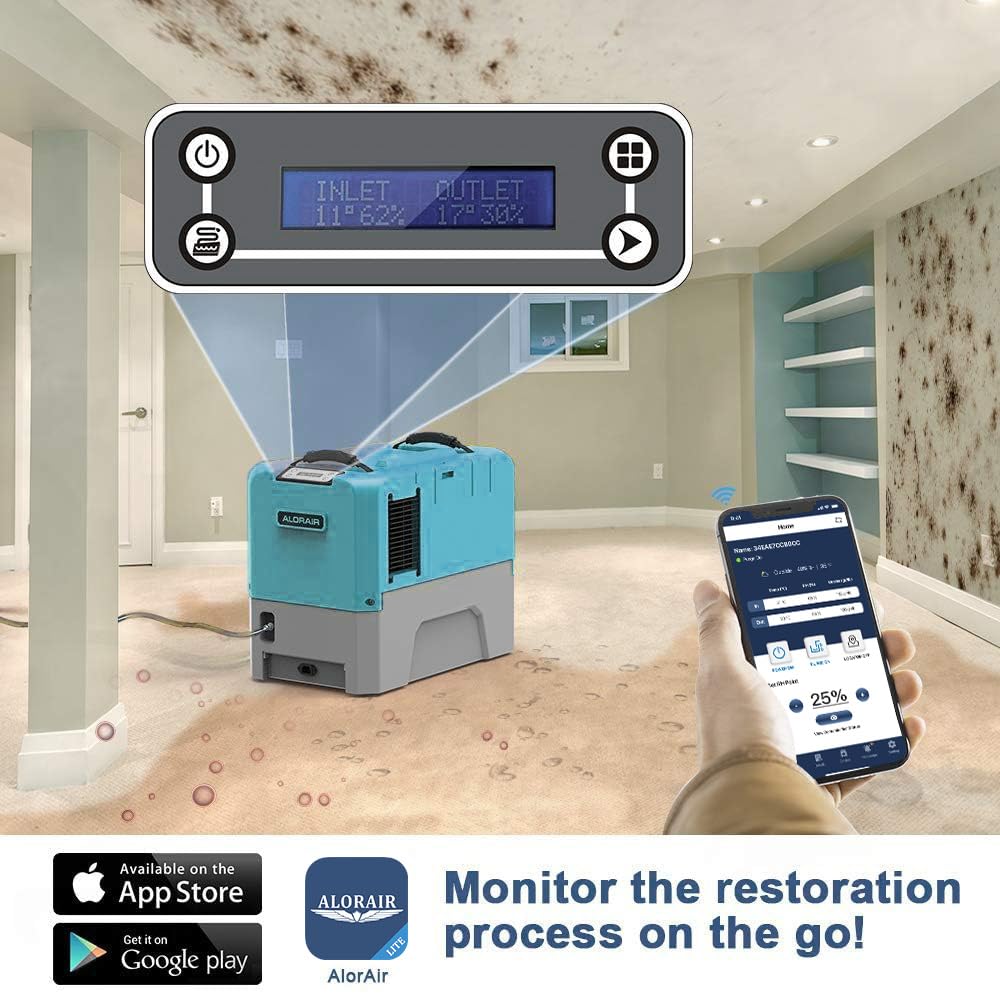


💼 Elevate your workspace climate control—smart, powerful, and always connected.
The ALORAIR Storm LGR Extreme WiFi is a commercial-grade dehumidifier engineered for large-scale water damage restoration and flood repair. Featuring a 180 pint per day moisture removal capacity, app-based remote control, automatic defrost, and built-in condensate pump, it combines industrial power with smart technology. Compact and portable, it fits tight spaces and supports continuous operation with memory restart after power outages. Ideal for professionals managing demanding environments, it comes with a 5-year warranty and ETL safety certification.







| Best Sellers Rank | #652,595 in Home & Kitchen ( See Top 100 in Home & Kitchen ) #702 in Dehumidifiers |
| Brand | ALORAIR |
| Capacity | 180 Pints |
| Color | Blue |
| Customer Reviews | 3.6 out of 5 stars 281 Reviews |
| Floor Area | 2300 |
| Product Dimensions | 22.8"D x 13.7"W x 17.3"H |
J**R
The APP does actually work.
I don't normally write reviews, but I am responding to the other reviewed that reported that the Wifi App does not work. I can't speak to android, but on iOS (iPhone) the app does work with a glitch or bug that must be overcome. I almost did not but this unit because of the reviews stating that the App doesn't work, but since I can usually figure technical bugs, I decided to give it a try. I read the instructions, I turned the humidifier on. After 30 minutes, I confirmed that it was functioning by clicking the button to manual turn the pump on which pumped out quite a bit of water that it had collected. Also the screen showed inlet humidity was 61% and the outlet humidity was 28% and the coil temperature was 44 degrees F which is what would be expected to dehumidify. Now that I was satisfied it was working (only for 1 day - can't speak to reliability yet), I decided to try the Wifi App. I signed up and sure enough, it would not recognize my username and password and it would not directly connect to the dehumidifier. I started to think it was true that the App didn't work, but I didn't give. After 10 more minutes I git it working and here is how I did it. Summary (If you don't want to read the details). After you sign up on the App, you have to go to your email and click on the link they send you to verify your email so they will activate your account. The problem is that the App does not recognize your original email that you entered when you registered. You need to click "forgot password", go to the email they send you to reset your password (which is misspelled in the App as "Restart Password". After you enter a new password, the App will sign you in and you can follow the rest of the instruction to get it to work with the internet (I don't know if direct connect works or not). 1) I installed the AlorAir App on my iPhone. 2) I opened the App and went to Sign Up 3) I registered with my email address and a password which I wrote down. It made me put the password in twice to register and I wrote it down, so the password being wrong should not have been an issue. 4) I tried to sign in on the App and it said my account was "not activated." I realized that they may have sent me an email to verify my email address to activate the account. And, that is exactly what happened. I clicked the link to Verify my email, it sent to my web browser and open a webpage that said my "Account is now Activated." 5) I got excited and went back the the App and tried to sign in using the e-mail and password I registered with. Low and behold, the App told me something like "User credentials incorrect" or "Username or Password is not correct." I tried multiple time and it would not recognize me. I know I had the correct password, because it sent me the email to activate. I knew it was recognizing me and the account activated because the the App now said Username or Password is not correct" rather than "not activated." I gave up and thought the App actually didn't work. 6) However, when I got up in the middle of the night to go to the bathroom, it popped into my head to try to click on "Forgot Password". I did this, they immediately emailed me a link to reset my password. I entered a new password (it only has one password field with no confirmation of the password, so write it down accurately) and clicked submit. It said password reset successful. 7) I want back the App and signed with me email and the new password and it logged me right in! 8) Then I had to get the Dehumidifier to log on the internet. The App just sat there frozen with a spinning icon and the unit was not connecting to the internet. I turned the dehumidifier off, unplugged it for 15 seconds then turned it back on. I manually closed the App by swiping up on it on my iPhone. I reopened the App, signed in again, followed the instructions on the screen carefully and this time it hooked right onto the internet and is working Great!
J**.
Alorair-r lite Wifi App no longer supported
I bought the machine in October 2024. It worked great for the first month. Then it would go offline for a day or two at a time. No, it wasn't anything with my router or phone. Long story short....I had the unit powered down for a couple of months because the temperature in the crawlspace was too low. I powered the unit up and it would not connect to the app. After hours of personal troubleshooting, I had no success. I finally broke down and called Alorair support, explaining everything I had done. Their reply was, "It isn't you. The app is no longer supported. We hope to have a resolution by July, but it might not be by then." I bought this version for the sole purpose of the app. Their support team suggests that I use it without the app. However, I like to monitor it for many reasons. Who wants to crawl 30 ft. to get to the unit every time you want to check the status....plain ridiculous. BTW, I purchased my unit for nearly $1k and now it's going for $300 less. I assume it's because of the app issue. Buyer beware. UPDATE 6/15/2025 After posting my initial review, I was contacted by Alorair 2 days after the review by email. In short, they wanted to assist anyway they could to make me happy. I reply to them, make the app work, and I will be happy and change my review. Lo and behold, the app is working today. I will repost in a week to let you know the current status of the app. I am changing my rating based on their quick action. I am giving a 4-star review, but will happily give a 5 if things continue to work. Update 7/17/2025 The app is no longer working once again. Initially, I was told the new app would be released in July, and now I am being told August. Thus, I am downgrading my rating.
S**E
Nice study product. Runs quietly and efficiently.
This one is built to last. I like the efficiency. It has an input filter to catch the dust. I run it 24/7. Costs much more than consumer dehumidifiers but I cannot keep buying a new consumer version every 3 years. It is quiet, that alone is worth part of the equation.
C**E
Solid product - highly recommended
After decades of using residential dehumidifiers that die within a few years, I discovered the world of commercial-level dehumidifiers a few years ago. Wish I had looked into it earlier; I would have saved a lot of money in the long run. This is the third Alorair product I have purchased over the last several years. I have the Sentinel HDi90 and Uni-P Dry Pro 120X permanently installed for basement and crawl space drying in separate buildings. I just purchased the Alorair STORM LGR Extreme with Wifi to use periodically in a portion of my home that never seems to be dry enough during the summer, despite AC and crawl-space dehudification. The product came well packaged and is a solid 70#. Cord and hose are good quality and a light in the plug indicates a live power socket. Handles on top make it easy to move around. It has a built in pump and is a little smaller than my HDi90 unit. The unit can be programmed to run using the onboard LCD display or you can connect two different ways via WiFi. There are several programming options not found on the usual dehumidifiers (such as controlling purge function). The device also gives a lot more real-time information such as both intake and outlet data. It has memory restart which I need because of frequent power-interruptions. After downloading the App to my iPhone I set the unit up using the home WiFi option. It took me a couple of tries to get the software installed mainly because I wasn’t reading the directions on the iPhone. Once I followed the instructions correctly, everything installed fine. I can now monitor and control the unit remotely. The Alorair-R app has a lot of functions that I can imagine would be very useful to a commercial restoration company. You can create working plans, assign dehumidifiers, track the dehumidifiers using GPS, and monitor them all from your phone. These units are modular and can be stacked. So far the unit is keeping my 700sq ft cabin dry. We’ve had historic levels of rain recently but no humidity issues inside. It is relatively quite despite a high CFM and I am pleased. Highly recommended
N**5
Great unit, app sucks
I installed this in the basement of an old building we purchased that was very damp. Handles on the unit made moving very easy. It’s working great. Two negatives: 1). not a whole lot of tubing provided; 2) The instructions leave the impression that you have to download the app and set up an account to operate this thing. I set up my account multiple times and every time I tried to connect to the unit I got a message telling me my account was invalid, along with some Chinese writing. Enough for me. The app is deleted. I can’t operate the unit remotely - how’d we ever manage before remote operation of everything. 😊. The important thing to me is that it’s doing a great job in the first week of operation.
L**G
Manual operation is good. App does not work
I bought this unit for placement in crawlspace that would not be accessed regularly. Wi-Fi connectivity and I phone AlorAir app was essential for purchase decision. In a nutshell Wi-Fi just does not work. Customer service has been responsive but sill no solution after several months. two new control boards were sent, but did not solve the porblem. My thoughts right now: don't buy the unit if you need Wi-Fi connectivity. if you can go to the place where you are using it easily, then the manual controls work good using the humidity setting. But buy one of the units that are lower cost and do not have Wi-Fi or look at other competitor options. would be 5 stars if the WiFi worked Update: 1/26/24: Customer Support made the positive difference with this company. Initially only 3 stars due to the above issues. However very persistent customer service trouble shooting each area, direct phone calls and follow up finally resulted in the new App talking to my WiFi communicating with ALORAIR LGR Smart WiFi: The App Home Screen is easy to read for summary and unit control. The detail screen provides additional supporting information on how effective dehumidification is in the crawlspace. Being able to monitor and control remotely is fantastic!.....Overall rating is upgraded to a solid 5. Updated 12/20/24: The App. continues to be completely unreliable requiring climbing into the crawlspace to turn unit off or on. Updated 5/20/25 App still not working. Updated 9/2/25. App still not working
P**E
Quiet, works well, and tons of features!
I’ve previously used big box store dehumidifier but they were not able to keep up with the humidity in my basement. I was told to look into light commercial units and came across the AlorAir products. I’m very happy with my decision to purchase this unit. I was looking for something mainly to help with humidity in my basement during the hot summer months but I also wanted something portable so that I could move into my garage when needed. When all the rain or snow from our car fills the garage with moisture this unit has no problems pulling it from the air. Even on the cold days I was able to run this successfully because it has a built in defrost function that keeps the coils from freezing up. Then when I’m done I can easily move this myself back into the basement to take care of the summer humidity. I was also very surprised at how quiet it is while in operation. I have a small office/home theater in my basement and am not bother at all by the noise while this unit is running. The coolest thing about this unit is all the little features it has. The build in Wifi is great, and I was able to get it setup relatively quickly with the included instructions. Very important to me was that it has a built in pump so you can pump the drain water wherever it needs to go and not have to rely on gravity. Also, this unit gives you so much information that I’ve never seen on other dehumidifiers. It displays the temperature and humidity of the inbound and outbound air. It will show the current amp draw, the temperature of the coils, as well as the running hours of the machine. Plus a few little things that show they really thought this unit through… 2 heavy duty lifting straps attached to the top of the unit for moving it around, the power cord end is lighted so you know that you are receiving power from the outlet and there is a Velcro strap attached to the unit for securing your drain hose or power cord when not in use. Overall this unit is great at what I needed it to do… remove moisture from the air. With that alone it is worth every penny over cheap big box store units. But then throw in all the extra features this unit has and you can’t even compare it to anything else. Bottom line, if you need a serious dehumidifier you won’t be disappointed with this one.
S**R
It's good for a basement but, not a crawlspace with dirt and ventilation
Background: Recently, the crawlspace of my 1200 sqft home flooded due to heavy rain and poor placement of downspouts. I bought an industrial grade debris pump and flushed out the water. I then installed a french drain and sump pump to avoid future flooding. At that point, obviously the air was saturated with a Relative Humidity (RH) of about 89%. So, I wanted to find something that will permanently be in the crawlspace and help dehumidify. Shopping around I found this unit that was easy to setup and had a Wifi to monitor. Kudos to Alorair for the APP integration and ease of setup. I liked the overall setup experience. The power wire and drain pipe were sufficiently long. All the below feedback is based on using the unit for about ~143 hours (6days): I used a TP Kasa Link Wifi Switch to monitor the power consumption. The unit consumes around 485 Watts. Cost per day during continuous operation: 9.71 kWh * $0.33 ~ $3 (Attached image of power consumption) Approximate per day running cost is about $3. I setup a Govee wifi thermometer with temperature and humidity monitor every 10 minutes within 2 feet of the Alorair unit. The data captured is attached and shows that the relative humidity when I setup the unit to 6 days later came down by about 5%. I also collected the purged water from the unit in a 96 gallon trash can. Over a 6 day period, the bin accumulated about 25 gallons of water averaging 4.2 gallons a day which translates to about 33 pints per day (PPD) (I was expecting it to be much more since the listing says 180 PPD). Overall I was not satisfied with the performance especially the amount of the purged water. It may be good for an enclosed space like a basement to keep the humidity low. Or may be my unit was faulty.
Trustpilot
1 month ago
5 days ago