
DOWNLOAD THE APP


Customer Services
Copyright © 2025 Desertcart Holdings Limited
DOWNLOAD THE APP
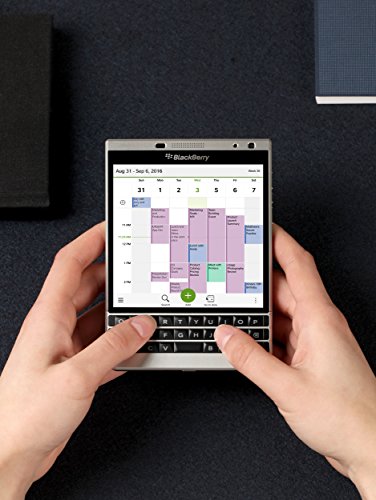
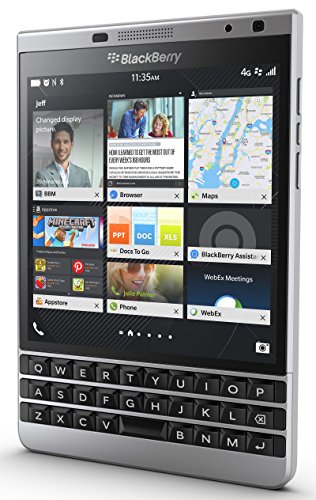
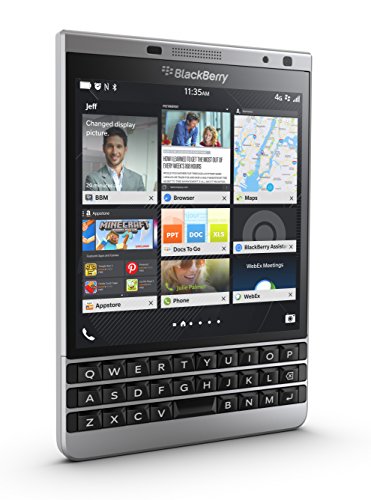
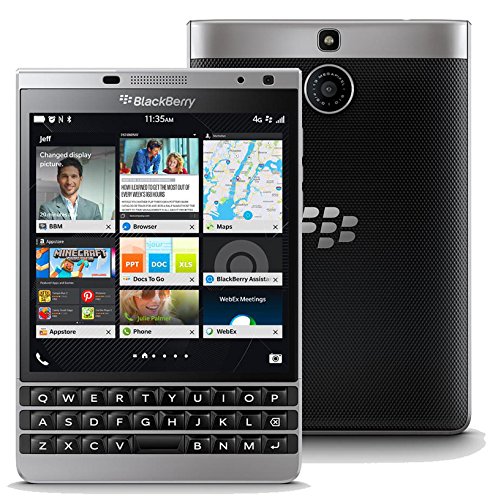


⌨️📱 Power your professional edge with the BlackBerry Passport Silver Edition!
The BlackBerry Passport Silver Edition is a GSM unlocked smartphone featuring a unique 4.5-inch square 1440x1440 IPS touchscreen, a long-lasting 3450mAh battery with up to 30 hours of mixed use, and a touch-enabled physical QWERTY keyboard that doubles as a trackpad. Running BlackBerry OS 10, it supports both native BlackBerry apps and Android apps via sideloading, making it a productivity powerhouse designed for business professionals who demand security, durability, and seamless desktop integration through BlackBerry Blend.


| ASIN | B011DJN5K8 |
| Audio Jack | 3.5 mm |
| Batteries | 1 Lithium Metal batteries required. (included) |
| Battery Capacity | 3450 |
| Best Sellers Rank | #503,464 in Cell Phones & Accessories ( See Top 100 in Cell Phones & Accessories ) #10,170 in Cell Phones |
| Color | Silver |
| Connectivity technologies | Wi-Fi |
| Customer Reviews | 4.2 4.2 out of 5 stars (1,618) |
| Date First Available | August 5, 2015 |
| Display resolution | 1440x1440 pixels |
| Form Factor | Smartphone |
| GPS | True |
| Human Interface Input | Keyboard |
| Is Discontinued By Manufacturer | No |
| Item Weight | 7 ounces |
| Item model number | PRD-62121-001 |
| Manufacturer | BlackBerry |
| Memory Storage Capacity | 32 GB |
| OS | Blackberry |
| Other camera features | 13 MP |
| Other display features | Wireless |
| Phone Talk Time | 30 Hours |
| Product Dimensions | 5.1 x 3.5 x 0.36 inches |
| RAM | 32 GB |
| Ram Memory Installed Size | 3 GB |
| Scanner Resolution | 1536 x 864 |
| Special features | Built-In GPS, Mobile Hotspot Capability, dual-band, dual-camera, smartphone |
| Standing screen display size | 4.5 Inches |
| Weight | 0.44 Pounds |
| Whats in the box | Camera, Video Recorder |
| Wireless communication technologies | Cellular |
W**R
A truly impressive device
I am extremely impressed with the capabilities of this device and the thoughtfulness and coherence of the BlackBerry 10 operating system. I've had the Passport now for a couple of months, and recently received the 10.3.1 OS update, which added a ton of cool new elements, including emergency battery saving mode. I've stumbled across a number of other features, though I'm not sure if they are new or not, like "advanced interaction" which does stuff like silence or shut off screen when the device is flipped over (also I'll note the universal search is amazing ... for example I couldn't remember the term "advanced interaction" but I just typed in "flip" on the home screen and, among the results, was "advanced interactions" in settings). I also recently discovered the keyboard shortcuts, you can assign an app or a bunch of other actions to the long press of any key. It would take too long, and frankly I don't remember off hand, all the pleasant little surprises the OS and the device offer, but it's pretty cool. I will say I saw one review complaining about the combo virtual and hard keyboard. I'll say I think the arrangement is genius (how does one complain about a partially virtual keyboard but embrace a fully virtual one? Makes no sense). Anyway, you need to realize that the keyboard is touch sensitive. So, a back swipe = "backspace". And a down swipe = shift. Further, though the virtual keyboard appears when you swipe down (shift), you don't actually need to use it: When you "shift" you can then press the hard key corresponding with the soft key, so for example, swipe down then press the "m" key and you'll get a dollar sign. Though the secondary character isn't printed on the hard key, it works exactly as you'd expect a keyboard with the shift key pressed to operate. Finally, a swipe up selects the predictive text word being suggested for you (there are three presented just above the keyboard, left, right and middle). Once you become accustomed to using the shift key to get your symbols (like speed typing you remember that shift-"b" is "@" and shift "h" is "&" etc, though you can also see it when the virtual keyboard pops up), and begin to rely on the predictive text swipe up, and the really high quality hard keyboard, you can beaver out messages dramatically faster than any other input device. Virtual Assistant: Unlike predecessor BlackBerrys, the voice command system works really well. I haven't done side-by-side tests, but I ask it to do stuff like set alarms and find things on teh web or the device and it performs very well. Blend: This is one that seems to have been overlooked by a lot of people. You install the app on your computer or tablet, and then basically it gives you access to all the messaging, calendar and contact functions of your phone right on your desktop. So, get to the office, pop the Passport on to a cradle (fyi battery life is very good, I often forget to charge at night and I'm still OK for the better part of the next day, which is a relief from battery anxiety I've had with all previous phones), and respond to SMS, email, BBM from my computer; it also shows your contacts and calendar. It doesn't show Notes which is a shame that I assume will be addressed in a future update. It also doesn't let you edit your contacts. But it is Gen 1, and quite a remarkable tool. Also they say nothing is saved on the second device; just the display and input of the second device are used, so Blend could be used on any random computer without worrying your data is going to be left behind for someone else to come across. Anyway, I've seen a lot of reviews where the user seemed to have no idea how to make use of the capabilities of the device (I'm not surprised, I just happened to stumble on this function, there are a lot of hidden gems really, maybe I should read the manual). Oh, the photos are really great quality, even my friends with iPhones have to admit. I just noticed a couple of weeks ago that in the Photo Album app, if you click on the occasional banner that separates sets of photos and videos, it automatically creates a slide show of videos and photos taken in some coherent period of time, with a variety of transitions, etc, it adds some music and a little intro cover and closing. I'm really impressed with this, as what a cool way to show your vacation pics without the dull flipping from one pic to the next. And no effort on my part at all (this is called "Automatic Story Maker"; there is a "Story Maker" app too which allows you to select the media, the intro, the music, etc but I haven't spend time fussing with all that, so I like the automatic mode). I've had good luck with Android apps on the Passport. There are a bunch of Android app stores you can install directly from the browser on the device (the browser is REALLY fast) like 1 Mobile Market and Aptoide and APK DL and Vshare and Mobogenie, so you are not limited to Amazon App Store. I strongly encourage people to install this app called "Snap" which is a native app like Google Play Store. Snap must be side-loaded (a 1-time thing), which is about a 5-10 minute process, there are lots of guides how to do it (basically put the device into Dev mode and install an extension on Chrome browser of your computer). I put on Google Maps (there's an apk on the web you can install to address the sign on issue), yelp, snapchap, instagram, paypal, Shazam, Airbnb, several off-line maps apps, and a bunch of other ones I actually never use. Uber has a mobile site m.uber.com which works just like the app. Is the Android emulation absolutely foolproof? No, you'll occasionally see some message about Google Play Services or something, but I'm really happy with it. I think of it like this: It's a small compromise to pay for access to a mobile powerhouse of features no other device offers and that I really need and use and rely on. And anyway I have an android tablet where I've downloaded hundreds of apps I never use, but maybe that gives me psychic comfort I don't know. Finally, I'll note the dramatic improvement just in the OS update from 10.3 to 10.3.1; the OS isn't perfect but is constantly being polished and improved.
E**N
The best smartphone I've owned
I purchased this phone for myself about a week ago. I was looking for a more professional phone with good security and durability. This is it. The Passport has a tremendous battery life. Just yesterday, I used it most of the day until late night, and it went from 100% to still 67% charge. It could last another 2 days at my usage level before needing to be charged! I love the physical keyboard. It takes some getting used to if you've been accustomed to all these iPhone / Samsung virtual keyboards, but I've always preferred the physical keyboard, although I miss the speed of the swipe function of the Android virtual keyboard. The screen is square, so it actually makes reading better and looks more like a desktop screen. It's not ideal if you want to play games or watch movies, but for work purposes, it is excellent. The shape is more ideal for reading articles or looking over graphs and charts. The screen is incredible. It is a HD IPS (in-plane switching) LCD screen with exceptional resolution. The advantage of this type of screen is that it has a BETTER life span than a normal LCD or even OLED screen while retaining the same clarity. Keep that in mind. Also, and even better, you can read easily from this screen in direct sunlight! I was stunned when I discovered this while using my Passport outdoors and I realized I can see everything on screen perfectly without having to find shade somewhere. The build is quite sturdy. My silver edition has a metal frame which is quite solid. It is more stumpy in shape, which probably makes it more damage resistant than the elongated rectangular shapes of most oversized smartphones now. The shape also makes it feel much more secure in my pocket; I don't have to worry about it falling out. And even if it did, like I said, it's quite sturdy, and even moreso now that I have it in a leather case. The OS is the BEST I've ever used. Clean and smooth and fast. My phone was the unlocked version and there was no bloatware on it. I've owned a Note 3 and iPhone 6s+ and a Windows phone (and even my beloved Amazon firephone, too!), but Blackberry's OS 10 is the best. The downside is that its app store is not well-supported, but if you use the phone as a productivity device and not as a toy, the Passport is absolutely the best around. You could always load up the Google Play Store by yourself if you know what you're doing, but if apps are important to you, it is better to stick with Android (or maybe try the Blackberry DTEK or Priv hybrid phones). Personally, I already own an ipad, so I can have my fun apps on that, meaning my phone can be a productivity device. The Passport does have an Amazon appstore on it, so you can get most Amazon apps, including Underground games, too, if you like. That said, if you stick with the Blackberry native apps, they will run the quickest. I will admit to installing the Google store just so I could get my Kindle ereader; for some reason, it is not offered on the Amazon appstore for Blackberry, which is puzzling. I must praise the Hub, which collects all your emails / messages / facebook messages / etc in one easy-to-access location. It is a simple concept but once you use it, you will marvel at how useful it is! Nothing like it exists on other OS platforms. Other reviewers have mentioned this, but I will repeat it too - the Blackberry Passport is the best smartphone for WORK. It is NOT a toy. It has been designed to appeal to the business-oriented consumer. Casual consumers or app-lovers will not like this phone, but for business, you cannot find a better phone out there.
C**C
Me llegó bien físicamente, al configurarla no reconocía tarjeta SIM y tuve desconfigurarla y devolverla. Solicité otro terminal al mismo vendedor y me ha llegado ayer, Miércoles 4 de Abril. Al día siguiente la tenía configurada y ahora funciona estupendamente. Gracias
K**.
Received mine today absolutely brand new in a sealed box no problems at all Truly genuine blackberry product with all all the accessories
P**L
Not that easy. let me put you in context; I am a senior iPhone programmer & senior programmer for more than 18 years of experiences. I consider myself as above average technical. And this is my long review of the Passport. First, it's an awesome devices. Design is superb, excellent finition, feel sturdy and solid, it's a professional smartphone. Hardware is also very good for a 2014 phone; 3gm of ram, external sd card up to 128gb. Keyboard with touch sensitive scrolls / actions is nice too. Batteries last for about 72h with moderate usage; which is very very good in my book too. We love the top LED that flash the color you want for the notifications type you want (sms, email, etc) Software too have some very nice ideas : multitasking is very natural with the swipe up gesture to go back to your homepage (I also have tendency to swipe up on iphone but no!). The Hub is interesting too where you see all your notifications, very similar to the iOS notification drop down panel. On a 5@7 or during a diner, put the Passport on the table and you'll get zillions of comments like : what is that ? what are you doing with this ? Are you back from the past ? Do you need love, are you all right ? You know, that kind of comments... :) Where it is a bit harder to live with are: - not even software design during the experience: sometimes the back button is bottom left, sometimes it is top right, etc - not much available free applications; for facebook messenger, I've paid 3$ for an app that works. I mean, there is alternative solutions but be prepare to have some trade off, which I can live with that. - keyboard takes time and times and even more times to be familiar with. We've all been use to type on a virtual screen keyboard, going back to a physical one take times so give yourself time in the transition experience... - steal proof; nobody want to steal that thing out of your hands be worry free - bluetooth connection / layer seems faster than on my iphone 7+; the passport is super fast to reconnect to known bluetooth device which is nice Why did I bought that ? Well, after installing the ios app Moment, I've observed that I was spending *too* many times on iphone. I mean, it's sooo addictive and so crazy nice that it came to a point where it doesn't make any reasonable sense. 4h / day on a cellphone is a lot in my book. It's way too much. Sure I could have remove apps from the IOS device but temptations are too strong; games, social, pinterests and instagram, oh temptations... Also, note that the passport have an android emulator that can runs android content. So it means that if you can find the app on the amazon app store, you can potentially run it on your Passport. Go to the grocery, or on the sidewalk of a populated street, or in a park and observe. Everybody's on their smartphone. I was and still am one of those folks. I've witness someone almost been killed by a van while doing whatever on her smartphone and not looking while crossing the streets. Grocery waiting line everybody's hooked, in fact, at the moment you wait for something, we / I have the reflex to reach out for the smartphone and scroll / navigate / chat / whatever. Try going to the bathroom / restroom without your smartphone just for fun. With the Pasasport, there is soo nothing curious to check on that you will be wondering why did you bring it with you at the cabines. :) Well, enough said... if that device would have come 4 years before, it could have been a winner on the market causes ideas were there, not just the level of refinement that we are experiencing on our everyday's life today. What software works for me : - Spotify from amazon app store; works like a charm but the not vertical wide screen give me a compact interface which is a medium experience. - Face10 for facebook - Messenger 10 for facebook messenger (with notifications in the hub) - iGrann for instagram - HG10 for hangout chat Its a good device for : - a person that want a physical keyboard for SMS only messaging - a person who want to be 'disconnected' from the social networks like snapchat, instagram, google play, etc... - you don't play game - battery autonomy is important in a business context - relative security of the device (even if I do thing that apple have very secure and robust device + os too) Its a "ain't that sure" device for: - you like mobile gaming (but last time i've tried Hay Day it was working yay!) - you are more social app user than an ant on a rainy day - you like to do everything with your mobile (controlling lights, doorways, special apps, carrier apps, apps apps apps)
K**K
Its a nice-looking phone...attracts attention everywhere...but a lots of important apps don't function well on it like whatsapp, truecaller, google maps, etc..gr8 for executives!
K**A
Can't believe the company sold it to me for the 168$ not including tax and shipping tag, I won't bother with the trouble of returning this or demanding a refund but merely taking it as a lesson. The storage the apps took also was ringing bells in my head when it said "Apps: 666mb" Just kidding, it's just a number but still somewhat a sign. Also my dumb bum should have listened to when Blackberry said they stopped supporting their phones. - Pros: the rear camera is great if you're on the go but good luck even trying to offload the photos. YouTube works fine but don't expect to log in to your accounts. Cons: The SD card reader wont even update. Claims to be off a network, even though clearly is on my home wifi. Cant log into emails, can't log into Twitter (what I wanted it for to take a social media break.) Can't even log into LinkedIn. My mac won't even read the phone itself in order to add Documents, Pictures or Music Phone is an absolute lemon, but if you're like me and love the design of the phone and overall nice display and keyboard with a backlight. It'll do as a work phone. Just have to carry a second phone on me for email related stuff. Anyways learn from my review as a sign or reason, that I suppose Blackberry will be dead forever. Sad because I've always liked John Chen. Edit: I got the phone working with apk versions of Twitter, Facebook and a different browser. I'm not using media currently but also still good to have access to outlook from the web. There's a trick on how to activate the wifi on youtube and ever since then it's been doing great :) I actually came to enjoy it!
Trustpilot
2 months ago
3 days ago