


⚡ Power your rig with Corsair Vengeance LP – where speed meets style!
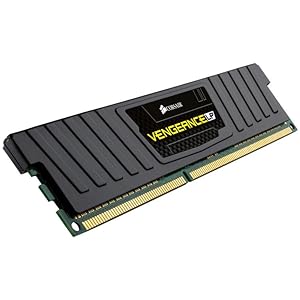
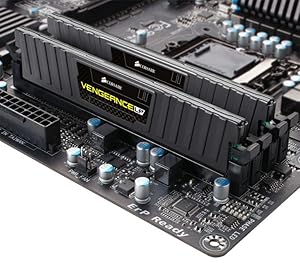
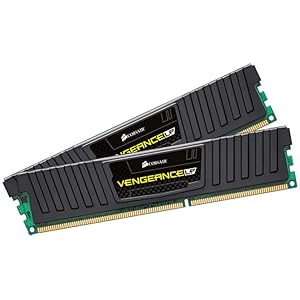
The Corsair Vengeance LP 16GB (2x8GB) DDR3 1600MHz desktop memory kit delivers reliable, high-speed performance with low-profile heat spreaders for enhanced cooling and compatibility. Designed for Intel and AMD platforms, it supports dual-channel configurations and Intel XMP 1.3 for easy overclocking, making it a trusted choice for professionals and gamers seeking stable, fast, and stylish RAM backed by a limited lifetime warranty.
| ASIN | B007TG8QRW |
| Additional Features | Lightweight |
| Best Sellers Rank | #2,863 in Computer Memory |
| Brand | Corsair |
| Column Address Strobe Latency | 10 |
| Compatible Devices | Intel and AMD Platforms |
| Computer Memory Size | 16 GB |
| Customer Reviews | 4.7 out of 5 stars 1,217 Reviews |
| Data Transfer Rate | 1333 MHz |
| Form Factor | Desktop |
| Global Trade Identification Number | 00843591022408, 04054318036967 |
| Item Height | 5.98 inches |
| Item Weight | 63 Grams |
| Manufacturer | Corsair |
| Memory Speed | 1600 MHz |
| Model Name | Vengeance LP |
| Number of Pins | 240 |
| RAM Memory Technology | DDR3 |
| RAM Size | 16 GB |
| Special Feature | Lightweight |
| UPC | 132017839431 843591022408 |
| Voltage | 1.5 Volts |
N**N
Great ram, Works on Both ASUS and Gigabyte 990FXA boards
Excellent RAM. As per almost everyone else. You will most likely need to go into BIOS and set for 1600mhz. I have used this Ram in a Gigabyte GA990FXA UD3 and also in an ASUS Crosshair V Formula Z. Both with AMD FX-8350's. I have overclocked the Gigabyte board to 4.7 by changing the multiplyer and voltage. While running the ram at 1610mhz, no problems. On the ASUS Formula Z I tried the ASUS Auto Overclock feature which changes the HT clock ,which also affects Ram speed. I let it go to 4.6ghz and the ram was running at 1685mhz at 1.5volts, Again , no problems. On both boards I used a Phanteks PH TC14pe (5 Heat Pipe) Air cooler. The clearance is about 1/2 inch above the Ram heat spreaders on both boards. With a little finesse there is no need to remove the cpu cooler to install or remove this Low Profile Ram. As a note, I also use 7Gb of the Corsair 16gb kit for RamDisk (on both boards) using it for temp Internet Files (set to 1024mb, Auto Update and do not delete), also allowing me to use the remaining 6GB of RamDisk for often used games or Photo editing files. Doing this gives you a data transfer rate of about 6,000MBps, far faster than my SSD's of 500MBps. Doing this greatly speeds loading of Internet pages you use often, as well as any program or files loaded on the RamDisk. The current "sweet spot" for ram amount is 8 to 16gb. at 1600mhz or 1866mhz. However, the AMD website says only 2 slots at 1866mhz. Although many find they can run 32gb in 4 slots at 1866 or above. This will depend upon the individual Integrated Memory controller on the CPU and the Motherboard. At the speed difference between 1600 and 1866, that represents only a few tenths of milliseconds difference in overall through-put. No noticeable difference to the observer. The reason you may want to exceed the 8gb or 16gb "Sweet Spot", would be to run large Photo Editing, video rendering or large RamDisk. Overall I highly recommend Corsair and this 16GB (C10) Ram Kit. Having said that, IF you can comply with the QVL (Qualified Vendors List), for your Mother Board maker I recommend it. But you will see a disclaimer on the Gigabyte QVL that says "Memory modules listed below are for reference only. Due to massive memory models on the market, we can only verify some of them." Also Note: This RAM is NOT listed on either QVL for the Formula Z or the UD3, but it WORKS. (The C9 IS listed.) But from my usage, it works great on the ASUS Crosshair V Formula Z and the Gigabyte GA990FXA UD3. Update: I just received another 16gb kit and the upgrade to 32gb was smooth on the Asus Formula Z.
S**1
Love Corsair products and they're one of the few I trust.
No complaints when installed on a new MSI Performance Gaming motherboard. Plug and play as RAM often is. Verified the sticks were running at the 2666 Mhz advertised using CPU-Z and the rest is history. I mostly bought this ram for its low profile as I have a massive Hyper 212 Evo heat sync that is very close to the RAM slots. The RAM installed with ease but it did require me to remove the radiator fan from the CPU cooler on that side. Overall I love Corsair products and this RAM does not disappoint. I purchased another 16GB kit for my girlfriend's computer as well and it also has performed without issues.
F**S
Great performance, no hassle
I bought these to expand my computer's RAM to 24 GB. I use it for rendering, and in some big scenes I was runnig short of it. Low profile modules are perfect when you are using third party air cooling for your CPU, because most of them will be rignt on top of the first RAM Module in a standard motherboard layout. So I used my two 8GB modules on the first bank and the two 4GB modules on the second. Corsair Vengeance modules are reliable and fast enough (there are faster nowadays, but your motherboard and CPU must accept them). Never had any RAM related issues in my 3 years using them. They don't heat up. In my rig they are cooled by the case's fans, not by specific ones. There was no hassle at installation and were recognized at once by the BIOS. I'll stick with Corsair Vengeance modules for a while longer, even if faster ones come to replace them. They are my old faithful choice for RAM.
I**F
Great Fast RAM, Fits Under NH-D14
Great RAM kits. This is my second pair of this RAM and they work great. I bought these specifically because I am using the NH-D14 CPU cooler from Noctua and it doesn't have clearance for large heatsinks on the RAM sticks. These easily fit under the cooler and have always worked very well for me. The price is ok at around $70 but it's not great. I knew what I was buying and what I was paying so I can recommend it for the price.
O**N
Excellent memory for the price.
I just doubled my rig's memory for considerably less than the cost of the 8GBs that these replaced - and I bought those three years ago. And so far, so great. I can open up programs until my WIN7 taskbar is full of things like Photoshop, Word, a browser or two, a media player, email, skype, etc. And the load on the memory barely hits 6GB. Same with playing a resource-intensive game. Well worth the money. Do not believe a single review that states these modules can't be set to 1600mHz. The default frequency is 1333 but that can be easily manipulated in the bios. An increase in frequency will often need an accompanying increase in DRAM voltage. So if there is instability after upping the mHz, increase the V incrementally. The majority of motherboards made in the last couple of years will have an XMP or automatic overclock setting. I slapped these modules in, started up the computer, and the system read the frequency as 1333. I went into the bios. On a Gigabyte board, the automatic frequency profile settings are called DRAM EOCP. I selected that and it asked me what frequency profile I wanted. I chose 1600. It told me the current voltage was not optimal. So I selected the optimize DRAM voltage option. It automatically adjusted the voltage and said that the DRAM was now optimized. I booted into windows, run CPU-Z and it showed each module at 800mHz (which - since these are dual-channel - means 1600). Fait accompli. If your DRAM can not be set to a certain frequency, it means either a defective module, an outdated/malfunctioning memory controller (CPU or onboard), an outdated bios, or simply user error/ineptitude. But this item is absolutely rated as advertised.
J**W
Nice sticks, not designed for Haswell but will work
Good product, I will enjoy the lifetime warranty... But I think I ordered a newer set as this model is over 3 years old and designed for sandy/ivy bridge support... These modules work with the 4th gen Haswell, but I get error 51 which gigabyte rep says this is perfectly fine as long as the board boots with no problems.
V**I
One of the many few that can do what it says
I've had corsair PSU - fans but never tried their memory sticks till now and I am glad to have made the purchase. cause these are running well My gigabyte motherboard is nearly 6yrs old yet still running strong these boards are really made to last if you maintain them well. And these sticks are helping to bring it back up again. I've used G skill sticks they are pretty awesome as well don't get me wrong on that two of the best companies I would gladly purchase stuff from are them. Amazon has some pretty amazing deals and glad they are putting best buy and Walmart to shame. Newegg is slowly but surely dying
J**Z
Nice RAM for the value!
Really good RAM. I have to say that is not that "low" profile if you compare them with some value RAM that it is less tall, but this RAM looks great and works as expected. Depending on your motherboard, you've to change the speed to 1600 MHz to get better results. I have them for 2 months and so far, no problems or issues. If I can, I'll get other 2x8GB to complete the 32GB of ram that my Motherboard can handle. PC Specs: Intel Board DZ68BC Intel Core i7-2600 Corsair Vengeance 16GB LP (2x8GB) Thermalright True Spirit 120M cooler EVGA GeForce GTX 560 Ti Superclocked Corsair TX850 V2
Trustpilot
2 months ago
2 months ago


