Desert Online General Trading LLC
Dubai, United Arab Emirates
Desert Online General Trading LLC
Dubai, United Arab Emirates


🚀 Elevate your home Wi-Fi game — never miss a beat, stream, or scroll!
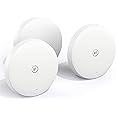
The BT Mini Whole Home Wi-Fi 3-disc pack offers dual-band AC1200 mesh networking designed to blanket medium to large homes with fast, reliable internet. Featuring intelligent roaming, app-based device control, and a 3-year warranty, it ensures seamless connectivity and user-friendly management for all your devices.


| Brand | BT |
| Product Dimensions | 12 x 12 x 5 cm; 1.29 kg |
| Item model number | 96450 |
| Manufacturer | BT |
| Series | 3 Disc Pack |
| Colour | White |
| Wireless Type | 802.11ac |
| Operating System | RouterOS |
| Are Batteries Included | No |
| Item Weight | 1.29 kg |
| Guaranteed software updates until | unknown |
G**M
Really good solution for stable wifi around a typical home.
Since working from home began, I've started to have lots of issues with the WiFi on my BT Homehub 5. Whereas it was fine for light use, I have found that subjecting it to continuous high loads from my work laptop all day plus doing a lot more streaming to wireless devices (Chromecasts) has lead to the WiFi on the original hub becoming very unstable and requiring me to reboot every 4 or 5 days. This lead me to look for a better solution - initially I was thinking of purchasing a whole new router but it occurred to me that a mesh WiFi system like this, which is designed to replace the hub WiFi, could also be a lower hassle solution and cheaper to boot (at £75 which I what I paid for this).I am pleased to report that this indeed an excellent way to circumvent WiFi problems. After installing this, the weekly reboots to fix the WiFi have gone away and I have perfect reception around my entire house - and into the front/back gardens - to boot. I am very happy.The units themselves are about as easy to install as you could wish. Install the app on your phone and follow the instructions it gives which are basically to plug one disc directly into your router via the supplied ethernet cable and then plug a second and third disc into power in other rooms of your house, forming a 'mesh WiFi network'. The discs themselves are very discrete and pretty small, you aren't go to have problems with them being obvious and you can turn off the small LED on the front of the unit via the app if you find it annoying.Once the system is working it's best to turn off the WiFi that your old hub provides and use the discs for all WiFi. You can give the mesh network the same SSID and password as your old WiFi network so your old devices should auto-reconnect. I found it best to power cycle all the WiFi devices to ensure a completely 'clean' connection when I moved them to the mesh however.Performance is as good as I need - the specs say up to 877mbit/s on 5GHz and 300mbit/s on 2.4Ghz but in reality it will probably not hit that speed. I only need them to match my 75mbit/s internet download though, which they do perfectly. A friend who bought a set on my recommendation gets 200mbit/s on his higher speed link with no issues. Very few people are likely to find that their performance is a limitation on internet speeds.A nice bonus of the system is that since it merely acts as a replacement wireless access point (AP) you can swap out to a different router or different ISP and just plug the discs into the new box and continue as normal, no need to do any WiFi reconfiguration again. A very flexible solution.Definitely a great solution for an average 3-bed home. Larger houses or properties with very thick stone walls may require either more discs or a different solution though.
A**S
Cheap and Simple set up and improves household wifi signal.
As the title says, this kit does what it says on the box. Its not a complete winner though and the result will vary from house to house. Our house is an old brick built 4 bed and we were using 3 extenders with mixed results. The 3 pack Whole Home set just about gives a good/excellent, rather than excellent, signal in every room. A 4th disc would have been better. Installation is simple if it works first time. The 1st hiccup was the instructions to find the app on the printed guide in the box. The link was dead, but the app is easy to find on App store. The app guides you through the initial 1st disc set up, after asking how many discs in your pack. 2nd and 3rd discs did not link first go using the app, but closing the app and restarting it magically link the 2nd. The 3rd. had to be added from the additional disc function in the app and this linked on the 2nd attempt. Once all working the app neatly shows whats working with what devices and helpfully suggests moving the disc to improve reception. You can see your own device move from disc to disc as you move round the house and the transfer between discs is seamless. Speeds were measured on all three discs and were as promised. Worth noting that you can link the disc 2 and 3 to a non wifi device by ethernet cable. Disc 1 is permanently linked by ethernet cable to the existing router. There are reports that it is not possible to do this with the mini discs, but you definitely can on disc 2 and subsequent discs. The system works fine with the wifi working on the original router or with it switched off. I would recommend that you switch it off during installation of the discs to stop your devices constantly connecting to the old wifi, which again upset the app. The instruction booklet should guide you to do this but does not. Had no problem connecting Sky box and Amazon Firestick to the network.Overall for the discounted price I paid I am very pleased with the purchase. If you have a very big or thick walled house or want big garden coverage I'd spend a bit more. Biggest hassle was the app, but it worked in the end with no technical tweaks from me. The discs are small and unobtrusive.
G**D
It works well.
A bit of a fiddle to set up initially. But once it's working it does a stellar job of extending your WiFi to cover the whole house. Also easy to roam around the house whilst using it - it's a really nice bit of a kit for the money. it IS a little cut-back as I have the mini versions, but for the price it's pretty impressive. The lack of complexity will appeal to people who just want it to work. Which, it does.One thing that isn't made plain in the instructions is that you can use these with ethernet cables or power line adaptors to reach rooms outside of the range of the other disks. All you need to do is set them up and then plug the disk into the Ethernet cable & reboot it. When it comes back up it'll start using ethernet for backhaul, so it doesn't rely on being able to "see" other disks to work and will still steer users to the correct disk. I found that this provided some pretty impressive performance increases compared to using WiFi for Backhaul.Alternatively you can also use the disk as a wireless bridge by plugging a device or switch into the ethernet port. So even devices without WiFi can join your whole home wifi network. This was really useful for our aging satellite TV box, for example.
Trustpilot
3 days ago
3 weeks ago