We remain fully operational. Our teams are working around the clock to ensure your deliveries continue safely.

DOWNLOAD THE APP


Customer Services
Copyright © 2025 Desertcart Holdings Limited
DOWNLOAD THE APP


🚀 Elevate your workspace—connect, charge, and conquer in 4K clarity!
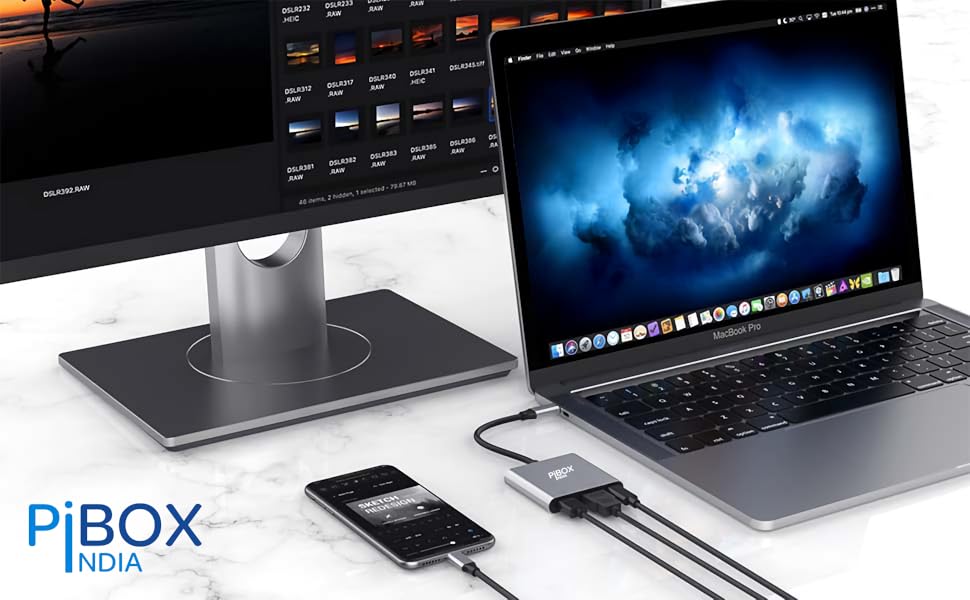
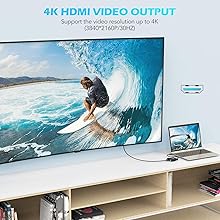
The PiBOX India USB C Hub 3-in-1 is a versatile multiport adapter featuring 4K@30Hz HDMI output, 100W USB-C power delivery, and a USB 3.0 port with 5Gbps data transfer. Compatible with a wide range of devices including MacBook Pro/Air, Windows laptops, and USB-C smartphones, it offers seamless plug-and-play connectivity in a sleek, durable aluminum design weighing just 50g. Ideal for professionals seeking a compact, powerful hub to extend displays, charge devices, and connect peripherals simultaneously.




| ASIN | B07SVVR598 |
| Best Sellers Rank | #1,855 in Computers & Accessories ( See Top 100 in Computers & Accessories ) #46 in USB Hubs |
| Box Contents | USB C - HDMI / USB 3.0 / PD multiport Hub |
| Brand | pibox India |
| Brand Name | pibox India |
| Colour | Silver - 3 in1 |
| Compatible Devices | Desktop, Keyboard, Laptop, Monitor, Mouse, Projector, Television |
| Connector Type | HDMI |
| Country of Origin | China |
| Current Rating | 3 Amps |
| Customer Reviews | 3.8 out of 5 stars 7,758 Reviews |
| Importer Contact Information | Discount Bazaar India, Jalahalli, 560013 |
| Input Voltage | 240 Volts |
| Item Dimensions | 10 x 10 x 10 Centimeters |
| Item Package Quantity | 1 |
| Item Type Name | USB C - HDMI / USB 3.0 / PD multiport Hub |
| Item Weight Unit of Measure | 50 Grams |
| Item dimensions L x W x H | 10 x 10 x 10 Centimeters |
| Manufacturer | Discount Bazaar India, Discount Bazaar India, Jalahalli, Bangalore |
| Manufacturer Contact Information | Discount Bazaar India, Jalahalli, Bangalore |
| Model Number | PI-D6318 |
| Number of Items | 1 |
| Number of Ports | 3 |
| Packer Contact Information | Discount Bazaar India, Jalahalli, Bangalore |
| Power Plug Type | No Plug |
| Product Finish Type | Glossy |
| Specific Uses For Product | Monitor, Keyboard, Mouse, TV, Projector, Samsung DEX mode |
| Unit Count | 1 Count |
| Warranty Description | 1 Year manufacturer warranty with registration |
| Warranty Type | Limited |
F**D
Great Product !!
Works like a charm on my MacBook Pro 2018, at least for now. This is exactly what I wanted for my WFH setup. I use a monitor with integrated webcam, mic and speakers. So needed a 3-IN-1 4K adapter with (a) HDMI for video+audio (b) USB-A to power the webcam & mic (c) USB-C to charge the MacBook >> so this met all the requirements and at Rs 900 its a great buy. Looks and feels very premium too. Also all the USB ports of my monitor works and so I can plug in and use - pen drives, external HDD, usb headsets, my old iPhone with usb-a to lighting cable.. etc.. I use the Apple keyboard & mouse so didn't have to connect it to the monitor USB ports, else that also can be used. They sent me the premium box that contained the carry pouch, mobile stand (but its too flimsy & gave it to kids) and a snap-on magnetic ring shield for the cable, which I found to be very nice. Overall a good buy!
D**P
overall, a good product
i received it under 5 days of ordering and it works all fine, but the product itself felt like it was being used before it has some kinds of scratches and marks on the side of the ports, which is not something i was expecting it to come with other than that, it's a good value for money product!
A**I
Very good product
Very good product value for money
G**N
VFM product with very few set backs
For anybody having n Samsung Galaxy Note series 8 and above and want to view the movie contents on a big TV, this small gadget is a very useful tool. So, let me share my experience after using it for nearly a month now, in PRO & CON format, as usual. First, CONs: 1. If you expect out to work like a Dex Station, you'll get disappointed, because Dex app is not supported in this. I am using Samsung Note 8. It just mirrors the mobile screen and full Dex mode is not available in this. 2. Frequent disconnections. Yes. It frequently disconnects for no reason. 3. Gets overheated when you connect even your original Samsung Type C charger. 4. When you connect it to TV, call cannot be attended using a headphone, because Dex mode don't allow call connectivity. So, you have to either disconnect or use the speaker in the phone to attend your call on Dex mode. Now, PROs: 1. Without the need for costly Google chrome cast you can simply mirror your Samsung Note to your TV using the HDMI port. 2. You don't even need a separate power connection for this. Only if you need to charge your Note, you have to attach the charger. Otherwise, no need. 3. You don't need any internet connection or WiFi for mirroring to TV. It's as easy as connecting a headphone to your Note. 4. Using the USB port, you can connect either a wireless remote/keyboard or even a weird set using USB hub. I have tried both. And i tried Air Mouse also. All working very well. Air mouse is a breeze to use. 5. Cost: Very reasonable price compared to the other even lowest featured models. So, i can say it's VFM. If you have Note 8 series and above and want to use Miracast without a separate dongle or wifi this is the best. Strongly recommend.
S**A
Good enough for the cost, but not good as the original
Review of: "PiBOX India, USB C to HDMI Adapter, Aluminium Type C USB hub 3.1 to HDMI 4K/USB 3.0/USB C Converter Cable Charging Port Adapter Cable" It has just been a couple of days since I have started using it, though I think this most of the review would now change even after longer usage. I already have an Apple original 3 in 1 USB-C adapter which I use to connect my MacBook Pro to an external monitor, wireless mouse USB receiver and the power input. I bought this for connecting my second external monitor via HDMI. 2 major feedbacks for improvement: 1 - Although the HDMI connection works all fine and as expected, there is an issue with the wireless USB receiver, the mouse movement becomes jittery and in some cases just stops responding for a while, this is not the case when I connect the wireless USB receiver with Apple original adapter. - I have not yet connected any other USB device via this adapter and hence don't know how it performs - but I think it would impact the overall data transfer and probably have similar effects. 2 - I have observed that the adapter heats up a lot if I connect the power adapter via the PiBox 3-1 adapter. Btw, the apple adapter also heats up in such a case, but I felt (by touching both the adapters) that the PiBox adapter was hotter than the apple original. Although it does the expected job for me, I would suggest not to rely on it as your only adapter. As mentioned I use this as secondary adapter just for HDMI connection, as its a good option given the high costs of apple original adapter. Looking at the above issues, I am wondering if buying just the USB-C to HDMI converter would have been a better choice as 1- other ports are useless for me, 2 - saved me 300 Rs. Let's see how it performs with time. Thanks.
P**A
Seamlessly Connect and Enjoy High-Quality Displays
recently purchased a USB-C to HDMI adapter to connect my mac to an external display, and I have been quite pleased with its performance. Here's my detailed review of the USB-C to HDMI adapter: Compatibility and Connectivity: The USB-C to HDMI adapter is designed to connect devices with a USB-C port, such as laptops, tablets, or smartphones, to an HDMI-enabled display or projector. It offers a convenient and reliable solution for expanding your screen real estate or enjoying content on a larger display. It is important to note that your device must support video output over USB-C for the adapter to work effectively. Ease of Use: Using the USB-C to HDMI adapter is a breeze. It is a plug-and-play device, meaning there is no need for any additional drivers or software installations. Simply connect one end of the adapter to your USB-C port and the other end to an HDMI cable, then connect the HDMI cable to your display or projector. The adapter provides an instant and stable connection without any hassle. Video and Audio Quality: I was impressed with the video and audio quality delivered by the USB-C to HDMI adapter. It supports high-definition and resolutions, providing crisp and vibrant visuals on the external display. The adapter also supports audio transmission, allowing you to enjoy synchronized sound through the connected display or external speakers. I experienced no noticeable lag or degradation in the video or audio quality. Sturdy Build and Portability: The USB-C to HDMI adapter I purchased features a sturdy build quality. The connectors feel robust and secure, ensuring a reliable connection. The adapter is compact and lightweight, making it easy to carry around in a laptop bag or pocket. This portability is especially useful for individuals who frequently travel or need to connect their devices to different displays on the go. Compatibility with Additional Features: Some USB-C to HDMI adapters may come with additional features. For example, certain adapters may include an extra USB-C port or USB-A ports, allowing you to connect additional peripherals or charge your device simultaneously. It's worth considering if you have such requirements, as these added features can enhance the overall usability and convenience of the adapter. Value for Money: USB-C to HDMI adapters are generally reasonably priced and offer good value for money. They provide a cost-effective solution for connecting your USB-C devices to HDMI displays without the need for expensive docking stations or specialized cables. Additionally, their versatility allows you to use the adapter across multiple devices, making it a worthwhile investment for both personal and professional use. Conclusion: In conclusion, the USB-C to HDMI adapter has proven to be a reliable and convenient tool for connecting my USB-C devices to HDMI displays. It offers seamless connectivity, excellent video and audio quality, and is built to last. With its ease of use and portability, it has become an essential accessory for me, enabling me to enjoy larger screens and enhanced visual experiences wherever I go. Note: They send a gift with it which was a mobile stand.
M**A
I made android to pc for gaming with this product
I bought this gadget for playing freefire on android mobile with keyboard and mouse as pc I found this 💯 % work with full satisfaction... FreeFire gamers will love this as I love to have such product.
A**R
7 month update: USB port is dead. Make sure you register the warranty for replacement.
Works perfectly with my Dell Latitude 5480. Plugged HDMI into the adapter and adapter into the laptop's Thunderbolt port. Laptop detected the external monitor immediately. I've used the USB-A port for Logitech mouse receiver only. Yet to test with a storage device. I also plan to get a USB 3.0 or 3.1 hub soon. So hoping the USB port supports hubs. I don't have a USB-C PD charger, so couldn't test the power-in. Very well constructed, came with a small carry pouch as well. All in all, a very good device at a reasonable price. ******** Update after 7 month use: ******** Was using it with a USB hub to plug in my keyboard, mouse & USB headset - so that I need to plug in just 1 cable into my laptop, instead of 4 (HDMI & 3 USB). Worked perfectly fine till yesterday. Today morning I turned on my laptop, and the HDMI out still works fine, but the USB port seems to be dead. The hub I was using is still fine. So the issue must be with the USB-A port on this. For 900 bucks, I expected it to work much longer. Deducting just 1 star because of the dead USB port.
Trustpilot
2 months ago
1 month ago