Buy anything from 5,000+ international stores. One checkout price. No surprise fees. Join 2M+ shoppers on Desertcart.
Desertcart purchases this item on your behalf and handles shipping, customs, and support to Denmark.
⌨️ Elevate your workflow with silent precision and ergonomic mastery
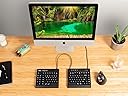
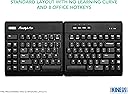
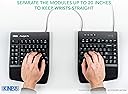
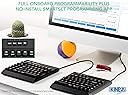
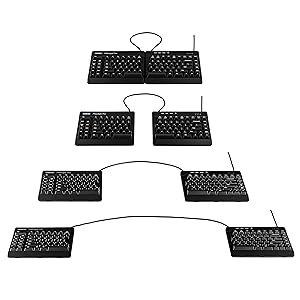
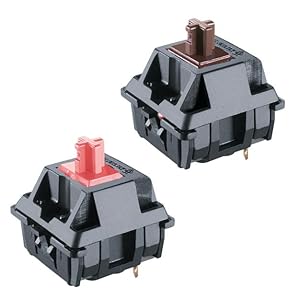
The KINESIS USB-A Freestyle Pro is a premium ergonomic split mechanical keyboard featuring Cherry MX Silent Red switches for quiet, smooth typing. Its award-winning adjustable split design supports personalized comfort, while onboard SmartSet programmability offers advanced customization without drivers. Compatible across major OS platforms and backed by a 2-year warranty, it’s engineered for professionals seeking durability, health-conscious typing, and productivity-enhancing features.


| ASIN | B07J1ZJ6XR |
| Additional Features | Ergonomic |
| Antenna Location | Office |
| Best Sellers Rank | #1,114 in Computer Keyboards |
| Brand | KINESIS |
| Built-In Media | USB Cable |
| Button Quantity | 104 |
| Color | Cherry Mx "Quiet" Red |
| Compatible Devices | Windows 7, 8 & 10 Mac OS X 10.4+ Linux Android Chrome |
| Connectivity Technology | USB, USB-A |
| Customer Reviews | 4.2 4.2 out of 5 stars (592) |
| EU Spare Part Availability Duration | 2 Years |
| Enclosure Material | Plastic |
| Global Trade Identification Number | 00607998890011 |
| Hand Orientation | Ambidextrous |
| Item Dimensions L x W x H | 7.25"L x 15.5"W x 1.25"H |
| Item Weight | 2.6 Pounds |
| Keyboard Backlighting Color Support | Single Color |
| Keyboard Description | Ergonomic |
| Keyboard Layout | QWERTY |
| Manufacturer | KINESIS |
| Mechanical Keyboard Switch Model | Cherry MX Quiet Red |
| Model Name | Freestyle Pro |
| Model Number | KB900-RDQ |
| Number of Keys | 20 |
| Number of Sections | 9 |
| Power Source | Corded Electric |
| Series Number | 900 |
| Style Name | Silent Linear Red Switches |
| Switch Type | Linear |
| Theme | ergonomic keyboard |
| UPC | 607998890011 |
J**Z
Great keyboard
I love this keyboard. It helps my hand posture by being split allowing it to be ergonomic. It does take time to train your muscle memory. At the time of this review, im still learning it's layout. One thing I suggest to the developer, keep in mind the muscle memory that we are most of us used too. The "ESC" key is too far and it wants to be where the F1 key is. Additionally, the left side shortcut keys are useful but perhaps try to see how will it work out if those where on the right side of the left keyboard. I feel that location will make ot easier to train our muscle memory. Designing around muscle memory can be very challenging but not impossible.
M**E
Almost the perfect keyboard
Almost. This is a beautiful device that feels wonderful to type on. The keyswitches are as quiet and low-force as mechanical keys get, and if you don't bang on them, it is nearly as quiet as a membrane keyboard like the Freestyle 2. I won't bother touting the benefits of this type of switch; if you're buying this type of keyboard, you probably already know how they differ and why you'd want them vs. a membrane keyboard. I can say, as a fan of the old IBM M-series, that this keyboard is nearly as satisfying, a heck of a lot quieter, and a lot less painful. The only downside is Kinesis' baffling lack of a vertical mounting option for this keyboard. For those with carpal tunnel issues, there's really no substitute for a vertical configuration that keeps the wrists perfectly neutral. The Freestyle 2 gives you that with the Ascent adaptor, but the Freestyle Pro doesn't accept that adaptor. I understand that the mechanical switches occupy a lot of space, so the depth required for the screws for the Ascent isn't there, but come on -- the plastic risers they do provide snap on firmly, and a similar attachment would work just as well for a vertical mount. I also understand that vertical keyboards are a niche market, but I'm going to go ahead and guess that at the price of the Ascent mount, the R and D is covered. The good news is that Kinesis did at least provide a 20" connecting cable, so the separation is adequate if you want to fabricate your own mount. Furthermore, if you, like me, are upgrading from a worn-out Kinesis Freestyle 2, you already have a solution. Open up the Freestyle 2, and you'll find 2 metal plates which contain the threaded bosses for the Ascent adaptor. Remove those plates and discard the Freestyle 2. Pick up a roll of low-profile 3M Dual Lock (not plain Velcro - it moves around too much). Use it to attach those plates to the bottom of the Freestyle Pro in the right position, attach them to the Ascent adaptors, and Bob's your uncle. But really, Kinesis - throw us a bone here; you could have helped with that!
E**.
Very nice feel; but very frustrating macros app.
Ergo awesome, macros not so much. Here's why: ERGONOMICS: These keyboards are outstanding for ergo (you have to get the palmrest & angle pack to make them work right though, I would not advise just getting the keyboard.) I previously owned the cheap version and (same manufacturer) and if you can't afford this, you should get a Freestyle 2. Keys are nice; I got "quiet" red keys. Feel is great, noise is fairly low though not at ALL silent (quite audible, as with any high-travel decent keyboard.) I'd say it's a bit louder than the Freestyle 2 which I previously had. The Pro palmrest is very nice, it's a comfier surface and padding then my old Freestyle 2 (though they may have upgraded that one as well, mine was a few years old.) MACROS: Overall, meh. It is keyboard-based and not app-based, which I suppose is good for some people but not as good for me. What you CAN do: You can store any text string; you can insert pauses; and you can insert basic Windows functions. What you CANNOT do: (a) record live while in another program; (b) record live from Windows; (c) record any macro which is not KB-driven, or which requires a mixture of mouse and KB Overall it seems nice but it will take a lot more work to set up than I expected. And it seems fairly vulnerable to change. For example, I always insert a certain set of page numbers in my Word documents. And I can, eventually, do that via these macros. But this has steps like "arrowing down to select an item in a list" and if the list order or # changes the macro will go bad.
L**S
El teclado estaba usado, me di cuenta porque traia una macro pregrabada que hablaba de una Janet, dos correos y algo de una visa DS160. Aparte de esto no traía las teclas de Mac ni la herramienta para reemplazarlas. Y venía "sellado".
A**N
I really like the Kinesis brand. This keyboard has been an upgrade from Kinesis Freestyle2 Blue. I have been using the split keyboard(s) from this brand for 6+ years, and I am very much used to the split-keyboard concept. Complementing this with programmable and silent mechanical switches simply boosts the experience, especially in open-office workplace environments. Being able to choose among different pre-configured layouts and program useful macros for different computer settings is a bonus. The only downside I could see (compared to Freestyle Edge) is that the VIP3 kit is excluded. The kit should have been included already in the package.
M**P
After one week of usage, one of the keys stopped working. I am very angry considering the cost of the keyboard.
M**R
This has a nice keys recoil and not too 'clicky' like the usual Cherry keys. However here is the fundamental problem: I was looking for a fully ergonomic keyboard solution to avoid wrist and hand strain. The cherry keys recoil solves one issue, but it's incomplete without the tenting to position the wrists in a more natural 'handshake' position. However, the tenting is not designed for this Kinesis Freestyle Pro model so it doesn't securely fit into the keyboard. It kind of does the job but the tenting falls off if you lift the keyboard off the desk, so you can't quickly move workstations or change the height of the tenting, etc.
S**L
Très agréable d'utilisation quoiqu'il nécessite une courte période de familiarisation. A soulagé mes douleurs au poignet.
Trustpilot
2 days ago
3 weeks ago