
Buy anything from 5,000+ international stores. One checkout price. No surprise fees. Join 2M+ shoppers on Desertcart.
Desertcart purchases this item on your behalf and handles shipping, customs, and support to Denmark.
🎧 Elevate your workspace audio—because your calls deserve pro-level sound!
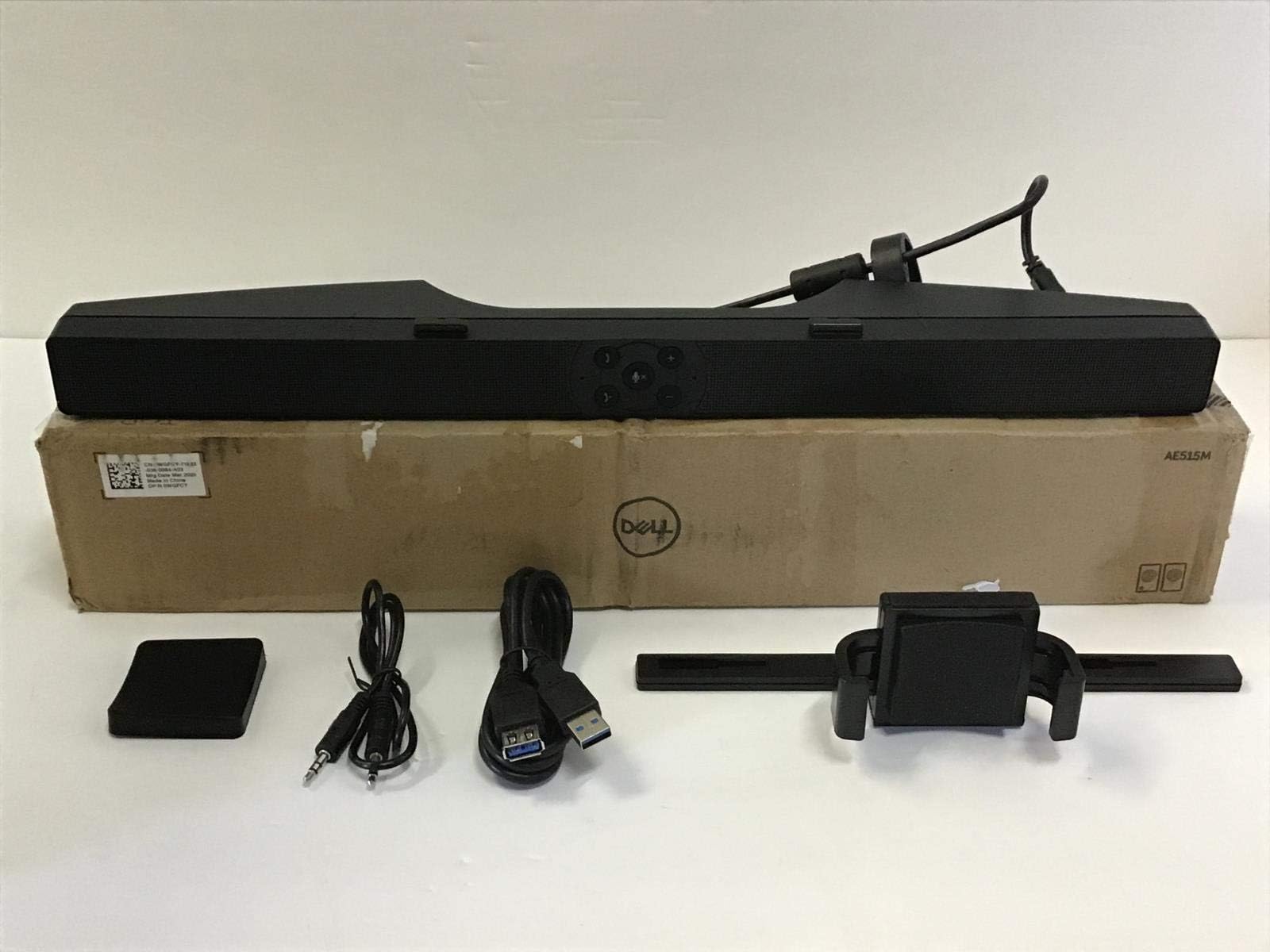
The Dell Pro Stereo Soundbar AE515M delivers powerful 5W stereo sound with a wide frequency range (90Hz-20kHz) and dual mic array featuring echo cancellation for crystal-clear calls. Designed for seamless USB plug-and-play setup, it mounts easily on select Dell monitors without compromising adjustability. Certified for Microsoft® Skype® for Business, it enhances both conference calls and multimedia streaming with rich, balanced audio and convenient front-panel controls.

| ASIN | B07G128QNT |
| Additional Features | Bass Boost |
| Antenna Location | For Computers |
| Audio Driver Size | 50 Meters |
| Audio Driver Type | Dynamic Driver |
| Audio Output Mode | Stereo |
| Best Sellers Rank | #66,646 in Electronics ( See Top 100 in Electronics ) #49 in Home Audio Sound Bars |
| Bluetooth Range | 10 Meters |
| Brand | Dell |
| Built-In Media | soundbar mount |
| Color | Black |
| Compatible Devices | Dell E1914H, E1914He, E1916H, E1916He, E1916HL, E1916HM, E1916HV, E2014H, E2014T, E2015HV, E2016, E2016H, E2016HV, E2214H, E2214HV, E2215HV, E2216h, E2216HV, E2218HN, E2219HN, E2314H, E2316H, E2316Hr, E2318H, E2318HN, E2318HR, E2318HX, E2414H, E2414Hr, E2414HX, E2417H, E2418HN, E2715H, P1914S, P1917S, P1917SWh, P2014H, P2016, P2017H, P2018H, P2214H, P2217, P2217H, P2217Wh, P2219H (with mount), P22… |
| Connectivity Protocol | Bluetooth |
| Connectivity Technology | USB |
| Control Method | Voice |
| Controller Type | Voice control |
| Customer Package Type | FFP |
| Customer Reviews | 4.2 out of 5 stars 518 Reviews |
| Enclosure Material | Plastic Or Metal |
| Frequency Response | 1000 GHz |
| Global Trade Identification Number | 00884116311836 |
| Is Electric | No |
| Is Waterproof | FALSE |
| Item Dimensions D x W x H | 2.38"D x 17.44"W x 1.38"H |
| Item Weight | 0.97 Pounds |
| MP3 player | No |
| Manufacturer | Dell Technologies |
| Maximum Range | 20 Meters |
| Model Name | 520AAOR |
| Model Number | 520AAOR |
| Mounting Type | Bar Mount |
| Number of Audio Channels | 2.0 |
| Number of Microphones | 2 |
| Power Source | Corded Electric |
| Speaker Maximum Output Power | 5 Watts |
| Speaker Size | 1.38 Inches |
| Speaker Type | Soundbar |
| Specific Uses For Product | Multimedia |
| Total USB 2.0 Ports | 1 |
| UPC | 884116311836 |
| Unit Count | 1.0 Count |
| Warranty Description | 1 Year Manufacturer Limited |
| Warranty Type | Limited |
| Water Resistance Level | Not Water Resistant |
| Wireless Technology | Bluetooth |
G**6
515M Good General Purpose Soundbar
I got this for a desktop computer I was building and added it under my Dell monitor. I use it for conference calls, not for music. It plays music just fine and plenty loud but it is a soundbar. Simple USB cable was plug and play with Windows 10. Zoom, MS Teams, etc... all recognize it. It is small and discreet but the buttons are big enough for you to find and press with ease. Check the compatible Dell monitor stands but it attached with ease to mine. Sounds: Voices are loud and clear for calls. The soundbar has volume adjust buttons which increase or decrease the Windows volume control. The sound is a bit deeper and richer than you get from typical "tinny" sounding PC speakers. I have not run into any issues with audio. Mic: This unit has an integrated far-field microphone. I typically sit 2-4 feet from the microphone and it picks my voice up well. Feedback has been that I sound clear on calls. There is a mute button on the soundbar, in addition to buttons for answer and hang-up, which could be handy in certain circumstances. The microphone on this soundbar is far better than the integrated mic on my USB camera. However, I would say it's generally of average sound capture quality. I have had no issues with it and it is sufficient for hours of daily conference calls. I have attached pictures of the front view under monitor and the rear view of the mounting adapter. I purchased this because it had an integrated microphone. I believe that is the key feature to choose this soundbar over all other alternatives available. The second feature would be mounting compatibility with Dell monitors. The third feature would be the inclusion of front mounted buttons for volume, mute, and call handling if someone were looking for a setup without easy access to a keyboard or mouse (i.e. distributed setup or TV display as a conferencing interface).
J**S
Works great with Skype for Business and Microsoft Teams.
My Dell monitor had provisions to direct-mount this unit and a USB plug on the back of the LCD to direct-wire it to. I bought the unit it in order to simplify using Skype for Business and MS Teams in my small home office. The unit didn't disappoint! Install was a breeze, just pop it on, attach the USB to a hub or your computer, then get to making adjustments. Configuration was a little clumsy, but I've worked in the IT world longer than I'd like to admit, so I was able to adjust my sound settings and make this the primary device. For calls where I need to use a headset, I don't have problems with Skype for Business selecting the speaker over my headset. Teams took a bit of fumbling at first to figure it out. Sound quality is good, both from my side, and people I call say it sounds like I'm on a headset. Full disclosure, I did have an issue with interference from my wireless access point which sits on my desk under the display this speaker is attached to. That resulted in people I called hearing a rhythmic clicking or popping sound (I couldn't hear it, took a couple calls before someone pointed it out). Solution was simple, move the wireless access point more than 24" away, problem solved. Calls are clear as can be. I've had this for a couple months now. I still haven't really used the button controls on the front of the unit very much. I normally adjust all of those settings from inside the app using the speaker. I guess they're nice to have, just not something I necessarily need. YMMV.
C**S
Works well, sounds good
I looked at quite a few reviews on this and other products before purchasing. Made my head hurt because there was a lot of love and hate. So let me pile on. - Product arrived well packaged and unharmed - Unboxing was uneventful - Setup was very simply (mount, connect, use) - Plug and Play. Computer recognized and loaded drivers (used computer for USB power) - Sound is solid and gets plenty loud. I listened to music, spoken words and video conference. For all three it showed surprisingly good frequency response with very good clarify. I accidentally ran the volume is all the way up with music and it held up surprisingly well. It did't fall apart, but was beginning to distort (not unexpected). - Mic performed well (one use). People on the conference said my voice was clear, loud enough, understandable and was not affected by speaker sounds. - Mount is very solid on the stand, although I was worried is would snap before I got it mounted to my Dell U2520D stock stand. The bracket barely fit, but it did not break. Overall I recommend this speaker/mic system for use on computers. It is not an expensive speaker system and probably won't make audiophiles happy, but for what it is it works quite well. Just be ready to come up with a mount if the one they provide doesn't work out.
D**S
Hissing Sound
The sound quality was ok for a speaker bar but there’s a pretty noticeable hissing noise when the volume is off but power is on
S**J
Very good conference speaker/microphone and ok music speaker
First thing I want to say is that I wish Dell offers more flexible mount that works for newer/bigger monitors. However, don't move away from this awesome speaker just because your monitor is incompatible with the mount. You can just use 3M Command tape to attach it to the bottom of your monitor like how I did in the picture. This speaker is for someone who doesn't want to wear headset for conference call. The echo cancellation works great as long as you keep speaker volume in reasonable level. I found echo cancellation works better if you just keep the microphone always on rather than turning it on only when you want to speak. It is a 5W speaker and music performance is decent, but it won't satisfy you if you compare it with proper PC speaker like Bose. To me, it sounds great and I enjoy listening music from it. What you get is a very convenient USB speaker that you don't need to use 3.5mm cable to your PC and echo cancelling microphone that works great.
D**P
Good sound quality; mounts on a P2720DC stand
This mounts nicely on a Dell P2720DC monitor. It's pictured mounted about as high as possible, so it does eat a little space if you have things on the desk under your monitor. Works nicely with Teams and also Cisco IP Communicator. I was expecting much worse sound after reading the reviews here, but it's surprisingly good for a small soundbar. If you're disappointed in the sound quality, you have unrealistic expectations, or a poor grasp of physics. Perfectly adequate for listening to music while working, and great volume. At 100 volume (Windows 10 volume slider, via USB audio connection) I didn't hear any distortion, though it's way, way too loud to be pleasant. 30 is about right. The included 3.5mm cable is pictured--it's a little short to use for anything other than a phone or tablet.
R**G
Beware: in a quiet room you will hear static / white noise
This sound bar has fine sound and a good microphone. It tucks nicely underneath most Dell monitors. However, in a quiet room you may find yourself very distracted by the white noise / crackling / static it emits. The static is due to bus bandwidth issues on the USB controller. It is widely discussed on Dell forums and help pages. It is a shame that after so much feedback, Dell has improved this product. I can offer one jury-rigged solution. See photo. This makes the soundbar think a pair of headphones are plugged in and therefore diverts the sound from the speakers to the headphone jack.
L**R
Works well for what I need.
I purchased this AE515M soundbar because people were complaining that the sound from my webcam microphone had a lot of echo. I'm using this soundbar on a an Apple computer, not a Windows PC. So far, people I have called using the new soundbar have said that the audio is good, with only a hint of echo that is not objectionable. I am using Apple FaceTime, not Skype. The volume up and down buttons work and so does the microphone on-off button. It appears that the phone call buttons do not work with my Apple computer but I may find a way to make them work later (not sure). It fit my Dell 25" Ultrasharp monitor perfectly. And, unlike my previous Dell soundbar, it recognized the USB audio right away. I do not need to use the sound-in jack on the new soundbar like I did with the old one. The audio is not as good as with my previous Dell soundbar. To me, it sounds slightly shrill and "tinny". I have kept the old soundbar hooked up for when I must have better audio. I just lay it on my desk under the monitor. If they could make a version of this soundbar that was 100% Apple compatible with the slightly better sound quality of my old Dell soundbar, I'd be thrilled.
Trustpilot
2 weeks ago
1 week ago