Desertcart purchases this item on your behalf and handles shipping, customs, and support to Denmark.
โก Power up your cable game with precision and style!
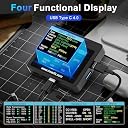
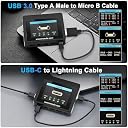
The Treedix USB Cable Tester is a compact, professional-grade tool featuring a 2.4" HD color display that tests USB cable continuity, resistance, and PD 3.0/3.1 compliance. It reads Type-C eMarker chip data to reveal cable capabilities, supports multiple USB standards including Lightning and Micro-B, and offers flexible power options via AAA batteries or USB-C. Ideal for tech-savvy professionals ensuring optimal cable performance and safety.


| ASIN | B0DYJL5Z67 |
| Best Sellers Rank | 8,280 in Business, Industry & Science ( See Top 100 in Business, Industry & Science ) 789 in Test & Measurement |
| Brand | Treedix |
| Colour | black |
| Compatible Devices | usb cable |
| Customer Reviews | 4.6 out of 5 stars 577 Reviews |
| Included Components | usb cable tester |
| Item Weight | 0.09 Kilograms |
| Item weight | 0.09 Kilograms |
| Manufacturer | Treedix |
| Manufacturer Part Number | TRX5-0816-AC |
| Measurement Type | Ohmmeter, Ammeter |
| Min. Operating voltage | 5 Volts |
| Minimum Operating Voltage | 5 Volts |
| Model Number | TRX5-0816 |
| Number of Items | 1 |
| Power Source | Battery Powered, Corded Electric |
| Power source | Battery Powered, Corded Electric |
| Specification Met | CE, RoHS |
| Style | Circuit Tester |
| Style Name | Circuit Tester |
| UPC | 644197778283 |
M**E
USB Cable Tester
Excellent USB lead tester for routing out those poor quality usb leads you may have with details of power or data or both.
M**R
Invaluable for anyone using USB and TB cables
One of the best purchases if you use lots of different Usb cables and devices. There are Soooo many reasons why certain cables donโt work. Usb is โless a standardโ and โmore a lotteryโ but this makes it simple to check and label every cable for itโs suited purpose.
F**N
De mis mejores herramientas
Tenia muchisimos cables y ahora tire mas de la mitad porque al fin pude separar los que valian la pena de los que no servian para nada. Perfecto para conocer y auditar tus cables incluso validar que los nuevos sean como los anuncian o si es una mentira. Te va ahorrar molestias si la transferencia de datos es algo importante para ti y no saber que cable usar
C**G
Useful device for USB-C cable info.
Item is as described. Fast delivery. It is a bit expensive but display the necessary info about the cables. I wished the device can update future firmware when technology evolved. Thank you very much.
D**E
A very useful and easy to use tool
This is a very nice device and provides a lot of useful information. It is easy to use and easy to read. It comes with a small instruction booklet that is quite clear. The basic process is to connect both ends of your cable to the device and slide a small switch to the desired power source (included AA battery or external USB C power source). There are four pages of information and you step through them by pressing a small button. The first page gives you a summary of the protocols supported (e.g., USB 2.0, 3.2, 4 and Thunderbolt). Note that it does not report the "generation" of USB 3.2. Your computer might have USB 3.0, 3.1, 3.1 gen 1, or 3.2 gen 1 interfaces - these are all equivalent to 3.2 gen 1 (5 Gbps) and the "USB 3.2" indicator that will light for cables that support that. However, it also will light for USB 3.1 gen 2 and USB 3.2 gen 2 (10 Gbps), and for USB 3.2 gen 2x2 (20 Gbps) cables. The fact that 3.2 lights up indicates it's at least 5 Gbps but might be more. The second page shows the wire connection list between the two ends of the cable. The third page shows some resistance and latency information. The fourth page shows data from the "e-marker" chip, if present. These chips are embedded in some USB C cables. If present, the e-marker will report the max data rate and the max charging power supported. If you have USB A-A or USB A-C cables, or USB C-C cables without e-marker chips, you won't be able to tell whether they are rated for 5 (gen 1) or 10 (gen 2) or 20 Gbps (gen 2x2). If you have a cable with a chip, you will see the maximum data rate on the fourth page. Note also that if you want to evaluate a USB A-A cable, you'll need a USB A to C adapter plug. The unit has a wide variety of USB 2.0 connectors but only one Type A USB 3 connector. To perform the tests, both ends of the cable have to be connected to the device so you must be able to adapt a Type A connector on one end of the cable to a Type C. Overall I recommend this, but I wish it could tell which USB A-A 3.x cables support 5 (gen1) or 10 Gbps (gen 2) interfaces. I suspect it is technically impractical to determine that in a low cost device. I found that almost all of the USB C "charging" cables I have lying around have no e-marker chip and no data capability at all or just USB 2.0 480 Mbps. An e-marker chip is required for any cable that supports 60W or greater charging; any cable lacking the chip must necessarily be rated for <60 Watts, but you cannot tell whether it's 15, 20, 30W, etc. Lastly, the device comes with an AA battery. You can use that to power it, or you can plug in a power source via a USB C cable.
R**M
Worked as expected
Seems to work well. I use it to test a number of my random cables. Also good to make sure any custom cables I make are working as intended.
E**C
It just works
Works as advertised.
Trustpilot
1 week ago
2 months ago