


🚀 Elevate your home WiFi game with the future-proof Deco XE75 Mesh System!
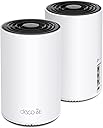
The TP-Link Deco AXE5400 (Deco XE75) is a cutting-edge Tri-Band WiFi 6E mesh system designed to replace traditional routers and extenders. Covering up to 5500 sq.ft, it leverages the new 6 GHz band for ultra-fast, interference-free connections supporting up to 200 devices at speeds up to 5400 Mbps. Its AI-driven mesh technology ensures seamless roaming and adaptive network optimization, while the Deco app and Alexa compatibility make setup and management effortless. With built-in HomeShield security features, it safeguards your home network and IoT devices, making it an ideal choice for tech-savvy professionals seeking reliable, high-performance WiFi throughout their living space.
| ASIN | B09VW5JHPH |
| Antenna Location | Gaming, Home |
| Antenna Type | Internal |
| Best Sellers Rank | 212,081 in Computers & Accessories ( See Top 100 in Computers & Accessories ) 463 in Whole Home & Mesh Wi-Fi Systems |
| Box Contents | 1 x Quick Installation Guide, 1 x RJ45 Ethernet cable, 2 x Deco XE75 units, 2 x Power adapters |
| Brand | TP-Link |
| Brand Name | TP-Link |
| Colour | Black and White |
| Compatible Devices | Gaming Console, Laptop, Personal Computer, Security Camera, Smart Television, Smartphone |
| Compatible devices | Gaming Console, Laptop, Personal Computer, Security Camera, Smart Television, Smartphone |
| Connectivity Protocol | WiFi |
| Connectivity Range | 5500 Square Feet |
| Connectivity Technology | Wi-Fi |
| Control Method | App |
| Controller Type | App Control |
| Coverage | 5500 square feet |
| Customer Reviews | 4.4 out of 5 stars 4,428 Reviews |
| Data Transfer Rate | 5400 Megabits Per Second |
| Frequency | 6 GHz |
| Frequency Band Class | Tri-Band |
| Frequency band class | Tri-Band |
| Global Trade Identification Number | 00840030707131 |
| Has Internet Connectivity | Yes |
| Has Security Updates | Yes |
| Is Modem Compatible | No |
| Item Dimensions L x W x H | 10.5L x 10.5W x 16.9H centimetres |
| Item Weight | 2.69 Pounds |
| LAN Port Bandwidth | 1000 Mbps |
| Manufacturer | TP-Link |
| Manufacturer Part Number | Deco XE75(2-pack) |
| Maximum Upstream Data Transfer Rate | 2402 Megabits Per Second |
| Model Name | Deco XE75 |
| Model Number | Deco XE75(2-pack) |
| Model name | Deco XE75 |
| Number of Antennas | 3 |
| Number of Items | 1 |
| Number of Packs | 2 |
| Number of Ports | 6 |
| Operating System | RouterOS |
| Other Special Features of the Product | Alexa Compatible, Guest Mode, Internet Security, Access Point Mode, Beamforming, Parental Control, QoS |
| RAM Memory Installed | 512 MB |
| Router Firewall Security Level | Basic |
| Router Network Type | hybrid |
| Security Protocol | WPA2 or WPA3 |
| Special feature | Alexa Compatible, Guest Mode, Internet Security, Access Point Mode, Beamforming, Parental Control, QoS Special feature Alexa Compatible, Guest Mode, Internet Security, Access Point Mode, Beamforming, Parental Control, QoS See more |
| UPC | 840030707131 |
| Unit Count | 1.0 count |
| Wi-Fi Generation | Wi-Fi 6 |
| Wireless Compability | 802.11ac, 802.11ax, 802.11b, 802.11g, 802.11n |
| Wireless communication standard | 802.11ac, 802.11ax, 802.11b, 802.11g, 802.11n |
L**I
Game Changer
EDIT: I did find out later that all of the internal settings for the pods are on the phone app, and yes, you can use 6g for clients to connect, but for my needs setting the second pod to being a dedicated backhaul got the best speeds. You will need to use an ethernet cable from the pod to your computer to get these speeds. Bottom line, problem solved! My problem was a video game called Diablo 4. The game requires a fast connection with minimal latency or it starts to lag. When I got D4, I noticed horrible lagging and asked to get my money back, but since I had played 2+hours they wouldn't refund me. Then I checked my network and discovered why I was lagging so bad. The fastest connection speed I could get was about 200mbs wireless which is not ideal for gaming. I tried upgrading to a traditional 6G router with a 6g wi-fi card, but the card would only work under windows 11, and when I upgraded to windows 11, it didn't work. The next thing I tried was to get another wi-fi adapter which did work, and I could finally see the 6G network and connect to it, but the speed was horribly slow, not even usable after that. I'm just too far from the router. I thought a lot about what might be going wrong and how I might fix it. After doing some research I found out that there were these things called mesh units which were all supposed to use 6G to connect to each other and cover the whole house with a strong 6G signal. I decided to give it a try. Well, the results were a bit mixed but I am plenty happy I got these. The mixed part is that you cannot make a 6G wireless connection directly to these mesh devices. You are still using the 5g/2.4g for the actual device connection. The 6G band is reserved for transmitting data from one pod to another, and it works better than I thought. Way better. I set up the second pod in my room and it still didn't resolve the speed issue, and then I discovered the real beauty of these pods: You can run an ethernet cable from any of the pods to your devices. I hooked up an ethernet cable to my pod and the other end to my computer and BINGO! My speeds went from the low 200s up to almost 900mbps and averaging around 600mbps. In other words the pods more than TRIPLED my speed on the same existing ISP network. The real trick here it to place your computer near enough to the pod to use the ethernet port on the back of the pod. I think they call it backloading and it works! Finally, I was a bit annoyed that you had to download and install an app and set up a cloud account to set up the pods, but the instructions were easy to follow and the whole setup was painless. Goodbye traditional router and goodbye wireless adapter! The only downside here is that you don't have any manual control over the internal working of the pods. There's no log in page or webpage to go to for management like a traditional router, but in my case, they whole thing worked right out of the box. All of the necessary settings are in the phone app, which brings up my last point: You WILL need a smart phone to set these up. There's no alternate option. Watching those line speeds triple was worth the price. I now have the fastest internet I can get in my home short of pulling out drywall and laying ethernet connections to every room.
W**N
منتج جيد جدا
منتج ممتاز ليه الان اكثر من سنتين وشغال اهم شي تحه جنب الراوتر الفايبر من غير حواجز عشان مايقطع
F**B
excellent
excellent
G**O
Increíbles
Increíble, tengo un par de deco M5 y decidí agregar este pack para aprovechar la red de 6Ghz, no los conecté cableados, pero que gran cambio, con los M5 tenía velocidaded de 350MB en la parte alta (junto al módem) y 110MB en la planta baja, ahora tengo 400MB y 350MB. Los M5 los aproveché y los puse en la habitación de TV y el otro en la cochera, ahora mi Internet es más rápido y funcional. Próximo paso es cablearlos y pondré reseña. Tip: Deshabiliten su wifi en el módem de la compañía para que no haya interferencias y aprovechen el máximo de su conexión, en mi caso tengo contratados 350MB simétricos.
C**N
Assez impressionnant
J'avais un vieux linksys et il commençait a mal fonctionné. Je me suis mis a la recherche d'un mesh wifi parce que je voulais que mon wifi fonctionne bien dehors. Problème réglé et le système fonctionne bien et est stable depuis l'installation. Environ 3 semaine. L'application fonctionne bien aussi. Au début je trouvais spécial d'être obligé de passer par l'appli pour tout installer, mais le tout s'est fait très facilement. Aucun problème de connexion ou quoi que ce soit. Les bidule de chauffe pas vraiment comparé a mon ancien router. Bien content pour le moment. Très rapide et le wifi se rend très loin. Probablement pas le meilleur, mais correspond à nos besoins a la maison. Faire attention au endroit que vous les mettez. Ils peuvent entrer en conflit et ne pas vouloir se connecter au bon bidule. Par contre ont peut forcer la connexion dans l'appli a un bidule.
Trustpilot
2 weeks ago
4 days ago