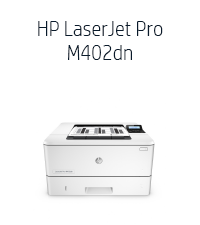
ā” Power through your print jobs with HP LaserJet Pro M402n ā where speed meets reliability!
The HP LaserJet Pro M402n is a monochrome laser printer designed for professionals who demand fast, reliable printing. With a print speed of 27 pages per minute, network-ready Ethernet connectivity, and a large 850-sheet capacity, it delivers efficient, high-quality black-and-white prints. Its compact design fits neatly on any desk, making it ideal for personal or small office use.


| ASIN | B013SKIC7G |
| Additional Printer Functions | Scan |
| B&W Pages per Minute | 27 ppm |
| Brand | HP |
| Color Pages per Minute | 27 ppm |
| Connectivity Technology | Ethernet, USB |
| Customer Reviews | 4.3 out of 5 stars 510 Your Review |
| Dual-sided printing | Yes |
| Global Trade Identification Number | 00787322066548, 00888793328644 |
| Hardware Interface | USB |
| Item Weight | 18.92 Pounds |
| Manufacturer | hp |
| Maximum Copy Speed Black and White | 40 ppm |
| Maximum Sheet Capacity | 850 |
| Model Name | M402n |
| Model Number | C5F93A |
| Other Special Features of the Product | Network-Ready |
| Print media | Card stock, Envelopes, Fabric, Glossy photo paper, Labels, Paper (plain) |
| Printer Connectivity Type | Ethernet, USB |
| Printer Output | Monochrome |
| Printer Output Type | Monochrome |
| Printer Type | Laser |
| Printing Technology | Laser |
| Processor Count | 1 |
| Scanner Type | Portable |
| Special Feature | Network-Ready |
| Total USB 2.0 Ports | 1 |
| Total Usb Ports | 1 |
| UPC | 787322066548 888793382912 888793328644 |
| Wattage | 591 W |
C**R
Not a good looking printer, but works great!
Perfect for personal use, fit right on my desk.
F**T
no imprime a doble cara...!!!!
como logro la factura ?? no imprime a doble cara... no hay suficiente advertencia... no estoy contento con el proveedor... falta de atención...
S**G
Best printer for your buck! Ethernet card for an IP address!! Refill like crazy, and PRINT like crazy!!
Fantastic! Operating systems printing on this printer: 2 Chromebook Laptops, 1 Kindle Fire, 2 Android Phones, and 1 Windows 7 computer. No issues. Fastest install ever. The 2 Chromebooks need an extension call HP Print to Chrome and after that fast addition with the printers IP address, we were in business. Wow. WOW!! You will find something useful in this printer guaranteed. I have struggled with print issues for years and have always wanted a laser printer with and ethernet card that provides a simple IP address to direct my printing traffic similar to printers at work but the past few years most printers were very expensive that included an ethernet card. I even tried a printer with wireless wifi connections and google print, BIG MISTAKE. Try this very affordable laser printer, jack in the ethernet connection to your router/switch, and watch you print worries go away. The damn printer even decided to print on its own at one point to remind me that it (the printer) had a specific email address I could email it to with any print stuff. Wouldn't you know it? IT PRINTS when you EMAIL IT as well!! I would be surprised if you could not find a method to simply get your print on with this thing. Well worth the money. HP nailed it with this one. Regarding pricing on print cartridges: GET THE REFILL BOTTLE AND LEARN HOW TO REFILL THE TONER from youtube and you will save $$$. Example, for $8 you could get a bottle of toner on amazon and learn how to empty the used ink/toner cartridge and refill (twice with one bottle) with some fresh toner. OR you could spend $100 and get a new one. YOU DO THE MATH. Print, print some more, PRINT LIKE CRAZY. Get some baby.
A**N
Quality is top. 1 sided printer only
This is one sided printer which does not sense anymore. Why even bother making it if double sided is just a little more$ and well worth the investment.
J**N
Nice printer, and I can print wirelessly - thru Wi-Fi.
Works great! Although this model, M402n, does not have wireless capabilities built in, i can print wirelessly from laptops easily thru Wi-fi. Set up was so easy. First, connected the printer to my Wi-Fi router with a USB cable. Then turned on the printer. Then opened my Mac's System Preferences, "Printers and Scanners". Just clicked "+" to add a printer. The printer shows up , I selected it and ticked the box, "Share this printer on a network". Now, as long as my laptops are connected to the same Wi-Fi network as the Wi-Fi router, the printer shows up. I had an antiquated non-network printer. I had it connected to my desktop via USB. For or other computers, like our laptops, to print, they had to go thru a computer to computer network, so the desktop computer where the printer was connected had to be on, and the first page took a long time. Now, connecting this printer to the router, our MacBook and Chromebook can print without the desktop being on, and the first page is out super fast.
Trustpilot
3 weeks ago
2 months ago