Buy anything from 5,000+ international stores. One checkout price. No surprise fees. Join 2M+ shoppers on Desertcart.
Desertcart purchases this item on your behalf and handles shipping, customs, and support to Denmark.
🔍 Stay one step ahead—because your privacy deserves pro-level protection!
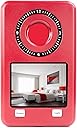
The Mic-Lock Camera Finder Pro is a compact, rechargeable device designed to detect hidden cameras and infrared signals in any lighting condition. Featuring dual modes for day and night detection, it uses red LED reflections and auto-focus technology to locate camera lenses quickly. Ideal for travelers and home users alike, it comes with a USB charging cable and a training guide to enhance detection skills, ensuring your personal and professional spaces remain secure.
| ASIN | B0C29SPJMN |
| Antenna Location | Indoor Security |
| Are Batteries Required | No |
| Best Sellers Rank | #354 in Hidden Cameras |
| Brand | Mic-Lock |
| Built-In Media | Camera Finder Pro Device, Charging Cable, Hidden Camera Trainer |
| Color | Red |
| Compatible Devices | Desktop, Laptop, Smartphone, Tablet |
| Connectivity Protocol | Wi-Fi |
| Connectivity Technology | Wireless |
| Controller Type | Android |
| Customer Reviews | 3.5 out of 5 stars 33 Reviews |
| Focus Type | Auto Focus |
| Indoor Outdoor Usage | Indoor |
| Indoor/Outdoor Usage | Indoor |
| Item Dimensions | 4 x 3 x 1 inches |
| Light Source | LED |
| Manufacturer | Mic-Lock |
| Model Name | Pro Camera Detector Red |
| Model Number | Pro Camera Detector Red |
| Mount Type | Wall Mount |
| Night Vision | Night Color |
| Number of Items | 1 |
| Other Special Features of the Product | Portable |
| Power Source | Battery Powered |
| Recommended Uses For Product | Indoor Security |
| Room Type | Classroom, Kitchen, Living Room, Office |
| Special Feature | Portable |
| UPC | 784718733329 |
| Unit Count | 1.0 Count |
| Video Capture Format | MPEG-4 |
| Wireless Technology | Wi-Fi |
O**A
Found our cameras with ease
This camera detector has two modes to uncover hidden cameras. The night mode is working with a screen that picks up any light, including the infrared light from a hidden or visible camera. Tested it with our own camera and it worked great on that. For times where you can't turn off the lights it has a strobe light that makes a camera lens appear to blink in the same frequency. That works as well. From what I have read I understand that nightvision cameras rely on infrared light and that is why they are detectable with this device. However, it did not detect the camera on our Echo device. Not sure if that is because of a different technology or because it is not on? Can't wait to take it on my next trip and test it out in the hotel. Of course, now I wonder if there are camera types it would not detect.
N**O
Less "Master Sleuth," more "Fun-Size" CIA
Will this make you a master of discovering unwanted surveillance devices? Definitely not, but it does at least give you a shot at it. Out of the package, this Camera Finder has the feel of a cheap carnival trinket. It is a screen, two buttons, and a peephole all wrapped in a thin candy shell. Okay, maybe not *actually* candy, but the plastic housing is ridiculously thin. There are clock markings around the peephole that might mean something, but the matching decoder ring didn't seem to come with this pack. In terms of operation, it's not terribly hard to figure out - even though the user interface is terrible. One button flashes a ring of red LEDs on the back of the device. Multiple presses of said button will change the frequency at which the LEDs flash. By looking through the peephole while the lights are flashing, you can detect the reflection of "suspected" pinhole camera lenses in both light and dark rooms. I say "suspected" because: 1. You really need to be within a few feet of the lens to detect it, and 2. Lots of tiny things can cause a similar reflection - like an LED, glass tile, plastic bead, etc. The LED feature really just helps you hone-in on objects to further inspect. The second button activates the camera and LCD screen which, I must admit, is impressive given this feels like it came out of a claw game. Perhaps less impressive is that the button does not appear to work... until the lights go out. No doubt many will repeatedly push the button and think "...this thing doesn't work," then be jarred when the screen pop-on, seemingly by itself, but really because the room just got dark enough. In this mode, the detector is, perhaps, a bit more powerful as it will detect IR light at a fair distance. The reason the lights must be off for this feature to work is that cameras will automatically switch to IR mode (if they have it) as soon as the lights go out. This makes them much easier to detect as they are emitting light, rather than just reflecting it. The camera and screen do a pretty good job of picking this up Trust that the included manual does not do a great job of explaining any of this and the molded labels on the buttons are almost completely unreadable. Once you have the functions down, however, the detector is easy to use. Just expect to be crawling on your hands and knees and getting uncomfortably close to potential camera locations more than doing the sweeping scans like you see in the movies. One last little thing to mention is the sample camera greebee that comes with the kit. It gives you a sample of the different types of lenses to practice on so you know what you're looking for. Overall, this isn't going to go on your resume to the CIA, but that's not to say it is not without use. For me, it will live in my computer bag so that I have it available when I travel and can checkout any clock, plug, picture, or vent that looks sus.
S**N
Not perfect, but it does what it says
This is a combination active/passive hidden camera finding system. There are two parts, one is the rechargeable detector, the other is a tester. Both have Micro-USB ports on them: on the main unit to charge it, and on the tester to power it when testing. There are two modes of operation. Active mode: In this mode, the finder sends out a flashing red light. You look through the center lens as it flashes. If there are tiny hidden cameras in the room, they will reflect back directly and light up - which you normally would not see. They can be better identified because they will be "flashing" at the same rate as the emitted light on the device. You need to move around the room using it to check for cameras. In my testing, this worked reasonably well. You need to be more or less in front of the camera, in the direction it is facing, in order to see it. I tested with three different cameras, and it could see all of them. Passive mode: In this mode, the unit turns on an infrared camera, and displays the result on the LCD screen. If there are any IR emitters (used to illuminate rooms so that cameras can see in complete darkness without alerting the occupants) they will show up as bright lights on the screen. In my testing, this worked exceptionally well, it was very easy to identify infrared emitters using this camera. The tester plugs into a USB power source, and is used to learn how to utilize the unit. Two of the ports on the tester emits different frequencies of infrared light, and the third port simulates a camera lens. You set it up in a dark room, and then use the detector to identify what things would look like. While not an exhaustive test for cameras, this kit definitely gives you a head start, and can definitely identify night vision cameras with IR illumination with ease. Who is this for? - Travellers staying in AirBnB or hotels - Anyone wanting to check for hidden cameras Pros: - Easy to use - IR detector works exceptionally well Cons: - Active detector can be ambiguous if not directly in front - Uses outdated micro-USB ports instead of USB-C
T**N
Not a premium build quality, not easy to figure out
This device build is of low quality. The casing is a very light plastic-ish material that won’t likely pass a moderately serious stress test. However, if you plan on keeping this tucked away somewhere for occasional use, this may not be a deal breaker for you. In that case, you have the added benefit of this device being very light and unassuming when carried in a pocket or purse. This is the first “camera finder” I’ve ever had any experience with so I can’t compare it to other products nor do I have any idea how they are supposed to work. Unfortunately, I am no more wiser than before as I still don’t fully understand how it works or how to accurately read what it tells me. All in all, I can’t recommend this as a good product for a layman. It appears to be functional though, so perhaps this may be a better product for someone with more experience using them. For those that do not, a more carefully constructed manual might solve the problem.
C**.
Good for infrared-enabled cameras, likely bad for everything else.
Initial experience:: First thing I noticed was the weight, it was quite lightweight for what you'd expect. I had to charge it after opening because it was a completely depleted battery upon arrival. After initial charging, I was a bit confused how to operate it, but after reading the instruction booklet and analyzing the device, I could get a better picture for what was supposed to happen on-screen. The one thing that I didn't quite understand was what the viewfinder was for as compared to the LCD screen, as well as the orientation dial ring. It's useful for a single-purpose: finding an infrared-enabled camera, but beyond that, it might be less reliable (such as a non-infrared hidden camera). [: Pros :] -Very lightweight. ]: Cons :[ -Not useful for finding cameras that are not using infrared lighting. -A bit complicated to initially understand. -Micro-USB charging (Not USB-C).
B**N
Already used to sweep my workplace and four hotel rooms. Good product!
I got a lot of use out of this little thing in a short amount of time. For starters, I ran through the workplace to find where all of the "hidden" cameras. Being an engineer, I have access to the building at all hours of the day and night. I don't do anything nefarious but the idea of working late and feeling like I am being watched since I'm the only one there irks me. Two weeks ago, I embarked on a trip through southeast Asia and stayed in three hotels and one resort. I was quite contented to be able to bring this along and sweep my hotel rooms. I'm a very fit man and my fiancé is a beauty queen... the idea that people could be spying is always in the back of my head given the extra incentive. This brought a lot of peace of mind on our travels.
J**H
Compact, lightweight, and works!
I’ve tested other devices that are similar to this before. The other ones that I’ve tested tend to concentrate on detecting “bugs” that are emitting RF signals, and sometimes also have a magnet detector for finding tracking devices on your car. Usually on those other devices the camera detection feature is limited to just the filter lens and blinking lights which help you find camera lenses. Those devices also tend to be larger and heavier than this one. I think for most people the main concern is probably cameras rather than listening bugs or tracking devices, and so this device is better as it features a video screen and camera itself that are used to find infrared lights that many hidden cameras use to see in the dark. The device itself is very compact and easily can be thrown in your luggage or bag. It weights under 2 ounces and measures around 4”x2.5”x0.5”. Included in the box is the main unit, a special test board that you can use for practice, a USB-A to micro-USB cable, and an instruction pamphlet. The instructions are well written despite the device being made in China, in contrast to other devices I’ve tried where the instructions are poorly translated to English. The instructions show a slightly different version of the test board where the fake camera and IR emitters are on separate sides from one another. In my kit the test board has all the lenses on one side. The instructions also don’t mention how to turn off each mode. To turn the lights or screen on and off simply hold down the relevant button for a second or two and then release it. To use the device first charge it up using the included cable and any USB-A charger (or computer) that you already have. Once it’s charged up the operation is very simple. Two buttons are the only controls on the unit. One is used for turning on the red LED lights to look for camera lenses, the other is used to turn on the screen and built-in camera to look for infrared light emitters. Press and hold down either button for a moment to turn on the desired mode. To look for camera lenses you turn on the red LED lights and then look through the specially filtered lens on the unit. You want to scan around the room looking for any flashing dots, which will be the camera lenses reflecting the red LED light back at you. Pressing the button again allows you to cycle through 4 different flashing speeds so you can select the speed that is easiest for you to see. To look for infrared emitters make sure you are in a completely dark room. It needs to be dark because the emitters will likely not be easily visible if the room is already lit with regular light, but also because most cameras don’t even turn on the infrared emitters unless they detect that the room is dark. Turn on the screen using the proper button, then pan around the room looking at the screen. Any infrared light sources will be clearly visible as they will appear as bright lights like flashlights on the screen. The included test board features a mock camera lens, and two different types of infrared emitters. You connect the board to a USB power source using the included charging cable and sit it wherever you want to simulate a camera. One of the infrared emitters glows red with visible light, while the other is a different type that is not as easily seen. The detector easily spots both of the lights. I covered up the more visible of the two just to confirm that it can see both types. The fake camera lens was not very useful as a test for me as it didn’t seem to reflect the light like a real camera would and thus didn’t really show up using the detector. I tested both the lens and infrared detection modes on a real security camera and the detector easily saw the lens reflection and the infrared emitters fro the real camera. This device actually works for finding cameras so if that’s something that concerns you this is a great, compact device to take with you on trips. The only downside I see is that it uses a micro-USB connector for charging which is outdated at this point. I would prefer that it used USB-C as then I wouldn’t have to keep track of a micro-USB cable, but this is a minor issue.
C**G
Will detect IR based cameras, but not very good for detecting other types of cameras
Maybe I'm doing something wrong, but I couldn't get the device to work as exactly as advertised. While the unit does detect infrared emitters when using the screen, it will not detect non-IR cameras when using the screen, the viewfinder, or the flashing red LEDs or any combination of those methods. I tested this using the detector's own tester device at first. The IR emitting LEDs on the tester device show up as bright dots when viewed through the screen on the detector, but the non-IR spot on the tester doesn't really show up any differently. I had the same result when testing with some other cameras. I guess if detecting night vision cameras is your main goal, then this product will work well. If you want to detect anything else, good luck.
Trustpilot
2 weeks ago
1 month ago