Buy anything from 5,000+ international stores. One checkout price. No surprise fees. Join 2M+ shoppers on Desertcart.
Desertcart purchases this item on your behalf and handles shipping, customs, and support to Denmark.
👁️🗨️ See everything, miss nothing — your smart home’s vigilant eye!
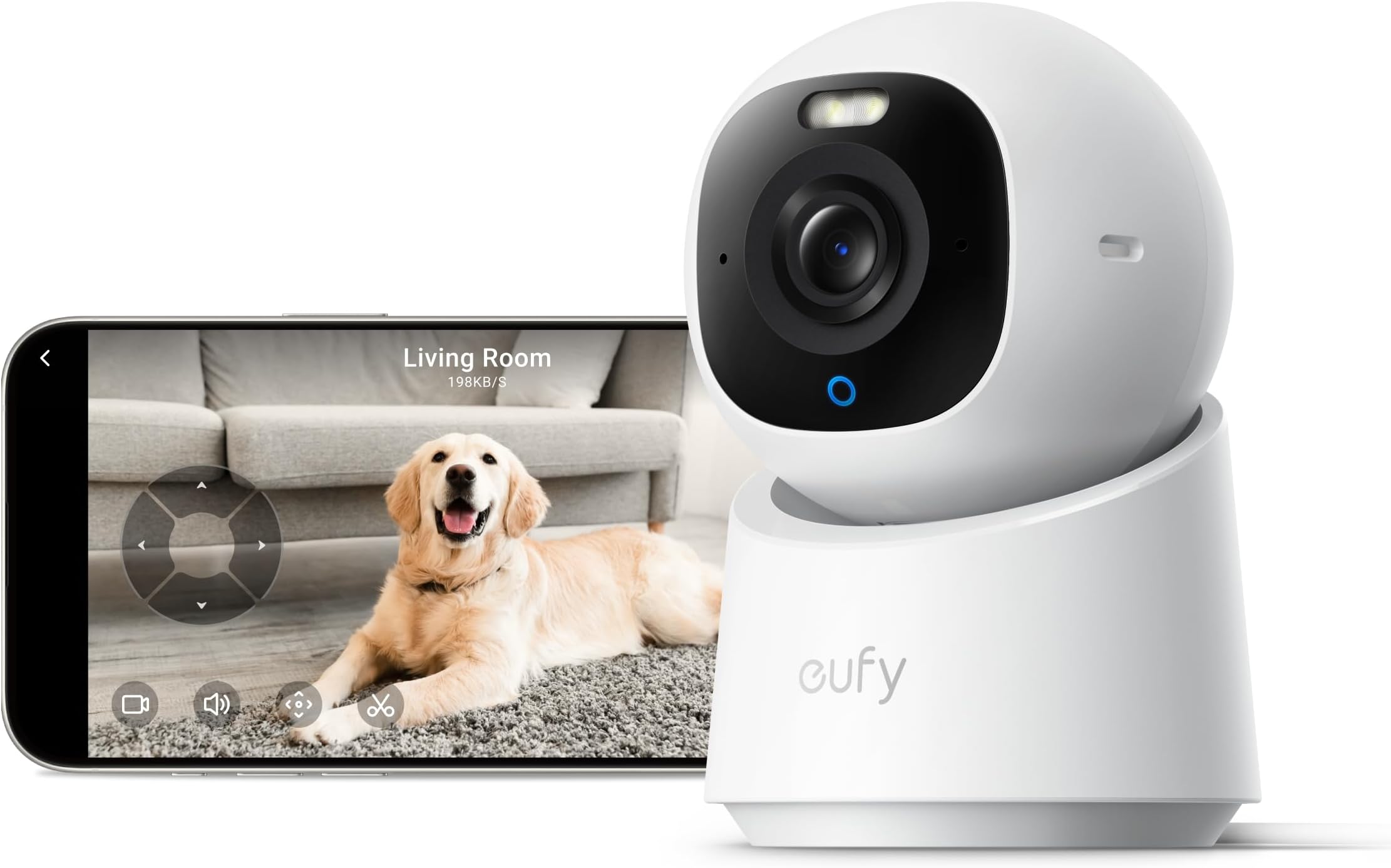
The eufy Security 4K Indoor Camera E30 delivers professional-grade 4K video with 360° pan and tilt, powered by advanced AI for auto tracking and detection. Designed for pet owners, parents, and home security enthusiasts, it offers color night vision with a built-in spotlight and two-way audio for real-time communication. Compatible with HomeKit, Alexa, and Google Assistant, it supports local SD card storage with no subscription fees, ensuring privacy and convenience in a sleek, easy-to-install indoor camera.


| ASIN | B0DJVGZQW7 |
| Alert Type | Audio and Motion |
| Antenna Location | Indoor Security |
| Are Batteries Required | No |
| Best Sellers Rank | #708 in Baby ( See Top 100 in Baby ) #7 in Dome Surveillance Cameras #7 in Video Baby Monitors #10 in Pet Cameras & Monitors |
| Brand | eufy Security |
| Built-In Media | Positioning Sticker, Screw Pack, Quick Start Guide, USB Cable, USB Adapter, Wall Mount, eufy Indoor Cam E30 |
| Color | White |
| Compatible Devices | Smartphone |
| Connectivity Protocol | Wi-Fi |
| Connectivity Technology | Wired |
| Control Method | App |
| Controller Type | Amazon Alexa, Apple HomeKit, Google Assistant |
| Customer Reviews | 4.5 out of 5 stars 2,421 Reviews |
| Effective Video Resolution | 1080 Pixels |
| Field Of View | 360 Degrees |
| Form Factor | Dome |
| Frame Rate | 25 frames_per_second |
| Indoor Outdoor Usage | Indoor |
| Indoor/Outdoor Usage | Indoor |
| Installation Type | Freestanding |
| Item Dimensions | 2.8 x 2.9 x 4.2 inches |
| Item Weight | 0.78 Pounds |
| Manufacturer | Anker |
| Model Name | eufy Indoor Cam E Series |
| Model Number | T8417 |
| Mount Type | Wall Mount |
| Night Vision | Night Color |
| Number of Items | 1 |
| Other Special Features of the Product | 2-Way Audio, 4K UHD with 360° Pan Tilt, AI Auto Tracking, Night Vision, Works with Homekit |
| Power Source | Corded Electric |
| Recommended Uses For Product | Indoor Security |
| Special Feature | 2-Way Audio, 4K UHD with 360° Pan Tilt, AI Auto Tracking, Night Vision, Works with Homekit |
| UPC | 194644297985 |
| Unit Count | 1.0 Count |
| Video Capture Format | MP4 |
| Video Capture Resolution | 4k |
| Video Encoding | H.265 |
| Viewing Angle | 360 Degrees |
| Wireless Technology | Wi-Fi |
K**E
User friendly pet/security camera
Great pet cam. We previously had the YI cameras. They started glitching, adding advertisements, and limited viewing time. After lots of research we decided to pickup the Eufy cameras. I bought the E 220 which are nice cameras, but if placed on a table or on a cabinet higher up they do not pan down far enough to see the floor in all areas. Pets spend lots of time down there. I kept them for 2 rooms that are not entered as much by pets and they are on lower table. Bought the e30 and they are great 4k camera so far. 1 mounted in the corner on ceiling in kitchen and the other on the entertainment center in front of tv. Barely noticeable in black. Easy setup. Stream is good. Video excellent and great image when zoomed in. Very user friendly. Motion detection works well, but we do not use. Easy to put in sleep/privacy mode when we are home. For the price excellent cameras. Microphone works well and can talk to the pets. The e30 just push the phone image on the app and o the e220 you have to hold the microphone. Easy to shre the cameras with other members of household. With so many cameras out there, I really had to do some research. Seems like I made a good choice.
P**Y
Totally Awesome!
I’m so happy and impressed with this camera. WOW! The set up was super easy, the clarity of the video is crisp and clear and the sound quality is amazing. It’s super cool that you can talk from your phone app and the other person can respond back. I totally recommend this camera. Also, it will alert you on your phone when there is motion. The camera follows the motion too. You can mount it on wall, ceiling or furniture. (Hardware included) You can zoom in and control the camera from your phone. Everything you need to set up and get it working is all included, no subscription which is a huge plus. It’s very sturdy and made well. I’m so beyond happy with this purchase!
M**L
Able to keep an eye on our dog while away
We got the eufy Indoor Security Camera E30 three weeks ago as a last-ditch effort to catch our dog in the act—he kept sneaking onto the kitchen counter whenever our backs were turned. Honestly, this little camera has made a world of difference for us. The biggest win for me is that it’s not subscription based. I really didn’t want to get locked into another monthly fee just for basic home monitoring, so this was a huge relief. The alerts show up on my phone almost instantly when there’s motion, and the two-way audio actually lets us tell our dog to get down right when it happens (confusion guaranteed). The camera also rotates via the app, so even if our dog tries a new angle, we can still catch him in the act. The picture is sharp during the day, and while the night vision could be a bit clearer, it’s still useful enough. Setting it up was straightforward—took less than ten minutes—and the app is simple to navigate. The camera itself feels sturdy and reliable. If you’re looking for outdoor use or want ultra-crisp night images, you might want something else. But if you’re a parent or have mischievous pets, this is a solid, no-fuss solution that won’t nickel-and-dime you each month. Highly recommend for peace of mind!
O**D
Fantastic resolution, feature rich, easy setup.
Got it on sale so I’m very happy with getting a quality full feature indoor camera at a good price. Fantastic resolution, easy to use and set up. I’m impressed with the night vision though there is some lag or ghosting. Can use alone and use a micro as card or hook into the home base 3 for storage of video which is what I did. WiFi connection with the E30 is stable with a small amount of lag. The only disappointment is I tried to mount it to the far wall of a room and the tilt won’t allow for being able to tilt enough to be able to look to the end of the room. Perhaps a different mounting bracket would allow an upright mount. I had to wind up placing it in a more obvious spot on my mantle. Overall I am very happy with this camera and feel more secure both when I’m at home and away.
P**D
Excellent camera for the price
I love this little camera. the AI tracking is great. the response time and video quality is outstanding. There are alos plenty of features that you can customize. I mounted mine in a high window inside my garage for monitoring the front of my house and it works like a champ. it notifies you with people pull in my house and tracks them moving around. the only negetive in my perspective is it is struggling inside my google assistant environment. It does pair with google assistant but takes it a bit for the video to come over and you can't manually pan/tilt. Not a game changer for me as i use on my phone/tablets. Anyway, would highly recommend and its a steal for the price. I will be getting the outdoor solar version for my backyard
N**N
Eufy E30 Security Camera
A+ product, simple and easy set up, clear and quality camera, great price
C**S
Finally Caught A Possible Suspect That Let Their Dog Leave Waste On My Front Lawn
I first bought a used one. It worked well but the usbc cable was loose, so it kept disconnecting. The next day, they had a deal and the new ones were the same price as the used one I just bought. So I ended up returning the defecting used unit and grabbed me the 2 set brand new. The image quality is pretty good. I put one on my porch window using an invisible shelf attached by adhesive and the other one just laying on the window pane. Adding a mini SD card in it, really opens up its full potential. I only used an 8gb one but I think it's more than sufficient for my area and activity I want to capture. I really like the easy of use for the App and how you could highlight sections where you want the Motion Detection to only capture. Works good while lights are off and the Night Vision off. I recommend this camera to my family. I was able to capture a suspect and their dog relieving itself on our front lawn of our apartment. They were lucky they didn't leave hard waste. I would forward the video to management, if they left poo poo. I think they noticed the camera, so I think they now avoid letting their dog go.
J**X
Camera is very good, BUT playback sporadic, and downloading a "block" of time...BEYOND FRUSTRATING!
Long review?....Oh Yeah. But this camera company’s software, and the Phone App specifically, has one VERY GLARING limitation that has UNNECESSARILY cost me HOURS of my life trying to figure out a “workaround,” and thus, I’m here to warn others about said Phone App limitation (if you care about REMOTELY getting your non-“Event” footage off of your Eufy camera, in a TIMELY fashion). >>>>>>>>>>>>>>>>>>>>>>>>> Side Note: TL;dr 1 – IF you are thinking about buying this camera, and will have PHYSICAL ACCESS to your camera’s micro-SD card, and don’t mind removing it from your camera to be able to download specific time blocks of footage (inconvenient as that might be), then you can skip this entire review. The camera is great and captures great video quality. CAVEAT: Remotely accessing the footage on the camera’s micro-SD card is sometimes sporadic, and the ability to download a block of time/footage, is KLUDGY, bordering on non-existent (unless you don’t mind tying up your phone recording from the camera’s Playback archives, In Real Time….meaning, if you need a 6-Hour block of footage, you’re going to spend 6 Hours having your Phone tied up, recording that off the camera, as it plays back, in real time). But, as I said, if you will have physical access to said micro-SD card, you can always bypass the Eufy Phone app, remove the micro-SD card from the camera, insert it into your computer, and download the block of footage you want to save directly to your computer, as inconvenient and inelegant as that workaround is. 2 – IF you need to be able to download specific blocks of time, REMOTELY, from your Eufy camera's micro-SD Card, this detailed review is for you. <<<<<<<<<<<<<<<<<<<<<<<<<< So, again, the camera quality is great, as is the video it captures. The software has some minor issues (which I won’t really get into), and (at least for accessing / downloading video footage from the camera’s SD card, remotely), one MAJOR FLAW / Purchase-Decision-Changing LIMITATION if you need remote access to your video footage. The main flaw I will address in this review, is the ability to remotely download blocks of footage even if there are “nothingness” segments throughout the time block that you need to download. By “nothingness,” I mean that nothing is happening on the screen aside from the time-stamp in the upper righthand corner of the video footage ticking away to denote that time IS actually passing by, even though nothing visible in the footage denotes the passage of time (ie: birds flying, dogs, people walking by, cars passing by, the mailman, etc.). Set Up and Full disclosure: a) My current situation is that I’m trying to remotely download a block of footage / time from my gf’s Eufy camera in another state to assist the Fire Department. b) I have 2 different types of Eufy cameras in my condo in Florida. My girlfriend has 2-3 different Eufy cameras in her house in another state. c) ALL of our cameras have a 256GB micro-SD card in them. d) ALL of our cameras are set up to record continuously, as well as "Events" (ie: movement). e) I have 1.2Gb Internet / Ethernet at my house, and she has 500Mbps Internet / Ethernet at her house (so “Bandwidth” is not the issue here). f) I mention all of this is to be transparent about the Phone App’s limitations (sometimes related to being able to connect to said cameras, but primarily the inexcusable lack of ability to simply remotely download blocks of footage from the camera’s micro-SD card), regardless of location / same-Wi-Fi network, Web-Portal nonsense, etc., etc. So, the company has 3 ways to look at your camera video: Dekstop App, Web Portal and Desktop App, all with overlapping, and concurrently separate flaws / limitations. 1) Want to download a video from one of your cameras on the (Mac) Desktop App? Nope, you can only view LIVE on the Mac Desktop app (assume PC version is the same). 2) Their recommendation?...download video from the "Web Portal." Have been trying that for hours. Keeps giving me error messages claiming that cameras might not be "online." 3) The problem with this error message, is that as I type this, and the Web Portal is frosting all of my camera images, and giving me this error message,…..I'm looking at the Eufy camera in question, on my Phone App, STREAMING LIVE....so, OBVIOUSLY, the camera is working perfectly fine, is connected to my account, and is streaming video over the Internet, to my Phone. So, I don’t know why the Web Portal is treating my Eufy camera as either M.I.A., or persona non grata. 4) No matter how many times I hit the "Refresh" button, on every camera of mine, in the "Web Portal," they all give me the same pattern, "Establishing secure connection.....(a few minutes go by while I wait, then)…..Device failed to start streaming (408). Please check if the device is online and try again."...3 Hours I've been seeing these error messages on the Portal, even though all of my cameras are Live Streaming in the Phone App. 5) So, in terms of being able to remotely download video, the Desktop App is out, and I can’t get the Web Portal to connect to my account / cameras, even though I can see all of my cameras Live Streaming on the Phone App. So, I’m left with the Phone App to be able to download videos remotely from the camera in question, but the Phone App software WILL NOT allow you to download a chunk of time from the camera’s micro-SD card. You CANNOT “Bracket” a certain block of time, and download it to your phone. You can download “Events” (ie: self-contained “Occurrences” that the software encapsulated as their own stand-alone video files), but in terms of downloading a block of time, of your choosing, to your phone…. You could get a PhD quicker. Here is my main issue, with the Eufy Phone App, which I will delve into (with a specific real event, as an example): Say you need a 6-Hour segment of footage, and in that time-frame 3 “Events” happened. You CAN easily download those “Events,” remotely, from the Phone App (provided the App can connect to the camera; not always a guarantee, even on your own home Wi-Fi network), because the software (most likely, but not always) logged them as “Events,” and thus, they are their own, encapsulated, stand-alone video files. However, need the whole 6 HOURS of footage, including the “nothingness” surrounding those events?....it’s going to take you 6 HOURS to record that footage, IRT, from your Phone’s Eufy App, thus, tying up your phone for 6 HOURS! So, this review is primarily about the Kludgy Phone App software, because what good is having a device that records great video, but whose Phone App software makes it very hard to remotely get the video footage you need when it really matters? Might as well not have the footage at all, if the effort you have to go through to get specific footage is HUGELY time-consuming / wasting. Limitations of Saving Videos, remotely, using the Eufy Phone App’s "Playback" Mode: a) You CANNOT save a block of time that YOU determine. I'll give you a great example. Across the street from my gf's house, a huge house burned down last week (in the middle of the night), and her Eufy camera had a FRONT ROW seat for the show. The camera did record continuously, as well as some comings and goings of people, on the street, pre-fire, and peri-fire (which, in the "Playback" timeline, were recorded as "Events"). However, in the Phone App, it is only easy to download “Events,” as the software logs the beginning and endings of “Motion,” as “Events,” and saves them as their own, stand-alone, video files. HOWEVER….Recording from Time “X-->Y” is DAMN NEAR impossible without MAJOR Effort and Time-Investment. For example, if I told the app, “Go to 5/21/2026, and download a video from 3am – 9am”….Nope, can’t do that. You have the option of downloading pre-packaged “Events” during that time frame, but a continuous video, where YOU, the User, set the time-frame bookends / brackets?....Nope. Not possible. Their BRILLIANT solution for recording a block of time / footage?... "Go on the Eufy Phone App....... Select "Playback.... Go to the Calendar Date / Time you're interested in starting the recording.... Then, as the video is playing back, hit the "Record" button on the App, and record (ie: "Download"), the segment you want, IN REAL TIME, on your phone's screen..." If the (non-“Event”) video footage you need is only 30 seconds long, then having your Phone tied up, downloading video, from the camera’s micro-SD card, via the Eufy Phone App, in real time, while inconvenient, isn’t that big of a deal (ridiculous as this task foisted upon the user might be). However, what if you want to record a 6 HOUR segment of video from the micro-SD Card in your camera? Their response?....(and I’m paraphrasing): "On the Eufy Phone App, find the starting point of your video while in "Playback" mode, speed up the Playback to 2X, or 4X, or 8X or 16X, and hit the “Record” button. Even though the Playback (which you're looking at), will be at that “X” speed, the actual "Recording" (ie: final video saved to your Phone's Photos file), will be at Regular 1X Playback Speed." Tried this....doesn't work correctly (remember, I'm trying to record the “nothingness” before the fire even starts, so there are no technical "Events" going on....just boring, no motion recording before the first signs of fire). a) I went to the date / time that I needed, backed up a few minutes to record the “nothingness” before the actual “Event” (ie: start of the fire), and when the video started to Play(back), I upped the speed to 2X. Playback doubled. Set the Playback speed to 4X, and it sped up again. Hit 8X, and the app stalled / hung / buffered for about 15 seconds, and then gave me the error message, “Unable to play live video. (Cancel / Retry).” Anybody else see the error, in that error message? Yeah, I’m trying to watch Playback video, not “Live” video. That’s the first problem. Secondly, no matter how many times I changed the speed, adjusted the timeline, came out of the video and went back in, etc., etc., whenever I hit the 8X or 16X Playback speed option, to try to speed up this ridiculous download process, the Phone App would hang, and then give me the same error message. b) So, the Phone App would let me Playback at 4X, but not 8X or 16X (remember, I'm trying to record like 6 HOURS of footage, so I can't have my iPhone tied up for 6 HOURS, playing back video footage, IRT, so I can record it IRT, because the App won't let me select "START" and "END" recording times. Who has time to just tie up their phone for 6 HOURS to record footage that is already saved on an SD Card?!. Extracting the footage shouldn't be anywhere near as difficult as they make it). c) So, I was stuck with 4X Playback speed, found my starting place (AGAIN), in the video footage prior to the building showing any signs of fire, and a quiet (motionless) street, made sure the Playback was set to 4X, then hit the "Record" button. The App started recording, and while I WAS seeing the Playback in 4X, on my Phone's Eufy App, and the App "Record" button was showing that it was recording, when I stopped the video after about 20 minutes (just doing a "Test Run"), and went to look at it in my Phone's "Photos" app where it was stored, the Eufy Phone App DID record from the time I started the Record process (ie: the timestamp on the video), to the timestamp on the video where I stopped the recording, BUT the video itself did not show continuous playback / motion. So, I'll try to explain this as best I can. Remember, the camera is recording continuously, even the "nothingness" (ie: no motion, just the passage of time as denoted by the timestamp in the upper righthand corner of the video). Okay, so, let's say the house fire started at 3:10am, but I want to back up the recording to 3am, to record the “nothingness” leading up to the fire, and to see if anybody was being shady and/or had anything to do with setting the fire (because the Fire Department has already contacted us for the footage). So, I’ll start my 4x Playback speed download recording at 3am. So, 3am – Start downloading, from micro-SD card on Camera, via Eufy Phone App, at 4X Playback Speed. 3am-3:01am – Someone walking up street. Downloaded video shows this motion. 3:01am-3:10am – While the camera’s SD card recorded continuously, and has footage of the nothingness that happened between 3:01am (ie: walking person), and 3:10am (visible signs of the fire starting), instead of making that “time-ticking-by” continuous footage part of the finished downloaded video, instead, the downloaded video shows you the person walking by from 3:00am – 3:01am, then shows you 9 MINUTES of “Still Frame” of the last frame of that person’s movement…., and then the downloaded video, and respective time-stamp, jump back to life, 9 minutes from the last time stamp, showing the house across the street, already on fire. If the camera’s SD cards HAS the continuous “nothingness” footage between 3:01 (the person leaving the frame), and 3:10 (the start of the fire), why did the software put 9 MINUTES of “Still Frame” in the video, and only start showing “Motion” in the video when the fire is already started? The Real-Time footage is already on the SD Card. What good does 9 MINUTES of “Still Frame” do for me in a VIDEO?!.... So, in order to download the entire block of time that I, the user, want, I have to record using the Phone App, In Real Time, which is a HUGE WASTE OF MY TIME for such a large block of footage. ALSO, frequently, when you’re in “Playback Mode” and ask the Phone App software to go back and call up a specific date / time, it will think for a minute or so, then say it can’t get the footage, and to “try again later.” I’ve experienced this, in my house, sitting 2 feet from my Modem/Router, and 2 feet from my Eufy camera, both on the same Wi-Fi network… and the Phone App software still can get my request done. I know that some people reading this might say, “That’s a good point; just remove the micro-SD card from the camera, download the footage to your computer, then put the micro-SD card back in the camera.” True, that is an option. But there are two flaws with that logic (at least in my case, and I’m sure I’m not the only one to experience one, if not both, of these events). First, what about recording the footage the camera is seeing while I’m removing the micro-SD card, and doing all of this workaround B.S. of putting the micro-SD card directly into my computer to be able to get to the footage, so that I don’t have to deal with Eufy’s Phone App shenanigans? Obviously, if I remove the micro-SD card from the camera, to be able to download the footage, the camera, during that time, no longer has anything to write new footage to. Secondly, remember, I’m trying to record the fire from my gf’s Eufy camera in another state, so even if I were willing to do this workaround that Eufy’s stupid software is forcing upon me, neither I (nor she), is physically in her state, let alone in the room where her camera is, so I/we don’t have physical access to the camera card in question, so I/we are limited to Internet connectivity, and the limitations of the Eufy’s Phone App. And, I’m trying to download this footage to give to the Fire Department (which they called and requested), so I’m trying to get this done before the footage gets over-written. So, you can see/understand my frustration with the idiotic limitations of Eufy’s Phone App when it comes to simply downloading a block of time, of footage, from the micro-SD card, and my NOT wanting to spend 6 HOURS having my phone tied up, downloaind / recording footage IRT, that is already saved on her camera’s micro-SD card. It seems like such a simple concept. I mean, it’s baffling to me that companies can create a great product (ie: the camera itself), and then not be able to figure out a simple Customer App (GUI), where you can tell it, “Hey, go back to this date on the micro-SD card, and record a video that Starts at “X” time, and ends at “Y” time (I don’t care if there are any “Events” or “Motion” or whatever….I want a video, from “X” time, to “Y” time, on this date. Simple). I mean, the footage is ALREADY THERE… on the micro-SD card. Why is it SO hard to download a video from “X” time, to “Y” time, on date “Z”?!?!.... I work with multiple video editing softwares, and ALL of them will allow me to “Bracket” the timeline and simply say, “Export this timeline of video.” Done. Simple. I did this earlier today with Wondershare Uniconverter. I bracketed the timeframe I wanted, clicked a button, and exported that clip, and from my pulling up the master video in question and bracketing my timeframe, to having a finished, encapsulated video, was maybe 18 SECONDS. Comparatively, it’s taken me HOURS trying to figure out how to get around Eufy’s Phone App “block-of-time-recording” limitation, without having to spend 6 HOURS tying up my Phone, remotely recording the footage I need to give to the Fire Department before it gets over-written. For whatever reason, Eufy’s software is LIGHT YEARS BEHIND this SIMPLE bracketed time block export capability. Hey Eufy!.... Get with the Times! So long 8-Track….Hello, Cassette!.... 🤦♂️ You CAN download “Events” that the software app deems as an “Event,” but what if you want footage flanking an event…what then? Nothing happened, so there is no “Event” prior to the “actual Event”, so no way to record that “nothingness,” aside from the moronic workarounds above, which are either HUGELY time-consuming (ie: recording your phones screen for 6 HOURS, IRT…who has time for that?!), and/or downloading in sped-up time, which doesn’t work, because you get long blocks of “Still Frame” in your Video. The NET-NET: Desktop App: 1) Can’t record “Playback” footage; only Live Streaming. Must use Web Portal, or Phone App to record Playback footage from the micro-SD card in your camera. Web Portal: 1) Major issues / error messages logging in / seeing cameras Live Streaming POV. 2) I have no idea of the “Download” options I might have on the Web Portal. Still getting error messages after 3 Hours. Phone App: 1) Can’t download video from “X-->Y” times, in a block; only “Events” footage. 2) In order to download a large segment of footage (including “nothingness” and “Events”, in one chronological time block), you have to tie up your Phone for “X-->Y” time, recording, IN REAL TIME, from the Eufy Phone App. Need a 1-Hour segment of footage from your Eufy Camera?...start the recording process in the Phone App, and say goodbye to your phone for 1 HOUR. Need 6 Hours of footage….Bye-Bye Phone for 6 HOURS. Absolute insanity. Lastly, why ALL 3 of the aforementioned modalities of viewing your camera’s video footage aren’t IDENTICAL, is beyond me. Why make a different GUI / Interface for each medium, all with different capabilities / limitations? Makes ZERO sense to me. While I like the video footage that the cameras create, if Eufy doesn’t get their act together in terms of their software functionality (or lack thereof), I won’t be buying their products again. This absurd remote download limitation of the Phone App (ie: simply downloading footage from “X-->Y” time), is like someone taking my micro-SD card out of my Eufy camera, and then locking it in a safe, where I have to spend 6 hours with an acetylene torch to get access to it. Is the footage I need on the card? Absolutely. Can I get to that footage without spending outrageous amounts of time and effort?....Not a chance.
M**.
Buena cámara con excelente resolución, pero es forzoso el almacenamiento
Esta cámara me parece una muy buena opción, tienen bastantes funciones y un seguimiento muy útil para la detección de movimientos. La resolución está bien, sin embargo no le pongo las 5 estrellas porque se debe considerar que se necesita almacenamiento para poder tener almacenaje en 4K funcional, tanto para que lo tengas de manera local así como su centro de datos el cual le puedes complementar el uso ( Que añade IA y funciones especiales)
A**B
Integration with homekit does not allow all features
Its a camera that doesnt work exactly like say aqara if you are looking at homekit integration. Otherwise quite good
R**B
User friendly.
Easy to use and set up. Very simple instructions.
L**S
FUNCIONAN BIEN
FUNCIONAN BIEN
A**A
Excellent Performance and App Stability
The eufy Indoor Cam E30 (4K UHD) is an impressive home security camera that delivers sharp video, smooth tracking, and dependable software performance. It has worked flawlessly since setup. Build Quality & Design Compact and well-built with smooth 360° pan-tilt motion. The white matte finish blends easily into any room. Setup took about 5 minutes via the eufy Security app and connected instantly to Wi-Fi and Apple HomeKit. Real Performance Test Used for 3 months in a living room. The 4K image quality is excellent—clear details even in low light. Color night vision performs better than expected, maintaining realistic tones under dim lighting. Motion detection for humans, pets, and sound is fast and accurate with minimal false alerts. Auto-tracking follows pets smoothly without jitter. No app crashes or connection drops. Pros Crisp 4K UHD video with color night vision Reliable motion and sound detection 360° smooth pan/tilt control Works seamlessly with HomeKit Stable app and firmware performance Supports onboard microSD storage Cons Slightly bulky head for smaller shelves Requires high-endurance microSD for best results Best For Homeowners wanting a premium, reliable indoor camera with smart detection and full local storage control. Not Ideal For Those needing outdoor coverage or battery-powered operation. Tips for Buyers Use a high-endurance microSD card (128GB+ rated for surveillance use) to store footage locally and ensure long-term reliability.
Trustpilot
3 weeks ago
2 weeks ago