Desertcart purchases this item on your behalf and handles shipping, customs, and support to Denmark.
โจ๏ธ๐๏ธ Elevate your Surface Pro gameโtype, write, and conquer with style!
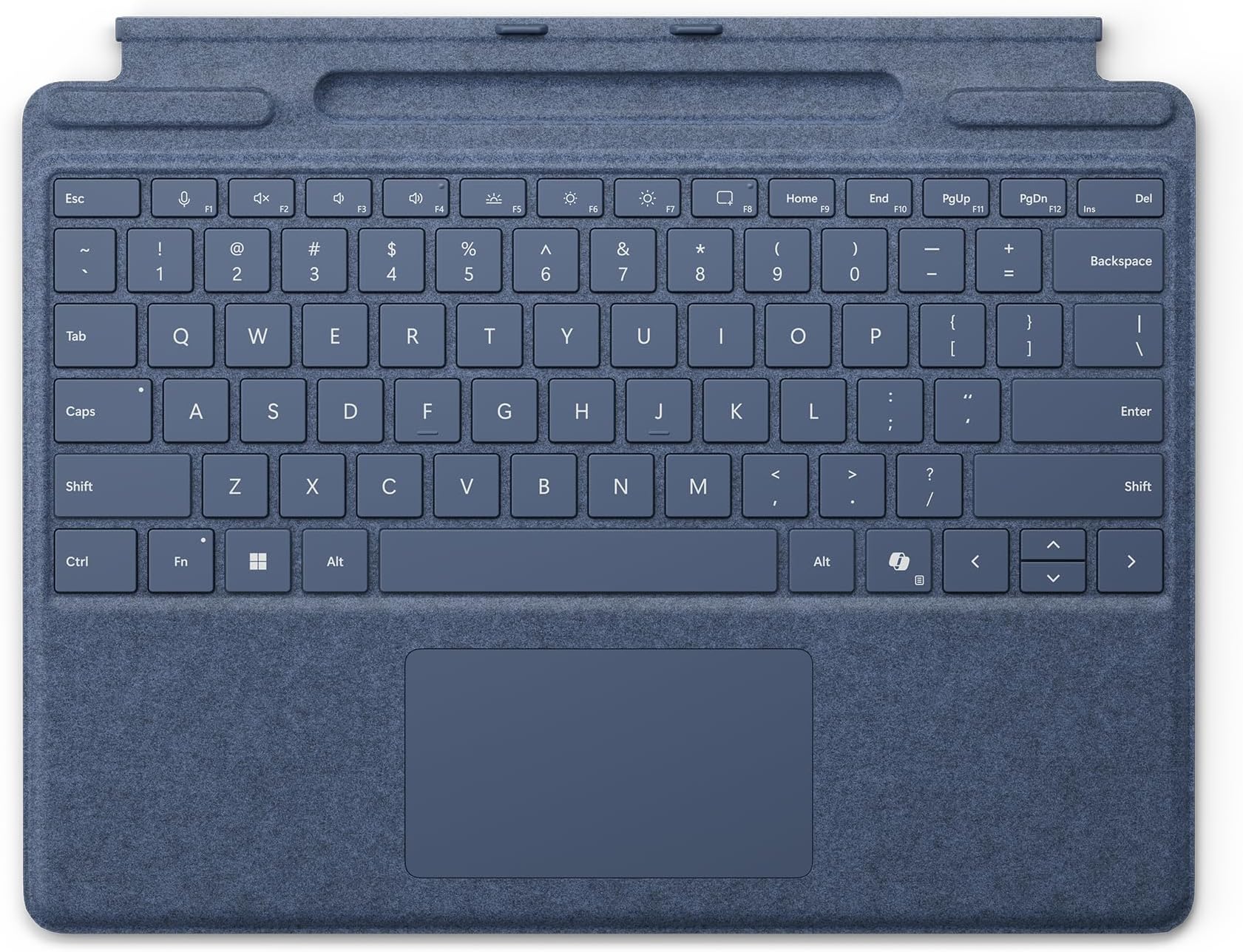
The Microsoft Surface Pro Keyboard with Slim Pen Storage in Sapphire is a premium mechanical keyboard designed for Surface Pro 8, 9, and Copilot+ models. Featuring 78 backlit mechanical keys, a dedicated Copilot key for instant AI-powered productivity, and a built-in tray for the Surface Slim Pen, it combines sleek design with enhanced functionality. Lightweight and portable, it offers precise typing and navigation with a large trackpad, making it the ultimate accessory for professionals seeking seamless multitasking and creative freedom.
| ASIN | B0D22QSLDV |
| Antenna Location | Everyday Use, Mobile Computing |
| Box Contents | Keyboard |
| Brand | Microsoft |
| Brand Name | Microsoft |
| Button Quantity | 78 |
| Colour | Sapphire |
| Compatible Devices | PC, Tablet |
| Compatible Operating System Family | Windows |
| Compatible Tablet Computer Models | Microsoft Surface Pro 8, Microsoft Surface Pro 9 |
| Compatible devices | PC, Tablet |
| Connectivity Technology | Proprietary Surface Connect |
| Connectivity technology | Proprietary Surface Connect |
| Country of Origin | China |
| Customer Reviews | 4.0 out of 5 stars 52 Reviews |
| Enclosure Material | Probable Metal |
| Hand Orientation | Ambidextrous |
| Item Dimensions L x W x H | 28.9L x 22.6W x 0.5H centimetres |
| Item Weight | 0.28 Kilograms |
| Keyboard Backlighting Color Support | Single Color |
| Keyboard Description | Mechanical |
| Keyboard Layout | QWERTY |
| Keyboard description | Mechanical |
| Manufacturer | Microsoft |
| Manufacturer Part Number | 8XA-00217 |
| Minimum Required Operating System Version | Windows 10 |
| Model Name | Keyboard |
| Model Number | 8XA-00217 |
| Number of Keys | 19 |
| Number of Sections | 1 |
| Power Source | Wired |
| Product Features | Dedicated Copilot Key |
| Product Warranty | 1 year manufacturer |
| Recommended uses for product | Everyday Use, Mobile Computing |
| Special feature | Dedicated Copilot Key |
| Style Name | With Slim Pen Storage |
| Switch Type | Mechanical |
| UPC | 196388357321 |
| Unit Count | 1.0 count |
A**R
Perfect Keyboard for Seamless Surface Pro Experience
I recently bought the Microsoft Surface Pro Keyboard with the Copilot key in black, and Iโm thoroughly impressed! As someone who uses their Surface Pro for both work and casual use, this keyboard has significantly enhanced my experience. The Copilot key is a fantastic addition. It provides easy access to productivity features, making navigating through tasks and switching between apps much quicker. Itโs intuitive and truly makes using the Surface Pro feel like a full-fledged laptop. The keys are responsive, with great travel, making typing smooth and comfortable. Iโve used it for hours of work and havenโt experienced any discomfort, which is a big plus for me. The black color looks sleek and professional, while the Alcantara fabric feels luxurious yet durable. The backlit keys are perfect for low-light environments, and the magnetic attachment keeps everything secure. The keyboard also folds flat for portability, and the kickstand allows for adjustable viewing angles. Overall, this keyboard is a game-changer for anyone who wants to enhance their Surface Pro experience, especially with the Copilot key making multitasking and productivity a breeze. It's a little on the pricey side, but totally worth it for the added convenience and functionality.
D**N
Replacement of Surface Pro keyboard
Lovely accessory to my Surface Pro. The docking slot for my Slim Pen on the keyboard that was replaced, just stopped working. Would be good to be able to diagnose when the pen slot is not working.
C**Y
Do NOT Bother
This is my third in as many years: they have all stopped working around the 1 year mark. While they work, it's a good little keyboard. Unfortunately, they do not last long enough to justify the cost.
S**K
Not a bad keyboard.
Keyboard was good and working. Was not badly priced and would recommend.
A**D
Cheap keyboards canโt hold a candle to the real thing
I had bought a cheap Chinese Surface Pro keyboard, but I soon got fed up with the following foibles: Required separate charging Did not charge my Slim Pen 2 Had several key illumination colours, but you could only really see it under the keys, it didnโt really shine through the key caps The touchpad frequently mistook two finger scrolling for the โexpandโ gesture, even when the fingers were touching. The genuine Surface Pro keyboard has absolutely none of these vices. The only reason I docked a star is that it is somewhat bendy.
C**T
Works well
Works really well, no issues
P**.
Excellent keyboard and great design
Excellent keyboard, little bit pricey, however, I would highly recommend this keyboard over any other keyboard for the surface,
T**D
Ridiculously Expensive!
I had to order this Surface pro keyboard due to my original one failing after just under 2 years use! The cost of replacing the keyboard is quite frankly obscene, especially if they only have a short use life! Having researched these surface pro keyboard i can see i am not the only user to have one pack up on them after a short period of time - how can microsoft justify the cost of these to the end user! Notwithstanding my opening comments, the keyboard works well and is a pleasure to type on, the backlit display has not improved, i still find it a little to dull for my liking, especially when typing late into the evening. The surface pen fits well into the holder and charges as expected. I ordered the blue colour this time and it looks great with my surface pro 9. One thing i did note however is that the magnets that hold the keyboard to the front of your surface pro screen do not seem to be as strong as my previous SP keyboaerd. Microsoft really need to improve the durability of these keyboards - for the price they should last a lot longer than 2 years!
M**R
Great
Great
M**E
Keyboard not Working
I bought this surface keyboard for my computer but it started to malfunction such as not working, I've tried forced resets and even though Type cover detected it still won't respond. I have even reinstalled the driver but it still wouldn't work.
Trustpilot
1 week ago
1 month ago