🖊️ Elevate your Surface experience—where precision meets power and style
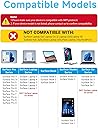
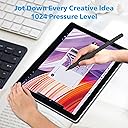
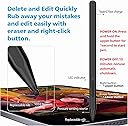
The Milikilo F97 Stylus Pen is a high-performance accessory compatible with most Microsoft Surface devices (excluding Laptop Go series). Featuring 1024 pressure sensitivity, tilt support, and palm rejection technology, it offers professional-grade precision for note-taking and creative work. With a fast 40-minute Type-C charge providing up to 80 hours of battery life and dual magnets for secure attachment, this pen ensures you stay productive and inspired all day long.


| ASIN | B0CYXWKWNY |
| Best Sellers Rank | 46 in Stylus Pens |
| Guaranteed software updates until | unknown |
| Item model number | F97 |
| Manufacturer | Milikilo |
| Product Dimensions | 15.8 x 0.99 x 0.99 cm; 14 g |
M**E
Works with the Kobo Libra Colour
This stylus works perfectly with my Kobo Libra Colour - amazing considering that the Kobo Stylus costs £70! There is no discernible lag and the writing process is as easy as it ever is with a stylus on glass. Even with my fairly awkward handwriting (OK, childish...) I have no problem writing with this stylus in the Kobo Notebooks on my KLC. The second great thing is that you can get replacement nibs here on Amazon. They're not the same as the one installed in this stylus, but they work just the same. They're here: https://www.amazon.co.uk/dp/B08CGN6CKV?ref=ppx_yo2ov_dt_b_fed_asin_title&th=1 Don't know about the battery life, but I haven't managed to run it out yet so it's obviously going to be fine for me (making notes about things I think of while I'm reading, for example something I need to do or look up later) without worrying about the battery running out. The magnetisation keeps the stylus attached to my Kobo Libra Colour in just the same way as my partner's Kobo stylus stays attached to his KLC. Highly recommended. Update 08/05/25: The battery life is impressive. I don't need to keep track of it, just plug the stylus in now and again when I think of it.
D**O
VFM and great functionality
Works very well with the Kobo Libre ebook reader. Lightweight and fantastic for highlighting and taking notes. Very quick to charge which is good if you forget to do so, as I often do - but the battery life is long when charged. Value for money.
S**V
Just like the expensive ones
Great stylus pen for the price. It’s looks great like the expensive ones and works like one too. Got to match my daughter’s blue surface pro tablet and keyboard. Definitely worth it as although she has now lost it that it’s cheap enough to replace and still be quids in over the expensive ones.
T**K
Good value but may lack a stable connection
Works reasonably well (surface pro 7) but sometimes fails to work again /reconnect if away from display a bit. Ended up buying a different one and more expensive. This may work for most people though jist fine.
N**N
Quality Stylus
Weighty and solid feel great stylus and long battery life
S**E
Works for a month and dies
Good for a month and then doesn’t charge anymore. Don’t bother
J**R
Surface pen
Was delivered fast. Pen does as advertised.
L**Y
Brilliant pen even for older Microsoft surface pros
Spent ages looking for a pen for my old version of the Microsoft surface pro and couldn't find any. This works great and charged quickly. Will keep it on the favourites.
R**6
Compatible surface pro 7+ et 9. S'aimante bien a la tablette. Finition vraiment bonne.
M**A
Works fine, on surface pro 4
S**A
Funziona perfettamente con surface
T**M
Works great. I have a Surface Pro 7, 9 and 10 and this pen works on all of them without an issue. It holds well (magnetic) on the side of the tablets. I also like that it uses the genuine microsoft tips/nibs. This way you don't need to search for some obscure 3rd party consumables when it is time to replace them. Charging via USB is a nice bonus and simple. No need to constantly buy batteries. All this at a fraction of the price of the original MS pen. Now if they can make one with the form factor of the newer "Microsoft Surface Slim Pen 2", that would be great, so it can easily fit in the dedicated slot that is present on the newer Surface Pro 9 (and above) type covers.
A**.
I needed a backup stylus for field work because I didn't want to risk losing my expensive official Microsoft Surface Pen on a job site. I honestly expected this to feel "cheap" or have connectivity issues, but I can't tell the difference in daily performance. The "MPP" Magic (No Bluetooth needed): Because this uses the Microsoft Pen Protocol (MPP), there is no fiddling with Bluetooth settings. As soon as I turned it on and touched the screen, it worked. • Pressure Sensitivity: It tracks perfectly. If I press harder while sketching a diagram in OneNote, the line thickens exactly like the OEM pen. • Palm Rejection: This is the dealbreaker feature, and thankfully, it works here. I can rest my hand fully on the screen while writing, and it doesn't register stray marks. Magnetic Attachment & Charging: It has a strong magnet that snaps firmly to the side of the Surface Pro, just like the original. • Important Note: While it magnetically attaches, it does not wirelessly charge (unlike the Slim Pen 2). You have to plug it in via USB-C to charge it. However, the battery lasts forever. I’ve used it for a week of meetings and haven't needed to recharge it yet. Tactile Feel: The tip has a nice amount of friction. It doesn't feel like slippery plastic-on-glass; there is just enough resistance to make your handwriting look neat. Verdict: Unless you are a professional digital artist who needs specific tilt-shading capabilities of the high-end Slim Pen 2, save your money. For taking notes, marking up PDFs, and general navigation, this is an absolute steal.
Trustpilot
2 weeks ago
2 months ago