Buy anything from 5,000+ international stores. One checkout price. No surprise fees. Join 2M+ shoppers on Desertcart.
Desertcart purchases this item on your behalf and handles shipping, customs, and support to Denmark.
✒️ Elevate your Surface game — precision, power, and style in one sleek pen!
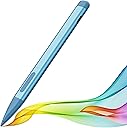
The Slim Pen 2 by JvKzaen is a premium stylus designed for Microsoft Surface devices, featuring 4096 levels of pressure sensitivity, a graphite nib that mimics pencil drawing, and double magnets for secure attachment. It offers fast Type-C charging with up to 66 hours of use, palm rejection, eraser functionality, and Bluetooth-powered remote control for presentations, making it an essential tool for professionals seeking precision and productivity.


| ASIN | B0D39NV3FT |
| Are Batteries Included | Yes |
| Are Batteries Required | Yes |
| Battery Average Life Standby | 365 days |
| Battery Description | Lithium-Ion |
| Best Sellers Rank | #11,680 in Cell Phones & Accessories ( See Top 100 in Cell Phones & Accessories ) #281 in Styluses |
| Brand | JvKzaen |
| Charging Time | 1 Hours |
| Color | Blue |
| Compatible Devices | Surface Pro 12,Surface Pro 11th Edition, Surface Pro 10, Surface Pro 9, Surface Pro 8, Surface Pro 7+, Surface Pro 7, Surface Pro 6, Surface Pro 5, Surface Pro 4, Surface Duo/Duo 2, Surface Pro X, Surface Go/Go 2/Go 3, Surface Book/Book 2/Book 3, Surface Studio 1st Gen, Surface Studio 2, Surface Studio 2+, Surface Laptop 1/Laptop 2/Laptop 3/Laptop 4/Laptop 5/Laptop 6, and Surface Laptop Studio.Som… |
| Compatible Tablet Computer Models | Microsoft Surface Duo, Microsoft Surface Go, Microsoft Surface Go 3, Microsoft Surface Pro 10, Microsoft Surface Pro 11, Microsoft Surface Pro 3, Microsoft Surface Pro 4, Microsoft Surface Pro 5, Microsoft Surface Pro 6, Microsoft Surface Pro 7, Microsoft Surface Pro 7+, Microsoft Surface Pro 8, Microsoft Surface Pro 9, Microsoft Surface Pro X |
| Customer Reviews | 4.2 out of 5 stars 490 Reviews |
| Enclosure Material | Aluminum |
| Item Dimensions | 5.4 x 0.46 x 0.46 inches |
| Item Weight | 11.3 Grams |
| Manufacturer | JvKzaen |
| Material | Aluminum |
| Minimum Required Operating System Version | Windows 10 |
| Model Number | X1-PRO |
| Number of Batteries | 1 Lithium Ion batteries required. (included) |
| Unit Count | 1.0 Count |
| Warranty Description | 1 year manufacturer |
S**Y
Pairs with Surface GO perfect! Buy it
Works perfectly with Surface Go. Palm rejection and is so light weight. So much nicer than the heavy early gen surface pens. If you take a lot of notes on OneNote you’ll want this pen. Total game changer. I’m super skeptical of things like this so I took a chance. Worked out.
J**H
Initially was uncertain but I'm so glad I bought this!
But now that I'm using it, I like it. I appreciate that it has a magnetic quality which helps to maintain it's location near my computer. I've only had to charge it once since I purchased it so it holds a charge very well! I have a touch screen and sometimes when the pen is off, it's difficult to use like one would use a finger to interact with the screen. So, it's good to keep it on for that activity. I also appreciate that it automatically shuts off after about 4 minutes because it helps hold the battery life. Highly recommend.
R**Z
Great value for sure
While it is a third of the price of the windows' official one, the button press to wake up is a bit annoying francly it does work well, but the main issue lies with Windows stuff, like haptic feedback was mostly unpresent in almost all aps and windos dosent let you customise it much Great value for sure if you don't mind the small issues to wake it up The compatibility with the back magnet is spot on
J**T
This is the only pen that fits in the back of the surface pro 12.
I checked many sites and could not find thiis size pen, it fits in the back of the surface pro 12 inch. Thank You so very much .
D**H
good price, does the job
The Slim Pen 2 for Microsoft Surface offers a functional solution for users seeking pressure sensitivity, eraser functionality, right-click capability, and palm rejection. While it may feel somewhat odd to hold, its performance effectively fulfills its intended functions. One notable aspect of the Slim Pen 2 is its considerably lower price point compared to the Microsoft branded pen for the Surface. Despite this, it competently executes tasks expected of such a stylus, making it a cost-effective alternative for users who prioritize functionality over ergonomics. However, an area of improvement lies in its charging mechanism. Unlike many other devices, the Slim Pen 2 utilizes a different method to connect to the Surface for charging, which some users may find unconventional. Implementing a standard cable charging solution could enhance user convenience and streamline the overall experience. It's worth noting that the branded pen shares a similar shape to the Slim Pen 2, so the issue of the pen's shape is not exclusive to this copycat brand. Overall, the Slim Pen 2 delivers satisfactory performance at a competitive price, with potential for enhancement in its charging functionality to further improve user experience.
M**L
Not a $100 pen here. But it's definitely worth it when you don't wanna buy the brand name
5 stars for price and ease of use compared to $100 for the brand name pen. I like the button placement, the ability to change what the buttons do especially. To top it off, it holds very nicely to the keyboard made for the brand name slim pen. I was worried the most that the pen wouldn't fit in the keyboard. But it does!
S**N
stopped working after a month.
Worked fine for a while but now it charges once and never shuts off. The green led is permanently on until the pen is fully discharged and can't use it until it is fully charged again.
J**L
Cheap Fix Compare to Official Pen
My Surface pen broke for my computer at work. The tech department told me it would take a few weeks to get a genuine Microsoft replacement (which was over $100). In the meantime, I bought this pen to use. I was a little concerned at first when I couldn't get it to pair, then I realized I needed to click the button on the side of the pen to have it turn on. Once it was on, it paired with my Surface easily enough. Unlike an official pen, I couldn't have the button on the top of the pen function as an eraser. Instead, you have to click the button on the side of the pen. It's a small inconvenience for something that is otherwise an excellent fix for under $30. It also comes with a replacement nib for the tip of the pen, so you're not out of luck if you drop the pen and the other nib stops working correctly. All in all, I was pleased with this product.
A**.
Perfect piece
Good quality, light weight and easy to connect. Strong responsiveness and feel like real pencil with a long holding battery life for one charge. Recommend it because also of fair value for money
E**N
Slim Pen 2 for Microsoft Surface with 4096 Pressure, Eraser & Right-Click, Palm Rejection,Grap
This is a good product that works well and connects quickly. I highly recommend the product for Microsoft surface running WIN 11.
M**N
Great
Great
M**S
Funciona bien, con ligera imprecisión
Es funcional, aunque noto cierta imprecisión en mi Surface Pro 11; el desfase es evidente, pero no me limita para trabajar. Aun así, por el precio me ha funcionado bastante bien. Llevo 3 meses de uso intensivo y la batería ha resultado adecuada y duradera.
F**M
في احسن منه وارخص لا تستعجل
من خذيته وهو يعلق وحالته حاله وكل شوي يفصل ساعه يكتب وكويس وساعتين مشاكل رفع ضغطي
Trustpilot
5 days ago
1 month ago