Buy anything from 5,000+ international stores. One checkout price. No surprise fees. Join 2M+ shoppers on Desertcart.
Desertcart purchases this item on your behalf and handles shipping, customs, and support to Denmark.
🚀 Elevate your workspace — connect, charge, and conquer in style!
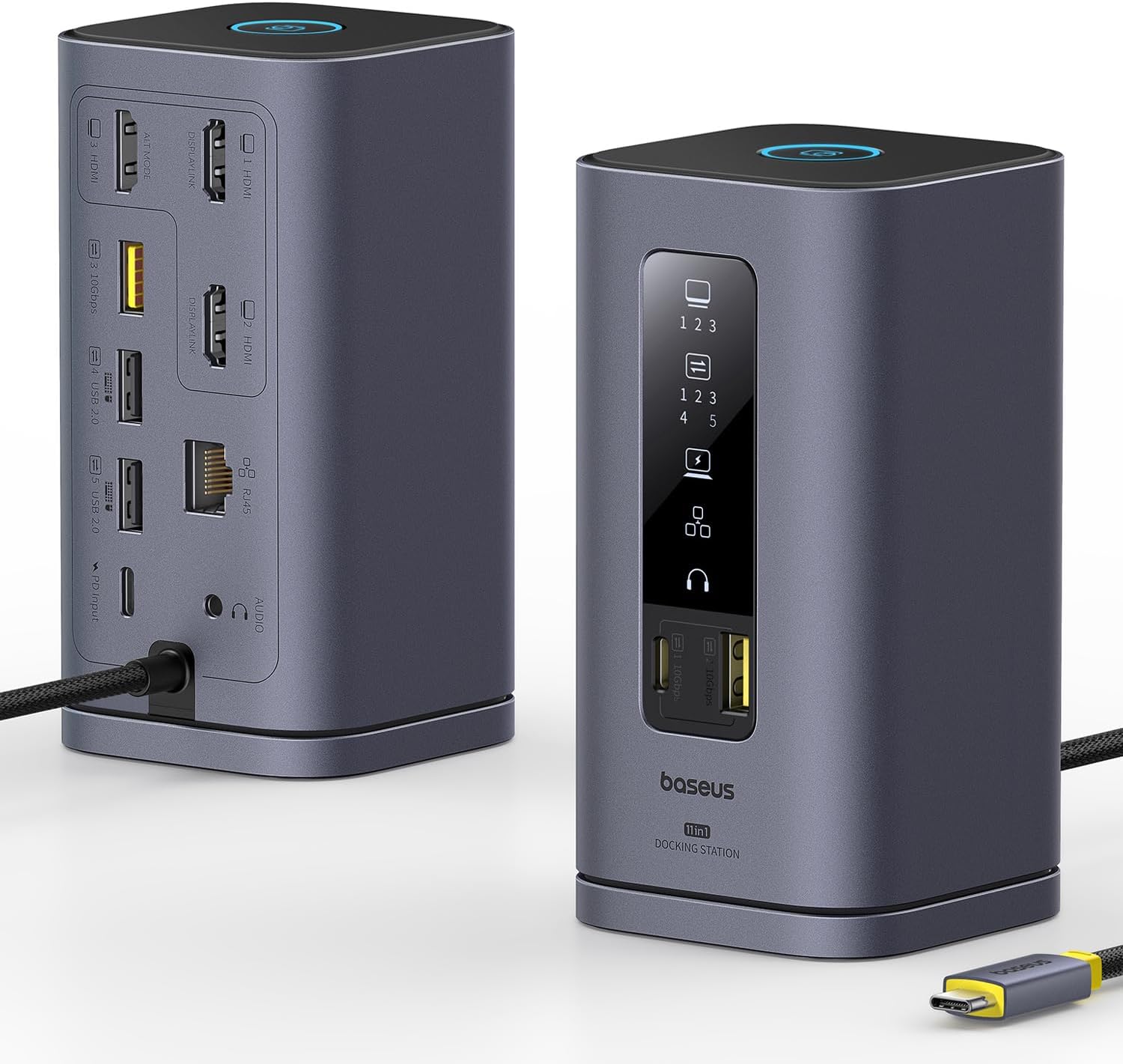
The Baseus SpaceMate(MAC) Docking Station is a premium 11-in-1 USB-C hub designed for Mac and Windows professionals. It supports triple 4K HDMI displays via DisplayLink technology, offers ultra-fast 10Gbps USB data transfer, and delivers up to 100W power delivery for laptop charging. Its upright magnetic design optimizes desk space and cable management, while integrated LED indicators keep you informed. Perfect for multitasking millennials seeking a sleek, powerful, and versatile docking solution.


| ASIN | B0D3QFWPDW |
| Best Sellers Rank | #3,014 in Electronics ( See Top 100 in Electronics ) #47 in Laptop Docking Stations |
| Brand | Baseus |
| Color | Space grey |
| Compatible Devices | For MacOS 10. |
| Customer Reviews | 4.3 out of 5 stars 756 Reviews |
| Hardware Interface | 3.5mm Audio, Ethernet, HDMI , USB 2.0 Type A, USB 3.1 Type A, USB 3.1 Type C |
| Item Dimensions L x W x H | 7.09"L x 4.69"W x 2.87"H |
| Item Weight | 0.68 Kilograms |
| Manufacturer | Baseus |
| Mfr Part Number | 11 in 1 |
| Model Number | 11 in 1 |
| Number of Ports | 11 |
| Product Dimensions | 7.09"L x 4.69"W x 2.87"H |
| Total Number of HDMI Ports | 3 |
| Total USB Ports | 5 |
| Total Usb Ports | 5 |
| UPC | 850064146417 |
| Warranty Description | one year manufacturer |
| Wattage | 100 |
C**S
Decent dock at a reasonable price
Updating my original review which scored low because I had received a defective unit. The issue was that the USB ports were nonfunctional on that unit. The replacement appears to work 100% out of the box. I will not quite go to a 5 because electronics that are somewhat expensive should be fully tested before shipping and it doesn't seem possible for a dock to pass quality testing and then fail while in the box. There are no moving parts to physically damage in transit so I can only conclude the quality testing is either not happening or isn't adequate. I will deduct a star for that. Second update: Seller has been incredible in following through to check that I have received my replacement and that it is working. I don't usually see such good follow-up from most manufacturers. I am adding back the star because they expressed intent to enhance their testing processes. I am taking them at their word. I have bought other BASEUS products before (which have been excellent and very well priced) and will again in the future. On to the review of the WORKING unit. I will need to use it for a longer period of time to assess the performance and reliability. As of now, I've only plugged in the replacement and checked that the ports are all working and that the docked notebook can do everything it should be able to do with the devices. All of that is 100% The other thing I will note is that I do like the form factor of this dock. It's not too huge but it does have a nice selection of ports on the front and rear. I also like the indicator lights to show what's connected. My only complaint so far -- and I might have deducted a point for it, had I not already deducted one for the inadequate quality control, and don't want to take this down to 3 stars -- is that the cable to the computer is built into the dock. I really HATE built in cables on ANY device. Given a choice between that and a similarly capable device with a removable cable that plugs in via some kind of STANDARD port, I'll always choose the removable cable option. If I find the supplied cable to be too short or too long, a removable one allows me to remediate that. Can't do that with this one. Also, cables do experience wear and tear and sometimes run into problems before the unit itself is dead, and being able to replace it is a nice thing. It's not a deal-breaker for a nice dock, but it does give it one small disadvantage against a comparable device with a removable cable. On BaseUs as a company, I have used some of their other products, particularly chargers, and this is the first time I've gotten anything that didn't work or failed. I like the design of their stuff and when you receive a working device they seem to be good quality, good design, and quality components. I also have to speak well of their support. I didn't even bother to contact them -- I just initiated a return with Amazon. They saw my previous review and contacted me to see what they can do to correct the situation, i.e. refund, replacement, or tech support. I like that. Often I don't get a contact from a company when I report a problem in a review. I have a feeling their support would have been 100% responsive had I contacted them, and the contact info for support was right on the device itself -- nice!! I would usually have to go looking for it online. That tells me they're ready to give support. Also, when they contacted me, it wasn't like most the other few who contacted me, usually with something like "please take off the low rating -- what can we do to buy a better score?" (paraphrasing :D) -- no, BaseUs never asked me to change my review or score. They only asked how they can help make me happy with the product. That's the right way to do it. Begging to fix the score tells me a company is more worried about sales than customer service. Not an issue here!! I'd give them 1/2 extra star back for that.
A**R
[UPDATE: it works now!]. worked like a dream ... for a week.
read the UPDATE at the bottom for the happy ending... ************* INITAL REVIEW: BaseUS for Mac, running on a 2024 M4 Pro Max. Initially, it worked beautifully ... for a week. I have an M4 mac and after installing the driver, it displayed to the laptop display and 2 separate monitors via HDMI. Also plugged in where a webcam to the USB-A, an ethernet cable, and power to the incoming USB-C port. I used the macbook's power supply to power the hub. I was happy. For a week. I then left on a trip and returned a week later. Pluged my macbook back in and ... nothing on either external monitor. I tried: restarting the macbook restarting the monitors restarting the BaseUS (well, unplugging it, unplugging everything from it, waiting a minute, and plugging it back in) using only one monitor (each external in turn) I can validate the cables are working by plugging them directly into the macbook. I can also validate the monitors are working by plugging them directly into the macbook via hdmi. When both monitors are connected to the hub, the front panel lights show the external monitors are connected. The indicator lights also show when the webcam is connected, as well as power. and ethernet. The webcam is recognized and usable by the macbook. Only the displays are buggered. I tried doing the "press option while in the display control panel" trick to force the macbook to recognize the monitors. It did not work. As a final step, I tried with the 3rd HDMI port. (previously I'd only used 1 and 2) Connecting the HDMI to the third port, video appeared on an external monitor. (this, of course, does not work for me since I need two external monitors) I honestly don't remember if I'd only ever used ports 1 and 2, but it seems perhaps both of those ports are bad. Poor soldering and the physical ports are buggered? The only pressure on them is from HDMI cables coming out the back and draping down to where they enter cable management ... so really, no pressure at all. While I've seen multiple reviews regarding the company being very responsive, this is for work and I need a replacement soonest. I'll be ordering another and returning this one to Amazon. Hopefully it was a one-off and the next will work. I'll update this review once the next one arrives and I can determine if it works past a week. I'm leaving two stars instead of one because hey...at least the other features still work. ¯\_(ツ)_/¯ *********************************** UPDATE: (spoiler: it was not a hardware problem. And they have *AMAZING* customer service!!) I received my second unit only to find ... it was doing exactly the same thing as the one I already had! So something was up. I'd gotten rid of the previous one's packaging because, hey, it was working great and if something did go wrong, I was sure the manual was available in a pdf somewhere. (sneak peek .. it was/is. I just somehow missed it) When it stopped working I searched high and low to find a manual. The BASEUS site had a page for the model, but somehow I completely missed the manual. <facepalm> Find it here: https://support.baseus.com/product/452/Spacemate-Series-11-in-1-(MAC)-Docking-Station?n=mxobwklbv9 I opened up the manual (printed with probably 6 point type ferchrissakes .. my eyes are OLD, people!) with the new unit I received and - there it was - the note that the unit needed a driver and the magic link to find it. (here it is for some poor soul coming after me: https://www.synaptics.com/products/displaylink-graphics/downloads ). I downloaded the installer and re-ran it only to be kindly informed "You've already got the newest version." Oh. Right. Ok, I knew that. So what's the problem?! I can't believe I got *another* unit that happened to be borked in exactly the same way that my current one is. (when the current one initially worked great) Now here's the rub. These aren't exactly "drivers" ... it's a driver set/program pack. When you install the driver it launches the controller program and everything works splendidly. However, if you subsequently reboot, the multi monitor feature of the hub stops working UNTIL you relaunch the program - DisplayLink Manager. DisplayLink Manager DOES have an option to relaunch at system restart. But was that enabled by default on install? (you can guess). So from where I sat, the unit just ... stopped working. And nowhere - I mean *NOWHERE* online did I find someone saying "oh, yeah. You not only need those third party drivers - the controller needs to be running or things won't work". I was expecting a driver to be, well, a driver. Something that, once installed, I didn't have to think about again. But even THAT could be forgiven if there had been documentation somewhere that detailed what needed to be done. Even the manual simply had a reference to the driver and nothing more. An additional line saying "make sure you set DisplayLink Manager to launch automatically after login" would have saved no end of trouble. Or even better - a big 'ol notification at the end of the install. In the end, the hardware is fine. I was going to update the review, but only bump it to four stars. But I'm putting it at 5. Why? Because, for everything else that went wrong and frustrating and caused me to burn time ... the company saw this review, contacted me, and offered to refund the purchase price. No hassle, no argument, no nothing. Just "we're sorry it caused you inconvenience". I can forgive an *awful* lot for proactive, respectful customer service like that. So five stars it is.
P**N
Works Great on Windows — Very Reliable Dock
I’ve been using this Baseus Spacemate 11-in-1 docking station for a while now, mainly on Windows, and it works really well. I’ve tested it with both a desktop and a laptop, and the performance has been stable across both setups. The triple display support is very useful for multitasking, and all the ports (HDMI, DP, USB, Ethernet) work as expected. Data transfer is fast and connections feel solid. One thing I’d recommend is going for the powered version if possible—it provides more consistent performance, especially when running multiple devices. Overall, a reliable and practical dock for everyday use. Highly recommend!
R**B
Solid product, great customer support, but you need to know more if you have a Macbook M4
OLD REVIEW: This just died on me, I connect 2 HDMI cables to my 2 monitors and it stopped working. No light indicator and no signal. On Windows and also on MacOS, same behaviour. I've tried unplugging, restarting my PC, no success. It looks dead. Probably something got fried inside. NEW REVIEW: The Company was kind enough to send a replacement device and I can now give a proper review. I have a Windows PC and a Macbook PRO 2024. Context: I want to use 2 monitors to extend my primary display. I have a LG and a Dell monitor to use alongside my Macbook pro M4 2024. WHAT WORKS - Works 100% well on my other Windows Laptop, it connects perfectly to all the 2 monitors and I can extend the displays to the 2 monitors. Perfect! WHAT DOES NOT WORK - It does not support MST on Macbook pro m4. From what the customer care shared and also I found out later in the documentation, this device does not support multi streaming transport. So that basically means, out of the box, this device can only help you connect your peripherals and one monitor, if you connect to two monitors, then both monitors will show a mirrored version of the display, but cannot extend the display. So you are stuck with using one monitor only. - On the same MacOS, It does not support display link drivers, I hoped this could be a last resort solution, unfortunately, it does not support. CONCLUSION: - This is a solid device, great build quality and design - On the technical side however, for someone looking to extend primary display to multiple monitors when using a Macbook M4 chip, then this device will not give you the justice you need. You can consider other options out there that supports specifically display link drivers so that you can use them on your Macbooks. RATINGS: I now can give it a solid 4 stars because of the great customer support, they sent a replacement device free of charge although it eventually did not solve my problem 100%
T**G
Solid feel. No surprises -- it just works!
I decided to replace my old desktop computer (can't run Windows 11) with a new Dell laptop. That drove me to buy a docking station to provide all the ports I need (4 USB-A, 2 USB-C, 2 HDMI, and audio). I purchased a different brand of docking station from Amazon, for about half the price of the Baseus Spacemate. After connecting it up, it seemed to work fine. All my USB devices worked, and both of my HDMI monitors (3440x1440 and 2560x1440) worked fine. But after the computer went to sleep and woke up again, only one of my monitors was active. Windows "Display settings" said there was only one monitor connected. I tried everything I could think of -- rebooting, power cycling, plugging and unplugging every HDMI connector, and the USB-C plug from the docking station to my laptop. I tried several other things, including buying a 100W power supply to replace the 65W one that came with my laptop. No joy. It was time to try a different docking station. I went back to Amazon and found a Baseus Spacemate docking station that had the functionality that I wanted. It was almost twice the price, but I didn't know what else to try. Amazon offered overnight, early morning delivery, so I bought it. When it arrived I had a very nice out of box experience. Even the cellophane wrapping around the box was done to precision. The box was a work of art, with everything fitting precisely, like a precision machine. It was the same feeling I have when unboxing a new iPhone, where they think of everything, and you want to keep the packaging. Regarding the docking station itself, It has the feel of a very quality unit -- a good, hefty, solid feel. I liked it before I had connected up a single cable. After connecting everything up, I turned it on (using my 100W power supply), and it just worked -- as advertised. It is only very mildly warm to the touch after running with everything turned on for a couple of hours. There are two downsides compared to the other docking station I had tried. First, the 2X price. Secondly, it's quite a bit bulkier, and I probably wouldn't want to travel with it. But in my case, if I'm traveling, I don't need all the other peripherals, so I don't need the docking station on the road. (OK, one complaint -- the printing in the little user's manual was WAAYYY too small for a person of my age to read.) I'm very happy with the Baseus unit, and I'll soon recover from the higher price. I hope I'll still feel the same way in a year.
M**J
Ditch all your other hubs and get this unit!!!
I have had probably at least 2-3 dozen usb hubs over the last 20 years of my computer using experience. From Docking stations to USB A, USB C, Comm port hubs. This one is amazing. I think it takes care of all my needs in one. It has a power on off button right on the top of the unit. The cord is definitely heavy duty braided cover so it doesn't rip or tear apart. Now it doesn't have 20 USB A ports on it but you could plug an additional hub into it to get some more usb a ports. Whats the best is it has a Network Plug on it. It has 4 monitor ports on it. It has USB C and USB A ports on it. So plugging this into my computer i can remove all the USB A to monitor adapters that i have and just have it run all of this. Now i can run the 2 on board monitors and have 4 additional monitors hooked up without lagging and using all my usb A ports. This thing is a powerhorse. It doesn't lag or slow down it doesn't freeze everything connects quick and without an error. Its even portable in both weight and size so I'm thinking of ordering another to keep with my laptop when i go from office to office. I can't find any Cons except a few more USB a ports would be nice but i have a tiny 4 port hub i plug right into this to add that. Great Job!
S**D
USB Port Issues on Docking Station - Maybe (?) compatibility issue on my laptop.
USB Port Issues on Docking Station - May just be compatibility issue with my laptop (?), other people had no issues. I’ve been having ongoing issues with this docking station. The USB ports intermittently stop working, which causes my wireless mouse and keyboard to stop responding. When this happens, the keyboard misses letters and the mouse cursor just freezes on the screen. The monitors and other connected devices seem fine, and the docking station still shows power. However, this behavior makes it very frustrating to use. Honestly, it would almost be better if it just didn’t work at all, instead of working sporadically. Currently, the mouse is connected to a USB 2.0 port. I may try using a wired mouse and keyboard to see if that helps. The wireless keyboard and mouse work perfectly when connected directly to the laptop, so the issue seems specific to the docking station. But the whole point of a docking station is for it to work properly, and at this point the frustration might not be worth it—I’m considering boxing it up and returning it. I do have another laptop I could test it with, though it’s a work laptop that I wouldn’t normally use with this docking station. If I try it and it works, I’ll post an update. So far, I’ve spent a couple of hours trying different things with no success. Other than the USB issue affecting the keyboard and mouse, the docking station seems to work okay—but the keyboard and mouse are essential. It’s probably some sort of compatibility issue. What’s strange is that the keyboard and mouse work fine for a bit, then stop for 10–30 seconds, then start working again—this just continually repeats. Tried it on my work laptop. Same issue,
D**K
All-in-One Dock That Instantly Upgrades Your Desk Setup
I’ve been using the Baseus Spacemate 11-in-1 Docking Station every day, and honestly, it’s made my whole setup way more organized and efficient. Hooking up multiple 4K monitors is super easy—everything looks sharp and stays connected, even when I’m bouncing between a bunch of apps or moving big files around. The dock itself feels really solid and has this nice aluminum finish, plus the upright design saves a ton of desk space. I love the magnetic base for quick detaching, and the little LED screen is actually pretty useful for seeing what’s plugged in. File transfers are crazy fast with the 10Gbps ports, and the 100W charging keeps my laptop powered up even during long work sessions (just remember you’ll need your own power adapter for max charging). The Ethernet and audio ports are super handy too, so I basically just plug in one cable and I’m set. Only downside is there’s no SD card slot, and Mac users can only do one external display, but for Windows it handles triple monitors no problem. Overall, if you want a reliable, sleek dock that keeps your desk tidy and handles all your connections, this is a great pick.
F**I
hochwertige Dockingstation – funktioniert einwandfrei 💪👍 – Empfehlenswert 🤩
📦Lieferumfang: 1 x Baseus 11-in-1 Dockingstation 💲 149,99 € 🧐 Qualität / Funktion / Anwendung: Die Baseus 11-in-1 Dockingstation beeindruckt mit ihrer hochwertigen Verarbeitung und vielseitigen Anschlussmöglichkeiten. Mit Unterstützung für drei Monitore und 4K-Auflösung bei 60Hz liefert sie beeindruckende Leistung. Die Kompatibilität mit einer Vielzahl von Laptop-Marken wie Dell, HP, Mac, Lenovo und Acer macht sie zu einer äußerst praktischen Ergänzung. Für den Stromanschluss ist ein PD-USB-C Anschlusskabel mit Netzstecker erforderlich, der nicht im Lieferumfang dabei ist. Power Delivery ist eine Technologie, die es ermöglicht, ein Gerät mit maximaler Geschwindigkeit und sicher zu laden. Das System passt den Ladestrom automatisch an das jeweilige Gerät an und vermeidet so Überhitzung und Kurzschlüsse. Ladegeräte, die diese Technologie nutzen, müssen über ein geeignetes Kabel mit USB-C-Anschluss verfügen: Eine Verbindung über USB-A-Ports kann die Vorteile von Power Delivery nicht nutzen. Angeschlossene Geräte werden schnell erkannt und verbunden. 👌 Auf der Unterseite ist eine silikonähnliche klebrige Fläche integriert, die mit einer stabilen Schutzfolie geschützt ist. Dadurch hat man die Möglichkeit die Baseus Dockingstation Basis sicher und fest auf dem Schreibtisch zu fixieren, so dass diese nicht verrutschen kann. Die Dockingstation selbst wird magnetisch auf der Basis aufgesetzt und fixiert – Magnet ist sehr stark, damit auch bei Zug an den Kabeln die Dockingstation sicher auf der Basis fixiert bleibt. 💪 Dies finde ich super praktisch, vor allen Dingen, wenn die Dockingstation so platziert ist, dass man nicht ohne weiteres von hinten an die Anschlüsse kommt – es ist dadurch einfach die Station von der Basis zu heben und die Kabel einfach anzuschließen. 👍 Auf der Vorderseite ist ein kleines Display, das einem die verbundenen Anschlüsse anzeigt und mit zwei zusätzlichen USB-A und USB-C Anschlüssen mit 10Gbps Geschwindigkeit – sinnvoll, um einen USB-Stick oder ein anderes Gerät zu verbinden. Alles in allem funktioniert die Dockingstation einwandfrei 👍 🏆 Mein Fazit: Insgesamt bietet sie eine erstklassige Lösung für anspruchsvolle Nutzer, die Wert auf Flexibilität und Leistung legen.
A**I
Un monolite dalle eccellenti prestazioni
Ricorda vagamente l’entità sconosciuta dell’iconico film di Kubrick, ma è una potente docking station a forma di parallelepipedo che dispone di ben 11 porte di comunicazione per la gioia degli utenti più esigenti. La scelta di un design verticale così esclusivo non mira tanto all’aspetto estetico quanto a rendere più ordinata la gestione dei cavi che possono occupare spazio sulla scrivania. Dispone di un grande display a LED che visualizza lo stato di funzionamento delle periferiche e ci informa su quale porta è collegato il dispositivo. Prevede inoltre un pulsante di blocco dello schermo per abilitare l’accesso selettivo al PC e proteggere le informazioni che non vogliamo condividere. Oltre al display, il frontale della docking station contiene un ingresso USB-A e uno USB-C contrassegnati dal colore arancione, segno distintivo che le porte di comunicazione funzionano con una velocità di 10 Gbps. Sul dorso si concentrano il grosso delle porte a partire da due ingressi HDMI + due DISPLAYPORT in grado di riprodurre filmati in 4K fino a 60Hz. Seguono una porta USB-A 2.0 per il collegamento di periferiche standard e una porta USB-A 3.2 per trasferimenti ad alta velocità. È inoltre presente un ingresso JACK da 3,5 millimetri per cuffia e un ingresso RJ45 per collegamenti LAN in grado di supportare velocità fino a 1 Gbps. Infine, come ciliegina sulla torta, è presente una porta PD da 100 Watt che, oltre alla ricarica rapida, permette di alimentare dispositivi ad alto assorbimento elettrico quali hard disk meccanici e lettori DVD esterni. Nelle prove sul campo la BASEUS non tradisce le aspettative. Una volta inserito il robusto cavo in tessuto all’ingresso USB-C del computer, la docking station viene riconosciuta secondo quattro diverse interfacce (BILLBOARD). Sulle porte arancioni i dischi SSD raggiungono velocità di trasferimento elevatissime anche se non equiparabili agli standard Thunderbolt. Un file di 10 Gb viene copiato ad una velocità iniziale di 800 Mbps per poi stabilizzarsi intorno ai 200 Mbps, tutto sommato nella media dei dischi con interfaccia SATA. Nel complesso, la docking station rispecchia caratteristiche di fascia alta e rappresenta un accessorio risolutivo per i portatili che non dispongono di porte aggiuntive con prestazioni elevate. A suo favore gioca l’aspetto esteriore, una scocca in alluminio pregiato dal design decisamente accattivante. Inoltre, grazie alla sua base magnetica sganciabile, può essere collocato in qualsiasi punto della scrivania senza occupare eccessivo spazio, facilitando in questo modo l’accesso alle periferiche. Nel momento in cui scrivo il costo non è particolarmente contenuto, ma è in parte giustificato dalla qualità complessiva del prodotto e dal marchio assolutamente affidabile. PRO - Elevata qualità costruttiva - Design originale in alluminio - 11 porte di comunicazione - 2 porte HDMI + 2 DISPLAYPORT (4K/60Hz) - 2 porte USB-A + 1 USB-C a 10 Gbps (3.2) - 1 porta USB-A a 480 Mbps (2.0) - 1 porta Ethernet a 1 Gbps - 1 porta jack 3,5 mm per cuffia - 1 porta PD da 100 Watt - 1 cavo USB-C di collegamento - Base magnetica sganciabile - Compatibile con Windows/Android/IOS - Guida rapida in lingua italiana CONTRO - Nulla di rilevante
B**O
Qualidade
Muito bom
J**O
Top top top
Un portento! Docking station molto bella esteticamente e ricchissima di ingressi e/o uscite, che non sto a descrivere, in quanto basta leggere le info del costruttore. Utilizzo questa docking station per collegare il mio laptop con uno schermo in 4K e la risoluzione è perfetta. Visto che il mio laptop non ha molte porte, il collegamento tramite l'unico cavetto usb-c è perfetto. Quello che posso dire è che sulla scrivania fa il suo effetto e non occupa molto spazio: inoltre non ha bisogno di essere alimentata con un ulteriore cavo, ma basta collegarla con il solo cavetto usb-c al PC. Oltre al cavo hdmi video, la utilizzo anche per collegare il cavo di rete, un tramettitore usb, ma può essere sfruttata molto di più di come la utilizzo. Sul davanti è presente un display led che ci indica le porte che stiamo utilizzando: utilissimo. E' presente anche una porta usb-c ed una usb-A: ho provato a ricaricare il telefono tramite questa porta ma la docking è andata in crisi e in effetti occorre un adattatore, non incluso. Altra chicca è la base magnetica, sotto alla quale è presente un potente adesivo (attualmente protetto da una pellicola trasparente). Sulla parte alta è presente un comodissimo tasto che mette in standby il PC. Infine, anche dopo ore di utilizzo, la docking non scalda affatto. Davvero un oggetto completo che toglie tantissimi cavi dalla scrivania. La consiglio vivamente.
J**S
Adorei
Aparelho ótimo bonito rápido e eficiente
Trustpilot
1 month ago
2 weeks ago