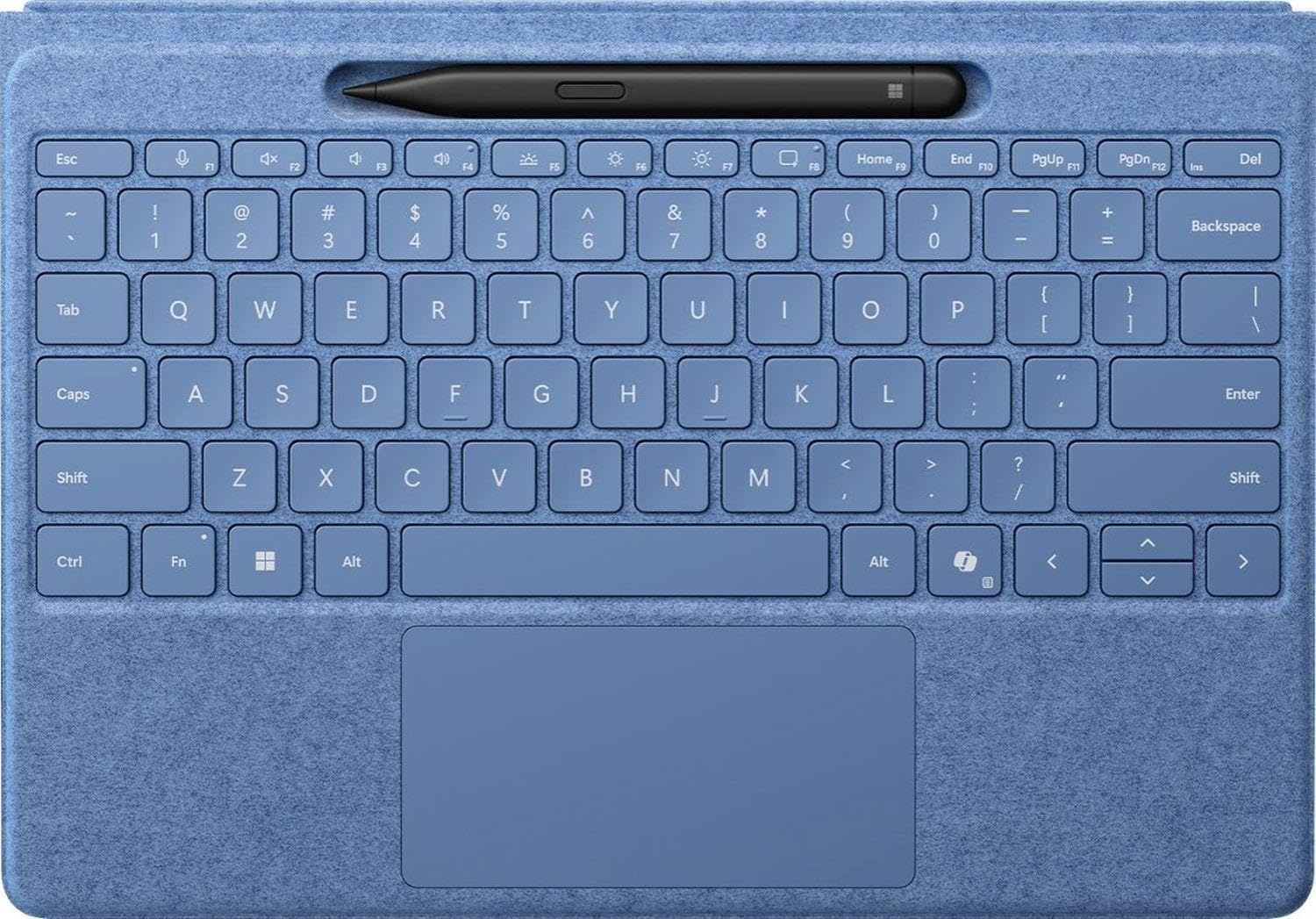
⌨️🖊️ Elevate your Surface game with style and precision — because your productivity deserves the best.
The Microsoft Surface Pro Flex Keyboard with Slim Pen Bundle offers a versatile 2-in-1 Alcantara keyboard designed for Surface Pro 8, 9, and 11th Edition Copilot+ PCs. Featuring a wider haptic touchpad, wireless Bluetooth connectivity with 128-bit encryption, and a Slim Pen that wirelessly charges while docked, this bundle enhances productivity with premium materials and seamless device integration.


| ASIN | B0CXL4TRML |
| Additional Features | Portable |
| Antenna Location | Office |
| Best Sellers Rank | #21 in Computer Keyboards |
| Brand | Microsoft |
| Built-In Media | Item |
| Color | Sapphire |
| Compatible Devices | Microsoft Surface Pro Copilot+ PC (11th Edition), Pro 9, Pro 8 |
| Compatible Operating System Family | Windows |
| Compatible Tablet Computer Models | AAUB P30 |
| Connectivity Technology | Bluetooth |
| Customer Reviews | 4.4 out of 5 stars 37 Reviews |
| Enclosure Material | Alcantara |
| Hand Orientation | Ambidextrous |
| Item Dimensions L x W x H | 12.25"L x 9.5"W x 0.75"H |
| Keyboard Description | Numeric |
| Keyboard Layout | QWERTY |
| Manufacturer | Microsoft |
| Mechanical Keyboard Switch Model | Cherry MX |
| Mfr Part Number | 8YU-00024 |
| Minimum Required Operating System Version | Windows 11 |
| Model Name | Surface Accessories |
| Model Number | 8YU-00024 |
| Number of Keys | 1 |
| Power Source | Rechargeable Battery |
| Recommended Uses For Product | Office |
| Special Feature | Portable |
| Style Name | Bluetooth |
| Switch Type | Mechanical |
| Theme | Technology, Sapphire |
| UPC | 196388335275 |
| Unit Count | 1.0 Count |
| Warranty Description | 1 year manufacturer |
M**N
Well Made but expensive
I purchased the item because it matched the Surface Pro, it paired perfectly, and has the ability to connect without attaching. However, and this is a big one, it is really cost prohibitive for the average user, which is really a shame, because it does have some very useful features, such as non-attachment connectivity and use. I really wish Microsoft would reevaluate the pricing.
M**N
Bluetooth Surface Pro 11 Keyboard
This is the perfect extension to the Surface Pro 11. This keyboard works great either attached or not and the pen that comes with it is exceptional
C**X
Worth the price
This was a game changer! I didn’t realize how well the surface pen and keyboard functioned compared to the cheaper versions.
R**N
Good companion for the surface pro.
Easy to install. Nice feeling when typing. Like the pencil holder that charges too.
M**A
A want not a need
I love this, but it’s definitely too expensive to have the issues I’ve experienced. It’s very easy to use and integrates well overall, but I’ve had recurring problems with connectivity and the battery draining faster than expected. I’ve also noticed that it struggles to charge properly when it’s connected for long, sustained periods. The design is super flat and sleek, but a bit more brittle than I would like considering the price point. Aesthetically, though, it’s beautiful—exactly what I purchased it for. I wanted the full, holistic Surface experience, especially as someone who primarily uses Apple products, and this keyboard completes the look and feel I wanted. That said, the user experience still needs work. The connectivity quirks, the feel of the hardware, and the minor performance issues make it feel more like an expensive toy than a robust accessory. I don’t regret buying it—I wasn’t going to own the Surface tablet without the matching keyboard—but the premium price definitely sets certain expectations that it doesn’t fully meet.
A**R
Good keyboard for iPad
I love the light weight of this product and the nice keyboard quality in general, the only reason I did not rate this item 5 stars is because the price is a little steep but besides that this is a good keyboard for your iPad 👍
H**U
Amazon support fails to deliver
This is actually a fabulous tablet, but the power supply brick failed within a month. I called support, and they told me the "supplier" would contact me within 48 hours. That was a week ago, and I've heard nothing. Fortunately, the power supply from my previous Surface works with the new one, so I can still use it, but it is highly disappointing that Amazon doesn't follow through on support issues.
S**K
Overpriced and low quality
I'm surprised a quick glance doesn't show anybody else complaining about how hard the keyboard is to clean. Laptops and tablets simply should not have Alcantara material--period. It takes 1-2 months, maybe even less, to get spots and/or to start seeing dark areas/discoloration appear just from normal use. And if you get food/drink stains on the keyboard, forget about ever getting them out. Nothing that takes a few months to irreversibly start looking like crap should cost so much. It's a shame, because I love the look and the different color options. But the look doesn't last. The only positive is the material without Alcantara material, which seems very durable and could have been scratched up by now or faded with the way I use it/lie it down, but there's not a scratch/mark. The keyboard is also a bit hard to type with fluidly and not make spelling errors/skip letters, unless you naturally tap hard on keys. That's the downside to a lightweight flex keyboard vs harder material. The keyboard also disconnects semi-often, and pressing a key doesn't always wake it. It's like it's sometimes just not recognized, and I have to try different things to get it working again. And the battery runs down fairly quickly when detached from the screen--I would never be able to get a full work day with it detached. Maybe 5 hours max, but probably not even that. And I now regret ordering the slim pen. Microsoft agreed to replace my keyboard (although I still haven't received a shipping label from them, so who knows), but you have to return the old keyboard first. That meant my slim pen would not be chargeable during that time, as far as I know, so I looked for recommendations and ordered the Metapen Stylus M1. Way better/cheaper than the slim pen. I have several quirky issues with the slim pen, like it being harder to click some things with it. As a sports fan, I check ESPN daily--the website--and when I try to click menu options the slim pen most of the time clicks the link underneath the menu. The only big issue I still have with the M1 is using Reddit's formatting options in the web browser--I have to just use the trackpad for that. That does seem to be a Microsoft Surface issue, though, and I have the same problem with my iPad. There's also some lag with the slim pen in some applications, but that also seems like a Microsoft Surface issue since the M1 also has some lag in those apps.
Trustpilot
2 weeks ago
1 day ago