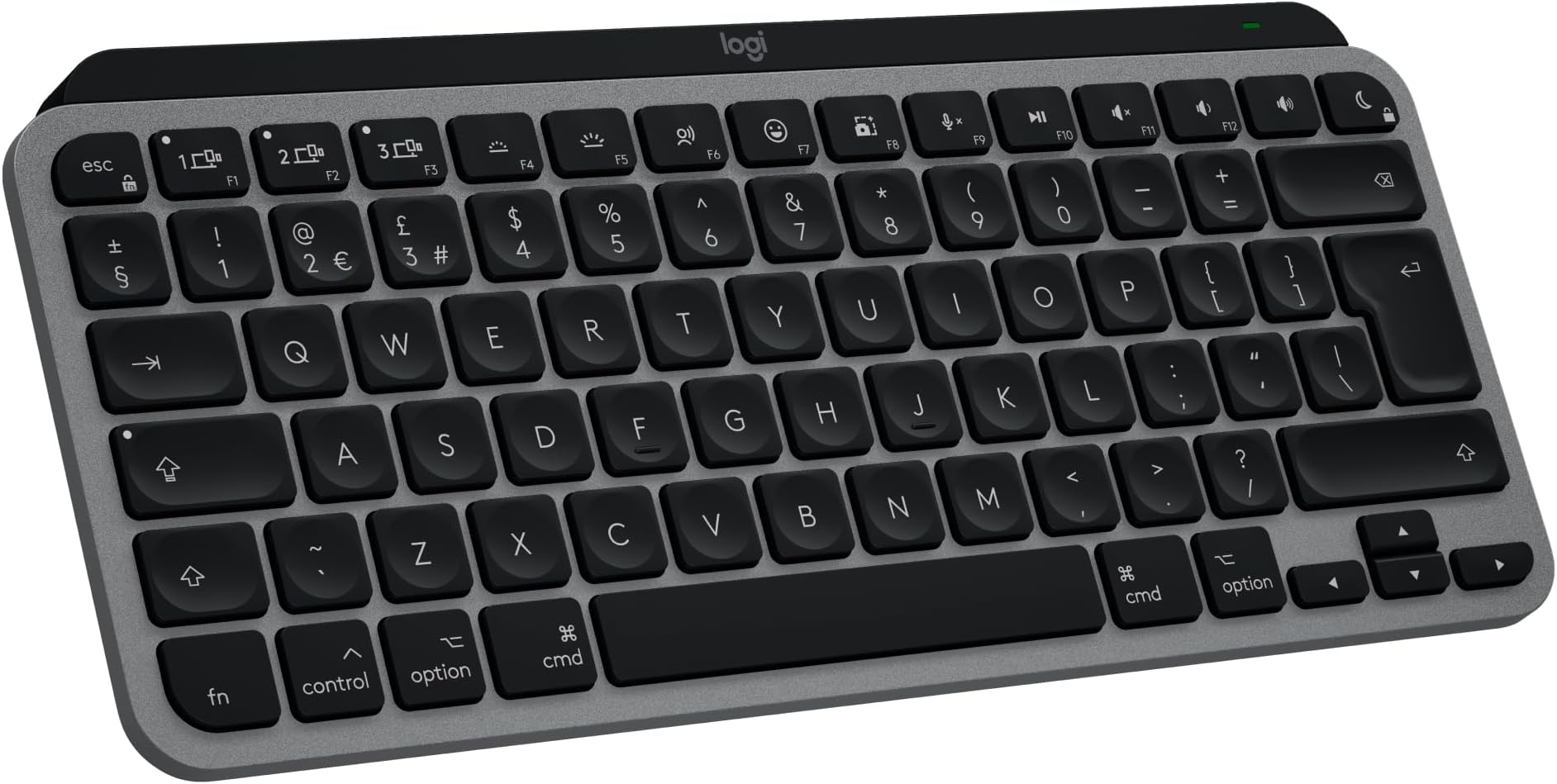


⌨️ Elevate your Mac setup with the keyboard that works as hard as you do
The Logitech MX Keys Mini for Mac is a premium compact wireless keyboard designed specifically for Apple users. Featuring a Mac-optimized layout, smart backlit keys, and multi-device Bluetooth connectivity, it delivers a fluid, precise typing experience with up to 10 days of battery life. Crafted with recycled materials, it blends sustainability with sleek, minimalist design—perfect for professionals who demand style, comfort, and seamless integration across their Apple ecosystem.


| ASIN | B0D3HNT19L |
| Are Batteries Included | Yes |
| Batteries | 1 Lithium Polymer batteries required. (included) |
| Best Sellers Rank | 8,073 in Computers & Accessories ( See Top 100 in Computers & Accessories ) 157 in Keyboards (Computers & Accessories) |
| Brand | Logitech |
| Colour | Space Grey |
| Customer Reviews | 4.6 4.6 out of 5 stars (105) |
| Date First Available | 30 May 2024 |
| Delivery information | We cannot deliver certain products outside mainland UK ( Details ). We will only be able to confirm if this product can be delivered to your chosen address when you enter your delivery address at checkout. |
| Guaranteed software updates until | unknown |
| Item Weight | 506 g |
| Item model number | 920-012651 |
| Lithium Battery Energy Content | 4.18 Watt Hours |
| Lithium Battery Packaging | Batteries contained in equipment |
| Lithium Battery Weight | 22 Grams |
| Manufacturer | Logitech |
| Number Of Lithium Ion Cells | 1 |
| Number of Batteries | 1 |
| Number of USB 2.0 Ports | 1 |
| Operating System | IOS |
| Power Source | Battery Powered |
| Product Dimensions | 26.9 x 13.14 x 2.1 cm; 506 g |
| Series | MX Keys Mini for Mac |
M**R
Pricey, but a joy to use, all day long!
I recently bought an MX S3 mouse and was so impressed by its comfort and usability, I decided to upgrade my keyboard also and bought the Logitech MX Keys S for my Mac Mini. The keyboard is a solid, weighty piece of kit, which stays where you put it. The Bluetooth connection has a slight delay after a fresh start up, but otherwise works fine, with no discernible lag. The mouse lasts a couple of months on a single charge, while the keyboard, with its very useful automatic backlight, lasts about 10 days, with both items in use all day, every day. I keep the fast USB-C charging cable handy on the desk and continue using both devices while charging. The layout is slightly different to my previous keyboard, but I quickly adapted to the differences. Both devices can be independently personalised via the Options+ software, so I added a couple of keyboard shortcuts for personal convenience. All-in all, a great keyboard.
S**E
Perfect Mac companion — Reliable and Good Quality
I upgraded to the MX Keys S for my MacBook Air setup, and it’s a night-and-day difference compared to cheaper alternatives. Zero Connection Issues: Unlike other wireless keyboards I’ve tried, this stays connected perfectly via Bluetooth. No lag and no random disconnecting. Typing Feel: The "fluid, precise" description is accurate. It has a high-quality, laptop-like feel that makes typing for long periods much more comfortable. Battery Life: The battery life has been impressive so far. Build Quality: It feels heavy and premium in the space grey finish, matching my Mac perfectly.
P**R
Nice quality
Expensive but feels lovely to use with lots of customisable features
F**T
Quite a keyboard, has room for improvement
It is almost a perfect keyboard. The keys are quite nice to use, providing some pleasure to type. The keyboard is made of quality materials, is quite heavy and very stable on the desk thanks to rubber at the bottom. Battery life is great, although I wouldn't mind so much having a cable connected all the time. The USB C cable could be used at all times but there is an annoying bright (flashing when charging) green LED that stays on as long as the charging cable is connected. Then, there is the mandatory installation of Logitech management software which doesn't really feel like adding value to me as a Mac user and seems more like a trick to publish ads for other Logitech products. Finally, the bluetooth connectivity is reliable BUT when Mac and keyboard went on standby, it is required to push multiple times on key(s) to get the keyboard operational which is slightly annoying. Only thing that is really missing compared to the Apple expensive Keyboard is the touchID which allows to close the laptop and keep the convenient TouchID feature. Overall, I am satisfied.
S**N
Still going strong!
Such an awesome keyboard the brightness controls and connectivity is amazing but also looks and value for money is perfect. I use it on my Mac and it connects so well!
K**Y
Best keyboard I’ve found
The best keyboard I have ever used. Well worth the money, even though I had to pay in monthly instalments. The buttons make such a soothing noise and the buttons are perfect for writing essays etc or working from home
C**G
Prefer the standard S version
MX Keys is a great keyboard and I used the dual platform version before as I was running both PC and Mac. Now I'm Mac only so got the Mac version but for some reason they have a slightly different number pad layout and when you have used same layout on numerous keyboards for decades I find this slower to use with a few keys, that I use often, changed for no reason. Having paid a premium for the Mac version it adds to the insult. If you have used number pads extensively before on standard keyboards then don't bother with the Mac version of the MX Keys.
C**R
Better than Apple version
This is more practical, better looking and much cheaper than the Apple one. Love it
Trustpilot
3 weeks ago
3 days ago