


Desertcart purchases this item on your behalf and handles shipping, customs, and support to Denmark.
🎬 Stream Like a Pro, Anywhere, Anytime!
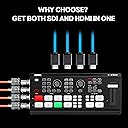
The Osee GoStream Duet is a compact, professional-grade live streaming switcher offering 9 versatile inputs including SDI, HDMI, USB-C, and NDI HX sources. It supports advanced keying effects and transitions, multi-platform simultaneous streaming, and multiple control methods, making it an all-in-one powerhouse for seamless, high-quality live video production. Perfect for content creators seeking a reliable, affordable streaming solution without compromising on features.






| ASIN | B0CZ97V8D9 |
| Best Sellers Rank | 17,693 in Electronics & Photo ( See Top 100 in Electronics & Photo ) 54 in Switches |
| Box Contents | GoStream Duet |
| Brand | osee |
| Brand Name | osee |
| Cable Type | SDI, HDMI |
| Cable type | SDI, HDMI |
| Compatible Devices | Television, Gaming Console, DVD Player, Blu-ray Player, Projector, Monitor, Personal Computer, Laptop, Camera, Satellite Receiver |
| Compatible devices | Television, Gaming Console, DVD Player, Blu-ray Player, Projector, Monitor, Personal Computer, Laptop, Camera, Satellite Receiver Compatible devices Television, Gaming Console, DVD Player, Blu-ray Player, Projector, Monitor, Personal Computer, Laptop, Camera, Satellite Receiver See more |
| Connector Type Used on Cable | SDI, HDMI, USB Type-C |
| Connector type | SDI, HDMI , USB Type-C |
| Country of Origin | China |
| Customer Reviews | 4.3 out of 5 stars 91 Reviews |
| Manufacturer | osee |
| Manufacturer Part Number | GoStream Duet |
| Model Number | GoStream Duet |
| Number of Ports | 9 |
| Number of ports | 9 |
| UPC | 769293552763 |
A**R
The Osee GoStream is Great... Almost Perfect
The Osee GoStream is Great... Almost Perfect! The Osee GoStream (Deck/Duet - depending on your model) is an absolutely fantastic all-in-one streaming solution. My experience with the core functionality was incredibly positive, offering a robust and intuitive platform that truly streamlined my setup and production workflow. Everything felt well-designed, from the video switching to the built-in control panel. For anyone looking for a powerful, portable, and reliable video mixer/switcher, this unit delivers exceptional value and performance. I was very pleased with how well it handled my video sources and simplified the complexity of live streaming. The only reason I ultimately returned the unit was the lack of an XLR audio input. As my setup relies heavily on professional microphones that use balanced XLR connections, the absence of this crucial port meant the GoStream couldn't fully integrate with my existing audio gear without requiring additional pre-amps or converters. Bottom line: If an XLR input is not essential for your audio setup, I would highly recommend the Osee GoStream—it's an otherwise excellent product. However, if your professional workflow requires direct XLR connectivity, you'll need to consider a different model or plan for an external audio interface.
G**R
Great device at a great price.
Previously, I was using two separate HDMI to USB devices with two separate cameras and a couple of Logitec webcams. All going into my laptop and all via OBS studio. But, every time I open up OBS, I ALWAYS had issues with the software trying to connect with the cameras. Sometimes, I just gave up. So, after a lengthy search and reviews, I tried out this GoStream Deck. Absolutely, BRILLIANT. No issues, works great with LOADS and LOADS of different configurations. Never have any problems with the cameras. It works perfectly all of the time. The only a few negative points: 1) It uses MERE 3.5mm audio jacks, instead of XLR (however, the GoStream 8 now does), 2) It gets very hot. However, I have used it on many occasions for more than 4hrs and it has never failed.
V**1
Some serious issues with chromakey
It's great just as a switcher to cut and mix cameras and if you buy it primarily for that you will be happy. Basic picture quality is excellent and it is worth the money for that. Now the downsides... There are issues with colour in chromakey. When you key on pure green, bright yellow in the foreground scene turns dark orange. Cyan turns to a dark blue. So if a person is wearing a bright yellow t-shirt it will turn orange. If you key with chromakey blue, cyan in the foreground turns into a pastel green. Not good if you want to switch between key and non-key shots of the same scene... This seems to create bright edge colours around the keyed area in some places. You will see a slight cyan, yellow or white halo. This also means that the GoStream gives a poor result when chromakeying titles. It's below what is normal for chromakey these days. For instance the chromakey filter in the free OBS Studio gives a much cleaner and easier key with none of these colour issues. The thing to note is that no amount of tweaking of the key settings changes this. Osee has known about this issue since summer 2024 and seems to have no intention of fixing it, if that is even possible. Interestingly, none of the YouTube reviewers seemed to spot it. Which suggests they didn't test the Osee GoStream very thoroughly. On a more positive note, titles can be keyed very nicely using lumakey with PNGs that have transparency, or by creating titles that have a zero levels black background and then making blacks in the visible title a very dark grey. The image store section is fiddly. You have two slots for images available. In the accompanying software you have to select the images from a drop down box. No drag and drop here! It's fine if you only need one or two beginning and end credits but you won't be doing any slide shows from this interface. The HDMI output to your monitor will be the same as the video output of the GoStream. If you set the video output to 24 or 25 frames per second you will very likely find that your monitor doesn't work with that refresh rate and needs 50 or 60. Fine if you always stream at 50 or 60fps... The available wipes are the sort that have been possible in TV since the 1950s. The picture itself doesn't move. Semi-pro mixers from Panasonic did more than this thirty years ago. Picture In Picture works quite well but positioning scenes using SuperSource is limited to a couple of different percentages sizes: 50%/50%, 33%/77% etc. If you put a border around the frames you will end up with a double border between the two. Streaming works great. You can go live on YouTube at the touch of a button. Is it worth the money? Yes despite the limitations and if you mainly want it to cut and mix between cameras with the occasional title and Picture In Picture and to stream easily.
A**R
Lots of bang for your buck
Very impressed with the functionality and build quality at such a low price point. Encoder, switcher, SDI/HDMI capture card, audio mixer, SDI-HDMI convertor, HDMI DA and more in one. All controllable directly, on an app or via Companion.
J**A
Very happy with GoStream Duet.
Very happy with the GoStream Duet. Resolves a lot of the minor annoyances in the ATEM Mini Pro and its my go-to Switcher for smaller gigs now. Five features I'm happiest with * Program AND MultiView Out * Save and Playback to SDCard * Headphone Out Port * Stream to Multiple Destinations * Control Menu, no longer need laptop to change settings Plus a few other features I like are T-Bar, NDI-HX Input, SDi Inputs, SuperSource Only issues I hope they address are * Lack of Streaming Buffer monitoring * Not being able to tell easily which sound sources are live
D**K
Execellent
100% 60 FPS Great Image
T**Y
Hot hot hot
I read various reviews before I purchased this item, some said it was noisy with the fan which to be fair I'm ok with that. So imagine my surprise when it was quite as a mouse. The cameras connected with ease and its functionality easy. I went with this because it didn't require a laptop and worked as a stand alone. After an hour I decided to move it and it was hotter than a mcdonald's apple pie. Reason why it was so silent was because fan wasn't working and decided to medium rare itself. Had to return for a refund so can't comment on how well it performed live streaming. It did switch my cameras ok before the third degree burns, can't comment on the audio either as didn't get that far. I'm sure under better circumstances it would be good, but I have no clue.
F**E
Awesome
Amazing product for the price - well done the creator
R**.
Leistungsstarker und zuverlässiger Video-Mixer Live-Streaming mit Multiview-Funktion
Der Osee GoStream Deck HDMI Pro ist ein durchdachtes Gerät für alle, die mit mehreren Kameras live streamen oder aufzeichnen möchten. Die Verarbeitung ist hochwertig, das Gehäuse robust und kompakt. Die vier HDMI-Eingänge ermöglichen den Anschluss mehrerer Kameras oder Signalquellen, die sich verzögerungsfrei umschalten lassen. Das Bild bleibt dabei stabil und klar – keine Aussetzer oder Signalprobleme. Ein besonderes Highlight ist die Multiview-Ansicht: Alle angeschlossenen Kamerasignale werden gleichzeitig auf einem Monitor angezeigt. Dadurch behält man jederzeit die Übersicht und kann schnell die passende Quelle auswählen. Diese Funktion ist vor allem bei Live-Produktionen und Events ein großer Vorteil, da sie professionelle Kontrolle und flüssige Übergänge ermöglicht. Die Bedienung ist logisch aufgebaut: Über die Tasten und das Display lässt sich das gesamte Setup einfach steuern. Besonders praktisch ist die Möglichkeit, direkt über den Mixer zu streamen, ohne zusätzliche Hardware oder Software zu benötigen. Auch der Ton lässt sich separat regeln und anpassen, was den Einsatz bei Interviews, Veranstaltungen oder Online-Events deutlich erleichtert. Im Alltag überzeugt das Gerät durch seine Stabilität und Flexibilität. Es eignet sich sowohl für professionelle Produktionen als auch für ambitionierte Content-Creator. Die Einrichtung geht schnell, und das System arbeitet zuverlässig über längere Streaming-Sessions hinweg. Insgesamt bietet der GoStream Deck HDMI Pro ein sehr gutes Preis-Leistungs-Verhältnis: professionelle Funktionen, inklusive Multiview-Display, einfache Bedienung und überzeugende Performance in einem kompakten Format. Ideal für Live-Streaming, Schulungen, Events oder hybride Meetings.
C**N
Cumple expectativas, buena compra
Cumple expectativas, muy completa
J**R
Déception
Franchement depuis que je acheter cette appareil je n’arrive même pas à utiliser comme je voulais ! Je Suis vraiment très très déçu car à la base je voulais aller chez le concurrent mais l’option NDI de chez osee qui m’avait attiré. Hélas NDI non opérationnel je acheté la licence NDI je reçois ni le lien rien du tout . Je contacte le SAV osee ils médisent que je ne pas besoin de Licence avec ma version or pour moi oui , il me dira qu’ils ont déjà procédé aux remboursements! Jusqu’à présent je ne pas reçu le remboursement NDI non plus déjà 1 mois… Et personne me répond non plus . Je vérifie la version firmware je la version 2.4.1 qui ne correspond pas à ma version d’appareil selon moi oui, par rapport au vidéo que je regarder sur internet . Je ne sais plus quoi faire . Je demande au vendeur de me trouver une solution s’il arrive de me lire . Merciiiiii
1**9
Leicht bedienbar und zuverlässig
Wir haben es seit einem Jahr an der Schule bei live-Übertragungen im Einsatz, es ist für die Schüler intuitiv erlernbar und hat uns bisher nicht im Stich gelassen. Kanns nur empfehlen.
R**O
Buon prodotto
Prodotto niente male. Inserito in una piccola sala conference fa il suo lavoro ottimamente,costando molto meno della concorrenza.
Trustpilot
1 month ago
2 weeks ago