Buy anything from 5,000+ international stores. One checkout price. No surprise fees. Join 2M+ shoppers on Desertcart.
Desertcart purchases this item on your behalf and handles shipping, customs, and support to Denmark.
🎯 Elevate your game with precision, power, and style — don’t just play, dominate!
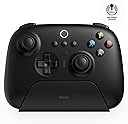
The 8Bitdo Ultimate 2.4G Wireless Controller features a Hall Effect Joystick for precise input, a multifunctional charging dock with auto-off and LED charging indicator, and a 15-hour rechargeable battery. Compatible with PC, Android, Steam Deck, and officially supported by Apple, it offers customizable profiles, pro back paddles, and a low-latency 2.4G wireless connection for seamless, lag-free gaming across multiple platforms.


| ASIN | B00TY8UR2K |
| Additional Features | Wireless |
| Best Sellers Rank | #84 in Video Games ( See Top 100 in Video Games ) #3 in PC Gamepads & Standard Controllers |
| Brand Name | 8Bitdo |
| Button Quantity | 10 |
| Color | Black |
| Compatible Devices | Android, PC |
| Connectivity Technology | USB |
| Controller Type | Gamepad |
| Customer Reviews | 4.3 4.3 out of 5 stars (5,025) |
| Hardware Platform | Gaming Console |
| Included Components | Item |
| Item Weight | 0.6 Kilograms |
| Manufacturer | 8BitDo |
| Model Name | 8Bitdo Ultimate |
| Package Quantity | 1 |
| Power Source | Battery Powered |
A**E
A great controller for a great price!
Honestly, when I purchased this controller at a friend's recommendation, I was very hesitant. I'm the kind of person that usually plays with wired controllers exclusively via a Windows PC, only using wireless when playing consoles. Input latency (the time it takes for an input on a device to make it to where it needs to go) is always one of my biggest problems. After receiving this controller, it probably took me a week to get over the fact that I could just pick up the controller out of the dock and it would automatically connect to the PC with no effort. I almost immediately forgot about the added input latency and decided that the tradeoff of convenience was very worth it! No more having to press or hold a home button to connect a controller to a device. No more having to wrestle with needing to keep a controller charged. The dock on this controller is its own beauty! The dock is shaped in such a way where you can easily slide the controller onto it without having to fiddle around with getting it into its form (if you have a Nintendo Switch, you know what I'm talking about). The dock itself has a hidden panel on the bottom that you can open up, which reveals the actual dongle, plugged into a USB port, that is used to connect the controller to your PC. If you'd like, you can take this dongle out of the port underneath, use that port for something else, and put the dongle elsewhere in your PC. Or, even better, if you're the kind of person that enjoys gaming in bed or on the sofa, you can just plug the dongle into your PC and then plug the dock in elsewhere, and just pick up the controller when you're ready to connect it! The controller itself is honestly very well put together and feels nice for the price you pay! The sticks and buttons all feel very nice. The face buttons are the perfect mix between soft and clicky, the bumpers are VERY satisfying to press, as they're big and have a very heavy click, and the hall effect joysticks have a very nice feel to their rotation and click. The DPad has a little bit too little feedback for my liking. Sometimes it's hard to tell you've even pressed it when you're hyper-focused on something in a game. The + and - buttons have a similar problem, but at least most games reserve those for pause-like functions! My only major gripe with the controller is that the triggers feel like Dualshock 4 triggers. To some people, that may sound like a huge positive, but to me it's a negative. I've always disliked the feel of those triggers, so these triggers don't have the greatest usage from me. Overall, this controller is GREAT bang for your buck! I can't recommend it enough, especially if you're on the edge about it.
N**N
What a great little unit!
*UPDATE* AFTER OWNING FOR EXACTLY 8 MONTHS THE MEMBRANES ON THE TRIGGERS ARE STARTING TO FAIL. THE TRIGGERS ONLY REGISTER ABOUT 35% WHEN FULLY DEPRESSED. YOU CAN "FIX" THIS WITH SOFTWARE, BUT IT ABSOLUTELY MAKES FINE TRIGGER USE, COMPLETELY WORTHLESS. I HAVE AN RMA CLAIM OPEN WITH 8BITDO, SINCE AMAZON TOLD ME TO KICK ROCKS... AND WILL UPDATE FURTHER ONCE I GET A REPLY ABOUT WHAT THEY WANT TO DO. Not only is the color just right! They really nailed the purple here... Like, for real! They need to do a retro mouse in this color way, or tell Logitech and the like to quit screwin 'round and use this! Lol! Anyhoo, the performance is fantastic! The right tactile feel overall, for those not really knowing that they like, and want a pseudo-nostalgic vibe to the controller. The d-pad, and abxy's are great. Bumpers and triggers feel right, and have amazing range as say... a throttle or a brake. The inside paddles are a neat addition too! You shouldn't use them for certain games or tasks, as they often get mashed during frantic action... But for things like a farming or truck driving sim... And open world crafty, survival-y types....... Holy smokes! Excellent asset! The greasy smooth hall effect joy sticks are a "thing" if I've ever experienced one! Lol! For this price point they are truly unbeatable! Nothing wrong with this unit yet, after it's first month and a half of abuse... and I don't really expect any issues either. 8Bitdo has done it the right way in the past, and this thing is no exception! Try one! You'll like it!
N**E
A Fantastic Controller with Just a Few Hiccups for iPad Users
Overall, this controller has been great. First off, the design is fantastic—it feels solid and comfortable to hold, and it has that wonderful retro aesthetic while still feeling modern. The buttons are responsive, the thumbsticks are smooth, and the D-pad is top-notch, which is perfect for anyone who enjoys precise control, whether for gaming or navigating accessibility features. As an iPad user, I was hopeful this controller would be the perfect companion for enhancing accessibility. Pairing it via Bluetooth was a breeze, and it’s been reliable for use with Apple’s AssistiveTouch and other accessibility options. The customization options with 8Bitdo’s software were also a nice touch, allowing me to fine-tune the controller to better fit my needs. However, there are some small limitations. While the controller works well with most iPad features, it doesn’t always integrate seamlessly with every app, especially those that don’t have native controller support. I also noticed that certain button mappings weren’t quite as smooth for some accessibility tools, which required a bit of adjusting. It would be great to see more refined iPad-specific support in future updates! That said, the overall experience has been incredibly positive, and I love how this controller has made my iPad more versatile. If you’re an iPad user like me, looking to enhance accessibility or just have a great controller for gaming, the 8Bitdo Ultimate 2.4G is definitely worth it—just be ready to tinker a bit with the settings to get everything running smoothly.
A**E
A great controller with a MAJOR FLAW
This pertains to the hall effect version of the controller. All was fine for nearly 2 weeks and I haven't noticed any issues until I played a game that requires you to click in the thumb sticks. In this case I was replaying Dragons Dogma DA and I immediately noticed something was off the first few times I clicked my left stick in to sprint, so I went to hardwaretester.com/gamepad to see what was happening. you could do the same thing in the 8bitdo software but it doesn't give a good visual representation of what's actually being read as an input. A circularity test showed the stick was not registering full input when it was physically at full lock. Under normal operation for circularity tests you should see the entire inner area of the circles filled with blue/purple. Having some spill outside of the circles is pretty normal some hall effect sticks but they are generally more accurate than ALPs potentiometers for example my old Dualshock 4 controller that is about 10yrs old shows a 10% error rate on both sticks while the hall effect 8bitdo has about 7% so they are a tad bit more accurate. The areas represented in green are what causes the problem. You can push the stick as far as it will go but it'll only translate in-game as a half of the full range of motion. This makes regular play impossible until you close then reopen the 8bitdo software, recalibrate the controller through the 8bitdo software or toggle the controller from xinput to dinput and back to xinput. This behavior indicates that this is some sort of software issue since in doing one of those three things results in the inputs being correctly read until you click L3 and R3 in at an angle that is. Also while the sticks are acting up you can click them in while keeping even pressure and move them toward the green areas where as long as you keep pressure on them they will read correctly but it'll feel extremely awkward to keep pressure on the stick like that since the clicks are essentially button presses. This would be a great controller if it didn't have these odd problems. Idk maybe I got a lemon but in doing some digging online I found other people reporting the exact same issue I've had with this controller and the more expensive bluetooth model as well. I'll be returning this and here's hoping this will be remedied in a future firmware update but I'd avoid this controller for now. The structuring of this "review" is awful but I hope my points came across well enough.
G**N
Ergonomics Require Adjustment Period
This controller is clearly a premium controller, and for the price point it can't be beat. That said, the ergonomics and size are definitely a sticking point. I'm a bigger guy, and this is a smaller controller with the handles being pretty much straight up and down instead of at an angle that keeps the wrists neutral like the Xbox core controller does and the PS DualSense controller does. Initially, there was a bit of pain and discomfort, but after playing for an hour or so, I seem t have gotten used to it. If that changes, I will update this review. The other key thing to note is that because it is a smaller controller, the buttons are smaller. This also has taken some getting used to. However, what I appreciate about the controller as a whole is that it seems to blend the best parts of both the DualSense and the Xbox core controller. It has the triggers and bumpers from the DualSense, obviously without the adaptiveness, as well as the joysticks. The buttons are from the Xbox core controller as is the D-pad. Everything is super responsive, and it paired up immediately with my computer. Another thing worth noting is that while there is a 2.4GHz dongle, it is seated in the charging base and if you leave it in there and instead plug the base into your computer with the included cord, the computer will recognize it and the controller will turn on when you pick it up off the charger and turn off when you put it back down. Small thing but definitely a quality of life feature. Time will tell on whether I end up sticking with this or not. I will provide an update if I end up returning it or not using it anymore.
M**E
The best pc controller I ever purchased!
Maybe it’s just me I’ve tried using Xbox controllers for PC in the past and always have had just a small degree of difficulty. This controller works perfectly from the start . Set up was easy, controller feels great. Has all the elements I would’ve wanted. Controller vibration is good, functionality is good. I am very impressed. It has Hall effect joysticks and Bluetooth as well as included dongle in a stowaway compartment on the bottom. One disappointment I ordered the purple and it’s a lot darker than what appears in the photo but not a dealbreaker it’s still looks great just would’ve been nice if it was a lighter purple. Overall, I believe I will be ordering another one maybe a different color although the purple is nice. Also the light on the bottom that comes on when it’s charging is awesome.
G**G
Absolutely loving this as a controller
Great product, but first going to say why I went looking for it to begin with I've been exclusively using Linux as an OS for half a decade at this point, and have gotten very tired of my bluetooth Xbox One controller. Of course Xbox is owned by Microsoft and Microsoft makes Windows, so their controls have good compatibility with their OS. On linux? Not so much. On Windows the OS has the ability to turn off the Xbox controller, but on a regular Xbox controller FROM the controller? No, no. On my PC I have no option to shut the Xbox controller off, so I'd just set it down and wait for it to idle out, which is just using the battery for no reason. The 8BitDo controller can actually be turned off FROM the controller. Just hold the center button for 3 seconds and off it goes. Plus it comes with a base that matches the controller color (mine is sitting on my infotainment center) so any time I'm done gaming I just put it back in the base where it automatically turns off and begins charging. Super happy with 8BitDo controllers and their ability to work with Linux/Steam Deck/Proton. If you want to be on the look out for any cons, my only possible complaint is that I have big man hands and it's a little bit small in my hands; which was odd at first. It just felt "different" than what I was used it. The handles are maybe 1/4 inch (~6.3mm) shorter than my previous Xbox One controller.
M**Y
Awesome Controller and Features - Pretty bad build quality (My experience)
Let me start by saying that I've used almost every console controller, PS1 all the way to PS5, Xbox (Original) to Series X, All Nintendo controllers and handhelds, Steam Deck, Stadia, Luna, everything! and this controller felt awesome, I have somewhat big hands, not extremely big, but bigger than the average, and this controller felt pretty well shaped for my hands, controller was beautiful, buttons felt a little hard to push at first, they got a little looser before I returned, but never as nice as the Xbox Series X Controller that I was coming from. Triggers also felt with some resistance that I got used to after 4 days, really low latency using the 2.4g dongle, dock was AWESOME, it connects to your pc automatically when you lift the controller off the dock, and turns off and starts charging as soon as you put it back on the dock, software was pretty neat, you can remap every button, vibration motors, everything! also the back buttons were pretty well placed for me and were a game changer for almost every game BUT now the worst part, the Joysticks, I got the hall effect version so I don't know if the regular joysticks have the same problem, but the hall effect ones were grinding the plastic off the edge of the hole they are set in, and also, I had to recalibrate them twice a day, because it would stop registering the edges of the joystick zone, so I couldn't fully run in games were walking speed is based on how close to the edge you move your joystick. I really wanted to keep this controller, but the build quality is just not there yet, I would wait for a new revision of this product to buy it again, but it probably is the best controller I've had on PC (when it worked fine)
H**A
Not even usable
Completely unusable for the reason intended. I have only had this controller for a day and had nothing but problems. Firstly I want to use it on Bluetooth, it registered however when I go into my PC games the A and B button are switched. I had to download some software to fix it Thought my problem was solved? Nope, next went into my game and registered as playstation despite the buttons being the same as xbox. I'm so sad, I just wanted to get away from xbox controllers as they break on me quite frequently. Do better 8bitdo.
A**O
L'ultimo controller che comprerete
Perché non gli manca davvero nulla. Innanzitutto è comodo: layout Xbox con dei grilletti simil-playstation 4. Rimpiango un po' i grilletti della 360 ma forse solo per abitudine, e comunque nessuno ne fa di simili. La comodità prosegue con il wireless: è possibile attaccare il dongle wireless all'hub di ricarica così che sul PC avrete un solo slot USB occupato comunque decidiate di usarlo; non capisco poi perché sulla pagina dell'articolo non si menzioni da nessuna parte il bluetooth, che funziona alla perfezione passando a Xinput con l'interruttore dietro al controller. Pensavo di fare un "sacrificio" dovendo scegliere tra layout Xbox senza bt o layout Nintendo con bt, e invece sono rimasto sorpreso! Il prezzo è adeguato, e non mi sento di stare comprando un "marchio" come comprando un controller Xbox in circolazione da 10 anni ma che in qualche modo costa come al lancio. Il controller 8BitDo ha un dpad adeguato (rocker ma assolutamente preciso), levette analogiche hall che urlano robustezza, due tasti programmabili dietro, i profili, la vibrazione è corposa e mai fastidiosa, la connessione immediata, la batteria lunga (credo, non mi è mai capitato di dover fermare un gioco perché mi fosse morto il controller!)... Di controller ne ho usati e non ricordo di essere stato mai così soddisfatto
A**Y
great controller
one of the great controllers I owned so far, and I used to have Razer Raiju Tournament edition. However, I somehow managed to break the R2 trigger thanx to Hollow Knight, though it was a great controller.
A**G
Bluetooth function is inside this 2.4ghz...so it's dual connection
If you are going to connect to an Android device, might need to configure the keys but not sure if will help as it depends on games, I guess..But if you are going to connect to Apple Device...this is the good news, this may be a 2.4ghz wireless but Bluetooth function is built in so it works perfectly when I played Roblox on the iPad especially.
A**N
Cómodo y buen precio
Es un control muy cómodo y para juegos de pc es excelente, no se desconecta y no he experimentado drift. yo no me fijé que el que compré no tenia Bluetooth pero no tuve mucho problema al respecto no me arrepiento de la compra
Trustpilot
2 weeks ago
1 month ago