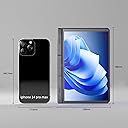
🚀 Compact power, endless possibilities—your ultimate on-the-go productivity hub!
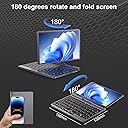
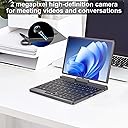
The Mini Laptop PC features a robust 12th Gen Intel Alder Lake-N N100 processor paired with 12GB DDR5 RAM and a 256GB SSD, all packed into a sleek 8-inch touchscreen device with a 180° rotatable aviation aluminum body. Running Windows 11, it offers versatile 2-in-1 functionality, HD wide-angle webcam, dual speakers, and up to 6 hours of battery life with fast charging support—perfect for professionals craving portability without compromise.


| Standing screen display size | 8 Inches |
| Screen Resolution | 1600 x 1200 pixels |
| Max Screen Resolution | 1600 x 1200 pixels |
| Processor | 3.4 GHz none |
| RAM | 12 GB DDR5 |
| Memory Speed | 1600 MHz |
| Hard Drive | 256 GB SSD |
| Graphics Coprocessor | UHD Graphics |
| Chipset Brand | Int |
| Card Description | Dedicated |
| Graphics Card Ram Size | 2 GB |
| Wireless Type | Bluetooth |
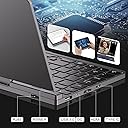
| Number of USB 3.0 Ports | 1 |
| Average Battery Life (in hours) | 5 Hours |
| Brand | Ruchonin |
| Series | N100 |
| Item model number | Alder Lake-N N100 |
| Operating System | Windows 11 |
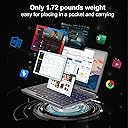
| Item Weight | 1.72 pounds |
| Product Dimensions | 7.87 x 5.5 x 0.8 inches |
| Item Dimensions LxWxH | 7.87 x 5.5 x 0.8 inches |
| Color | Black |
| Processor Brand | Int |
| Number of Processors | 4 |
| Computer Memory Type | DDR5 SDRAM |
| Flash Memory Size | 12 GB |
| Hard Drive Interface | Serial ATA |
| Optical Drive Type | No |
| Power Source | Battery Powered |
| Voltage | 11.4 Volts |
| Batteries | 1 Lithium Ion batteries required. (included) |
D**A
Very cute small full featured 2in1 Windows 11 laptop.
Very cute small full featured 2in1 Windows 11 laptop. Very useful in small spaces, for example in datacenter between the racks. I don't need separate charger for it since it is USB-C charging, just like my phone.
J**P
Best when used within its limitations
This thing is, for all intents and purposes, a netbook and should be used as one. It's not rugged, to be careful handling it. Surfing the web and word processing is what it's best at and can do a bit more but don't expect to do any gaming. It handles Norton, Opera GX, and Spotify running at the same time, so it's proved itself in multitasking. Will actually run Gimp drawing program to a decent degree. The hinge gets a little iffy over time but it's holding. The plate covering the hinge in the middle popped off (from my mishandling) revealing that junction is made of metal parts. The optic mouse is a little awkward because it supports tap clicking and no way to turn it off, though pairs with Bluetooth mice nicely. Backlit keyboard illuminates clearly and is adjustable. Touchscreen is very responsive and plays well with a mouse. Only drawback to tablet mode is after a moment of standby, there's no external button to wake it. You have to sneak the under the screen to the keyboard and press a button. Battery life is atrocious and understandably so. The more you make it do, the faster it burns through. Web surfing? You're golden for several hours. Playing with generative ai? It's dead in 20 minutes. Biggest drawback if all, I have no idea where to get drivers if I have to format this for any reason.
D**E
Sometimes it works
I like the form factor, there is a lot of potential for this computer to work for my mobile office needs. However, it seems to start up with the screen upside down and glitches once every 3 or 4 start ups. I'm not really impressed with this out of the box but will see if I can identify the error. Tried to do a windows restore to fix the random startup issues, computer wouldn't turn on past a black screen after the restore. I could enter bios but evidently there were issues here beyond what I would consider average computer knowledge so the laptop was returned. I'd have exchanged for another hoping I just got a bad unit but the supplier was out of the 1tb edition.
L**6
Neat little device with nonstandard keyboard layout
This is a neat little device featuring the Intel N100 processor. I'm an aficionado of tiny laptops and devices for the times you need something more than a smartphone, but a full laptop is overkill. I liked nearly everything about this smol computer, a very versatile and portable design with a quality build and a nice little screen. The "mouse" sensor works okay and isn't my favorite thing, but it's understandable given the size of the device. As other reviews have noted, the device is thicker than expected. I also found the hinge/swivel mechanism the screen is mounted on is a little unwieldy and too large for such a small device. These weren't deal killers for me. Windows 11 runs well -- I did a clean install and was able to activate Windows without issue. The N100 is powerful and makes this a much more practical device than ultraportable PCs of the past, especially when hooked up to an external monitor. Ultimately, the deal killer for me is the keyboard layout, which is nonstandard and frustrates any efforts to touch type, slow type, or most other typing on this thing, rendering it nearly useless for me -- I'd rather use a tablet than this, and my tablets have a larger screen even if they don't have a keyboard. I ended up buying and keeping a 7-inch mini laptop elsewhere (known as the Topton L4 or by a dozen other names) with a lower power Celeron processor, because the keyboard design on the 7-inch mini is FAR better and makes that much more usable for most folks for any purpose.
M**E
Very cool little laptop
HARDWARE: It's hard to describe how cool this little device it. My daughter calls it cute. It runs Windows 11 Pro and has decent specs. I won't work well for hardcore gaming, livestreaming, video editing, or intensive photo editing. However, it's perfect to use on the go for web browsing, watching videos, taking notes, or giving presentations. The form factor is really small (about the size of a hardback book). It's heavier than it looks, which is probably because of everything packed inside. It also charges via USB-PD, so you don't have to carry around a proprietary charger. INTERFACE: The keyboard is a bit small, but it's usable and the keys have good response. The hardest part of this is that there is no trackpad. There's a little touch-sensitive nub under the spacebar with right and left mouse keys below it. You don't push the nub side-to-side like on a Lenovo, but you brush your finger over it to move the curser. You can also tap the nub to click. It's not the best, but it works. I find myself using the touchscreen almost exclusively instead of the cursor nub. Actually, unless I need the keyboard, I just flip the screen around and use it like a tablet. THIS VS. A TABLET: I most often use this with the screen flipped around and laid flat on the keyboard. So one might ask why not just use a tablet. There are a few good reasons: #1 - It runs Windows and all the same applications I have on my main work computer. #2 - It has standard USB ports and a full-size HDMI port. #3 - It has a keyboard for when I want to use it to modify files and take notes. #4 - It's smaller (albeit thicker) than most tablets. #5 - It has an ethernet port. I am not doing the bulk of my work on this machine. However, it's great to take to conferences to take notes and to use when presenting. I can drop a file from my work computer onto a USB drive or network drive and pick it up, open, modify, and project from this device. No special cables, apps, or other go-betweens are needed. When I'm not working, I can set it up and watch a movie or TV on it like the old-time portable DVD players. And, as my daughter says, it's cute.
Trustpilot
1 month ago
2 months ago