


Desertcart purchases this item on your behalf and handles shipping, customs, and support to Denmark.
๐ Upgrade your workspace, upgrade your workflow!
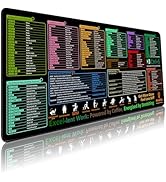
The ProbTis Excel Shortcuts Mousepad Pro Version is an XXL 35.4" x 15.7" desk mat designed for professionals seeking enhanced productivity. Featuring a non-slip natural rubber base, water-resistant surface, and high-definition printed Excel shortcuts, it combines durability with practical learning tools. Its stitched edges prevent wear, making it a stylish and functional addition to any office setup.








| ASIN | B0CDW52JS1 |
| Best Sellers Rank | #13,552 in Computers ( See Top 100 in Computers ) #296 in Mouse Pads |
| Brand | ProbTis |
| Brand Name | ProbTis |
| Color | Excel Pro Version |
| Colour | Excel Pro Version |
| Customer Reviews | 4.6 out of 5 stars 428 Reviews |
| Item Dimensions L x W | 39.9L x 89.9W centimeters |
| Item Shape | Rectangular |
| Item Thickness | 3 Millimeters |
| Item Weight | 0.62 Kilograms |
| Item weight | 0.62 Kilograms |
| Manufacturer | ProbTis |
| Manufacturer Part Number | MP-EXCEL-PRO |
| Material | Rubber |
| Material Type | Rubber |
| Model Number | MP-EXCEL-PRO |
| Shape | Rectangular |
| Size | Extended XX-Large |
| UPC | 658359391777 |
M**S
How is the productive?
Really good item
D**S
Formulas and spelling are wrong. Don't buy
Many shortcuts are wrong as well as the some of the spellings. Quality is not bad but you will lose your time trying to figure out what works and what does not work. I do not recommend it
D**N
I liked it
Works great for all the short cuts
G**Y
mouse pad is Excel shortcuts
If you're a professional or a student who spends a significant amount of time working in Microsoft Excel, the Excel Shortcut Mouse Pad Pro is an absolute game-changer. This extended office mouse pad has become an essential tool on my desk, and I can't sing its praises enough. Size and Coverage: โ โ โ โ โ The XL size of this mouse pad is nothing short of impressive. It covers a substantial portion of my desk, providing ample space for both my mouse and keyboard, with room to spare. This extra-large surface is perfect for Excel power users who need to work with large spreadsheets or multiple documents simultaneously. It eliminates the need to constantly reposition the mouse pad and allows for a clutter-free workspace. Excel Shortcut Integration: โ โ โ โ โ The standout feature of this mouse pad is the array of Excel shortcuts printed directly on the surface. Whether you're a seasoned Excel pro or a beginner, having these shortcuts at your fingertips is a game-changer. It not only speeds up your work but also helps you learn and remember essential Excel functions more effectively. The shortcuts are clear and legible, and they cover a wide range of functions, from basic formatting to complex calculations. Durability and Quality: โ โ โ โ โ The Excel Shortcut Mouse Pad Pro is built to last. The edges are stitched, ensuring longevity and preventing fraying. The surface is smooth, and it provides an excellent glide for my mouse. The bottom is designed with non-slip rubber to keep the pad in place, even during intense working sessions or gaming. The overall build quality is exceptional, and it feels like a premium accessory. Multi-Purpose Functionality: โ โ โ โ โ While the primary focus of this mouse pad is Excel shortcuts, it's versatile enough for other tasks. I find it useful for various applications, from graphic design to general office work. The XL size offers more than enough space for any task at hand.
A**R
Best cheat sheet for work!
The ProbTis Excel Cheat Sheet Desk Pad has become one of my favorite desk accessories. Not only is it super helpful for quick Excel references, but the feel and comfort of it really surprised me. The surface is soft and smooth, which makes resting my wrists and forearms on it very comfortable, especially during long work sessions. It has just the right amount of cushioningโenough to feel gentle and supportive, but not so thick that it feels bulky or gets in the way of typing or using a mouse. I also really appreciate the slip-resistant backing. Once you place it on the desk, it stays put. No constant readjusting, no sliding around while youโre typing or moving your mouse. It creates a stable, comfortable work area that feels really solid and dependable. In terms of comfort, it genuinely improves my workspace. It softens the hard edge of the desk, makes typing more pleasant, and adds a bit of ergonomic support. I notice less irritation on my wrists compared to resting directly on the bare desk. On top of that, the design is clean, practical, and visually appealing. The Excel cheat sheet layout is well-organized and easy to read at a glance, without looking cluttered. It adds a professional, modern touch to the desk while also being extremely functional. Overall, itโs a great mix of softness, stability, comfort, and smart design. For anyone who works in Excel regularly and wants a more comfortable and stylish workspace, this desk pad is a great choice.
A**S
Que puedo resolver problemas simples en excel
Es de utilidad tener a la mano los shortcuts para avanzar en el uso del Excel sin entretenerse mucho
S**N
The perfect mousepad for Excel users
If you work with data this is one of the things that will become a milestone in your life. You will mark your life as the time before the Excel shortcut mousepad, and the time after the Excel shortcut mousepad. Whoever came up with the idea to put Excel keyboard shortcuts on a giant luxurious mousepad is a visionary. Myself and every other quant analyst I've worked with have sticky notes and printed out guides of Excel shortcuts hanging all over the place... This mouse pad makes those dusty sticky notes obsolete. The mousepad material is fantastic. It's soft, but not squishy...perfect for an optical mouse. It rolls up nicely and then lays down perfectly flat. It is large enough to put your laptop on and have about a square foot of mouse-space on each side. The days of mousepad shuffling will be behind you. I brought it into work to show my colleagues (all data scientists) who were as impressed as I am. They all gave it a test drive and will be buying one for themselves. These are not just the garden variety 'ctrl+c, ctrl+v' shortcuts, either... There are dozens of pro-level workflow productivity shortcuts. Did you know there's a keyboard shortcut for flash fill? I call myself a pro, and yet I've been flash filling using my mouse, like a newb, for 10 years, apparently. Now, even if I forget the shortcut, it's right there. 'ctrl+e', yes please. It's even got Power Pivot shortcuts... I didn't even know there *were* Power Pivot shortcuts.
Trustpilot
3 days ago
2 weeks ago