


โ๏ธ Unlock your creative genius with Cricut Joy Xtra โ where smart meets stylish!
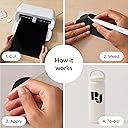
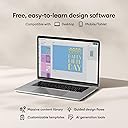
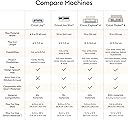
The Cricut Joy Xtra Smart Cutting Machine is a compact, versatile crafting tool designed for professionals and beginners alike. It supports over 50 materials including vinyl, cardstock, and iron-on, and features Print-Then-Cut compatibility with most inkjet printers for vibrant, full-color projects. With Bluetooth connectivity and the intuitive Design Space app offering access to over 1.5 million images and fonts, it empowers users to create personalized stickers, cards, decals, and more with ease. Lightweight and portable, it fits seamlessly into any workspace, making it the perfect smart companion for endless creative possibilities.








| ASIN | B0CF6L9SMJ |
| Active Surface Area | 218.75 cmยฒ |
| Best Sellers Rank | #6,159 in Arts, Crafts & Sewing ( See Top 100 in Arts, Crafts & Sewing ) #5 in Scrapbooking Die-Cut Machines |
| Brand | Cricut |
| Brand Name | Cricut |
| Color | White |
| Customer Reviews | 4.6 out of 5 stars 1,597 Reviews |
| Global Trade Identification Number | 20093573787144 |
| Included Components | Joy Xtra Machine |
| Item Dimensions D x W x H | 6"D x 12.5"W x 5.5"H |
| Item Type Name | Cricut Joy Xtra | Smart Cutting Machine - Create stickers, shirts, signs & more |
| Item Weight | 6 Pounds |
| Manufacturer | Cricut |
| Material | Plastic |
| Material Type | Plastic |
| Model | 2010313 |
| Operation Mode | Automatic |
| Part Number | 2010313 |
| Print media | Unknown |
| Product Dimensions | 6"D x 12.5"W x 5.5"H |
| UPC | 093573787140 |
| Unit Count | 1 Count |
A**R
So little, but so much to love!
This little machine is perfect for making cards and other small projects. It accommodates 8.5 x 12 paper or cardstock without pre-trimming, so it can make many regular-sized Cricut designs simply by rotating them lengthwise. It's super easy to use and it cuts, draws, foils, and supports the Cricut Print Then Cut function. Cricut provides lots of special products to make card making super easy and fancy with the Joy Xtra, but it's also easy to make cards from scratch using third-party card stocks. There are lots of support groups and video tutorials for using Cricut's design software and lots and lots of projects and designs to make as-is or to customize as your own. Cricut mats and blades are inexpensive compared to other brands, and third-party mats are extremely affordable, so replacing a worn mat is no big deal. Joy Xtra pens are also inexpensive, but many other brands of pens can be used, some without needing an adapter. It's super easy to change from the blade to a pen during the making process. I also have a larger cutting machine of a different brand, which is technologically superior to this little Cricut, but the ease of use and huge variety of Cricut stuff (materials, tools, projects, videos, etc.) make this one my favorite. The reasons for deducting a star are that the Bluetooth connection is slow, and it doesn't have auto-sensing technology so the user needs to manually select the material to be cut. Also, Cricut's proprietary software does not allow for the saving of projects in a standard format (SVG files) for use on other machines, but that's a Cricut drawback in general, not specific to the Joy Xtra.
J**E
Perfect Size
It connects fast to my Mac. The cricut application is needed. I have had it now for almost a year and still havenโt needed to replace blades. Great Bang for your buck in my opinion. Very Useful and solid cutting machine. You can cut various sizes with this.
K**N
Previously owned Cricut?
The package just arrived and it clearly had previously been opened and/or returned. The seals were broken on the product box, as well as the information packet. The top piece of vinyl is dimpled (as if used) and the lid to the Cricut is scuffed up and the mini weeder (as noted included on the box) is missing. I did not purchase a previously owned machine. I haven't connected it yet and if it works fine I'll keep it (because returns are a pain), but I am disappointed that it did not arrive pristine.
L**A
Great beginner cutting machine
I have been using Cricut cutting machines for years so I decided that it was time to try this Joy extra. I find that a lot of projects I do are 8.5x11 letter size or small vinyl cutouts which make this machine perfect. It has a very sleek design so be aware that there are no on/off or load/unload buttons so it does take some getting used to. When it arrived it was very well packaged and included not only the machine but a fine tip pen, a mini weeding tool, a sheet of transfer paper, 2 sheets of black smart vinyl, 1 sheet of white writable vinyl and a sheet of gold HTV. This machine was ready for a project once I connected it to Cricut design space on my computer. The set up was very simple and it is so compact that it fits perfectly in almost any space. When you buy this though please be aware that it is only connected with bluetooth and there is no usb port like the other large machines. It also does not come with a cutting mat so you will need to purchase one if you plan on using any materials other than the smart vinyls. Overall this has been a perfect addition to my craft room and I would recommend it if you are a beginner crafter or just looking for something more portable and compact for your smaller projects. The only issue I have run into so far and why I only am giving 4 stars (which I would give it 4.5 if I could) is the loading of mats. Since there is no load button directly on the machine you have to feed it by hand and I find that it takes me several attempts before it will finally feed.
D**D
A great product.
Another great product for a great value of money. A must buy for all. You need this machine in your life.
T**M
I've always wanted a Cricut...
So I have always wanted a Cricut cutting machine, but I don't really have the space in my house, they're fairly expensive and the original Cricut Joy was too small for my tastes. Enter the Cricut Joy Xtra machine...I'm loving this thing. I found it on sale on Amazon and it was small enough to be stored away when not in use, but big enough to be useful. So far I've cut some vinyl decals for a friend to sell to raise money for her nonprofit, I've cut some vinyl decals for myself, for my family, and I've made a few T-Shirts with heat transfer vinyl. I also have some printable vinyl sticker paper to try out soon. This machine cuts up to 8.5 inches wide and 12in long on a mat, but up to 4ft long with smart materials. That said I don't like the Cricut smart materials. There aren't enough colors/variety and the vinyl is difficult to handle due to the thick paper backing. I cut a vinyl decal of lettering for my Dad's truck using a mat and carefully aligning the letters and words to make it long enough. Is that convenient, no not at all, but it's doable and for my needs it worked well. Most of what I cut (so far) are small decals and hopefully small stickers soon, so this machine is excellent for my needs. It does officially support print then cut which is wonderful and one of the main reasons I ordered it. I also ordered sublimation markers that fit in the Cricut Joy Xtra and can be used like the infusible ink markers and I haven't had a chance to use them, but I'm looking forward to it. The downsides in my opinion are the smaller cutting width (not too big an issue if plan ahead carefully), the lack of official tools (like engraving tools or different cutting blades, etc), and there are no buttons on the machine so no off button (it must be unplugged to turn it off), and then there is the software... Cricut Design Space is designed to be intuitive and easy to use and for the most part it is...however too many features are behind the subscription/paywall and I don't think the subscription is worth $10 a month. It is easy enough to manipulate your own images and import them into Design Space though. I have been using GIMP to edit photos like PNG and JPG files as well as InkScape for vector graphics like SVG files. It's easy to create a vector graphic importing a JPG into Inkscape and tracing the bitmap. However this is easy for me as I have a bit of graphic design experience and a degree in Information Technology. Design Space might be easier to use for people without that background. Another downside that I absolutely despise is the need for internet in order to not only use Design Space, but to cut an image. Why do I need internet to cut something on a cutting machine. That's just dumb in my opinion. Overall, for a first time Cricut user and a first Cricut machine, I love this thing. If Cricut would improve Design Space and eliminate the need for internet connectivity to cut files, I would give it 5 stars.
L**S
Works very well! Good for small spaces
Bought this because the regular size Cricut machine was just too big. I also like making stickers so this has the exact dimensions for letter sized paper. Worked very well. Can adjust all the settings from the Cricut machine. I recommend this if you want a more compact machine.
S**N
Absolutely the best purchase Iโve ever made
Absolutely the best purchase Iโve ever made. Itโs opened up an endless amount of projects that keep me busy for hours. I chose this one because it was affordable, small, and compact, and it seemed like a smarter financial option since I wasnโt sure how much Iโd actually use it at the time. I could not recommend this machine enough. Setup was a breeze, and with so many YouTube tutorials available, learning how to use it was incredibly easy.
C**C
Missing items
Box looked like it had been rre-taped and some items were missing: instructions; pen; mini weeder Has USA plug Have not used machine yet
L**S
Impresora
Me encanta mucho el producto, era justamente lo que necesitaba para poder personalizar mis productos y los resultados son de muy buena calidad
M**A
Best best
I really like your services
ุง**ุน
ุดูุฑุงู ูู ุตุฏุงููุชูู ๐น
ุงูู ุฌูุงุฒ ุงุตูู ูู ุชูุงู ู ููุงู ุงูุชุบููู ู ุญูู ุงู ูุงูุตุญ ุจู ูู ู ูุฑูุฏ ุงูุญุตูู ุนููู ๐๐ป
B**.
Creative fun
Perfect size for my space. For me it was a compromise between Cricut Joy and Explorer. Cuts 50+ materials which is good enough for card making and alot more. Very happy with my purchase.
Trustpilot
3 weeks ago
3 weeks ago