


Buy anything from 5,000+ international stores. One checkout price. No surprise fees. Join 2M+ shoppers on Desertcart.
Desertcart purchases this item on your behalf and handles shipping, customs, and support to Denmark.
🚀 Elevate Your Surface Pro Experience!
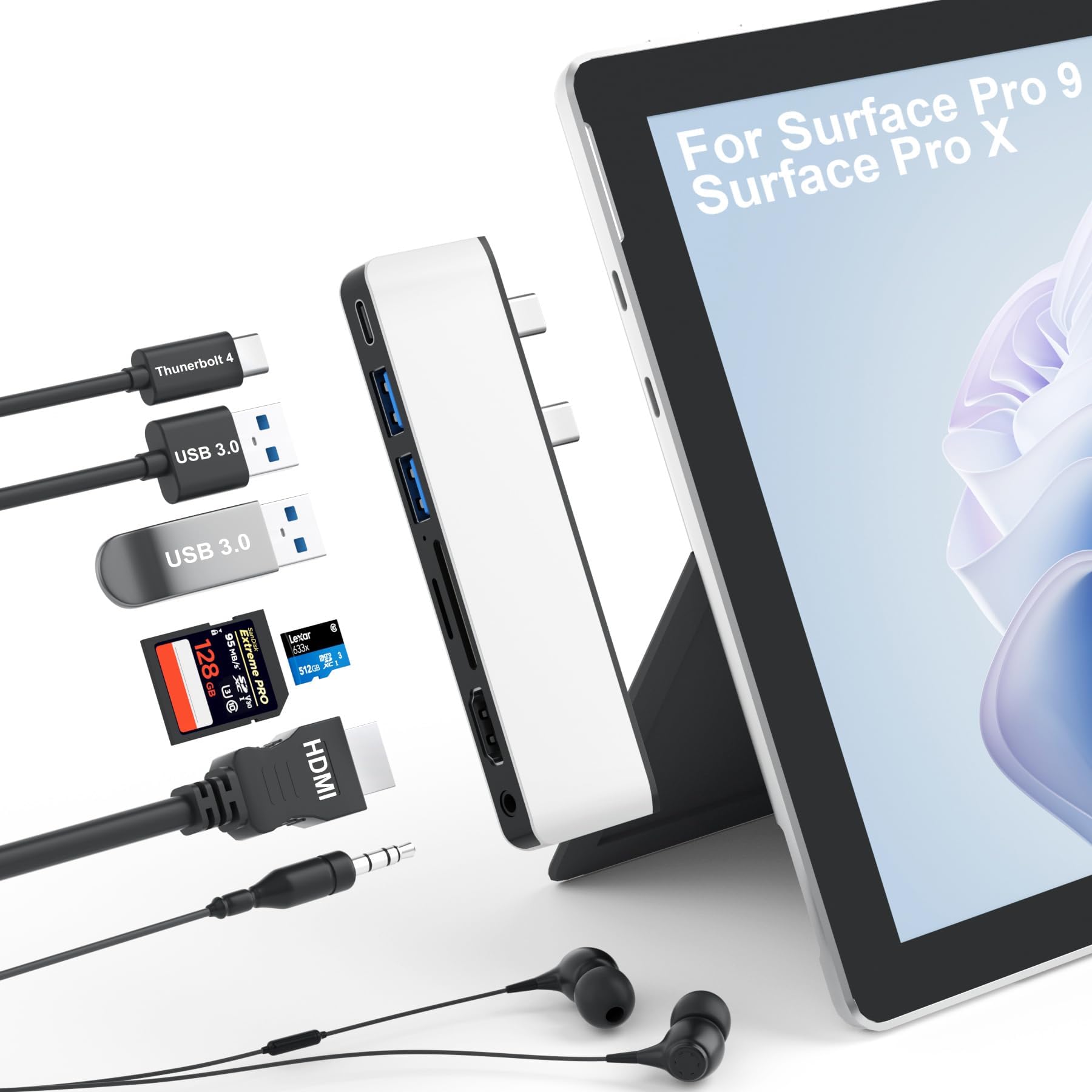
The Surface Pro 9 Hub Docking Station is a versatile 7-in-1 accessory designed specifically for Microsoft Surface Pro 9 and Pro X. It features dual USB-C connections that expand into multiple ports, including 4K HDMI, USB 3.0, and Thunderbolt 4, enabling triple display capabilities and high-speed data transfer. With 100W charging support and a 3.5mm audio output, this docking station enhances productivity and connectivity for professionals on the go.



| ASIN | B0C9QG7WCD |
| Best Sellers Rank | 61,756 in Computers & Accessories ( See Top 100 in Computers & Accessories ) 1,080 in USB Hubs |
| Brand | Yeemie Pro |
| Brand Name | Yeemie Pro |
| Colour | Surface Pro 9 Hub with 3.5mm Audio(Sliver) |
| Compatible Devices | Surface Pro 9, X |
| Compatible devices | Surface Pro 9, X |
| Customer Reviews | 4.2 out of 5 stars 163 Reviews |
| Data Transfer Rate | 40000 Megabits Per Second |
| Enclosure Material | Metal |
| Global Trade Identification Number | 00671891482505 |
| Hardware Interface | HDMI, MicroSD, USB 3.0, USB Type C |
| Hardware interface | HDMI , MicroSD, USB 3.0, USB Type C |
| Item Dimensions L x W x H | 11.6L x 3.3W x 1H centimetres |
| Item Weight | 0.06 Kilograms |
| Manufacturer | Shenzhen Fuxi Technology Co., Ltd. |
| Manufacturer Part Number | SP9-HDMI-02-S-DEF |
| Minimum Required Operating System Version | Windows 10 |
| Model Number | SP9-HDMI-02-S-DEF |
| Number of Ports | 7 |
| Operating System | Windows |
| Product Features | Triple Display |
| Product Warranty | 2-year warranty |
| Special feature | Triple Display |
| Total USB Ports | 3 |
| Total USB ports | 3 |
| UPC | 671891482505 |
E**O
So many useful ports, I love it!
Only had this hub less than a day and it is working just fine. My new Microsoft Surface Pro 9 doesn't have ports for my external drives, thumb/flash drives, the cable I use to transfer photos from my phone to the laptop, and so on--only two C ports (which are useless to me except for plugging in this hub!); it allows me to use all these tools both at home and when I travel. I love it! The photo shows the external drive and my cell phone cable plugged in to the hub.
C**W
Clever little hub - two devices in one
The video shows exactly what you get and my initial impressions of build quality as well as a quick overview of the ports, so I won’t go into all that here. Instead, I’ll go into what I consider most important: the transfer speeds and the port functionality. Full testing methodology included below for your information, but really, the summary is all you need to know. Summary: Clever little hub - it's actually two devices in one. The first USB C port is simply a TB4 passthrough - you keep your high data transfer speeds, your video out capabilities etc. The second USB C plug powers the rest of the ports - 5Gbps data transfer, HDMI out, 3.5mm audio and Micro SD. A very neat and capable device. Pros & Cons: + Good/expected: Very little drop in performance for the USB 3.1 Type C and USB 3 Type A ports compared to plugging into the computer directly. - Bad/disappointing: None. ----------------------------------------- Testing methodology: - USB 3.1 type C: Control - 10 GBps SSD enclosure containing 3300 MB/s NVMe SSD plugged directly into a USB 3.2 Gen 2 (10Gbps) Type C socket on the test PC (CrystalDiskMark benchmark 1065.74 MB/s); Test - Same drive plugged into the 10Gbps USB 3 type C port on this hub. - USB 3 type A: Control - 10 GBps SSD enclosure containing 3300 MB/s NVMe SSD plugged directly into a USB 3.2 Gen 1 (5Gbps) Type A socket on the test PC (CrystalDiskMark benchmark 464.20 MB/s); Test - Same drive plugged into the 5Gbps USB 3 type A port on this hub. Results: - USB 3.1 Type C speed: 1056.97 MB/s (8.77 MB/s slower than control) - USB 3 Type A speed: 462.57 MB/s (1.63 MB/s slower than control)
A**R
Mid-level number of ports at a reasonable price
Note: there is an Amazon voucher which gives 5% at the time of writing this review. This is a small and slightly limited dock, which I am using with a Surface Pro 9, but which also works with the Pro X. It comes in very compact packaging, a thin card box with no wasted materials - which is good to see. It takes up both left-side ports, and gives you 1 x HDMI output,1 x THunderbolt 4 100W charging + 40Gb data port, 2 x USB 3.0 ports, 1 x 3.5mm audio jack, 1 x Secure Digital card slot, and 1 x TF (microSD) card slot. Obviously this expands your options significantly, but compared to similar tablet docks that provide up to 12 ports it seems a bit limited. Thankfully it fulfills all the specs and abilities claimed in the amazon listing, although you won’t be actually getting 100W out of this. This is normal on 100W charging hubs, you usually get about 80-85W. Something that needs to be noted as it is VERY important is that if you have any sort of case or cover that impinges near the ports on your tablet then it won’t fit properly. I can only recommend this hub for use with a bare Surface. Anything else is going to give you problems, especially over time. Unless of course you are willing to make alterations to your case (using stanley knife) in order to accommodate it. So, for £30 is it worth it? I would say yes, although 2 thunderbolt ports would have been greatly appreciated. You should also have a look on Amazon and see if you can get something cheaper or better, as new versions are being produced on a weekly basis.
I**D
Works Well
This Yeemie Pro Surface Pro 9 Hub Docking Station has been a great addition to my home office computer set up. After getting 2 additional screens, I can extend my laptops display to use the 2 other screens individually. The connection is steady and reliable, with no lags or disconnection issues to interrupt me as I work. Conveniently, this hub supports 40Gbps transmission speed, whichs allows me to transfer data back and forth smoothly and quickly. Additionaly, it also supports audio and video which is great for when I have video meetings for work, or if I just want to enjoy music or a movie on one screen while still using the other 2. Another thing I like is that the hub supports 100W power transmission, so my laptop charges without issue while in use. Also, as this hub lets me connect the Ethernet cable directly to my laptop, my connection is even more reliable no matter what I am doing or how much I have going simultaneously. A unique feature of this hub is the 3.5mm audio jack where I can plug in my noise-cancelling headphones to prevent being disturbed when working. This is a reliable and high quality hub for surface pro laptops, and I definitely recommend.
O**M
Experience Enhanced Productivity
One of the standout features of this hub is its ability to support triple displays. With a 4K HDMI and an 8K video display via USB-C Thunderbolt 4, you can expand your workspace like never before. Whether you're working on a complex project, multitasking, or simply enjoying a more immersive entertainment experience, the triple display capability has you covered. The Surface Pro 9 Hub Docking Station is a game-changer for Surface users who demand more from their devices. Its triple display support, lightning-fast data transfer, robust power delivery, and audio versatility make it an indispensable tool for work and play. Whether you're a professional, a creative, or a student, this hub ensures that your Surface Pro 9 or Surface Pro X becomes the command center of your digital world. Elevate your productivity and connectivity with the Surface Pro 9 Hub Docking Station.
M**4
it's a game-changer for productivity and convenience.
The Surface Pro 9 Hub Docking Station is a versatile accessory that greatly enhances the functionality of your Surface Pro 9. With 7-in-1 connectivity options, it's a game-changer for productivity and convenience. This docking station offers multiple ports, including USB, HDMI, and SD card slots, expanding your Surface Pro 9's capabilities. You can easily connect external devices such as a monitor, keyboard, mouse, USB drives, and more. This is particularly useful for professionals and students who require a seamless transition between work or study environments. Additionally, the hub is designed to be compact and portable, making it ideal for users on the go. It's a must-have accessory for unlocking the full potential of your Surface Pro 9.
G**E
Sleek little hub
This is a great accessory for my Surface Pro 9. It's small, fits snugly into the two USB-C ports and is thin enough to sit almost flush with the edge of the tablet. One thing to note is that the two USB-A ports are very close together, so I had some difficulty plugging both an older style thumb drive and a small dongle at the same time. Right now the two USB-As and one USB-C suit my needs but as USB-As are slowly going away there will come a time when I will want the two USB-C ports back. Also, I love the micro SD port but have no real use for the regular SD. For my own uses it would have been nice if they had removed the SD port and put a little more space between the US ports. Overall, though, this is a great little device that stores easily in my Surface carrying case and greatly expands on Microsoft's limited connection options.
T**G
Lightweight, good functionality.
This compact hub installs seamlessly and is stable, remaining fixed in place. It’s a nice lightweight aluminium alloy build and looks in keeping with the Surface Pro 9. It’s a plug and play unit, no drivers are required so it’s a doddle to install and is recognised as soon as it’s connected. It provides some of the functionality I currently lack. I can extend or mirror to my other monitor which makes my work life easier, and the two USB 3.0 ports are also great additions. I would have loved an Ethernet connection but you can’t have everything, but the audio Jack is a nice addition and provides crystal clear sound. I didn’t experience any hot spots during my testing and I found the connectivity to be spot on with no latency, or stuttering. My desk is clear and tidy and the hub works well. For the price I can’t fault it. I hope you find my review helpful.
Trustpilot
2 months ago
1 week ago