Desertcart purchases this item on your behalf and handles shipping, customs, and support to Denmark.
๐ฏ Elevate your game with precision and power โ donโt just play, dominate!
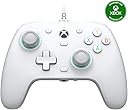
The GameSir G7 SE Wired Controller is a high-performance, plug-and-play gamepad compatible with Xbox Series X|S, Xbox One, and Windows 10/11 PCs. Featuring Hall Effect joysticks and triggers for superior accuracy and longevity, it offers customizable back buttons, immersive dual vibration feedback, and a 3.5mm audio jack for headset integration. Its ergonomic, textured design ensures comfort during extended gaming sessions, making it a top-tier wired controller choice for serious gamers seeking precision and reliability without the premium price tag.


| ASIN | B0C7GW9F88 |
| Additional Features | Ergonomic |
| Best Sellers Rank | #56 in Video Games ( See Top 100 in Video Games ) #1 in Xbox Accessories #2 in PC Gamepads & Standard Controllers #2 in Xbox One Gamepads & Standard Controllers |
| Brand Name | GameSir |
| Button Quantity | 1 |
| Color | White |
| Compatible Devices | PC, Windows, Xbox One, Xbox Series X |
| Compatible Video Game Console Models | Microsoft Xbox One, Microsoft Xbox SERIES X |
| Connectivity Technology | Wired |
| Controller Type | controller |
| Customer Reviews | 4.4 4.4 out of 5 stars (13,706) |
| External Testing Certification | Nรคo aplicรกvel |
| Global Trade Identification Number | 06936685220676 |
| Hardware Platform | PC, Xbox, Xbox One, Xbox Series X |
| Item Dimensions | 8.27 x 4.53 x 2.56 inches |
| Item Dimensions D x W x H | 2.48"D x 4.53"W |
| Item Weight | 420 Grams |
| Manufacturer | GameSir |
| Manufacturer Part Number | G7 SE |
| Model Name | G7 SE |
| Model Number | GameSir G7 SE |
| Package Quantity | 1 |
| Power Source | Corded Electric |
P**N
Great Controller with newer and better relatives.
I bought this controller after using the standard Xbox controllers for most of my life. It introduced me to a whole new category of inexpensive controllers that are surprisingly well designed and perform far better than expected. I started with the G7 SE, and it quickly became the best controller I had ever used. After several months, the bumpers began sticking, and it turned out that a small plastic piece inside had snapped from repeated use. This doesnโt seem to be a widespread issue with these controllers, so Iโm assuming I just got unlucky. Because of that, Iโm still giving the controller five stars. After that controller broke, I decided to try one of their newer models, the Cyclone 2. It was almost perfect, but the sticks didnโt feel quite as good to me as the ones on the G7 SE. Thatโs completely personal preference, and most people would probably say the Cyclone 2 is the better overall controller. After spending some time with it, I eventually decided to pick up the G7 Pro. All I can say is that the G7 Pro is one of the nicest controllers Iโve ever used. It doesnโt have any obvious downsides, and thereโs even a PC-only version now with an 8k polling rate, macro functions, and other extra features. If I had never bought the G7 SE in the first place, I probably wouldnโt have gotten into the GameSir ecosystem or realized how good a โproโ controller can be without the insane price tag. That said, I probably wouldnโt recommend the G7 SE as much anymore since the G7 Pro and Cyclone 2 are both better controllers in my opinion, and in some ways objectively improved. It also depends on whether youโre playing on Xbox or PC. For PC, I would definitely recommend the Cyclone 2 or the G7 Pro. For Xbox, the options are really the G7 SE or the G7 Pro. If youโre willing to spend the extra $30โ40 for the G7 Pro, itโs absolutely worth it.
P**Y
Great Controller!!
I absolutely would, and have, reccomended this controller to anyone who is in the market for something cheap but also with good performance and quality. As someone who has played with both high end and low end controllers, I can say that this is my go-to controller for day to day playing. What it lacks in built in assistance from the xbox system (custom setups, sensitivity, etc.), it easily makes up for in other features such as magnetic-based joysticks which have completely eliminated stick drift. Pros: -Extremely low price for the quality. For being on the cheaper end of controllers, the feedback and performance is extremely smooth and responsive. Over the past year and a half of using this roughly every day, I've had little to no long or short term issues on this end. -Removable front makes customizing, painting, and cleaning easy -Comes with a very long and hardy cord for wired gaming -Back buttons, level control for the triggers, and built in mute button give the taste of higher tier controllers such as the more expensive official Xbox elite controllers. Cons -B button lost sensitivity in a couple months, though that may be a personal issue over an actual issue with the controller -After roughly a 5 months the top part of the wire that connects to the controller frayed completely, showing the inner wires. Though this is a cheap fix with electrical tape, or a cheap replacement that is assisted by the fact that the wire is removable. -This is a wired only controller. I personally prefer wired controllers over controllers that require charging or battery replacements, though this is important to point out for those who do not prefer wired only controllers. Though other non-wired versions of this controller do exist!
C**G
Hall Effect means no drift. Ever.
I've spent hundreds, if not a thousand or so, of dollars on controllers over the years in my search for the perfect one. I thought I found it with the original Xbox Elite controller, which I sold off when the white version was released. For a year, that controller was my weapon of choice until the left joystick started to drift. I had it shipped off, hoping it could be fixed, but it was even worse when it was returned. Since then, I have had the worst luck with Elite controllers that either had drift right out of the box or buttons that needed to be pressed dead-center in order to work. Eventually, I gave up on the Elite controller and put gamepads from various other companies to the test. I bought a PowerA controller and several Razers. Buying extended warranties became a habit -- I normally don't purchase them, but controllers have limited 90-day to one-year warranties that don't cover enough of a controller's lifespan. Part of the problem is that modern-day controllers use potentiometers to determine how far or fast you move your joystick. Over time, the friction from components sliding over and under each other wears out until the tension holding your joystick at the zero-point becomes imbalanced. That causes stick drift -- your joystick is pushed or pulled away from the center. Hall effect sensors, which use magnets to detect the position of joysticks and triggers, will never drift -- in theory. Because the parts don't rub against each other, Hall effect sensors last a lot longer than your average gamepad that will eventually succumb to drift. I've used the GameSir G7 SE Wired Controller for a few weeks now, and it's been a great controller at a lower price-point than Microsoft's own standard controller. The controller has a build quality that feels similar to the standard controller with a sturdy plastic shell that doesn't feel cheap. The triggers were a little too sensitive out of the box, but after tuning them with the app and getting used to how much further they seem to stick out -- they're a little more pronounced, like upside down claws -- I haven't had any issues with them. The buttons feel fine without any mushiness or dead spots, and the sticks actually seem to be more accurate even with small nudges because you're not fighting the friction of the potentiometer. There are some features to the controller, like the buttons in the back, an app that lets you change a few settings, and some on-the-fly key presses you can do to change configurations that lift the value of the controller at its current price. I wish there were physical trigger locks, though the app allows for hair-trigger presses. I would advise that you immediately download and use the app before you game in order to calibrate the controller and set it up to your liking.
A**R
My new favorite controller! Get an unpowered USB hub to use longer USB exension cables.
Excellent controller! My new favorite controller with my Xbox Series X. Read on as I compare this controller to others I've had and also how to successfully extend the cord length. Playing FPS games, I've gone through 3 official Microsoft Xbox controllers. Each developing stick drift after less than 6 months. I didn't really like the official controllers and I started using PowerA Spectra Infinity wired controllers. I liked the PowerA controllers better as I could set a shorter distance on depressing the two rear trigger buttons and also the inclusion of the custom programmable buttons on the back of the controller. However, I went through a few of these controllers too as they also developed stick drift after a number of months. The PowerA controllers have an app so I could try and calibrate the worn out sticks. This was only a temporary fix as it would decrease responsiveness of the sticks and they would eventually drift further. I've now bought this GameSir G7 SE Wired Controller. It is GREAT! Right out of the box the sticks have no drift. Excellent responsiveness and control. It has the two programmable back buttons and through the GameSir Nexus app, on my Xbox, I was able to set the rear triggers to be hair triggers. Everything is good, EXCEPT I needed more cable length. With my old PowerA controllers I was using a 9.8 feet USB 3.0 extension cable with no problem. That same cable extension would NOT work with my new GameSir G7 SE plugged into it. This led to experimentation. I had a 3.3 feet USB 2.0 extension cable and it worked fine plugging it into the Series X and then plugging the GameSir G7 SE's cable into that USB extension. However connecting two 3.3 feet USB 2.0 extension cables together and then the GameSir G7 SE cable did NOT work. I had a single 6.5 feet USB 2.0 extension cable that I tried. Also did NOT work. Here comes the interesting part: ADDING A NON-POWERED USB HUB Adding a non-powered USB hub allowed me to use longer extension cables with this controller. So my current setup is: Xbox Series X > non-powered USB hub > 6.5 feet USB 2.0 extension cable > GameSir G7 SE Controller cable > Controller. I was also able to get the longer 9.8 feet USB 3.0 extension cable to work, but it needed to be in the following order: Xbox Series X > 9.8 feet USB 3.0 cable extension > non-powered USB hub > GameSir G7 SE Controller cable > Controller. All seems to work well with the extension cables, including with a wired headset being plugged into the GameSir G7 SE controller. USB extension cables I've tested: Amazon Basics USB-A 2.0 Extension Cable, 3.3 feet = Works without needing a USB hub. 2x Amazon Basics USB-A 2.0 Extension Cables connected together, (3.3 feet each, 6.6 feet connected together) = Works, but needs a USB hub before or after the extension cables. Amazon Basics USB-A 2.0 Extension Cable, 6.5 feet = Works, but needs a USB hub before or after the extension cable. Amazon Basics USB-A 3.0 Extension Cable, 9.8 feet = Works, but needs a USB hub AFTER the extension cable. (Xbox > Extension Cable > USB Hub > GameSir G7 SE cable > controller) USB Hubs tested and working: Anker 4-Port USB 3.0 Hub, Ultra-Slim Data USB Hub with 2 ft Extended Cable, Model: AK-A7516012 (A7516) Insignia USB 2.0 4-Port Hub, Model: NS-PCH5420 An old "Xtreme Tech" USB 2.0 Hub from Five Below My guess is other non-powered USB hubs may work too. If this controller keeps working as well as it does now, and lasts longer than 6 months, I'm going to be very pleased!
C**L
The controller is pretty good good
โญโญโญโญโ **Good controller for the money** I've been using this controller for a few weeks and it's been great overall. The sticks feel really smooth, and I like not having to worry about stick drift. It's comfortable to hold and the buttons feel responsive. The only reason I'm giving it 4 stars instead of 5 is because it's wired, and the cable can be a little annoying at times. It also doesn't feel quite as premium as the official Xbox controller. Still, for the price, it's hard to complain. I'd definitely buy it again.
P**A
Insanely good
I spent hundreds on the elite for Xbox the last 4 years and it broke so I had to budget a quick fix and got this. This remote is insanely good. I regret the money I spent on the elite. The response time from remote to console is soooo freaking fast. Itโs sturdy, and lightweight. I really like the fact the charging port is built deeper in the remote and the cord has support to stay. Makes it less prone to breaking. Hands down this remote is wildly underrated.
B**T
Definitely not just hype
I can't say enough about how great this controller has been to me, even regardless of its price point. The analog sticks and triggers have very smooth linear activation, the hall effect components are worthy of the hype in my opinion. There is no friction in the movement of the analog controls, and the "spring" resistance feels just right for me. The ABXY and d-pad buttons are dome switches, which is just what the Microsoft Xbox controller feels like. The other buttons including the rear buttons are micro switches. If you're not sure what that is, they're somewhat like a mouse click but take a bit more force to activate than a mouse (too little resistance in the switch would be bad, and these feel good.) The tops of the sticks are not concave like the Xbox controller, which has a different feel, but not one that bothers me or impacts performance personally. The analog triggers have a more aggressive anti-slip texture to them than the Xbox controller. The size and overall feel of the controller otherwise feels just like the Xbox controller to me. The weight of the controller feels perfectly acceptable, its definitely lighter than the wireless Xbox controller with batteries in it, but also not as light as an empty one. I have no complaints, it doesn't feel cheap. The cable that comes with this is really high quality. It's covered in braided material but not overly rigid. The molded heads on both ends are very thick and strong, and the USB-C end that fits into the controller is very secure - I don't really have any concerns about it wiggling around or breaking the connector by dropping it on the cord or something. The controller has lots of features that standard Xbox controllers don't. I found that game support for the bottom buttons is not really as good as I thought it would be - some games just don't register the input. Everything else works as expected. There's an added "M" key that works like a function key, unlocking some on-the-fly adjustments. If you install the GameSir Nexus app in windows you can set up to three profiles that are saved directly to the controller (not the PC). You can use the M key and the ABXY's to switch between the controller's defaults, and your three stored profiles. If you're using the headset jack on the controller, there's a handy mic mute button next to the 3.5mm jack, and you can use the M-key in combination with the d-pad to control the overall volume of your headset, and the voice to game volume ratio (to an extent). The profiles let you change things like button mappings, deadzones, and vibration. So far, it would seem you can only re-map buttons that are internal to the controller - there's no way to assign keyboard shortcuts to the buttons for instance. The one thing I found this useful for is to re-map the stick button clicks to the rear buttons, which I find useful because trying to trigger the stick switch while aiming/steering/looking/whatever usually causes me a non-zero amount of grief. Using the Nexus app for windows you can also test your inputs, view the analog stick values and real-time movement, calibrate the analog controls, and update the firmware. They recently published a firmware update (v6.28) that allows you to increase the polling rate from the default 250 to 500 and 1000hz (effectively 4ms, 2ms, and 1ms control response), like you can with the Razer accessories I have. Unfortunately the 500 and 1000hz polling settings still come with a "work in progress" warning and cause some issues. You cannot, for instance, use the headset jack with the higher polling rates. Also when I turn the polling rate up, it starts to generate some odd input "spasms". My right stick randomly whips a 180, and sometimes my left and right triggers activate for no apparent reason. Everything goes back to normal with the default polling rate though. Eventually they'll fix this, I'm sure. It's not a deal breaker for me in any event, as I really can't tell the difference between 4ms and 1ms. The front top plate is magnetically affixed and stays securely in place. Other than the obvious cosmetic implications, cleaning is the only practical reason I can think to have a removable top plate. There seems to be anti-friction rings around the analog sticks, maybe if those wore out one day it could be a meaningful replacement, but I predict that replacement face plates would be long out of stock before I would need to replace those.
E**A
It's really good but I got a faulty one
With all the positive reviews I was pretty excited to give this a chance. I was looking for something nice with more of budget friendly price. This controller seemed perfect. When first held it seems about the same size as your average xbox controller but significantly lighter since of course there is no battery pack. The analog sticks seems to be slightly smaller than the standard xbox so that felt pretty off to use. Not really my favorite part of the controller but I do have extra grip analog covers that I add on so it makes it bigger and ends up working well for me. The buttons are more tough to push so that is not something I liked but the triggers and bumpers felt nice and smooth. No issues there, in fact I really enjoy the feel of them. There are added buttons on the back that can be locked if you don't want to use them, so if you accidentally press them it won't click. That is such a nice touch. The D-pad feels about the same as your regular xbox controller so no complaints there either. The vibration can be a bit excessive as opposed to your standard xbox controller but if you download the gamesir app you can reconfigure this. So really, no complaints there. My biggest issue and which sucks because it is a big component of the controller and that is the headphone jack. I plugged in my Stinger 2 by HyperX headset and immediately it sounded like it couldn't register the headset. A bunch of static plays out, especially when I'm touching my volume wheel which can get loud. I have to find the right spot for the static to subside. When I do find the right spot the game sounds bad. It doesn't matter what settings I try to use it's almost as if the headset itself is bad. Now I know the headset is on the cheaper side but it never sounded this bad on a standard xbox controller. I am also incapable of actually speaking through the headset. Does not work for xbox party or game chat. For game chat it is actually worse. I tried playing overwatch and for some odd reason the audio that plays out isn't even my voice but the actual in game noise. I don't even know why that happens but there is no fix around that for me. I decided to test it with my old headset (older but more expensive) and the audio sounded so much better. I never would have guessed my headset isn't compatible with a controller but I guess that's the case, which sucks. But even though the old headset sounds better I still have to move it around so that I can hear the audio from both ears instead of one. It's pretty annoying. So while no static, the audio to both ear cups is inconsistent. As with both headsets, it does not work for game chat or xbox party. I can hear but I can't speak. If I plan to play with friends I have to use my old xbox controller. I've come to the conclusion that perhaps I recieved a broken or malfunctioning controller or more specifically, the headphone jack. My first time ever buying a gamesir and honestly I don't know if I will again. I might have gotten unlucky to get a faulty one or maybe there is an app setting I have to do for it to work but I haven't figured it out. I play on xbox so plug and play is really all I'm looking for. Great controller, feels well, plays well, and does not feel cheap but pro. But I got unlucky with a faulty one I guess. So be weary it can happen to you.
L**.
Manette G7 au top ๐
Trรจs bonne manette 2 ans que je l'utilise pas eu un seul problรจme , ni niveau joystick, ni au niveau gรขchette, rien je recommande, je vise le prochain achat par la sรฉrie pro sans fil , car le fil me dรฉrange , sinon je recommande vivement , arrรชter d'acheter vos manettes Xbox classique au mรชme prix pour une durรฉe de Vie de moins d'un ans car joystick drifts dans la plupart des cas , cet manettes adopte les joystick hall effect no drift et honnรชtement en deux ans zero problรจmes , je rajoute point + de la Gamesir , les deux palettes arriรจre ainsi que le logiciel pour paramรฉtrer la manette ๐ , 3 profil diffรฉrents, si gamesir veut m'envoyer la G7 pro je suis preneur ๐
J**L
Gamesir G7 SE is better than the Microsoft series x controller.
There's no drifting. I was playing a game without any drift based settings and it drifted a bunch on 3 controllers and there's many complaints about the game on forums. When you fully push the stick to the edge and do circles with other controllers there's a bumpy feel. The gamesir has no bumps, nice and smooth, very nice. The left and right bumpers a very easy to press. The series x controller bumpers are too hard to press so I bind them to something rarely used in games. The gamesir bumpers are something I can use without fear of tendonitis. The buttons are mushy, good. I hate mechanical buttons they are audible over games and sound terrible, they also don't feel nice to press. The software is good, I can rebind everything so when a stupid game puts dodge on Y instead of B and doesn't provide any control settings, then I can change it in the software. The triggers by default are ultra sensitive, I had to change the range in the software as I kept accidently shooting in game. My complaints, The select button is way to close to the left stick, it's very hard to press compared to series x controller. I can't actually press it naturally without also pressing the left stick button. The only way to press it is moving the hand. It's horrible if map is bound to select and you have to use it often. Lucky there's two back buttons and I use those instead. There's no way to turn off the indicator light which sucks when playing in the dark. The controller colour is white, I like black.
C**N
Good
It works well
D**U
ใจใซใใ็ฉใ่ฏใ
ๅใฎๅฅดใฎในใใฃใใฏใฎใใฉใใใๆฉใซใใฉใใใซๅผทใใใใใใใ่ฒทใฃใใ ใใฃใใใจๅฟๅฐใใ้้ๆใใใฏในใใฃใฎ่ณชๆใฎ่ฏใใใจใใธใใใฃใใๅบใ็ฒพๅฏใใๆใใ่ฆใ็ฎใใฉใฎ่ฆ็ด ใๅฟๅฐใใใๆฌๅฝใซ่ฏใใ ในใใฃใใฏใฎๆปใใLRใใฟใณ็พคใฎใใๆใๅฟๅฐใใใไธๅใใใใใใชใใ็นใซLRใใชใฌใผใฏๆฌๅฝใซๆผใๅฟๅฐใ่ฏใใ ใใ ใในใใฃใใฏใๅ ใใซๅใๆไฝใฏใใใซ้ช้ญใใใฆใใชใใใใซใใใฎใฏ้ฃ็นใใไธๆนใงใใใ่ฏใใใในใใฃใใฏๅผพใใฎๅ ฅๅใซใฏๅผทใใฎใงใใใฌใผใใชใๆใฏใใใ ใใใพใง5000ๅไปฅไธใฎใใใใ่ฒทใใฎใฏๅฐป่พผใฟใใฆใใใ3000ๅใจใใฎใใใ่ฒทใใฎใใขใใใใๆใใ่ฏใ่ฒทใ็ฉใ ใฃใใ ้ซ็ดใฃใฆ็จใงใใชใๅคๆฎตใฎๅฒใซใใฎๅบๆฅใฏ็ด ๆดใใใใจๆใใใฒใผใ ใใใ่ฒทใใชใใใใใใๅบใใๆนใ่ฏใใใ ใชใจๅญฆในใใ
E**E
Controller
Good quality and price is less compared to other premium controller, it's fast and responsive
Trustpilot
1 day ago
1 month ago