Buy anything from 5,000+ international stores. One checkout price. No surprise fees. Join 2M+ shoppers on Desertcart.
Desertcart purchases this item on your behalf and handles shipping, customs, and support to Denmark.
🚀 Elevate your server game with RackChoice: Power, speed, and cool efficiency in a sleek 2U frame!
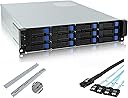
The RackChoice 2U Rackmount Server Chassis is a high-performance, compact solution supporting Micro-ATX and Mini-ITX motherboards. Featuring 12 hot-swappable 3.5"/2.5" SATA/SAS bays with 6Gbps transfer speeds, four 80mm cooling fans, and compatibility with standard ATX power supplies, it includes sliding rails and Mini SAS to SATA cables for easy setup. Perfectly sized for 600mm cabinets, this durable metal chassis balances storage capacity, cooling efficiency, and installation convenience for professional server environments.


| ASIN | B0BTY185DY |
| Antenna Location | Business |
| Best Sellers Rank | #1,340 in Computer Cases |
| Brand | rackchoice |
| Case Type | Unknown |
| Color | black |
| Compatible Devices | Servers |
| Cooling Method | Air |
| Customer Reviews | 3.6 out of 5 stars 25 Reviews |
| Enclosure Material | Metal |
| Fan Size | 80 Millimeters |
| Hard Disk Form Factor | 3.5 Inches |
| Internal Bays Quantity | 12 |
| Item Dimensions D x W x H | 21.5"D x 19"W x 3.5"H |
| Item Weight | 15.3 Pounds |
| Manufacturer | RackChoice |
| Material | Metal |
| Model Name | RackChoice 2U |
| Motherboard Compatability | Micro ATX , Mini ITX |
| Other Special Features of the Product | 2u 12 bay hotswap chassis |
| Power Supply Mounting Type | Top Mount |
| Recommended Uses For Product | Business |
| Supported Motherboard | Micro ATX, Mini ITX |
| Total Expansion Slots Quantity | 4 |
| UPC | 787996911731 |
| Warranty Description | 2 Year Manufacturer |
G**G
A good case, a mediocre price and ... oh, those rails ...
This is a relatively well designed case that could've been a great case at no real additional cost if they made better decisions. It's a good size, with good, workable space in side for wire management and just fitting components in. The documentation is terrible, but this wasn't my first RackChoice chassis and they've all been like that. Things I liked: - A well-designed backplane with drive trays that work well - Reasonable cooling via the 4 80mm fans. Certainly better than the 40mm screamers you find in 1U cases. - Reasonable routing options for cables in the case Things I didn't: - I should not have to spend a half hour peeling protective plastic off the case. That was a first, and boy did it annoy me. - There's no excuse for how bad the power/reset/USB panel is on there. There's no excuse for being limited to USB-2 in 2026, and the sheer stupidity of the power switch is really shocking. As other reviewers said, you have to be really careful not to bump it. The next time I have a reason to shut the server down, I'm just disconnecting both buttons and I'll route them to the back and put a couple pushbuttons in an expansion slot panel. Thankfully I can reach the back of my rack. - The rails. Oh, the rails. First off, they're the worst rails I've ever seen on any rack device, bar none. They mount stupidly, they don't really fit well, they bind. If you're looking at them and scratching your head, watch the video they posted in the listing. The way they work is so dumb, you kind of need to see it to figure it out. - I wish the PWM fan headers on the backplane had a PWM input so you could control the speed via software. The screaming 4800rpm is entirely unnecessary unless you're completely stuffing the server with drives. I used a $5 PWM fan 5-way breakout for them and ran them off the motherboard. Unfortunately, there isn't much competition for chassis in this size range, and in this price range. You're kind of stuck with this or a used SuperMicro, so the important thing is most of the stupidity in this option can be worked around.
A**R
This case is exactly what I was trying to find (for a drive sanitization system)
I bought this case as I needed a cheap way to sanitize drives. I own an MSP and we get hundreds of old servers hard drives each year to destroy. We offer shredding but many of our clients want a greener option that doesn't destroy the drive. We've done that on a one-off basis using a regular PC and some drive destruction software that offers certificates of destruction. We bought one of these instead of the eight bay Silverstone case. I would have probably gone with Silverstone except it requires a TFX power supply and I didn't find any that offered the correct number of Molex connectors required. This case accepts a regular ATX power supply which are ubiquitous and cheap. Build quality: This case has a very nice sturdy frame. The tolerances on the drive trays are tight so be prepared to work a little bit to get them back in the first time you pull them out. The trays themselves can be used tool-free as they have bumps on one side of the tray to hold a 3.5" drive in place. For long term use you should plan on using screws, but this deserves a mention for anyone using this case the way we are. The case accepts mATX or smaller motherboards and I happened to have an old one sitting around that I used in this. Backplane: The backplane is hot swap and does its job well. I used a LSI Broadcom SAS 9300-8i 8-port 12Gb/s SATA+SAS PCI-Express 3.0 Low Profile Host Bus Adapter and two 10Gtek Internal Mini SAS HD SFF-8643 to Mini SAS SFF-8087 cables to hook up eight of the drive bays. The motherboard I used had six SATA ports, four of which are hot swap so I was able to hook up the bottom four backplane slots using the cables that came with the case. Fans: The fans are loud and move a lot of air. This is not a big deal for us as it lives in our office workroom but if you are using this in your home it could be a concern. I tried using the system before I hooked the fans up and the drive bays got extremely hot. Once I connected the fans I was able to have 12 drives running without it overheating. Rails: They didn't fit my shallow rack so I didn't use them. Bottom line: I might buy another one of these to use a NAS down the road. To me this represents an extremely good value for a 12 bay server chassis.
O**G
Some improvements, some degradation vs. previous unit.
This seems to be the newer replacement for https://www.amazon.com/dp/B0C9N4N8T4?ref=fed_asin_title First, the differences I've noticed between the two: Improved: Now uses standard standoffs which are easier to install (and easier to source replacements if needed). The drive trays are slightly improved (smoother operation and better fitment) The rail kit extends longer (I had to use 6" extenders to fit my cabinet wit the previous generation rails). I like the blue color on the drive bay levers better than the green. Once you understand it (which does not match the documentation and isn't entirely intuitive), the rail mounting mechanism is fairly well thought out and nice for both square-hole and threaded racks. It comes with four rectangular pieces with clearance (non-threaded) holes. These pieces go on the exterior side of the rails, with the square bumps facing towards the rack (for square-hole racks) or facing away from the rack (threaded racks). The four counter-sunk screws provided should go through the top two holes of the square bracket, then through the rack, then screw into the rail "ears" behind the rack post on the front (server installation) side of the rack. Four of the 6 round-head screws with washers should go into the top and bottom holes of the brackets then through the rack, and thread into the rail "ears" on the back (cabling) side of the rack. When you go to slide the server into the rails, you may meet sudden hard resistance when the chassis midpoint is about even with the front of the rails. Force won't help here. Instead, a bit of upward pressure on the left side of the chassis just behind the rack face (or as close as you can get) will allow the cable protector (metal rectangular piece on the left behind the chassis ear which encloses the front-panel ribbon cable) to clear the top of the rack-side of the rail kit. Degraded:: The rail kit is more difficult to install and at least on my unit, the cable protector on the left side of the chassis (as viewed from the front panel) collides with the rack side of the rails when attempting to slide the server into the rack. They have eliminated the electrical insualation sheet that goes under the mother board. (probably wasn't really necessary, but was a a nice to have) The right-angle SAS connectors (cable slides into connector parallel to mid-plane) have been replaced with straight in (cable slides into connector perpendicular to mid-plane). Overall: This is a compact server chassis that is reasonably well built and fairly well engineered. The fan noise is minimal and the fans are well positioned for providing good airflow. The drive bays are adequate. It would be nice if there were options for other than 8087-4xsata for cabling as few motherboards that will fit in this chassis come with more than 4 SATA ports and its far more likely users will have a two-port sas card to handle 8 of the 12 drive bays, requiring (at least in my case) an 8087-8087 cable. The not so good: There is very little space and no protection between the mid-plane and the fans. This makes cable routing a bit of a challenge in that area. There is even less space on the protected (motherboard) side of the fans, which makes it desirable to put as much cabling as possible on the other (mid-plane) side of the fan wall. It also means that with a mini-its motherboard with the SATA connectors horizontal at the front of the board (e.g. ASUS PRO-WS-B850M-ACE), you basically have to runscrew the fan wall to connect the SATA connectors, then sharp-bend the cables right at the connector end to remount the fan wall. It would be nice if the chassis were just 1/2" longer and gave just a wee bit more room there. Also, beware that a 2U chassis will not accommodate a full-size CPU cooler and there's definitely no room in this case for a water cooler. So remember to get a low-profile cooler and prep the motherboard accordingly. Unfortunately, I haven't found a low-profile system that mates with the AM4/AM5 clip mounts, so this involves removing those and installing the adapter plate(s) that come with the cooler. Overall, I'm not unhappy with the chassis, but I wish they would combine the better aspects of this chassis and the previous generation. It would also be helpful to bevel the outer leading edges of the widest part of the rack side of the rail kit as well as shape the rear of the cable protector to facilitate a "levering up" of the chassis as it slides into the rack instead of the square collision/dead stop of the current shape. The misfit is less than 1/16", but it's enough to hard-stop the server dead in its tracks as it goes into the rack and took me some time to identify the collision point and figure out the above work-around during install. I was installing this server near the top of a 7 foot rack (over my head) single-handedly and it took several insertion/removal attempts to figure out what was happening, making my install experience particularly unpleasant.
J**E
Not worth the hassle
The overall build quality is extremely cheap, even cheaper than you'd expect given the price. The metal is extremely thin, and actually arrived slightly bent, despite the foam packing in the box. The PCIe covers are break-outs. The rails are horrible. They don't fit a standard depth rack. Fortunately, my rack is adjustable so I was able to decrease the depth a bit for the rails to fit, but they're also not really the right width either. I had to loosen the bolts on my rack to get just enough clearance for the rails to slide properly, and even then it takes some jostling to get it to come out all the way. Sliding it back in is worse. The cables for the front IO are routed externally for some reason, and there's a piece of metal covering them. The problem is this piece of metal doesn't have clearance for the rail, so the grind against each other as the rail moves. I thought about removing it, but that friction is the only thing actually retaining the server. With the guard removed, the server is free to slide out at any time if your rack is even slightly off-level. I have to imagine that problem would only be worse if the drive bays were all full. Speaking of the drive bays, my backplane seems dead on arrival. I've tried testing disks in different bays, tried different SAS ports, even tried using an HBA card instead of connecting the backplane to the motherboard SATA. The disks are powered, but they're not recognized by the OS. If I connect the disks directly to the motherboard, without the backplane, they're detected just fine, so the problem clearly isn't the disks or the motherboard. Oh, and like someone else mentioned, the power button is in a terrible place. There are no handles to grab onto, so if you want to slide the server for any reason, it's extremely easy to hit the power button by accident, which is obviously undesirable Honestly the only reason I went for this chassis over something else is because I really wanted something that supported an ATX power supply, instead of server power supplies. But after spending how many hours troubleshooting this backplane, I can definitely say it wasn't worth the hassle. Probably going to try and return it, even though repacking everything seems like another massive hassle.
W**N
Great Server Case but LOUD!!
The case fits mini-ITX style boards. I purchased a NAS mini-ITX board for this case and it works great. The case itself comes with all the cables needed. It has a backplane so you simply need to connect three molex to the backplane for power and use the provided cabling to setup your SATA connections. Make sure your board has 12 SATA connections or use a low profile SATA card. If you get an SATA PCI card, make sure the SATA connectors mount horizontally off the card. Straight up will hit the case top. With the motherboard I am using, the SATA connectors on the end of the card are useless as well. One big complaint is the case fans are LOUD. It will be impossible to sit next to this case on your desktop without swapping out the fans for something quieter. This is my biggest gripe with the case. It has 4 80mm fans to move air through the case and it could be a bit quieter. I'm planning to replace them with 4 Noctua 80mm fans which should hopefully quiet things down. The case is deep so if you plan to rackmount it make sure the rackmount is at least 22 inches deep. The sliding rails seem useless for the rack that I'm using and there was no other mounting options which was disappointing.
Z**K
Works great
After reading some of the other reviews, I suspect the seller has been watching and quietly fixed some of the issues: Instructions are essentially useless and the power button sticks out too far leading to accidental presses, those haven't changed. Improvements compared to prior reviews: - Rails are perfectly fine, I have a standard width rack and they fit no problem - would've been nice to have actual instructions to their assembly though but not hard to figure out regardless - Build quality is fine, pcie covers were screws and not breakouts - Can't speak for 12gb/s backplane, I have the 6gb/s one - For a rackmount chassis, fans are actually pretty quiet. That being said, still loud for any homelab environment and so I swapped them out - Drive sleds are tool-less which is really nice, still a screw option available One note is that I converted a prior jonsbo n3 build to this which had a sfx PSU. It'll work just fine with an sfx to atx faceplate adapter (supermicro makes some for $12). ATX cable was too short though
T**.
Nice case, but for the price I would rather have gotten a used SuperMicro
I'd been looking for a 2U 12-bay chassis for several months and came across this one. This format/size seems to be a bit rare so I thought this was a good find. More on that later... The case itself is pretty well-built. My rack doesn't have rear mounts so I can't make use of the rails. I had an easy time fitting in my mini-ITX board, HBA card, and 12 drives. I'm running TrueNAS SCALE and most things run great. I like the form factor, the finish, and the look. The main issues I have with this case are two-fold: The power button sticks out and is really easy to accidentally press if you are handling the server while it's on. I wish it were recessed or there was some sort of cover. I ended up taping a piece of cardboard around the left ear to make a shroud to make it harder to accidentally bump into the power button. The other issue is with the backplane. I don't think it's rated or designed for 12Gbps, although it does seem to function OK with my LSI 9305-16i HBA card. I'm using SFF-8643 to SFF-8087 cables to connect my HBA card to the backplane. In my Zpool I have a mix of Exos and HGST drives. The HGST drives all functioned fine, but the Exos drives have intermittent write errors. I first checked the firmware of the HBA card and my drives and made sure everything was up-to-date. I changed out the Gtek10+ cables for more expensive SuperMicro cables and no dice - I still received intermittent write errors. I ended up finding a forum post about how limiting link speeds on the HBA card to 6Gbps made the author's similar issue go away. I did the same, limiting and verifying that all the Exos drives were limited to 6Gbps and sure enough, I didn't get anymore write errors. Because I know the HBA card is good, the cables are top-quality (SuperMicro), and my drives are fine (no errors in my old system), then the only remaining link can be the backplane. I can't find any information online about it so I can only assume it is some generic or proprietary backplane made for this chassis. Due to this issue, I really wish I had just gone with a SuperMicro CSE-826BE1C4-R1K23LPB chassis instead. Anyone who knows anything would know that the chassis isn't going to give you any trouble, and you'd be able to use full 12Gbps speeds, not that it matters much unless you've got SSDs. So all-in-all, I'm not super bummed that I'm limited to 6Gbps, but at the same time I wish I'd with the SuperMicro instead. If this case were $100 cheaper I'd probably feel differently. Regardless, it still is pretty decent value, so three stars on that.
T**H
Read reviews before buying
Let’s start with the bad: 1. Thought I could avoid accidentally pressing that power button. Did it 7 times over 3 days. The button protrudes from the panel and is SUPER easy to bump. 2. Be aware: this is a “low profile”, mATX case - you need a low-profile video card. Should have done my homework, but was hyped about the intended purpose and relatively low cost. On your motherboard, make sure you don’t have outward facing SATA ports on the side opposite the PCIe slots (see MSI Pro B550M-VC motherboard) - very little room to maneuver. 3. Storage capacity: The issue many are having with the backplane isn’t the backplane itself - the case is shipped with crappy SAS to SATA cables. I happened to have some stored - swapped those in and everything else worked well. I’m running 12x WD Red 6TB HDDs with Windows software RAID 0 (65TBs usable). My purpose is served, so don’t judge, and no, it’s not a backup lol. 4. REALLY?!?! A USB2.0 port on the front panel? The good: 1. Fit: The rails. Watch the install video first before you buy if rack-mounting is your preference - it DOES fit in a standard rack without hitting the side rails (the rack doesn’t push the rails against the chassis. THE CABLE COVER TO THE FRONT PANEL DOESN’T INTERFERE WITH THE RAIL MOUNTS. This looks like a design flaw if you try to mount the rails outside of the rack. A. Mount rails in rack. B. Remove inner rail from slide assembly and install on chassis. C. Slide chassis into mounted rails (slide the secondary rails forward until the chassis rails click). D. Slowly set the position of chassis until seated in desired position. 2. Case is super light (when unloaded) and doesn’t hold heat. I was able to mount a fully-loaded chassis (all 12 bays filled with HDDs) by myself (and I’m not that strong). The vent areas on the removable panel cover and the PCIe breakouts help with heat dissipation. 3. HDD caddies are smooth if you don’t flex them while trying to insert a 2.5 SSD (which CAN be mounted in the caddies). Ask me how I figured THAT out… 4. Fans are quiet, provided that one takes the time to figure out how they are controlled by one’s motherboard. They scream like a banshee if the system starts getting hot (mine never does). Even while gaming (yes, gaming; FFXVI and Star Wars, Steam) using an NVIDIA 5060 OC LP, I never once heard the fans exceed the hum of a standard desktop device. Granted, my home environment also contributes to that (I keep my place 65 degrees Fahrenheit consistently). 5. Assembly was super straightforward. Use the motherboard riser bolts or you’ll end up with your peripheral ports not lining up properly. Overall, my intent was met, so I won’t shame the build. The USB port and power button are the reason for the one star loss. Don’t do like me and buy out of excitement - do your homework first.
R**E
Not Amazing, But Not Bad
In a nutshell; this 2U chassis has some oddities and downsides, but overall it does the job and considering the price, it's a lot cheaper than most 12 bay 2U cases. Pros: - 12 hot-swap drive bays - Comes with four 80mm fans (not quiet, but far from the loudest) - Very solid metal construction, doesn't feel flimsy - Comes with enough screws to install everything, including 12 hard drives - Comes with three 4x SATA to SFF-8087 cables - Comes with rail kit Cons: - Included rail kit is hot garbage. It'll work, after fighting with it for a while. - Power button on the front was stuck, I had to permanently remove two screws from the back of the plastic cover that houses the buttons and USB port in order to let the power button operate normally - Drive caddies/sleds feel cheap. They're built alright, there's just a lot of friction when inserting/removing. - Micro ATX motherboards that have 90-degree SATA ports will be un-usable in this chassis. Build: CPU - Intel Core i7 12700K Motherboard - ASUS Pro WS W680M-ACE SE RAM - Corsair Vengeance DDR5 64GB Cooler - Noctua NH-L9x65 PSU - EVGA 850 GT NIC - 10Gtek X540-T2 10GbE CNA The biggest con was the SATA port issue. When installed, a micro ATX motherboard sits at about ~5mm from the metal rail where the fans attach to, not leaving enough clearance for the 90-degree SATA ports on my motherboard. It was probably my fault for not researching enough beforehand, but I solved that issue by purchasing a "180 Degree Dual SATA Male to Female Connector". In the end, I had to remove one of the four included fans anyway so that I could access the SlimSAS port on my motherboard. There is a video review of this chassis on Youtube where the reviewer notes that the front USB port does not connect to anything. This is false. The USB header is bundled with the front panel connectors, but it's a 4-pin connector so it could be easily mistaken for something else if you're not paying attention. The front panel has the following: - Green Power LED - Yellow Networking LED - Red HDD LED - Power Button - Reset Button - Single USB 2.0 Port I would have liked to see a USB 3.0 port, however its not a big deal. I also ended up connecting the networking LED to the IPMI locator LED header on my motherboard, as I do not have a network activity LED header on either my motherboard or 10Gb NIC. All in all, I don't regret this purchase. I'm using three of these as I'm building a 3-node Proxmox cluster with them. I originally intended on purchasing the 8 bay variant of this chassis, however it went out of stock when I was ready to purchase. It was only a $50 difference between the 8 bay version and this 12 bay version, so I went ahead and bought three of these. For the price, this chassis is significantly cheaper than the other 12 bay cases out there.
Trustpilot
1 week ago
2 weeks ago