Buy anything from 5,000+ international stores. One checkout price. No surprise fees. Join 2M+ shoppers on Desertcart.
Desertcart purchases this item on your behalf and handles shipping, customs, and support to Denmark.
🚀 Elevate your SMB network with multi-gig speed and smart management—because slow is so last decade.
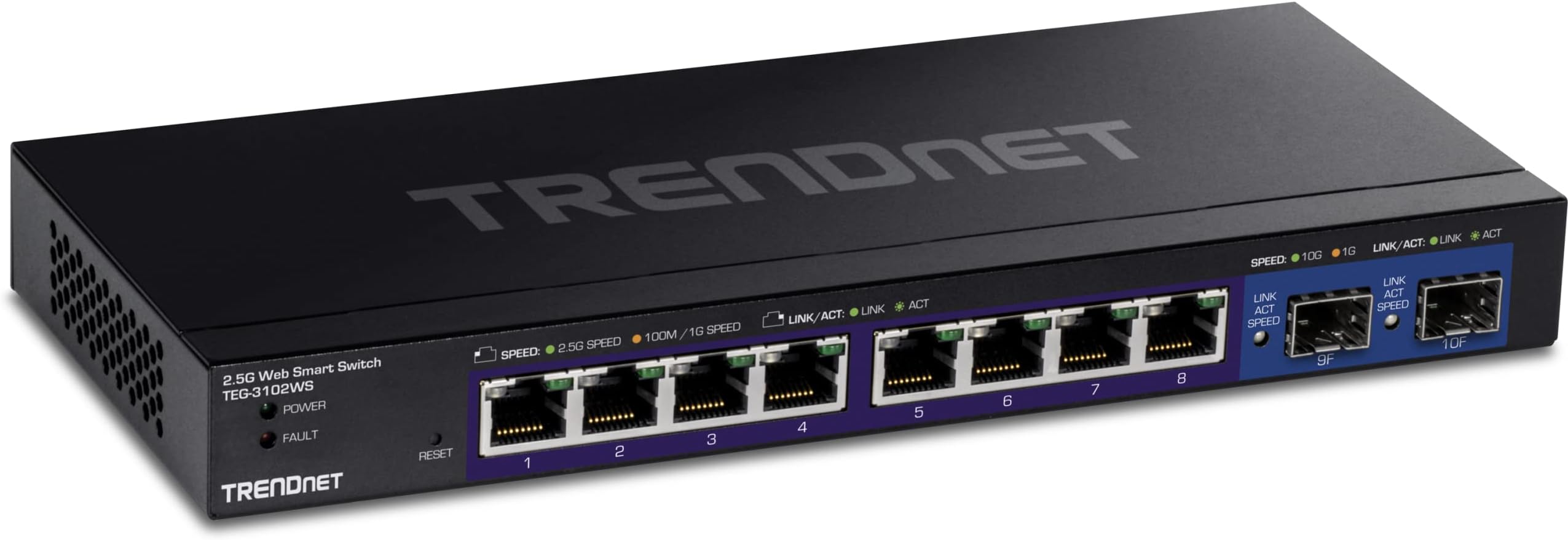
The TRENDnet TEG-3102WS is a 10-port managed switch featuring eight 2.5GBASE-T RJ-45 ports and two 10G SFP+ slots, designed to boost SMB network performance with multi-gigabit speeds over existing cabling. It offers advanced Layer 2+ traffic management, web-based smart management, and enterprise-grade security, all housed in a durable metal chassis with lifetime protection and compliance for government use.


| ASIN | B0BPJZCQ5J |
| Best Sellers Rank | #201 in Computer Networking Switches |
| Brand | TRENDnet |
| Built-In Media | Power adapter (12V 1. |
| Case Material Type | Metal |
| Color | Black |
| Compatible Devices | Desktop |
| Current Rating | 1 Amps |
| Customer Reviews | 4.5 out of 5 stars 106 Reviews |
| Data Transfer Rate | 2.5 Gigabits Per Second |
| Interface | SFP |
| Item Dimensions L x W x H | 9.45"L x 4.09"W x 1.06"H |
| Item Weight | 1.46 Pounds |
| Lower Temperature Rating | 32 Degrees Fahrenheit |
| Manufacturer | TRENDnet |
| Mfr Part Number | TEG-3102WS |
| Model Number | TEG-3102WS |
| Number of Ports | 10 |
| Platform | Not Machine Specific |
| Product Dimensions | 9.45"L x 4.09"W x 1.06"H |
| Switch Type | Managed |
| UPC | 710931140910 |
| Upper Temperature Rating | 104 Degrees Fahrenheit |
| Voltage | 12 Volts (DC) |
| Warranty Description | Lifetime Warranty |
J**L
Nice piece of equiptment
I needed something that supported 2.5 Gbps with a 10 Gbps Uplink (Fiber preferred) and this product meets those goals at a decent price point. I got this switch for my 3d printers to keep up with the streaming camera's and it handles the workload well. I was however impressed with the Management WebUI, its snappy and responsive. I have worked with other "web browser managed" switches in the past and this one seems to work decently. It did take me a minute to figure out how they tagged / untagged vlans per port. It isn't the "best" but still usable and functional. For me, its going to be more of a Set it and Forget it, so though it was a little tedious to set it up the fist time, I really only need to do it once and I am good to go. I really love that it has two 10 G SFP+ ports to match the possible throughput of the switch, allowing for full bandwidth on all the copper ports.
J**E
Blocks all VLAN traffic by default
For the price point, this TEG-3102WS managed switch is very attractive. Though, being managed, that means that customers will wish to support and/or use VLANs. The problem is that TRENDnet has block all VLAN tagging out of the box. Even worse, the documentation is terrible and does not explain how to configure VLANs very well at all. I only figured it out after hours of scouring the web looking for others who have explained the fix. Tagged and Untagged: TRENDNets language is confusing as to what "Tagged" and "Untagged" mean. Quite simply, "Tagged" means that the port will pass VLAN tagged traffic and "Untagged" will strip the VLAN tag. The default network is setup such that all ports are "Untagged", which is why all VLAN traffic is stripped by default. Basics: A VLAN client requires a minimum of two ports be configured: one for the Trunk and a second for the client. See below. Trunks: If you wish to setup an Unfiltered "Trunk" port that will pass VLAN traffic, you must first configure the VLANs in the "VLAN Settings/802.1Q" screen. Define each VLAN port as "Tagged" to pass the VLAN traffic. VLAN Clients: If you wish to setup a client active on a VLAN, you must first define the VLAN and then define the port on the VLAN which should be "Untagged" to strip the tags. Once you get past the above configuration challenges, the switch does work well. Though, again, the software is not industry standard and the documentation is terrible. Though, being $300 less than the Ubiquiti, the price/value still makes this worth it.
R**N
Outstanding value and quality at a resonable price
I had not used TRENDnet products prior to buying this switch, but I’m overall pleased with the quality. Easy to use, priced appropriately and most importantly, has excellent switching performance. It also runs cool and is just so much better than similar offerings I have tested this year.
R**L
Great price for 2.5G with 10G SFP+ ports
Previously I use a similar Netgear switch but it had only 1Gb ports and only 2 copper 10G ports. Ideally I would like 1 copper and one SFP+, but if I had to pick two SFP+ is better bec it's easier to convert one SFP+ to copper with a transceiver than the other way around. (You would think they are equivalent, but going in the other direction doesn't always work bec some appliances do not work with copper transceivers and then you need to insert a media converter!). So all that plus basic VLAN functionality at a great price. The only down side is -- for a partially managed switch, it takes forever to boot. Around 70-80 seconds. The netgear it replaces boots in under 3 seconds. Mikrotik switches running SwOS boot in under 10 seconds. But overall, I will likely pick up another one in the coming months as I push 2.5G upgrades through more of my network.
A**R
The only reasonably priced 2.5G Managed Switch
Overall the switch is working great and gave me what I needed for a residential setup that has multiple VLANs (IoT, Business, and personal). The one complaint that I have is it is missing a feature that TP-Link's managed switch has that allows better MAC address VLAN'ing. This one does do this to an extent but the assignment has to belong to a specific port which prevents me from "roaming" on the device and would effectively force me to upgrade my Access Points and have them address this shortcoming to achieve this. The other managed switch from the other company allows me to do this successfully and not limit the MAC address to VLAN reservation to a single port and if there was a 2.5G version of this switch that was in the 4 digit price range, I would get it. Fortunately for my case, the computers that need to be set do not roam and works for what I need. I have not had a chance to test the SFP ports at 10G but have the modules on order. If you need a managed switch that is capable of speeds above 1Gbps this is really the only one out there right now that has more than 1-2 ports that doesn't cost you an arm and a leg. It has a lot of features you would expect from a managed switch. If you just need a plug and play switch there are a lot of other options out there that have a lower price tag than this.
J**N
You get what you pay for...
This ethernet switch is expensive, but you get what you pay for. Web based interface is easy to understand and use, but most importantly, it works better than the cheap ones. Other cheaper unmanaged switches I have tried in the past were very buggy, and would intermittently disconnect my devices from the internet. However, this managed device has none of those problems. Never had an issue losing connectivity with this switch and I am very pleased with my purchase!
S**Y
It sorta works for whats needed
I purchased this switch as I needed an affordable managed switch with 2.5gbps ethernet. It is currently running in my homelab after much fussing around. The build quality seems good, and being fanless isn't an issue as it never gets too hot (it does get decently warm to the touch). The speeds are exactly as advertised. The things I wasn't so pleased about was how unintuitive the management would be. Strap in when you go to configure this bad boy. Setting my vlans was a pain, and I did have to reach out to support for some it. I've never had to do that prior. Something else that bother me was port isolation. It does not work.......plain and simple. I was never able to get port isolation working correctly. It would bleed from the 2 ports I isolated. If you have any other switch branched off from this unit, it will cross talk with the ports you isolate. I was pretty stunned by this and had to purchase a separate switch which I didn't need had this worked correctly. For what it does, it does decently well and it is affordable. But the problems I had getting it set up, and the isolation issue causes me to only toss this guy 3 stars. Hopefully this something that can be addressed via a firmware update, but I'm not holding my breathe. The Tech support was good though.
O**O
Exelente y selenciosa opciónde bajo consumo para un switch de 2.5Gbits
El TRENDnet TEG-3102WS es un switch silencioso, relativamente pequeño y versátil. Cuenta con 8 puerto que soportan hasta 2.5 Gbits. También cuenta con dos puertos SFP+ ideales para conectar Servidores, NAS o algún otro switch. En mi caso este equipo vino a remplazar un Netgear ProSafe MS510TX. La razón del cambio? El TEG-3102WS es muy silencioso y el viejo MS510TX, no. Un puerto SFP+ se usa para conectar otro switch Mikrotik por fibra óptica. Por el segundo SFP+ se conecta una Macbook Pro con la ayuda de un Adaptador QNAP QNA-T310G1S. El nas se conecta por dos puertos LAG a 2.5 Gbits. El resto es equipo segregado en varias vlans. Lo bueno Silencioso, bajo consumo energético, vlans, LAG, puertos a 2.5 Gbits, interruptor de encendido, Lo malo No es tan capaz como el MS510TX que remplaza, Las capacidades de erutado L3 son más limitadas. Lo feo Fuente de poder externa.
E**T
High Speed and Versatile Managed Switch with Enterprise Class Feature Set
Excellent and high quality device which is full of enterprise class features. A perfect fit for a high-speed home network which wants to benefit from ever-increasing high speed broadband speeds and separation of IoT devices from people!
A**K
Plenty of functions for very good price.
Good value for money
L**S
muy bueno pero se calienta
¡Buen producto!!!, interfase muy intuitiva y completa, funciona perfectamente, llevo un mes sin problemas; sin embargo, he notado que se calienta muchooo!! (50-60 centígrados), compre dos disipadores de aluminio de 10 cm c/u, los pegue encima como se ve en la foto y santo remedio. Las entradas sfp+ funcionan con adaptadores de 10 GB de fibra y cobre, los tengo conectados a un servidor vmware y a una mac mini.
W**N
Poor in many respects, avoid
Shipped to the UK with only a US mains adapter. I managed to source a UK adapter locally, but setup is not straightforward. It uses an ancient procedure from the 1990s. Once set up it appeared to work with a single device connected to it, but when I connected 8 (low-traffic) devices and a 1 GB fibre via SPF it just couldn't cope. I had tried a TP-link equivalent which worked perfectly out of the box with no setup, but that was too noisy (two fans). So back to my 1 GB Net Gear switch until something better comes along.
E**B
Actually impressed with this desktop switch
I've been looking for the perfect, fan-less, desktop switch that supported 10Gb SFP+ modules and 2.5GBASE-T Ports for a while and (so far) this TRENDnet switch ticks all the boxes. I originally tried a QNAP switch which was a terrible experience -- it had issues with my Intel SFP+ transceivers and exhibited packet loss and low throughput. Contrary to the QNAP switch, this switch "just worked" from the start. Pros: * No issues with my 10Gbe SFP+ transceivers to the router using 850nm OM4 fiber * Quiet, no fans * No packet loss but I have yet to test full 10Gb wire speed * Arrived with the latest firmware version * Impressive set of managed switch features that you would normally find on enterprise rack switches * Decent management via HTTPS Web UI & SSH support * Packaging includes rack mount ears in case you want to install into a cabinet Cons: * This is more of a nit-pick but I wish the web UI would show the internal temperature for the switch So far this switch has been solid.
Trustpilot
2 months ago
2 weeks ago