We remain fully operational. Our teams are working around the clock to ensure your deliveries continue safely.

DOWNLOAD THE APP


Customer Services
Copyright © 2025 Desertcart Holdings Limited
DOWNLOAD THE APP
Buy anything from 5,000+ international stores. One checkout price. No surprise fees. Join 2M+ shoppers on Desertcart.
Desertcart purchases this item on your behalf and handles shipping, customs, and support to Denmark.
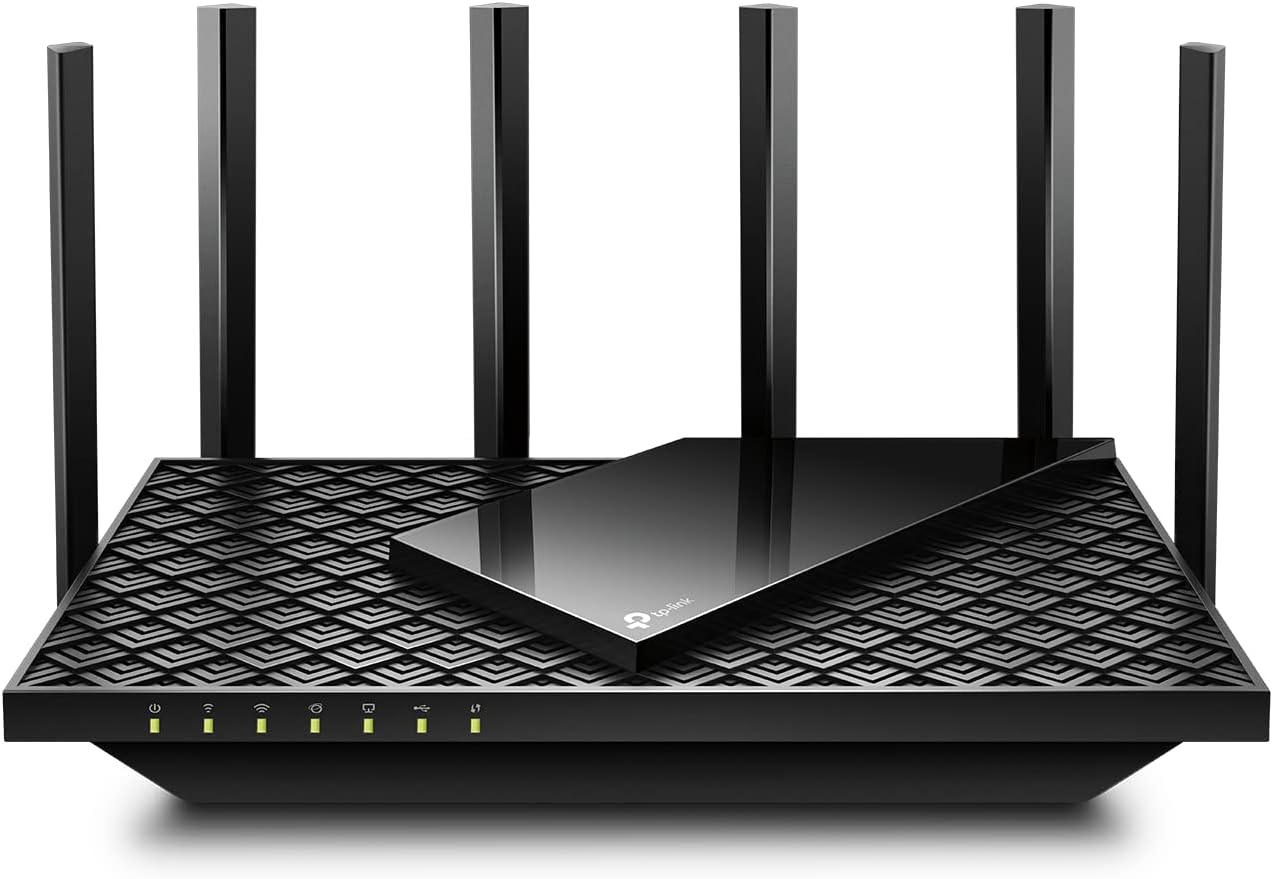
🚀 Elevate your home network to pro-level speed and security!
The TP-Link Archer AX72 Pro is a cutting-edge WiFi 6 router delivering up to 5400 Mbps dual-band speeds, powered by a 2.5 Gbps multi-gigabit Ethernet port and 6 high-performance antennas with Beamforming for extensive coverage. It supports advanced technologies like MU-MIMO, OFDMA, WPA3 security, VPN access, and smart home voice control, making it ideal for seamless 4K/8K streaming, gaming, and secure multi-device connectivity in modern homes.


| ASIN | B0BTT3F159 |
| Antenna Location | Gaming, Home |
| Antenna Type | Fixed |
| Best Sellers Rank | #4,408 in Electronics ( See Top 100 in Electronics ) #42 in Computer Routers |
| Brand | TP-Link |
| Built-In Media | Power Adapter, Quick Installation Guide, RJ45 Ethernet Cable, Wi-Fi Router Archer AX72 Pro |
| Color | Black |
| Compatible Devices | Personal Computer |
| Connectivity Protocol | Wi-Fi, Ethernet, IPv4, IPv6 |
| Connectivity Technology | Ethernet, USB, Wi-Fi |
| Control Method | App |
| Controller Type | App Control |
| Coverage | Extensive coverage |
| Customer Reviews | 4.3 4.3 out of 5 stars (499) |
| Data Transfer Rate | 1 Gigabits Per Second |
| Frequency | 5 |
| Frequency Band Class | Dual-Band |
| Global Trade Identification Number | 00840030706776 |
| Has Internet Connectivity | Yes |
| Has Security Updates | Yes |
| Is Modem Compatible | Yes |
| Item Type Name | WiFi 6 Router |
| Item Weight | 1.52 Pounds |
| LAN Port Bandwidth | 10/100/1000 Mbps |
| Manufacturer | TP-Link |
| Maximum Upstream Data Transfer Rate | 2500 Megabits Per Second |
| Mfr Part Number | Archer AX72 Pro |
| Model Name | Archer AX72 Pro |
| Model Number | Archer AX72 Pro |
| Number of Antennas | 6 |
| Number of Ports | 5 |
| Operating System | TP-Link Custom OS |
| Other Special Features of the Product | WPS |
| Router Firewall Security Level | High |
| Router Network Type | dual |
| Security Protocol | WPA, WPA2, WPA3 |
| Smart Home Compatibility | Smart Home Compatible |
| UPC | 840030706776 |
| Warranty Description | 2 year manufacturer |
| Wi-Fi Generation | Wi-Fi 6 |
| Wireless Compability | 802.11ax |
M**.
Some setup specifics, works great for good price
Works great now that I got it set up. At first it wasn't connecting properly but it was no fault of the device. I had to work around the Tether app and also I didn't see /realize there was a tiny black button to turn on "wifi." Francis Gail from their customer service helped me get it straightened out. Has been going strong for a few weeks now, no issues, good speed, happy with the product , service and price.
M**.
Perfect for everyday needs
This router has been a great upgrade for our home network. Setup was straightforward and the connection has been very stable since installing it. WiFi speeds are fast throughout the house, and it handles multiple devices streaming, working, and gaming at the same time without any issues. Coverage has been solid with no major dead spots, and the performance has been consistent day to day. I like that it offers modern WiFi 6 features without being overly complicated to manage. Overall, it’s a reliable, well-performing router that works great for typical household use and daily internet needs.
D**R
Works very well
Works very well. Great range and dependability. Definitely would recommend.
K**R
Great Features, Slightly Slower Speeds
I recently upgraded to the TP-Link AX5400 WiFi 6 Router and have been generally impressed with its performance. The setup was a breeze, and the router's coverage throughout my home is excellent, even reaching areas that were previously dead zones. The WiFi 6 technology definitely makes a noticeable difference in connection stability, especially when multiple devices are connected. The range of features offered by the AX5400 is quite impressive. The parental controls and device prioritization options are very handy, allowing me to manage and optimize my network for various tasks. The interface is user-friendly and intuitive, making customization a straightforward process. However, I did notice that the speeds were not as fast as I expected when compared to higher-end models like the TP-Link AX6000. While the AX5400 provides reliable and decent speeds, there's a slight gap when compared to the AX6000. In heavy usage scenarios, I noticed that the speed occasionally dipped more than it did with the higher-tier router. Overall, the TP-Link AX5400 WiFi 6 Router is a solid choice for most households. Its feature set and reliable performance make it a valuable addition to any network setup. However, if you're looking for top-of-the-line speeds, you might want to consider investing in the AX6000 model for that extra boost in performance.
K**Y
port forwarding bug found
I have been using this as an access point for a week or two, but power blinked today and had to mess with computers and drive arrays, so finally made the jump to having just this router today. (I didn't feel like duplicating all the port forwards, so it was easier to use it as access point for a testing period first.) Everything went fine, and I got the usual speed-ups you get from going from Wifi5 to Wifi6. My servers are hard-wired downstairs on a switch, and I connect upstairs using Wifi. My speeds to the web went from 60-80mpbs to around 400. Definitely faster now, but I ran into a weird issue. After turning on a port forward for a file server (using an unusual port), I couldn't reach the server from the WAN. Inside the LAN was fine, and the machine had internet without issue. The box used a static IP and even though I didn't see that IP address in the client list, once I put the IP reservation in, the router interface populated the name of the server, so it was aware of its presence. Having tried everything else, I rebooted the server and edited the port forward rule, but instead of typing in the IP address, I used the "connected devices" button, which now contained the server due to its recent reboot. The field was re-populated with the EXACT SAME STRING, and I deleted the optional inside port number before saving, and saved the rule. Suddenly, the server was reachable. The one-line summary in the list of port forwarding rules was identical to what it was before. Moral of the story : if you create a port forward rule, make sure you reboot the box first and use the connected devices button, because typing in the exact same thing manually didn't work for me.
J**S
Failed after 9 months, poor support
Product worked fine initially. Setup was pretty straightforward, though the app feels a little dated. Then it just up and failed entirely after only 9 months. Nothing would reset it, even the factory reset button. Contacted TP Link and while it was under warranty, their response was incredibly slow. The process for a replacement is super tedious. You either have to send the broken one back (and pay for S&H yourself) and wait for them to assess it and send a replacement, or pay extra for them to send you the replacement first, all while they put a $199 hold on your credit card until you returm the old one, even though $199 is MORE than the router cost in the first place. And it still takes 3 to 5 business days for them to process the claim even if you pay extra for faster shipping! So realistically, you have to accept having no wi-fi for 7 to 10 business days after the router fails. Mine was for my business office so that obviously wasnt going to work. I went out and bought a Netgear Nighthawk and regret not doing so in the first place. I cant speak to Netgears customer service yet, but it was even easier to setup, works better, and has a better app and admin console. Never buying a TP Link product again.
T**L
Top tier 5ghz performance 👏
I was extremely impressed with the 5GHz performance on this router. It blew away my expectations, and compared to the BE600 WiFi 7 router, this AX72 Pro destroys it with a single band. Range and speeds were both better. I have it a floor above me, about 8.5 feet up. My PC downstairs was getting a rock-solid 400+ Mbps with low jitter. If you think you can live without the WiFi 7 promises, I suggest you try this, as I think this had much more time in the oven. Otherwise try looking for the dual router setups thay link via MLO, those might actually deliver true wifi7 performance.
Trustpilot
1 month ago
3 days ago