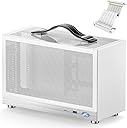
🎮 Small Case, Big Game: Power your portable rig with style and speed!
The KXRORS S300 is a premium aluminum Mini-ITX gaming case boasting an ultra-compact 8.1L footprint. It features front USB 3.0 Type-C connectivity, triple mesh panels for superior airflow, and supports SFX power supplies up to 130mm. Designed for high-performance builds, it accommodates GPUs up to 305mm with a PCIe 3.0 16X riser cable for vertical mounting. Ideal for gamers and professionals seeking a portable, stylish, and efficient small form factor PC solution.


| ASIN | B0BG22FT8R |
| Antenna Location | Gaming |
| Best Sellers Rank | #177 in Computer Cases #1,548 in Computer Internal Components |
| Brand | KXRORS |
| Case Type | Mini-Tower |
| Color | S300 White |
| Compatible Devices | [INF] Mini ITX motherboards, Gaming devices |
| Cooling Method | Air |
| Customer Reviews | 4.5 out of 5 stars 306 Reviews |
| Enclosure Material | Aluminum |
| Fan Size | 60 Millimeters |
| Hard Disk Form Factor | 3.5 Inches |
| Internal Bays Quantity | 1 |
| Item Dimensions D x W x H | 5.31"D x 12.28"W x 7.6"H |
| Item Weight | 2 Kilograms |
| Light Color | Blue,Purple |
| Manufacturer | KXRORS |
| Material | Aluminum |
| Model Name | S300 |
| Motherboard Compatability | Mini ITX |
| Other Special Features of the Product | Kompaktes Mini-ITX Formfaktor, Unterstützung von SFX-Netzteilen, vertikale GPU-Montage mit PCIe 3.0 16X Riser Kabel |
| Power Supply Maximum Output | 500 Watts |
| Power Supply Mounting Type | Internal |
| Recommended Uses For Product | Gaming |
| Supported Motherboard | Mini ITX |
| Total USB 2.0 Ports | 1 |
| Total USB 3.0 Ports | 1 |
| Total Usb Ports | 2 |
| Warranty Description | 60 days |
J**.
Tiny but mighty
I love this case! My build: Asus ROG-Strix B-760 mITX board Crucial Pro RAM 32GB DDR5 RAM, 5600 MT/S Intel Core I-7 13700, and using stock air cooler Noctua 92mm low-profile fan PNY 3070ti XLR8 Gaming Revel (triple fan) Samsung 980 Pro NVMe SSD, 2TB EVGA Supernova 750w SFX PSU, 80+ Gold I did buy a 4.0 PCIe riser cable as well, although the case comes with a 3.0 riser cable that does work This machine works REALLY well. The case is perfect to fit all these parts. Airflow is understandably a bit tight but with full mesh on 4 out of 6 sides, the single Noctua fan for some additional airtake on the bottom of the case is just fine. (This is really good, because I could only fit 1 slim fan inside the case with the rest of my components, and only 92mm at that!) I made sure to seat the PSU so that the fan faces outward and the other component fans already naturally face out the way that they're seated. The case was a little tight - not surprising given its remarkably small size - but I was able to get everything in and running with no real trouble. With slight tweaking to the standard settings of the GPU fan, this machine runs ~30-35c temps at rest and doesn't go above 65c for either CPU or GPU on a full-on GPU intensive game. I was worried that the gpu wouldn't fit. This graphics card is 2.2 inches deep. It does fit though! The card rests just against the outer mesh of the case. But it doesn't bow out and because it's a mesh exterior, exhaust airflow is just fine with the card. There were a lot of smart design decisions made for this case. The case is all metal - no plastic - and it has a premium feel because of that. I already mentioned the full mesh which makes this case maintain temps a LOT better than I would have expected. I now have a really nice gaming rig that takes up a similar amount of space to an eGPU and that makes my little nerdy heart happy :) I definitely recommend this case! I would ask the manufacturer to begin shipping it with PCIe 4.0 riser cables for convenience and future-proofing, but that's the only recommendation I have for this machine. Full 5 stars from me all-around to get the setup I've always wanted at a reasonable price!
J**H
Outstanding ITX SFF Value!
I've purchased a few different SFF cases recently. I've done a few builds in the NR200 series cases, and most recently I re-did my main rig in a Dan A4-H2O, which i really like. However, I wanted something a little smaller and lighter for work travel and LAN play. I tried the Velka 7 and ended up with a bad riser cable... Ahead of tomorrow's work trip, I decided to take a chance on this case. Got same day delivery. And this case... Man, am I impressed... The value equation here is pretty outstanding. The price point for what you're getting is very reasonable. You're getting an 8 liter SFF case that is very easy to build in, as SFF cases go. The layout is well thought out, leaving me with only minor criticisms. The fit and finish are good, and appears to be powdercoated. We will see how the finish holds up over time. You're also getting what appears to be a decent riser cable (says made in Germany). The Cooler Master NR200 is a great case, but is over twice the size of the S300 in volume. The Velka 7 is over twice the price, and isn't visibly much smaller. The Velka 7 is also a much larger pain to disassemble and build in, with its tons of screws. The S300 really shines here. The layout and design are good, and I had mine finished in under an hour. I'm an experienced builder, but even a first-timer would have an easier experience building in this case than others. One thing I love is that there's often enough room in the bottom of this case for a 15mm slim intake fan. Just take your time and be methodical about the order of assembly when it comes to all the components. The manufacturer's video can help with that. Take your time, and be gentle with the cables when cable managing. Also do your research on CPU Cooler fitment, both for your motherboard and for the case. I opted for the 47mm tall ID-Cooling IS-47, which uses a 92mm fan. I replaced the included fan with a Scythe RGB fan. It cools my Core i5 12400 pretty well, and I think that's an ideal type of CPU for this case. I'd personally avoid K series CPUs completely because of their higher TDP (and by proxy, more heat). Stick with a modern i3 or low end i5, as they don't consume tons of power. With my Cooler and CPU setup, I see gaming loads in the high 50⁰s. Be sure to pick a GPU that will fit the case. In this instance, I opted for a 3060 Ti because of its size and heat dissipation ability. It pairs well with a 12400. Personally, I wouldn't go over a 3070 in this case, assuming you pick one that fits. Anything beefier, and it will use more power, which means more heat. You'll also have a problem finding any 3070 Ti and above that will fit in the length and thickness dimensions. I would probably avoid Founders cards for this case too. The blow-through design will not work well here. I tried both an EVGA 3060 Ti XC (2-fan) and a Gigabyte 3060 Ti Gaming OC (3-fan), and here's my thoughts. The EVGA XC fills less space which does leave a larger air well inside the case, but it looks incomplete. The Gigabyte OC has a blow-through design for the end fan (similar to Founders), and I do think that inhibits cooling performance in this S300 case. That said, I was able to get both cards gaming in the 58-65⁰C range, and 15 minute benchmark loads seem to max out at 73⁰C -- very respectable for an SFF case. The Gigabyte card is slightly louder, and I did downclock it 75 MHz to 3060 Ti stock clocks which helped with noise and temps a bit. The 3-fan Gigabyte card adds some extra RGB and fills the case nicely, so it's my obvious choice. People love how small the rig is, and having essentially a full length GPU in there. I used a Lian Li 750W SFX power supply, which I highly recommend in these smaller cases over an SFX-L. The cables are individually sleeved too. I opted to remove the case's carry handle. You might like it, but I don't. It's held in with two Phillips screws from the inside, and comes off easily. I bought a cheap DSLR backpack to move this PC around with, so the unsightly carry handle isnt needed. The front IO works really well so far, as well, and I love the front IO placement. I can absolutely recommend this no-name S300 case based on my first impressions and a few outings. You can really put something cool together, for not a lot of money. It could easily demolish a laptop, while making a lot less fan noise. EDIT: I have since upgraded to an RTX 4070, which creates almost identical thermals and uses the same amount of power as my 3060 Ti. I normally wouldn't recommend the 4070, because of its poor value equation, but in this case, it really shines. The case says it's can hold a GPU 305mm long. My MSI 4070 Ventus is 308mm long and fits, albeit very snugly. I had to take the chassis apart to install it (this card visible in last photo). I've used both Gigabyte Eagle and MSI Ventus 4070 with similar thermals and performance levels. I'm still in love with this case, and totally happy I was an early adopter!
O**M
Fantastic case! ONLY issue was rewiring front-panel IO connector, but still worth.
So let me start off by saying this is a fantastic case! There's just enough room to snugly fit a full-size 2.5 slot modern GPU in it. I loaded a PNY RTX 3090 24Gb in it, which is like 295mm in length, and I can only describe the size of the case as though it was a "storage box" for the GPU. The fit is absolutely golden. The build went fine, Mini-ITX motherboard mounted just fine, SFX PSU is a little snug but the bracket it mounts to is removable so you can easily screw it in - it even has 6 screw holes if you want to fully secure it. I will say, with the particular SFX PSU I used, the cable management was a little rough, but it worked out in the end. Also the case does not come with fans, so I had to buy a Noctua 120x120x15mm fan. As for the CPU cooler, Noctua's NH-L9a-AM4 is no slouch. It fits with plenty of room, looks great in the case, and the metal emblem that it comes with for the front of the case JUST fits the metal trim at the bottom near the power button. Now for my one and only issue.. The front IO is a 8+1 pin connector meant to slide onto the motherboard front-panel IO header, but they pinned it incorrectly on my case. Note that the documentation is clear which pins it SHOULD be, it almost sounds like it uses normal front IO connectors as a result, but it has this connector (see images) which is pinned wrong. To fix this, I pushed the cables into the connector a bit, slid the tip of a knife in, and one-by-one removed the two power switch connectors and ran them to the right spots. Because this took me a lot of time to confirm which pins were which, and there's not a lot of documentation on it, I marked them in one of my images. For me, the pins were in a 2x2 square at the top, whereas they need to be in an inline 4x1 arrangement (on the side with only 4 holes, not 5). I tried to make it clear in my poorly mouse-dawn diagram, but you need to remove the two wires from the side with 5 holes, then put them on the lower two holes of the side with 4 holes. Once you do that, it boots fine, the LED for the button works, and the case is worth the time and money. Finally, I bought one more because I fear it'll go out of stock before my next PC build, so I wanted to ensure I had one just in case. Good cases are hard to come by sometimes and this one is one of the best SFF mITX cases I've seen. It may take a bit more work than a normal build, but it is absolutely worth it.
M**K
Awesome mini case for the price
Fantastic case for the price. The build quality is not outstanding, but solid and quite good. Packing a 4k gaming system inside was a relatively easy 1h job. Thermals are good. Esthetically pleasing. Would buy it again.
A**X
Good case, bad instructions.
This is my first time building a gaming PC, my prebuilt pc is in the background in the photos. I really wanted to try building something compact that still could play whatever I throw at good settings. Went with 3060ti, 12th gen i5, 2x16gb ram, NVME 1tb Samsung. First off, it’s actually not too bad to build on, the entire assembly comes apart with a few screws. I love that, it’s the best way to make cable management in this case possible. Some of the parts are a bit finicky, like the handle at the top of the case is held in place with two downward-facing screws. The only way to tighten them is to completely disassemble the PC, motherboard and all. Put some blue thread locker on it so you don’t have to worry about that. Get the slim noctua cpu fan. It fits, and a 12th gen i5 unlocked at max load, max fan speed, doesn’t get above a 65 centigrade. Also get the noctua SLIM 120mm case fan to cool the motherboard. I set it to max fan speed as well and will still barely hear either of them spinning. Mobo also won’t go above 65c for me. I’m not doing any overclocking, so for me this is plenty good enough. Tips: Use NVME drives. No space for SATA storage if your gpu is greater than ~200mm. Don’t use a graphics card that needs 3 io slots or won’t fit. MUST use a SFX psu. (A standard psu is almost as big as the case itself.) I really don’t think there’s enough space for an AIO/radiator, it’s way too small for that. Yeah so, it’s definitely possible to build yourself a gaming PC that’s the size of a toaster with this case. I like it, would consider using again, would recommend to a friend.
R**E
Good mini gaming travel.
Nice mini ITX case; it's really compact and has good airflow.
C**G
Great Value
**Edit 9/29/2023** I'm still really enjoying the case, and decided to make a modification so that it can be used in both horizontal and vertical orientation (mainly for travel use or desk space savings). It's really quite easy to remove the top handle and bottom feet to replace with your own designs, and of course due to its size most modifications you build can be printed on essentially any 3D printer, in this case my Creality E3V2. If you want to print this design for yourself, you can find it on Printable's website (search "S300 stand"). **Original Review** The S300 Mini-ITX case can be found across many different retail websites and brand names, making it another mass market generic OEM special. The big upside of this however, is that this is currently one of the lowest-priced sub 10-liter Mini-ITX cases available with riser cable included. And the fact that you can buy it at any time from Amazon with Prime shipping and actually have it delivered within a day or so is not to be taken lightly. At this size class, for example, you either have to deal with the incredibly expensive (the Dan A4-SFX, Dan A4-H20, Louqe Ghost S1, Fractal Terra), or the "overseas specials" from the likes of Aliexpress and Taobao. This case competes on size, it is well ventilated for good performance, yet comes in at half the current cost of most cases on this side of the pond. The S300 competes very favorably. It is a classic sandwich style layout, with the SFX PSU and inverted ITX motherboard on one side and the GPU on the other side connected by a riser cable. You don't get CNC aluminum in this case, rather everything is stamped coated steel, but the build quality is actually very good for this price range with very little plastic (outside of the "front/side" panel), straight ventilated panels, even paint and smooth edges. The case feels very sturdy without the flex that you can get from cheaper cases made of thinner gauge steel. Beyond the material choice of stamped steel, the only other obvious budget choice is that the riser cable is PCIE Gen 3.0, and that the side panels use the old-style sliding L-hook retention method with just screws to hold into place, vs. pogo latch/catches. If you access the interior often, I would replace those screws with thumb screws. There aren't many accessories that come in the box. You get a poorly written instruction manual (though it's not hard to figure out how to build in the case), and a box that includes some screws and zip ties. Also included is a magnetic dust filter, but this felt like a random addition as it just sort of slaps over a side or bottom panel and is super restrictive- I elected not to use it. Building in this case is generally, incredibly easy. This is about as simple and unfussy as you can make a sandwich style case, a literal box with predefined and obvious places to put your components. The only gotcha is that I found it easier to remove the PSU bracket from the case (three screws), and screwing the PSU to it before reinstalling it. If you intend to remove the top handle, it takes two screws and you must do this before you install your motherboard/riser cable or access to one screw will be blocked. CPU cooler height is actually fairly generous for a Mini-ITX case coming in at 60mm high, in this case I was able to just use a Wraith Stealth cooler on an AM4 CPU and it fit in with no shroud removal or other modifications required. The bottom feet are sized to allow the use of slim intake fans, but if like me you aren't using them, you can easily remove them (one screw each) and replace with your own 3D printed designs or rubber pads for easier insertion into a bag for travel. Pros: -Classic ITX sandwich style case, very easy to build in -Ventilation everywhere, default case feet rise off the desk and bottom intake fan options means good thermal performance -Good manufacturing quality, solid quality feel -Incredibly inexpensive coming in at least half the price of other ITX case options Cons: -PCIE-3.0 riser -Very basic "what you see is what you get" featureset. For example, no method of moving the spine to create more GPU vs. CPU chamber space, and limited to air cooled builds only -"Front/side" IO limited to one USB 3.0 and one Type-C port
P**N
Decent little case
Just finished the build, pretty content with this case. Decent "budget" alternative to the other <10l options out there The powdercoating is solid, all the mounting points are lined up well. The PCIe 3.0 cable fits fine. Came with a bonus magnetic filter for the bottom which was nice. If I was to nitpick, the handle is a little cheap, but you can get a good idea from the photos. Like another review mentioned, you're probably going to want to throw some threadlock on the handle screws because you're going to have to take everything out to get to them again. The printed instructions are laughable, but there's a video of a build on here that shows pretty good detail. This was my first PC build and it was pretty straightforward. I have a 120x15mm noctua fan under the motherboard. It specs a smaller fan under the PSU, but good luck not interfering with PSU cables. For fitment reference: RX6800, Ryzen 5700x, AXP 90x53 cooler, SF600 PSU. Decent temps in the case, though none of my stuff runs terribly hot.
Trustpilot
1 month ago
1 week ago