Buy anything from 5,000+ international stores. One checkout price. No surprise fees. Join 2M+ shoppers on Desertcart.
Desertcart purchases this item on your behalf and handles shipping, customs, and support to Denmark.
๐ Elevate your realityโwherever you go, the future follows.
The HTC Vive XR Elite is a cutting-edge, lightweight XR headset combining standalone freedom with high-fidelity PC VR streaming. Featuring adjustable IPD and diopter lenses for personalized clarity, vibrant high-res passthrough, and powerful integrated audio, itโs engineered for professionals and enthusiasts seeking premium immersive experiences on the move.


| ASIN | B0BQXDFLJ6 |
| Batteries | 4 Lithium Polymer batteries required. (included) |
| Best Sellers Rank | #34,728 in Video Games ( See Top 100 in Video Games ) #217 in Standalone Virtual Reality Headsets |
| Customer Reviews | 3.1 3.1 out of 5 stars (194) |
| Date First Available | January 5, 2023 |
| Item Weight | 4 pounds |
| Item model number | 99HATS002-00 |
| Manufacturer | HTC VIVE |
| Product Dimensions | 11.5 x 11 x 5.2 inches; 4 Pounds |
| Release date | March 24, 2023 |
| Type of item | Electronics |
S**S
Excellent quality! Excellent engineering!
Vive has produced yet another high-quality product! Once again HTC Vive is making headsets for recreational consumers. I originally had the Vive OG, and the Vive Pro OG with the lens mod. I bought the quest 2 just for travel and mobility. After hearing everybodyโs complaints with the XR Elite, I was concerned this headset would not be a vast improvement in quality of playโฆ Especially with PC-based games. A good example is the quest 2 running kayak mirageโฆ it is horribleโฆ no detailing or definition in any of the landscape/scenery whether playing standalone, or PCVR with a cable! And I was concerned that without the video compression of the Vive pro that the XR Elite headset running off USB-C would not be good. I was completely surprised! Very pleasantly surprised!!! Iโve been using VR since the inception of consumer headsets, and this is a nice step up! The pancake lenses make all the difference and it is so much better than the quest 2!!! So much clearer, great definition in images. and the diopters are the icing on the cake! I wear contacts and as part of the set up process you have the option to adjust the diopters. I decided to adjust the diopters just for the experience and wow! So now one eye is set on 2 1/2 and everything looks pristinely clear!!! My vision is fine in all other scenarios, and now Iโm glad to be able to see better in VR too. Iโve heard complaints of God rays, fix your diopters! Also, using the cable link, I was able to run Lone Echo flawlessly! I could never get the quest to run it, and when I did. It literally dropped more frames than it played and of course it just looked ugly. Even with a high-quality hardwired cable link. Lone Echo is also a program that doesnโt look great with the screen door effectโฆ So I didnโt want to play it with my Vive Pro either. It looks glorious and runs so smoothly itโs insane with the XR Elite!!! Havenโt run half life Alex yet, but Iโm sure itโs going to play as well as lone echo does, if not better! I have been thrilled to see that the headset runs all my old programs in steam, as well as revive! Sweet! Before getting the XR elite, I was using two headsets, my Vive Pro for at home on PCVR, and the quest 2 for mobility around the house, and when I travel using it as a standalone headset. The Vive XR elite is a step up in all directions! It is extremely comfortable, no mods needed like you have to do with the quest 2, (ouch!), and I canโt get over the clarity!!! I can use it anywhere in the house as stand alone, or run it with wireless streaming without sacrificing quality. Because it can run as a standalone, it makes it perfect for travelingโฆ Especially with its low profile and lightweight! The XR Elite definitely meet my needs, and exceeds expectations. I did not have a headset that I could run wirelessly with higher quality PCVR. Absolutely love it! So exciting! Now, like all things in VR, the software is a little bit slow in coming. Patience wins here. Software will be coming, and Iโm ready for it. I remember in 2016 trying to find softwareโฆ Thereโs a plethora available now in comparison to that!!! Lol.
J**F
Profoundly disapointed.
I got my unit today, and I have to say; ALL of my expectations were wrong. I'm absolutely gobsmacked at how bad the experience is. I'm coming from a Rift S; so I was under the, false, impression that no matter how bad this ended up being, it'd be so far above the rift that'd I'd be plenty happy to trudge through the early adopter tax and growing pains. I can't. The UI is so shoddy that after a couple hours using it I was overflowing with the desire to submit for a refund and buy a quest pro. I despise facebook, passionately; but I'd rather get back into bed with them, than bytedance, and there are no other standalone wireless options to speak of. Here are a few of my takeaway Pros and Cons. PROS PCVR latency on Wifi 6 (5ghz) was actually really good. (see first Con in list below for more context) The first thing I did was, open Beatsaber and test out some E+ songs. The saber movement felt accurate and realtime, as compared to my typical displayport tethered setup. Screen quality is nice, but honestly not jaw-dropping or anything. I was expecting this to be a big upgrade, considering the Rift S is relatively low res and has Fresnel lenses, but it kind of felt equivalent/worse on the XRE, even after acclimating to the sweet spot. The unit itself is tiny, shockingly tiny. The compactness of it blew my mind, after holding it in my hands, I'm convinced we're only a few generations away from near sunglasses sizes of HMDs. I had NO ISSUES with setup, or with pairing for wireless PCVR, everything connected more or less immediately. The instructions were sometimes poorly worded, but mechanically, each step worked out as would be expected. **I did have to segregate my 2.4ghz network, because it was preferring it over my 5ghz when I was allowing the router to decide. The 2nd accessory USB-C port(beside the right eye lens) does support USC-C Audio, so when I plugged in my 3.5mm adapter, it worked instantly with no configuration or other steps. The port is deeply recessed though, so the majority of USB-C ends will probably not fit. I used the official adapter that Apple sells, it has very thin insulation on the cable end. The in-arm speakers are excellent, better than most would expect. I had no issues with stereo positioning while using them. Aside from privacy uses, I don't think I'd have used my headphones for anything else. The unit is capable of functioning, in glasses mode, for a while on the 15W from a standard PC USB-C port. It does drain the internal battery, but that will depend entirely on your use case. The inability to get consistent tracking results seemed to constantly cause it to spin up into full power while searching for the controllers and landmarks. So it's hard to say how long I would get away with it. Seemed like an hour or two would be possible with light-ish use. The full color pass-through was really nice. Had no problem walking around, fixing myself a drink, reorganizing things around the room, etc... Very nice. There was definitely some warping in the image, so someone who is focused on AR/MR might find it intolerable; but for the home user in a casual setting, it was super useful to get around and do stuff without taking off the headset. CONS Controller and Hand tracking is abysmal. I'm shocked at how poorly this tracks in low-medium light settings. I can put on my Rift S, in a fully dark room, with only a TV offering indirect lighting, and it tracks extremely well. The XRE needs every light in the room on maximum brightness, or it will constantly lose tracking. This made playing high level Beatsaber almost impossible under normal lighting conditions. If I turn on all my lights I get passable tracking, otherwise the controllers would lose tracking during any quick motions. Even with all my lights on, it had a VERY hard time tracking movement on the outer edges of the play-space. This can be improved with software over time, because it's clear the predictive algorithms facebook uses for the Rift S can outperform it on older hardware using the same type of camera+controller gyro setup. The screen glare/light bleed are annoying. The blurriness you get from Fresnel lenses is, in my estimation, equivalent to the lens glare on the XRE's pancakes. It's not like I'm not used to it on my Rift, but I really thought the pancake lenses would be a huge increase in clarity. I see these as essentially a 1:1 swap. The OS is terrible. It looks pretty, and the options I sought out were almost always where I expected them to be in their respective menus; however, the OS itself was rife with bugs. Swapping in and out of apps would cause inexplicable system hangs that would have bizarre compounding effects, like sporadically unpairing the controllers until I did a hard system reset. This would happen in standalone and PCVR, however, the issues were far more severe on PCVR and required frequent resets and reopening PC apps and steam VR in a "just-so" method to allow it to function without breaking. The ability to reorient yourself is treated like a one-time initial device setup, instead of something you'd do constantly. This might just be an issue of how I use VR. Sometimes I'm on my couch, or standing in my VR space, or sitting at my desk. In the Oculus software, I can just long-press my menu button in the home screen and I'm instantly reoriented to my current facing. I probably do this half a dozen times in every VR session: whenever I move over in my chair, or lean back on the couch, or move over while standing for better positioning, etc... The XRE experience is terrible in this regard, it loses it's relative position without warning or skews the home screen position to some nonsense location and direction, but its "reset position" option, in the one tap menu popup, rarely reorients true to your heading, and often tries to honor some absolute positioning it has decided on it's own. Once you combine this with the repositioning of apps in steamvr, it's compounded into a nightmare of rinse-repeat in both interfaces until the app you're running is finally aligned correctly. The boundary settings are extremely limiting and can't be disabled. This is one of the most damning things in my list. If you set a huge boundary to avoid being interrupted by it, you'll be punished by the system relocating your displays all over the place. If you use stationary, you'd better stay still. Your floor position may change sporadically if tracking is lost temporarily. Any deviations from the boundaries, in stationary or room-scale, seem to have a 50/50 chance of causing standalone apps to crash, or streaming to crash, or to cause a system hang that needs a hard reset. This is all ridiculous to me, because, while I don't need boundaries, anyone who does, would probably have an awful experience with it. When I set up my Rift S years ago, by the 2nd week I'd turned off guardian completely, and I've never gone back; but even when it was on, it never broke system operation. Hand tracking, technically works. I've never had a hand tracking headset before, so I don't know if it's this awful on other hardware too; but it seems like to function at the level of a gimmick. It seems to struggle tremendously with the changing shape of hands as they move or rotate; which strikes me as the sort of thing that would be first-in-line-things-to-resolve in a hand tracking system. Like the controllers, it requires as much light as possible, and it's not usable in low-med light scenarios. The idea of taking the XRE anywhere without its controllers seems impossible to me. As others have mentioned; in the glasses mode, the arms will dig a hole into your head if your head is too large. It was pretty painful for me after ~40minutes, so if you decide to work through it, you'll probably have to sort out secondary padding. It's not bad at all with the battery pack attached, it feels like a normal headset in that mode. The central fixed-foveated rendering is way more aggressive than I'd have liked, it was very noticeable anytime I was in an environment with textured walls and especially for text, looking around with my eyes left delivered an unacceptable visual mess. I haven't used wireless VR before, so maybe this is a limitation of the XR2 platform and not HTC's fault; but, if it's on HTC, it's a huge negative. I have the hardware and bandwidth to easily push 2-3x what the headset is asking for, I'd have preferred user-control over the reduced peripheral quality. settings:200mpbs/ULTRA/DynamicOFF Overall, this was a huge let down for me. I was thrilled to finally divorce facebook, in regard to my VR experiences, but it's just too soon for me. HTC can improve a lot of what's wrong with this headset through software, but based on just how rough it is right now, I think that'll be more than a year away...
X**0
Really convenient but horrendously painful
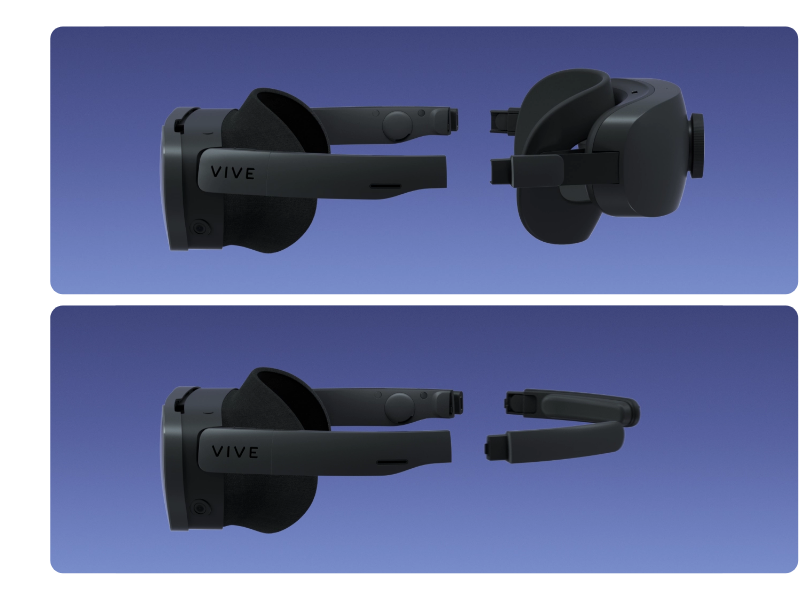
The XR Elite is a wonderful product that is horrifically painful to wear. There are a lot of good things about it but ultimately the pain was what made me get rid of it. The optics are really, really good. Edge to edge it's super clear. Even when the HMD jiggles around and loses centering everything is still clear. You can truly look with your eyes. In complete blackness you notice the screen isn't as black as it could be. When a high contrast object shows up in the darkness it will tend to glow a little bit. It doesn't look like light shafts but instead multiple instances in a line losing definition. They have individual Diopters as well but I left them both at zero. There is IPD Adjustment using a very coarse slider instead of the usual dial on other HMDs. It's kind of difficult to get it dialed in to the exact sub millimeter but the lenses are very forgiving so precision wasn't needed. The IPD adjustment did jiggle itself loose once when moving a lot in VR. The screens are pretty good minus the blackest of blacks, though coming from a Vive Pro 2 there isn't much difference. Resolution is dense and not much more could be stuffed in without the battery suffering. When used fully standalone the battery life is somewhere between bad to okay. For a quick XR adventure it's no problem which is what I think HTC is aiming for, not multi-hour adventures into the mist. I dunno if it was atypical but without the rear battery cradle the HMD would power on for about a second then shut off. With the battery cradle fully charged it lasted a little under 2 hours. When plugged into a computer it would charge but the drain would be larger than the supply. From full it would last around 3 hours when plugged into a PC. The controller's battery life is a totally different story. They would drain passively over the week and every time I went to use them they would be zeroed out completely. They automatically wake up from the tiniest of movements and they'd randomly wake up in the middle of the night from a 2.0 earthquake or something. I eventually left them on the charger for days on end until they would be needed to circumvent their drain. When fully charged I think they are supposed to last 6 some hours. Other than the controller's battery lives there isn't much to say about them. They feel comfortable in the hand and the buttons are in logical places. The thumb stick is kind of hard to push down but that's really about it for the main controls. They are kind of hard to differentiate left from right from feel alone if you don't have pass through mode enabled. They tracked well enough for the games I played but it got a little annoying when they got out of tracking space like above the head. They would track for about one second using only gyro and accelerometer when out of visual range then they'd go rotation only, no position. One second is enough if you're just tapping your back or putting a hat on but anything further and it's a mess. The HMD's self tracking is pretty good and it never really bugged out. In complete darkness it would complain but even some ambient lights like monitors it worked well enough. Pass through mode must have some crazy noise reduction because I can still make out shapes in darkness. Upon startup it asks to create a playspace that you draw on the ground. Usually that's just a room minus some furniture. If for any reason you completely leave that playspace while wearing the HMD, like in passthrough mode, it will completely lose the original playspace and ask you to create a new playspace. If you agree to make a new playspace it'll kick you out of whatever content you were looking at to do the setup. To get around this you can probably just draw a playspace that includes every room you think you'll be in. I really wish it was less dependent on defined playspaces than it currently is. The XR Elite is basically bound to one area, despite being standalone and portable. AR content is basically non existent on the XR Elite. It's primarily VR stuff with passthrough visuals in case you step out of bounds. There built in hand tracking which is cool but limited to only a gimmick because the entire UI is built like a VR interface. You don't reach out and touch any buttons or wave for gestures or anything like that. You vaguely point your wrist at a button then pinch your fingers to simulate a click. There is some content that uses the hand tracking a little better but not the home UI. There is an option to allow the hand tracking to pass through to SteamVR as a controller emulator. You can pinch your fingers to pull the trigger. You can also flip your right hand over and pinch to open the XR menu. That's about it. The built in speakers are actually decent. The Quest 2 internal speakers aren't quite as good and the PiMax 8KX strap speakers were a joke. Your ears are fully unobstructed so you can still hear your environment which is useful when activating passthrough. You'll notice an extreme lack of sub and bass through the speakers. They are fine for music like jazz and is particularly suited for human voices. If the environment outside the XR Elite is noisy things get progressively worse but that's the nature of off-ear solutions. For discussion between 10 some people I kept the volume at about 90% most of the time. The ergonomics SEEMED good at first but quickly devolved once positioned. The gasket around the face was really soft and pliant around the sides but at the top there is a plastic bridge that goes over the eyebrows. When using the battery cradle to crank down that plastic bridge gave me a headache after about an hour and I kept loosening the battery cradle until it just fell off. 100% of the tension is placed right on that forehead bridge. Since there is no top strap to keep the XR Elite elevated it only relies on squeezing around the head to stay up. The battery cradle side was comfortable but the effects at the front are unforgivable. There is also the alternate "Glasses Mode' which takes the battery cradle completely off and turns it into what looks like super techy glasses. The temples grab on ULTRA hard and the sides of my head were immediately aware of something trying to reduce the width of my skull. I wear medium-large motorcycle helmets and anyone with a wider head would be worse off. That being said, it was more comfortable than having my forehead be in pain though anything is more comfortable than being stabbed. There is a TINY amount of cushion in the temple ends that have about 1mm of squish. Problematically, it places all that squeeze on what feels like less than one square inch per side so you really feel it. Surprisingly even though there is no back strap to keep the XR Elite held on it manages to stay on my face, fully planted, through a bunch of action games I played. You might ask, how did I power the XR Elite without the battery cradle? You can use any power bank that outputs 12v like QC3.0/4.0 or variable voltage stuff. Generally, if it can charge a laptop it can definitely power the XR Elite. I put the power bank in my pocket and ran a 3 foot cable up to the cable holding pinch at the right temple and into the power slot. My power banks are decently large, two being 50wh and another at 100wh, and last way longer than the included battery cradle. You can also push the power banks through the battery cradle and get all the extra charge associated. With a quick charging power bank it'll push the battery cradle to 100%. As soon as the power bank dies it'll go back to using the battery cradle's charge and in this time you can plug in another one or ride the remaining energy to the end. Additional note, the battery Cradle can be used for USB tethering. I thought it was just a charge port but it pushed data through just fine. I plugged it into a USB 3.2g2 port but I'm not sure how fast the batter cradle's port is, might be 3.2g1 or it might even be 2.0. The cabled port on the side of the XR Elite obviously has full USB capabilities but without a power source it won't do much. There is also an additional USB-C port to the right of the right eye and to the left of the temple that's hidden. I didn't manage to try that port out but I believe it's a host port. Tethering is great on the XR Elite. Just install the app on both a PC and the XR Elite, make sure Wi-Fi is working OR the USB is tethered, and in the XR just click Streaming App. That kind of convenience made me really, really like the XR Elite. There was a few times when the Wi-Fi streaming would get a bit overcompressed possibly from environmental issues. Upping the SteamVR resolution had ZERO effect on visual quality since it must pass through the Streaming Hub compression in the end. Upping the resolution just made more pixels have to fit through the same bitrate through Wi-Fi which had negative effects scaling up. There seemed like some of the gradients would lose a bit of smoothness, especially in light greys to slightly darker greys, while using the Streaming Hub. The convenience factor was just too good though. Ultimately, the Wi-Fi on the XR Elite stopped working. That combined with the extremely painful mounting systems brought me to the final crossroad. I returned it.
T**C
Not perfect, but it stands strongly against the Quest Pro and Quest 3
I'm a big fan of VR since I discovered it just before the release of the Oculus Quest in 2019. I've used every Oculus headset, PiMax 8K X, Vive Pro 2, and now the XR Elite. The XR Elite brings some new tech to the non-Oculus VR game. Pancake lenses, independently adjustable focus lenses, a lightweight glasses-only setup using a power source not strapped to your head, color passthrough for mixed reality. It also supports a face tracking module. But if you're reading this review, you most likely already know the specs. You're here because you want to know how it feels and performs! Aesthetics: 5/5 This is one attractive piece of hardware! It looks, and feels, quality. And it is. It's one of the best looking VR headsets to date! Performance: 5/5 This headset is a solid performer, especially when connected to a PC. Vive has a streaming app that is meant to provide similar functionality as Air Link for Quest, and it works. You can also play by connecting via USB C. The real winner here though is Virtual Desktop (vrdesktop.net) by Guy Godin. For anyone unfamiliar with the app, its popularity soared as a wireless PC VR link, well before Air Link became a thing. One of it's strong points was and is the direct integration of launching Steam VR games from the app's menu. Well, the version of Virtual Desktop in the XR Elite store has the unique capability to play Oculus PC VR titles. Yes, you can play Oculus PC VR titles without an Oculus device, using your XR Elite. Due to the way it works, it's only available by connecting wirelessly and the headset must be able to run Virtual Desktop on its own, which makes the XR Elite one of .. 2? (Also the Focus 3) that has this capability. So if you're coming from Oculus and have titles you don't want to give up, you might not have to. It isn't 100% compatible with all titles, but most I tried seem to work great. Comfort 2/5 updated to 4/5: As it comes, I found this headset to be the least comfortable VR headset I've ever worn. Using it in glasses mode does help. Also, there is a strap that is more like an elastic band that is meant to go over the top of your head (there's a YouTube video about it made by Vive) to help, but it doesn't help much. The stock facial interface feels too small and awkwardly shaped, and when you think you have the headset in position, it can slide down a little in the back, throwing it all off. Honestly, this is the only real weak point I've found on this headset after a month of use. THAT SAID... I talked to Vive and they are aware of this common complaint, and they have released an alternate facial interface. It's my understanding that they are working to resolve the comfort issue. I've upped it to 4/5 because of the alternate facial interface and their acknowledgement of the issue and working on a fix. Features and Tech 5/5: People who wear glasses have struggled with comfort and usability with VR headsets from the very beginning. Some solutions have come out, such as custom prescription lenses that magnetically attach over the lenses on the Oculus Quest series of headsets. But that required ordering lenses and that's an extra expense. Vive upped the game with the XR Elite and is the first headset to offer adjustable diopters on each lens. What does this mean? Well, you know when you go to the eye doctor and you go through multiple lens power strengths to dial in your prescription "this... Or this... 1.. and 2... And 1 again... And 2 again..." So the lenses on the XR Elite are rotatable independently, and are adjustable from 0 to -5.0. I wear contacts and one eye is -2.25 and bthe other eye is -2.0. By taking off the bbรบ bรบ and following the very easy and simple instructions shown to you during setup, you dial in each eye individually. This is awesome! And it works. Very well! No ordering of prescription lenses. Note that this doesn't completely resolve all of your vision woes, as complex prescriptions would still need your corrective eye-wear, but it's a great option for most people. Continuing along this innovative feature-set is the expandability for facial tracking, eye tracking, or other future expansions. Who knows what will become available even within the next year. The tech world is kind of crazy like that. One major bonus is the ability to use Vive Trackers. These handy little pucks are not cheap (about $130 each) but they can be worn on your waist, legs, feet, arms, elbows, your cat... Don't ask. Vive is also working on a tracker that can watch you and track you. The device itself is stationary. This is something I have desperately wanted from Meta since the Oculus Quest, and so far, the only options have been using hacks that are still making progress, such as using a Microsoft Kinect (2.0, the one for the Xbox One) sensor for full body tracking. This does, of course, rely on PC software and only compatible with PC VR. To the best of my knowledge, it can also only be used with Steam VR, because Oculus... Controllers 4.5/5 The controllers will remind most people of the Oculus Quest touch controllers, but... Bigger. I don't know why they chose to use such large controllers, as this was a complaint with the Reverb G2. They are longer and you expect them to be a bit unwieldy at first, but I found them to actually be comfortable and didn't pay any attention to what I was holding in my hands. They didn't break immersion, which is important. I guess we shouldn't be too worried about how the controllers look in our hands when we have a headset strapped to our face. If you've ever seen a video of someone playing VR, from the real world perspective, it's almost.. embarrassing. But who cares, as long as we stay in the Metaverse, right? I experience no issues with tracking, and Vive is still pushing out firmware updates actively, so expect things to keep getting better. Hand Tracking 5/5 I'm giving this hand tracking rating a full 5 because it's honestly about as good as we're going to get with hand tracking without external sensors to see the other side of our hands. Some mixed reality content, like Maestro, uses one controller and one free hand to conduct an orchestra. For navigating the menus, I found it to be reliable and had no issues. Notables: There are a few extra things worth mentioning here. The battery pack, which can attach to the goggles and looks similar to the Quest Pro, is detachable. You can purchase additional battery packs and swap them (it does require removing the headset, pressing a button on each side to slide the arm out, and detaching the USB C power cable). The goggles have a very small battery and should give you enough time to disconnect the USB C power cable from one pack and attach the cable from the charged pack, though I'd do it quickly if I were you. I didn't test how long it will stay on, but I know it's not too long. You can, of course, opt to plug a USB C cable into the goggles that is attached to some other power source instead, such as a wall outlet with a long cord, or a portable power bank that you can slip in your pocket. Just be mindful of how you route the cable so you don't unplug it while embarrassing yourself in front of your family or friends, as you frantically try to beat that invisible monster to death. Unplugging yourself at that moment would force you to remove the goggles and see your family and friends taking cover and expressing confusion and fear. They're not doing it if you don't see them. Also, the app store for standalone apps is... Underwhelming at the moment. But some new releases are hitting for some popular titles, and I think in the near future we can expect to see many of the Meta standalone apps in Vive's store. I wanted to keep this review short because if you wanted a full article, you would probably be reading one of the many review sites. Well, I don't run a review site or publish a blog. Yet. However, I hope at least some people find this review useful. My final verdict is that yes, it's worth the price. Yes, it's comparable to the Quest Pro and Quest 3. You can expect great support for expansion of new trackers and ways to become even more immersed, than what Meta will provide you. Overall, this headset is a winner and even though I now own a Quest 3, this headset is still getting plenty of use.
C**N
Honest Review
Itโs been a week with the headset and so far I have not seen any problems with it. I only bought it for pc vr specifically and I can certainly say itโs better than my index in many ways. First off, giving this 4 stars because the controllers are awful. Now, Iโm coming from index controllers so I already had high expectations for them but they are just unusable even with steam vr binding settings. I ended up storing them away and using my index controllers. They donโt seem to track very well, they feel cheap and way too big compared to their quest lookalikes. These are not the controllers to expect on a $1100 headset. The headset itself tracks very well. Even in a low light environment I was surprised by how well it tracked even with half the cameras covered. The headset doesnโt heat up or anything while in PCVR and the quality of the display is there. Not to mention how comfortable it is compared to an index. The unit is very well made. Would I recommend this headset? Only and exclusively if you have a good pc with good internet. Iโm talking 3070 or newer gpu and i7 12th gen or newer. The vive streaming software is not well optimized and requests a lot of resources from your pc. Plus if you donโt have any other controllers and are planning to use the ones that come with the headset, this is def not for you unless you plan to spend more money for those. All in all, Iโve had a great time with the headset. So I would recommend it for those of you with good internet and a good pc.
K**E
Such a disappointment
I've been a long time HTC fan, owning the Original, Pro and Pro 2. I was very excited about the XR Elite and pre-ordered it as soon as I was able to. But when it arrived, I couldn't have been any more disappointed. -Gray display. No black means flatter world, with a very little 3D effect. It's the worst 3D I've seen in a headset. -Extremely cheap feel and make, especially the controllers. -The faceplate keeps falling off because the magnets are too weak. -Glasses mode squeezes your temples so hard, inducing a migraine headache. -Required VIVE software will crash or won't run unless you change your audio to stereo first. It can't handle 5.1, for example. -Wireless VR is all but impossible, even with the best Wifi. Low resolution, artifacts, blue screens, and eventual crashes. It doesn't take much or long for the crash. -Below-average see-thru camera. The world looks flat. I don't understand all the hoopla, as the camera's nowhere good enough for an XR experience. -Speakers sit too high, allowing in too much ambient noise. -Still has screen door effect. -Awful battery life. The only good thing about it is that it's light and reasonably comfortable. Everything else about the unit is low quality and subpar. For example, the temples on my unit for glasses mode still had plastic extrusions with sharp edges that flowed over the mold. Apparently HTC couldn't even bother checking and polishing the units. Every time I looked at the Elite, I couldn't help but feel ripped off. It's sad, because I really wanted HTC to succeed.
L**Y
Crisp VR in a very comfortable form factor
As an avid gadget user, I've built up a large collection of VR/AR/MR headsets over the years. Having used devices like the original Vive and Vive Pro, the Quest, and the Valve Index, I've enjoyed seeing the innovation and improvements over the years. I recently got the Vive XR Elite, and this headset is in a good sweet spot. While not saying it's perfect, it definitely has a solid place in this collection and is something I see myself using more over other devices. The best aspect of this is that wearing and using the headset feels like a quantum leap in improvement of VR headset design. The comfort is a huge win for me. The front goggles of the headset is much lighter compared to the first generation devices, and the battery at the back not only keeps the front slimmer but also balances the weight nicely. The device makes it easy to adjust the tightness of the strap and makes it the most stable configuration I've ever used. There's little to no feeling of overhand and makes wearing the headset incredible. The visuals are really nice, everything looks clear and sharp. Although other devices like the Index are comparable in terms of visual quality, the fact that this device is so much smaller makes it that much more impressive. With the streaming app, I'm able to get most of my favorite games to work. While the setup is some times a little bit more cumbersome than something like the Index, once you have everything set up it's quite easy to use. Overall, I'd recommend the HTC Vive XR Elite. Everything about it is solid, and it's the overall leap in comfort that makes it stand out.
E**R
Literally Falling Apart After 4 Hours of Use
I was so excited to try this after using a first-gen Vive for years, but wow - what a letdown. First, it took months to arrive. I purchased it on the Black Friday sale (end of November,) and it kept getting delayed and cancelled despite me saying yes, I did actually want it. I finally cancelled the original order in APRIL and placed a new one (at full price) and received it within a week. (muffled shriek) Despite being excruciatingly careful with this expensive new toy, the temple bars have broken - one side completely through, and the other is well on its way. The hand controllers feel insanely cheap, it's kind of amazing they work at all. Battery life is not great - I have two batteries, each lasts about an hour. Connecting to games through Steam is a huge pain in the patoot, especially if you want the audio routed to the headset and not through your computer. Wifi reception is substandard, which causes stutters and freezing in a lot of games, and the field of view lacks much peripheral vision. I am so not a fan of this thing. It is uncomfortable and puts an absolute ton of pressure on the bridge of the nose. The diopter does not stay where I set it, and neither does the interpupillary distance (no one else uses this device.) The lenses smudge too easily and are difficult to clean safely, the speakers are sub-par, and the room camera doesn't work half the time (likely a software issue rather than a hardware one.) I truly wish I'd never ordered this. Being wireless is super fantastically amazingly cool, but this is not the way to do it. If you're on the fence, wait until they get the cheap plastic problems figured out (it's a known issue on their site.)
J**B
What a total let down
When HTC announced this headset in January it felt like a dream come true. A light form factor headset with inside out tracking and controllers more akin to oculus than the clunky vive wands, and most importantly not tied to meta. I'm not exaggerating when i say this was the pre-order that kept me going the last few months excited every day for when it would be released. I have to say, what a total and complete let down. To put it concisely, coming from a CV1 (a headset from 2016), this headset has several key failures that make it completely inadequate for PCVR, and some that make it a horrible headset over all. The built in audio is horrible for starters, compared to the valve index, CV1, or any in ear headphones, this cannot be fixed as the headset has no 3.5mm jack and the bands are very thick making wearing any over ear headphones extremely uncomfortable. The controllers are probably comfortable for some people, but the weight distribution is really lopsided and they want to roll out of your hands, the triggers also have an extremely cheap feeling click so shooting games have a really uncomfortable tactile response. I also find the tracking rings very large and poorly placed making reloading in games difficult when trying not to smash the controllers together. Tracking on the headset and controllers is both fine but there are pleanty of times I felt like tracking was being lost or lagging behind my real movements. The image is crystal clear and this is definitely the strong point of the headset. However based on the type of games you play and the shape of your head, the vertical FOV makes playing certain types of games impossible. For me I was unable to see my chest without bending my neck down much more than im use to with any other headset. For people who dont usually play VR, lots of games store items/menus on your chest. This means that actions in games like Pavlov and Contractors I use to be able to complete by just peering down a bit now require a ton of head movement. I think the comfort level overall is really going to depend on what kind of person you are, features like the IPD adjustment and the diopters are really nice and i hope more headsets can make use of them going forward, but the lack of a more traditional headstrap design (like found on the index, CV1, Rift S, HP reverb g2) seems really short sighted and basically entirely reliant on third party developers to make solutions for people who dont want a lot of clamping pressure on their face and back. I cant even really give any opinions on the standalone capabilities for this headset because there isn't enough content on the vive store. Think about this if you arent intending on using this thing for PCVR. You are spending close to 2000$ with tax on a headset that has enough content to entertain you (if you like playing vr fishing games and meditating in front of a waterfall) for less than a hundred hours. For PCVR, the current streaming software is obviously not as good as virtual desktop. I read this from reviews before purchase but i think i sorely underestimated how buggy and slow it was. It launches from steamvr alright conceptually, but there are plenty of times before i was able to get that to work the software would lock up my computer requiring me to hard reboot, or do random things like not let me close any programs once i exit out of the usb streaming. To top it all off my unit came with a dead pixel. To summarize, very poor audio, uncomfortable controllers, bad software (on launch), no games for standalone (on launch), bad vertical FOV, and an overall total disapointment as a PCVR headset. Please do not experiment with this thinking you can return it, they will charge you for shipping. HTC, I think this headset might kill your company but at least you used recycled packaging
A**A
Can't take its own power.
Cons: Overheats quickly, very uncomfortable, controllers are not well supported, battery doesn't last long. Pros: amazing screens, good hand tracking
M**G
Alpha product.
This looks and feels like an alpha product that was quickly dumped on the market by a company that's about to go under.
M**S
Pas encore fini
Pour le prix, il n est vraiment pas encore fini ... une bonne idรฉe ne fait pas un bon produit. Le software bug. La batterie ne tiens pas . Bref il y a encore du travail pour htc.
J**.
Nope
Product was rushed, Quest Pro is a much better headset.
Trustpilot
1 month ago
2 days ago